

X Launcher Pro
- 342.00
- 4.8
- Installs
- 50.00K
- Price
- $1.99

Screenshots
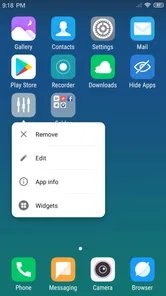
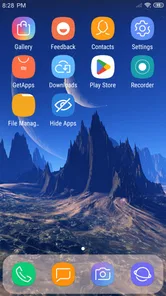
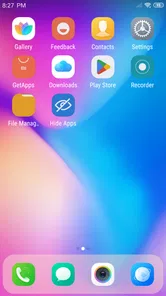
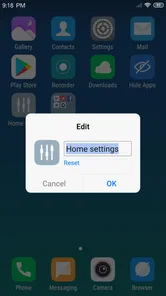
Analysis by Reviewed
I often change my Android home screen when it starts feeling cluttered or familiar, but I don’t always want to replace the phone or spend an afternoon rebuilding everything. X Launcher Pro is aimed at that in-between moment: it gives the home screen an iOS-inspired appearance while keeping the device on Android. The useful question isn’t whether it can make a phone look different—it can—but whether its layout and tools suit the way you actually use your phone.
Deciding what needs to change
I’d start by identifying one specific annoyance rather than trying to reinvent the whole phone. Maybe the home screen is crowded, favorite apps take too many taps to reach, or the default appearance simply feels stale. That distinction matters: a launcher changes the way you organize and approach the home screen, but it won’t fix a slow app, change how every Android settings screen looks, or make an untidy app collection tidy by itself.
This is most appealing to someone who likes the general visual language of an iPhone but prefers to keep an Android phone and its apps. It can also suit a person who enjoys adjusting their setup gradually: move a few frequently used apps, learn a gesture, then decide whether the new arrangement earns a permanent place. If your current layout works well and you have no interest in an iOS-like style, the change may feel like extra adjustment rather than an improvement.
Starting with the phone you already have
This is a paid launcher from Launcher Developer, priced at $1.99, and it sits in the art and design space rather than being a separate productivity system. It has a 4.8 average from around 8,500 ratings and over 50,000 installs. It’s rated for Everyone, runs on Android 5.0 or later, and its current version is 3.4.11. Those details make it relevant to people with older Android phones as well as newer ones, though the experience will still depend on the device.
Before changing anything, I’d take a moment to notice what bothers me about the current home screen. Is it the icon style, the way apps are arranged, or the number of steps it takes to reach common controls? That small check helps keep customization practical. A visual makeover is satisfying, but it won’t automatically fix a messy app collection or make every part of Android behave like iOS.
The Power of Customization in Your Hands
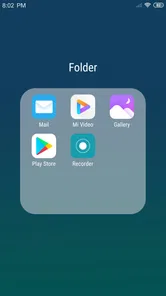
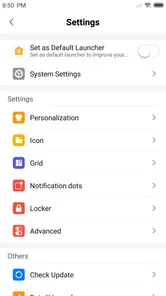
First off, let me tell you how intuitive the X Launcher Pro is. It’s designed to mimic the iOS interface, which is perfect if you’re in love with Apple’s sleek design but can’t part ways with your Android. The app lets you customize everything from the home screen layout to the app icons, which is like having a brand-new phone every day.
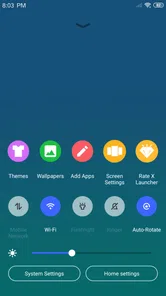
It’s not just about looks, though. The functionality of this launcher is top-notch. You get features like app hiding, app lock, and even a control center that’s eerily similar to what you’d find on an iPhone. And let’s not forget the gesture controls, which make navigating your phone feel smoother than ever. It’s like your phone suddenly learned some cool new tricks!
More From Our News Desk

 Gmail
GmailGmail in a Busy Inbox: Who Benefits Most?
From first account to crowded workday, Gmail earns its place through dependable search and flexible sorting—but its best fit depends on how much inbox maintenance you can tolerate.

 Prime Video
Switching to Prime Video: What Changes in Your Viewing Routine
Prime Video can make a compelling second home for streaming, but switching means learning a different catalog, rental layer, and route from browsing to playback.

 Universal TV Remote Control
Universal TV Remote Control Works Best as a Reliable Backup
A phone remote earns its place through quick setup and reliable habits. Here is how to get more from Universal TV Remote Control—and where its limits show.

 Weather - By Xiaomi
Weather by Xiaomi Review: Clear at a Glance, Less Clear Up Close
Xiaomi’s weather app makes everyday forecasts quick to scan, but its calm surface can leave useful details and recovery paths harder to find than they should be.

 X
XX Under Pressure: Can It Recover When Posting Goes Wrong?
A resilience-focused review of X, examining setup, mistaken posts, interruptions, weak connections, and the gaps that matter when recovery needs to be dependable.

 Clash of Clans
Clash of Clans Is Won Between the Battles
Its raids are quick; its community is a long-term project of coordination, teaching, rivalry, and shared responsibility—with all the friction that entails.
Latest News



A setup flow that stays manageable
Once I’ve chosen the look I want, I’d make the first pass deliberately small: put the apps I use every day in the most convenient spots, then leave the rest alone until I know how the new layout feels. This is a useful way to avoid the common customization trap of spending an hour arranging icons and then discovering that the arrangement doesn’t suit the way I actually reach for the phone.
Next, I’d test the app drawer with a few real searches. Sorting by frequency can help bring regular tools forward; alphabetical order is a straightforward fallback when I know an app’s name; sorting by date can be handy after installing something new. These options solve different problems, so I wouldn’t treat one as universally best. If I’m often trying to remember an app I just added, date sorting helps; if I’m opening the same handful repeatedly, frequency is more useful.
Only after the layout feels comfortable would I try gestures and the control center. Changing several habits in one go makes it hard to work out what’s helping and what’s getting in the way. A better test is to use one new shortcut during an ordinary task, such as opening a commonly used app or reaching a control, and keep it only if it becomes easier than the old route. That little pause prevents novelty from being mistaken for lasting convenience.
Putting the layout to work
My practical starting point would be to set up the main screen around the handful of apps I reach for most, then use the app drawer to keep less-used tools out of the way. Sorting by frequency is especially useful here: it can help surface apps I open regularly without making every icon compete for space on the first screen. Sorting by name is a better choice when I know exactly what I’m looking for, while sorting by date can help me find something I installed recently.
There’s a small but important trade-off with a launcher that changes familiar controls. Gestures and a control center can make routine navigation feel quicker once they become muscle memory, but they also mean I need a little time to learn where things are. I’d try one change at a time rather than rearranging icons, gestures, and app organization all at once. That makes it easier to tell whether the new setup is genuinely helping or simply feels novel.
Keeping the visual refresh practical
Icon and layout changes are most satisfying when they serve a purpose beyond looking different. I’d keep the main screen reserved for things I actually open often, rather than filling it just because there is room. The app drawer then becomes the handoff point: it keeps the less-used apps accessible without requiring me to make every screen a directory. This simple division can make the home screen feel calmer even if the total number of installed apps hasn’t changed.
There’s also a useful distinction between hiding an app and removing it from everyday view. Hiding can help reduce visual clutter or keep an app from sitting in plain sight, while app lock adds an access barrier. I would not treat either as a replacement for the phone’s own security protections or an app’s built-in account safeguards. For sensitive information, those underlying protections still matter; the launcher’s tools are better understood as convenient layers within the home-screen experience.
A realistic routine might be a quick check before leaving home: I open messages, maps, and music repeatedly, but only need less frequent tools now and then. I’d give the regular apps easy-to-reach positions and let the drawer handle the rest. During the first few days, I’d notice whether I’m reaching for the expected spots or hesitating because the new layout has made familiar actions less automatic. That is a more useful measure of success than how polished the screen looks in a screenshot.
Performance That Packs a Punch
Now, you might be wondering about performance. After all, what good is a fancy interface if it slows down your device, right? Luckily, X Launcher Pro runs like a dream. It’s light on resources and doesn’t bog down your phone’s speed. I’ve been using it for a couple of weeks now, and let me tell you, the fluidity is impressive. Apps open quickly, and switching between tasks feels seamless.
Another neat feature is the ability to personalize the app drawer. You can sort apps by name, date, or even how frequently you use them. It’s these little touches that make the app so user-friendly. Plus, the transition effects are just the cherry on top, adding that extra dash of elegance to your phone.
What changes—and what stays Android
The main handoff is between the launcher’s home-screen choices and the rest of the phone. The iOS-inspired presentation gives the start of a task a different feel, but the apps themselves remain Android apps, and their own screens and behaviors still belong to them. I see that as an advantage if I want a visual refresh without switching platforms, but it also sets a sensible limit on expectations: this is a new front door, not a conversion of the entire operating system.
Compared with simply keeping the phone’s built-in launcher, this option makes sense when the iOS-like appearance, app hiding, app lock, or control-center-style access are meaningful to me. The built-in choice is the easier path if I mainly want to avoid relearning anything. Other customization-focused launchers may be a better match for someone who wants to shape every detail extensively; this one is more compelling when its particular style and practical tools are exactly the combination I’m after.
When it fits—and when it doesn’t
For a concrete everyday example, imagine checking messages, maps, and music repeatedly during a commute. Putting those regular stops within easy reach and arranging the rest by usage can make the phone feel more intentional, while the iOS-like styling provides a consistent visual theme. I’d also treat app hiding and app lock as organization and access tools rather than as a substitute for the security settings of the phone or the apps themselves.
Compared with the launcher already on an Android phone, this one makes more sense if the iOS-inspired look and its extra controls are part of the goal. If I mainly want a clean layout with minimal adjustment, the built-in launcher may be less work. If I want broad, highly granular visual control, I’d compare other customization-focused launchers before paying; X Launcher Pro’s appeal is its particular mix of iOS-like presentation and practical home-screen features, not a promise to change every Android screen.
The app is also a weaker fit for someone who dislikes changing navigation habits or wants their Android interface to remain visually familiar. Since a launcher shapes the first screen and routine navigation, I’d spend a little time checking how its layout feels in daily use before moving every app into a new arrangement. The paid price is modest, but it still makes sense to be sure the style is what you want rather than buying simply because the screenshots look different.
Where the routine can stumble
The biggest friction is the learning curve created by changing several familiar things at once. A gesture that seems elegant in theory can be slower than a tap until I remember it reliably, and a newly arranged drawer can make an app harder to find before its sorting pattern becomes familiar. If I depend on quick, predictable access, I’d keep the first setup conservative and test changes in small batches rather than treating customization as a one-time makeover.
There is also a trade-off between a coherent iOS-inspired appearance and keeping the exact visual conventions I’m used to on Android. If the appeal is only a different set of icons, I may find the novelty wears off quickly. If I want my phone to behave precisely like an iPhone, I may be disappointed by the boundary between the launcher and Android itself. I’d choose this for a home-screen refresh, not as a substitute for changing phones or operating systems.
Before settling in, I’d check the setup on the particular phone I plan to use and pay attention to the basics: can I locate my everyday apps, do the controls feel intuitive, and does the screen remain comfortable to navigate? The minimum requirement is Android 5.0, but meeting that requirement alone does not guarantee the same feel on every device. A short, ordinary trial is more revealing than judging the experience by appearance alone.
Is It Worth It?
So, is X Launcher Pro worth the download? In my opinion, absolutely! It’s an affordable way to breathe new life into your Android device without making any permanent changes. Whether you’re looking to spice up your phone’s look or enjoy a bit more functionality, this app delivers on all fronts.
And hey, if you’re someone who loves to tweak and tinker with your phone’s interface, this app is your playground. It’s simple enough for beginners but packed with enough features to keep even the most tech-savvy users entertained.
To sum it up, X Launcher Pro offers a unique blend of style and substance, making it a fantastic choice for anyone looking to refresh their smartphone experience. So, go ahead and give it a whirl—you might just find your new favorite launcher!
Choosing it for the right reason
The clearest reason I’d recommend it is that I want an Android home screen with an iOS-inspired look and I’m willing to adapt a few habits to get there. The combination of layout customization, drawer sorting, gestures, and access tools gives the refresh some practical purpose, rather than leaving it as a purely decorative change. Its 4.8 average and around 8,500 ratings suggest that many users have found it appealing, though my own decision would still come down to whether I enjoy the style in daily use.
I’d skip it if I’m happy with the familiar launcher, want extensive control over every visual detail, or expect the entire phone to adopt iPhone behavior. For everyone in between, I’d begin with a restrained layout, try one new control at a time, and keep only the changes that make common tasks easier. At $1.99, the decision is less about a dramatic transformation than whether this particular home-screen approach feels like a better fit for the phone I already use.
X Launcher Pro Frequently Asked Questions
What Android version do I need to use X Launcher Pro?
X Launcher Pro requires Android 5.0 or later, so check your phone’s software version before downloading. If your device meets that requirement, you can try its iOS-inspired interface and personalization options. The app is intended for Android phones, and its minimum operating-system requirement is worth checking before you make the purchase.
What is X Launcher Pro and what does it offer?
X Launcher Pro is a premium app designed to transform your Android device's interface into an iOS-like experience. It offers a clean, intuitive user interface with customizable themes, icon packs, and widgets, bringing the aesthetics and functionality of iOS to Android. It's perfect for users seeking a fresh look and enhanced usability on their devices.
How does X Launcher Pro affect my phone's performance?
X Launcher Pro is optimized to run smoothly on most Android devices without significantly affecting performance. It uses minimal resources, ensuring your phone runs efficiently. However, it's always recommended to check compatibility with your device's specifications to ensure optimal performance and avoid any potential slowdowns.
Is X Launcher Pro safe to use on my device?
Yes, X Launcher Pro is generally safe to use. It is available on reputable platforms like Google Play Store, which vet apps for security. However, users should always ensure they are downloading the app from official sources and keep their devices updated to protect against any potential vulnerabilities.
Can I customize the themes and icons in X Launcher Pro?
Absolutely! One of X Launcher Pro’s key features is its extensive customization options. Users can personalize their device with a variety of themes and icon packs, allowing them to tailor their Android's appearance to match their personal style. These customizations are easy to apply, providing a seamless user experience.
Pros
- Smooth and intuitive user interface.
- Highly customizable with themes.
- Supports app hiding for privacy.
- Fast performance
- no lagging.
- Regular updates with new features.
Cons
- Limited free features
- premium needed.
- Some themes may be buggy.
- Ads in free version can be intrusive.
- Occasional crashes on older devices.
- Limited widget options compared to others.











