Work Log Pro
- 2.54K
- 4.7
- Installs
- 100.00K
- Price
- $9.99
Screenshots
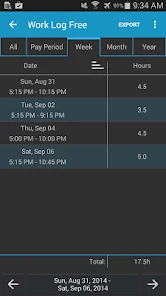
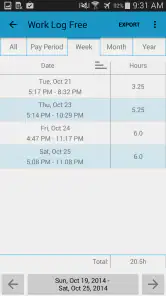
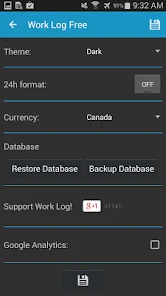
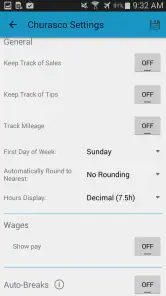
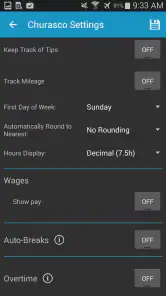
Analysis by Reviewed
When work hours are split across clients, locations, or changing shifts, the hard part is often remembering what happened before the day gets away from you. Work Log Pro is a paid productivity app from AR Productions Inc. built around keeping a record of work time. I find that focused purpose appealing: it is easier to judge a time log when it is not buried inside a broad project-management system.
Work Log Pro costs $9.99, is rated for Everyone, and has a 4.7 average from around 8,300 ratings. It has over 100,000 installs, and its current version is 12. The app has been available since July 14, 2013, and supports Android 4.0 and later. Those details place it as an established, narrowly focused option, though a long history does not by itself tell me whether its workflow will suit every worker.
Using a time log in everyday work
Readability and navigation
Hey there, fellow app enthusiast! Today, I want to chat about an app that's truly stepped up my productivity game – Work Log Pro. This tool has been a game-changer for managing my work hours and ensuring I'm staying on top of my tasks without losing track of time. Let's dive into what makes this app a must-have for anyone juggling multiple projects or simply wanting to keep an accurate log of their work hours.
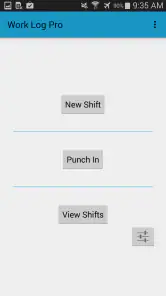
First things first, the interface is super intuitive. You know that feeling when you open a new app and it takes forever to figure out? No worries here! Work Log Pro is designed with simplicity and efficiency in mind. The navigation is straightforward, making it easy even for those who aren't exactly tech-savvy. Plus, the app's design is sleek and modern, which is always a bonus in my book.
In practical terms, a simple path through a work log matters most when I need to record a shift quickly, not when I have time to explore menus. If your day includes a short break between jobs or a last-minute change of task, it helps to think ahead about what labels you will use. A small, consistent set of categories makes later reports easier to interpret than a different description for every similar task.
That consistency is especially useful when work is irregular. For example, a freelancer who alternates between consultations and hands-on project work can decide in advance which distinction matters for billing or planning. If the goal is to see where the week went, broad categories may be enough; if the goal is to explain separate client hours, client-specific labels may be more useful. I would choose the simplest structure that answers the question I expect to ask later.
Motor and sensory considerations
The straightforward navigation described above can make routine logging less demanding, especially for someone who prefers a focused utility over a crowded dashboard. I would still treat any time-entry workflow as something to test in the conditions where I actually work: one-handed use, interruptions, or a noisy setting can change how easy it feels to enter or check a record. Notifications may help prompt a new task, but reminders are only useful if their timing suits your routine.
More From Our News Desk

Clash of Clans Is Won Between the Battles

Android Auto Makes the Case for Quieter Car Software

MobiOffice: Transforming Mobile Productivity with Seamless Integration

EA SPORTS FC™ Mobile Soccer: Redefining Mobile Sports Gaming

How Microsoft OneDrive Became a Mobile Productivity Giant

How Google Translate Breaks Language Barriers Effortlessly
For a more reliable habit, I would pair any reminder with a simple personal cue, such as recording the shift when I put away a tool or finish a client call. That reduces the risk of relying on a notification I might dismiss while busy. Anyone who needs very large controls, screen-reader-specific behavior, or other particular access support should try the relevant tasks on their own device before depending on the app for essential records.
There is a small but important trade-off here: prompts can help establish a routine, yet frequent alerts can become background noise if they arrive during customer-facing work or concentrated tasks. I would start with only the reminders that correspond to real transitions in my day, then adjust my habit rather than trying to make every work activity generate an alert. If touching the screen during a shift is difficult, a cue tied to a natural pause may be more dependable than trying to enter details while moving between tasks.
Features That Make a Difference
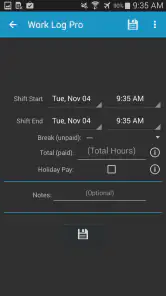
Now, let’s talk features. One thing I absolutely love is the automatic time tracking. Forget about having to manually punch in and out every time – this app does it for you. It’s like having a personal assistant who’s always on the clock. You can also categorize your tasks, which helps in prioritizing work and understanding where most of your time goes.
Another feature worth mentioning is the reporting capabilities. With just a few taps, I can generate detailed reports that provide insights into my work habits. Whether you're a freelancer needing to bill clients or just someone who wants to improve productivity, these reports are incredibly handy.
A useful workflow is to review a report before sending an invoice or discussing hours with a client, rather than waiting until the end of a busy month to reconstruct each shift from memory. I would also keep categories distinct enough to answer a real question—such as which client or kind of work took the time—without creating so many labels that logging becomes a chore. A report is only as dependable as the entries behind it, so a quick same-day check is a sensible safeguard.
For instance, imagine finishing a mixed day of client calls, travel between work sites, and focused desk work. At the end of the day, I would check that the main blocks have been recorded and that the categories still make sense, rather than expecting a report to correct vague or forgotten entries. That brief review can catch an obvious gap while the details are still fresh. It also helps separate a useful record for estimating future workloads from a record intended to support a client conversation.
The distinction matters because a personal time log and a formal timesheet are not automatically interchangeable. If a client needs a particular format or an employer requires approved attendance records, I would follow that process first and treat this app as a supplementary record only if it fits the rules. For independent work, by contrast, being able to inspect time by category can help me make a more grounded estimate before agreeing to a similar job again.
Situational access and device changes
Beyond the basics, Work Log Pro also syncs seamlessly across devices. So, whether I'm on my phone, tablet, or laptop, my work log is always up-to-date. This cross-platform functionality is crucial for those of us who switch between devices throughout the day.
And let’s not forget about the customization options. You can set personalized notifications to remind you to take breaks or start a new task. It's these little touches that show the developers really thought about user experience.
Oh, and did I mention the app doesn’t drain your battery? I was pleasantly surprised to find that even with constant use, it doesn’t seem to have a significant impact on my phone’s battery life. Talk about efficiency!
One realistic use is a person who starts a shift at one site, handles a separate client task later, and checks the log from another device at home. Syncing can reduce the hassle of moving between devices, while categories help keep those separate kinds of work legible in a later report. I would still confirm that a recent entry appears where I expect before treating a second device as the only copy I need.
For people with changing surroundings, the key question is not simply whether a log can be opened on another device; it is whether the full routine remains manageable. Someone who can comfortably enter a shift at a desk may prefer to review records later rather than interact with a phone in bright sunlight, loud surroundings, or a crowded work area. I would use the calmer moment for checking and correcting details, while keeping on-the-go entries as brief and consistent as possible.
Switching devices also makes a sensible checkpoint part of the workflow. After recording a shift on one device, I would check the log from the device I expect to use next before assuming everything is ready for a report. That habit is especially worthwhile before an invoice or a discussion about hours, because a quick verification is easier than sorting out uncertainty after time has passed.
Where it fits—and where it doesn’t
Compared with a paper notebook or a basic note-taking app, a dedicated work log is better suited to organizing time records and reviewing them through reports. A full project-management tool may be the stronger choice if you need assignments, team discussions, or project planning alongside hours. Likewise, workers whose shifts are governed by strict attendance rules should use the system their employer requires rather than assume a personal log replaces official timekeeping.
This app makes the most sense to me for freelancers, people with multiple work types, or anyone who wants a personal record they can review instead of relying on memory. It is less compelling if you only need an occasional reminder, already have a dependable workplace timesheet, or want a broad task planner rather than a focused time log. The $9.99 purchase is worth weighing against how often you will use its logging and reporting workflow.
The choice between this and a spreadsheet comes down to how you prefer to keep records. A spreadsheet can be easier to shape around a specialized billing or payroll process, but it asks you to create and maintain that structure yourself. A notebook is flexible and available without learning an app, yet reviewing several weeks of handwritten entries can take more effort. Work Log Pro sits between those approaches: it is purpose-built for time records, but it still depends on you deciding what to log and checking that the results fit your needs.
I would skip it if my main need were coordinating a team, managing deadlines, or documenting every part of a project in one shared workspace. Those jobs call for a broader tool, even if its time-tracking area is less central. I would also think twice if I rarely need to review my hours: a paid, dedicated log makes more sense when I will use its records often enough to justify adding another routine to my day.
Remaining barriers
The central trade-off is that recording time still depends on maintaining a habit. Automatic tracking can sound effortless, but I would not build a billing routine around it without checking that entries reflect the work I actually did. Categorization also asks for a little setup and consistency; changing labels repeatedly can make comparisons less useful. For users who prefer one-tap entry with no review, a simpler clock-in tool may feel more comfortable.
Before relying on the app, I would test the whole routine that matters to me: record a shift, distinguish two kinds of work, review a report, and check that the information is available on the device I use next. That answers the practical questions of whether the workflow fits a particular job, whether reminders are helpful, and whether the reports support the user’s purpose. It is a more useful trial than judging an app by its first screen alone.
I would also test an imperfect day, not just an ideal one. A missed entry, an interrupted task, or a change of plan is where a time-logging habit is most likely to break down. The practical test is whether I can notice the gap, make sense of the record afterward, and still trust the report. If the routine becomes a daily source of uncertainty, that is a sign to simplify categories or choose a different way of recording time.
For users who depend on assistive technology or particular display and interaction settings, the same principle applies: try the complete task, not merely the opening screen. Check whether reading a record, correcting it, and finding a report feel comfortable on your own device. I would not infer specialized accessibility support from a clean-looking interface alone; personal testing is the responsible way to decide whether a time-sensitive tool is usable for you.
Final Thoughts
In conclusion, if you’re looking for a reliable and efficient way to manage your work hours, Work Log Pro is definitely worth checking out. Its combination of intuitive design, powerful features, and seamless device syncing makes it a standout choice for professionals and casual users alike. So, why not give it a try and see how it can enhance your productivity?
Thanks for hanging out with me while I shared my thoughts on this fantastic app. I hope it helps you as much as it’s helped me in keeping my work life organized and stress-free. Happy logging!
My inclusive verdict is that Work Log Pro’s focused purpose and reportedly straightforward navigation may suit people who want work-hour records without a large suite of tools. But comfort and access depend on the individual device, work setting, and entry routine, so I would test those essentials before making it part of a paid or time-sensitive workflow. If its categories and reports match the way you work, it can be a practical companion; if you need verified specialized accessibility support or formal employer timekeeping, I would choose a tool designed for that need.
Work Log Pro Frequently Asked Questions
Is Work Log Pro compatible with my device, and what does it cost?
Work Log Pro is a productivity app for Android, with a minimum operating-system requirement of version 4.0. It costs $9.99, so it is a paid download rather than a free way to try the app first. Before purchasing, check that your device meets the requirement and consider whether its focus on keeping track of work shifts fits how you want to record your hours.
Who develops Work Log Pro, and is it suitable for all ages?
Work Log Pro is developed by AR Productions Inc. Its content rating is Everyone, so it is classified as suitable for a general audience. The app is focused on work-shift tracking, making it relevant to people who want to keep an organized record of their working time. Its age classification describes the content rating; it does not determine whether the app’s features suit your particular work routine.
1. What is Work Log Pro and how does it help me manage my work hours?
Work Log Pro is a comprehensive app designed to assist users in tracking their work hours efficiently. It offers features such as automatic time tracking, manual entry options, and detailed reporting. This app is ideal for freelancers, contractors, and employees who need to keep accurate records of their work hours for billing or tracking productivity.
2. Can I use Work Log Pro across multiple devices and platforms?
Yes, Work Log Pro is designed to support multi-device synchronization. It is available for both Android and iOS platforms, allowing users to seamlessly switch between devices without losing any data. This feature ensures that your work logs are always up-to-date, no matter which device you are using.
3. How secure is my data on Work Log Pro?
Work Log Pro takes data security seriously by implementing robust encryption protocols to protect user information. The app ensures that all user data, including work hours and personal details, are securely stored and only accessible by the user. Regular updates are also provided to enhance security measures.
Pros
- Intuitive user interface
- Detailed reporting features
- Customizable log entries
- Supports multiple projects
- Offline functionality
Cons
- Limited free version
- No integration with some popular apps
- Occasional sync issues
- Complex setup for beginners
- Lacks time tracking automation
- Category
- Productivity
- Version
- 12











