Wink: Video Enhancer & Editor
- 1.36K
- 4.5
- Installs
- 10.00M
- Price
- Free

Screenshots
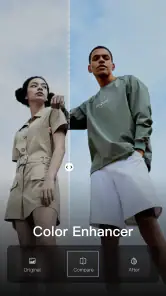
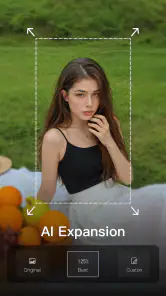
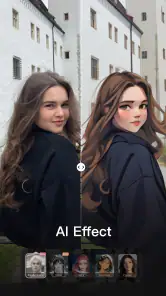
Analysis by Reviewed
I often start with a clip that is worth sharing but not quite ready: the light is uneven, a detail feels distracting, or the footage could use a more polished look. That is the sort of everyday job I would consider Wink: Video Enhancer & Editor for. It is a free video-editing app from Meitu (China) Limited, and its AI art, effects, and retouching focus makes it feel aimed at people who want to improve a clip without turning editing into a project of its own.
Choosing the right clip to work on
Wink is most appealing when the source video is basically usable and needs visual refinement rather than a complete rebuild. I can imagine reaching for it after filming a quick outfit clip, a close-up portrait, or a short moment from a day out. Before editing, I would pick the clearest take and decide what actually needs fixing. That small choice matters: effects can add polish, but they cannot make a shaky or badly framed clip tell a clearer story.
Starting with a practical goal
For example, if I filmed a quick clip before meeting friends and noticed that the lighting looked uneven, I would begin by asking what I want the finished video to feel like: natural, brighter, or more stylized. That gives each adjustment a purpose and helps avoid trying every effect just because it is available. I would also keep the original clip, so I can return to it if the finished version no longer feels like the moment I recorded.
This is where Wink’s emphasis on visual enhancement can be useful. It gives me a reason to reach for a phone app rather than transfer a short clip to a computer for a small correction. At the same time, it is not a substitute for choosing a better take. If the subject is obscured, the camera moved too much, or the important moment happened outside the frame, editing can only do so much.
Moving from a rough take to a finished edit
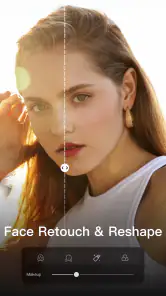
In my experience, the approachable layout helps keep the process manageable. I would first make basic visual adjustments, then try a filter or effect only if it suits the footage. Retouching is best used with a light touch; on a face close-up, a subtle improvement can look natural, while stacking strong treatments may make skin or other details look artificial. I would compare the result with the original before committing, especially when editing footage that should still look like a real moment.
A more deliberate editing routine
One useful habit is to watch the entire clip after making an adjustment, rather than judging it from a single still frame. A treatment that looks appealing on one face or one bright section might feel too strong as the lighting changes or the subject moves. I would make a small change, preview from beginning to end, and then decide whether it actually helps. This simple loop is more reliable than piling on several looks and trying to work backward later.
I would also separate correction from decoration. First, I would deal with what distracts me in the image; only after that would I consider a filter or a more noticeable effect. The distinction matters for a short portrait or outfit video, where retouching can easily become the main thing viewers notice. For a playful post, a bolder look may be the point. For a family moment or a clip meant to feel candid, restraint usually serves the footage better.
More From Our News Desk

Weather by Xiaomi Review: Clear at a Glance, Less Clear Up Close

X Under Pressure: Can It Recover When Posting Goes Wrong?

Clash of Clans Is Won Between the Battles

Android Auto Makes the Case for Quieter Car Software

MobiOffice: Transforming Mobile Productivity with Seamless Integration

EA SPORTS FC™ Mobile Soccer: Redefining Mobile Sports Gaming
Where the handoff matters
A useful edit is only part of the job. I would check the finished clip on the screen where I expect people to watch it, because a look that feels balanced on a phone may come across differently in a social feed. For a casual post, a quick effect-led workflow can be more convenient than opening a full desktop editor. For a video that needs precise cuts, layered storytelling, or careful sound mixing, I would rather use a more timeline-focused editor and treat Wink as a visual touch-up option.
From edit to sharing
The handoff from editing to posting is also a good point to pause. I would watch the saved result once more before sharing, checking that the beginning and ending feel intentional and that the visual treatment stays consistent throughout. A clip can look polished in the editor but feel oddly processed in the context where it will appear. If I am preparing something for a particular social feed, I would judge it in that context rather than assuming one version will suit every destination.
For a simple post, direct sharing can make the process feel quick, but I would not treat convenience as a reason to skip review. I prefer to keep a clean copy available and share only after checking that I am happy with the final look. That is especially useful when I might reuse the footage later in a different edit. A finished, heavily treated version is not always the most flexible copy to keep.
Who is likely to enjoy it
The app has a 4.5 average from around 705,000 ratings and has been installed over 10 million times. That kind of reach makes it an easy option to consider, but popularity does not mean every editing style will suit it. I think it is a better fit for casual creators and people who want a quick way to refine portraits or short clips than for editors who need detailed control over every part of a production. Its Teen content rating is also worth keeping in mind when deciding whether it is appropriate for a younger user.
Where it fits among editing apps
Compared with the usual timeline-based video editors, Wink’s appeal is its emphasis on improving the image and applying a look without making a short social clip feel like a production project. That is a worthwhile trade-off if I want a quick visual pass on a portrait or a brief personal video. A fuller editor is usually a better choice when I need to arrange multiple shots, control pacing precisely, or build a story from separate pieces of footage.
It also sits differently from an app whose main purpose is simply trimming or joining clips. If the raw footage already looks good and I only need to cut away a few seconds, a basic cutter may be faster and less distracting. Wink makes more sense when I have a visual reason to edit, such as wanting a different finish or a light retouch. I would choose the tool around the job instead of expecting one app to handle every kind of video work equally well.
The Magic of Wink
When I first stumbled upon Wink - Video Enhancing Tool, I was skeptical. There are so many apps out there claiming to be the best at video editing, but Wink genuinely stands out. The app is loaded with features that are both intuitive and powerful, allowing me to edit videos with ease and precision.
Intuitive Interface
The first thing that struck me about Wink was its intuitive interface. From the moment you open the app, it feels like everything is right where it should be. The tools are organized in a way that makes them easy to find and use, even if you're new to video editing. Plus, the drag-and-drop functionality makes it a breeze to add elements to your videos.
Advanced Editing Features
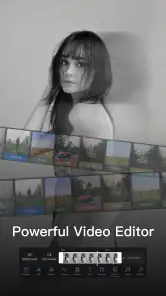
Now, this is where Wink really shines. The app offers a range of advanced editing features that allow you to enhance your videos like a pro. From adjusting brightness and contrast to applying filters and effects, Wink has it all. And let's not forget about the audio editing capabilities, which are equally impressive. Whether you're looking to add background music or adjust sound levels, Wink has got you covered.
Seamless Performance
Another aspect worth mentioning is Wink's seamless performance. I've used other video editing apps in the past that were prone to lagging and crashing, but not Wink. The app runs smoothly even when working with high-resolution videos, which is a huge plus for content creators who demand reliability.
Sharing Made Easy
Once you've created your masterpiece, Wink makes it incredibly easy to share your videos with the world. The app supports direct sharing to social media platforms like Instagram, Facebook, and YouTube, so you can showcase your work with just a few taps. Plus, the export options are flexible, allowing you to save your videos in different formats and resolutions.
Keeping a reusable version
For anyone who posts regularly, I would think of the edited clip as one version rather than the only version. Keeping the source gives me room to make a softer edit later, crop differently, or leave the footage untouched for a private share. That matters because an effect that suits a one-off post may not fit a later use. A little organization at the start can save me from having to recreate the edit or settle for a look I no longer want.
I would also avoid making a final decision while rushing to post. When I have time, I can view the clip once for image quality and again for its overall feel. The first pass catches obvious distractions; the second tells me whether the edits still let the moment come through. If I find myself noticing the treatment more than the person or event in the clip, I would dial it back or start again from the original.
Practical trade-offs before you settle on a workflow
For a realistic routine, I would use Wink to polish a short clip, save or share the finished version, and keep the original untouched in case I want a less processed look later. That gives me a useful comparison point and avoids treating a strong effect as an irreversible improvement. If the clip is meant to document an event faithfully, I would be especially conservative with retouching; if it is a playful social post, I would feel freer to experiment.
One practical friction is deciding when to stop. A preview can make each individual adjustment seem appealing, yet several small changes together may push the image away from its original character. I would make one change at a time and check the whole clip, not just a flattering frame. That is also a good way to judge whether the AI-led look is helping the subject or simply calling attention to the editing.
Version, cost, and alternatives
Wink is free to install, though optional in-app purchases range from $0.99 to $79.99 per item, so I would check what is included before building a regular workflow around a paid tool. The current version is 2.22.5, and it requires Android 8.0 or later. If you mainly need quick visual enhancement and retouching, it is a more focused choice than a traditional editor built around arranging clips on a detailed timeline. If you need exact trimming, complex sequencing, or dependable control over a longer project, a conventional video editor is likely the better starting point.
Who should look elsewhere
I would skip Wink as my main editor if I were assembling a long video from many scenes or needed every cut, transition, and sound change to be tightly controlled. A timeline-first app is better suited to that kind of work because its whole workflow is built around sequence and timing. I would also choose a simpler tool for a clip that only needs trimming, and leave Wink for footage where its visual treatment can do something useful.
Likewise, it is not the right choice for someone who wants every portrait to remain completely untouched. Retouching is part of its appeal, but that also means I would need to make conscious choices about how much processing feels acceptable. If a natural record is more important than a polished social look, the best edit may be no edit at all.
Wink was released on December 21, 2021, and its blend of visual effects and editing makes it worth considering for people who routinely share short videos. I would skip it if I wanted a strictly natural, untouched image or a precise, comprehensive production setup. For quick clips where a little visual care makes the difference, though, its accessible approach is appealing. In conclusion, Wink - Video Enhancing Tool is a fantastic app that offers a perfect blend of simplicity and power. Whether you're a beginner just starting out or a seasoned pro looking for a reliable editing tool, Wink has something to offer. Its intuitive interface, advanced features, and seamless performance make it a standout choice in the crowded world of video editing apps. So go ahead, give Wink a try, and let your creativity shine!
Wink: Video Enhancer & Editor Frequently Asked Questions
Can Wink help me create social-ready videos and apply creative effects?
Wink is aimed at video editing and visual creativity, with its summary highlighting AI art, effects, and retouching. That makes it worth considering if you want to give clips a more polished or stylized look before sharing them. The exact result depends on the footage and the tools you choose, so preview edits before saving or posting.
Is Wink available for my phone’s operating system?
Wink: Video Enhancer & Editor requires Android 8.0 or later. If your phone runs an older Android version, check compatibility before trying to install it. The app is categorized as a video editor, so it is intended for working with video rather than serving as a general media player. Make sure your device meets the stated minimum operating-system requirement before downloading.
Is Wink free to download, and are any features paid?
Wink: Video Enhancer & Editor is free to download, so you can explore its video-editing tools without paying upfront. The app also offers in-app purchases, with prices ranging from $0.99 to $79.99 per item. Before choosing a paid option, check what it includes and whether it suits the way you plan to use the editor.
Who develops Wink, and what kind of app is it?
Wink is a video editing app from Meitu (China) Limited, listed in the Video Players & Editors category. Its short store description is simply “Wink,” while its summary highlights AI art, effects, and retouching. That makes it worth considering if you are looking for an app that brings creative effects and visual editing together.
What features does Wink - Video Enhancing Tool offer to improve video quality?
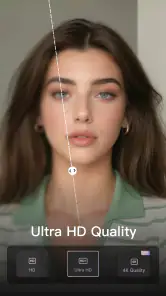
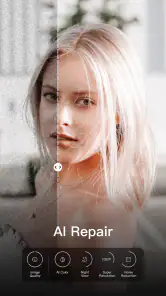
Wink - Video Enhancing Tool provides a variety of features designed to enhance video quality, including AI-powered filters, resolution upscaling, and noise reduction. Users can apply real-time adjustments to brightness, contrast, and saturation, ensuring videos look vibrant and professional. Additionally, it offers tools for stabilizing shaky footage, making it ideal for both amateur and professional videographers.
Pros
- User-friendly interface
- High-quality video enhancements
- Fast processing times
- Variety of editing tools
- Supports multiple video formats
Cons
- Requires internet connection
- In-app purchases for advanced features
- Limited free version capabilities
- May drain battery quickly
- Occasional crashes on older devices
- Category
- Video Players & Editors
- Version
- 2.22.5













