

WFP 306 Christmas tree
- 18.00
- 4.3
- Installs
- 1.00K
- Price
- $1.99
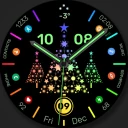
Screenshots
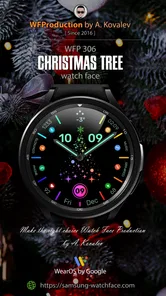
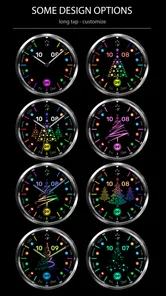
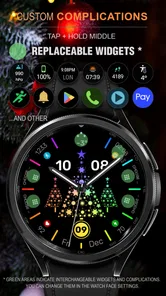
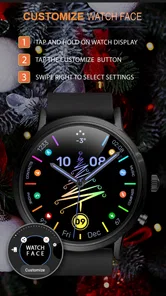
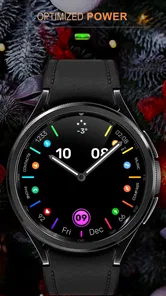
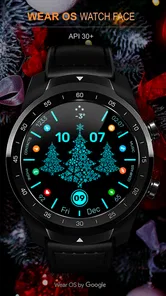
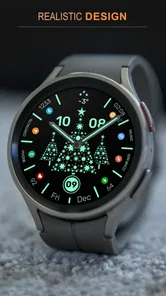
Analysis by Reviewed
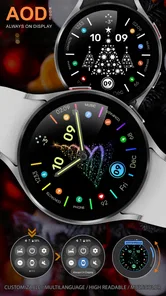
I’d start with the most important buying question: do you have a Wear OS watch and want it to look Christmassy? WFP 306 Christmas tree is a seasonal watch face, not a phone-based tree-decorating game. That makes it a focused choice for personalizing your wrist, but an easy one to overlook if you came looking for a festive activity on your phone.
When connectivity matters—and when it doesn’t
The main appeal is the face you see when you check your watch, rather than an online experience you return to throughout the day. I wouldn’t choose it for social sharing, messaging, or a stream of holiday content. The practical connection-related moment is setup: make sure your watch and phone are communicating normally, then allow the installation and change to finish before relying on it.
That distinction is useful if you are deciding whether you need to be online to enjoy the app. I’d plan for a working connection while getting the face onto the watch, but I wouldn’t assume that connectivity is the feature that makes it worthwhile. The reason to consider it is the seasonal appearance on a compatible watch. If you want an app whose main purpose is sharing decorations or sending digital greetings, this is not the right fit.
Choosing the right moment to install it
For a smooth change, I’d set it up at home or during another unhurried moment, not as I’m heading out the door. That gives me time to check that the watch is connected and see whether the new face has appeared. This is a small but useful trade-off: a seasonal face is quick to appreciate once it is ready, but there is little benefit in making setup a last-minute task.
For example, I might switch to it while getting ready for a December family visit. After that, the watch can add a festive detail to ordinary time checks while I’m travelling or helping prepare the meal. That is a more realistic use than expecting the app to occupy guests or provide a shared decorating session. If I wanted the latter, I’d use a dedicated activity or greeting app instead.
Who will get the most from it?
I see the best fit as someone who already wears a Wear OS watch regularly and enjoys changing its look for the season. It is also a reasonable choice for a person who wants a small festive accent without opening a phone app every time. A watch face is visible in brief glances, which can make the seasonal touch feel present without turning it into another activity to manage.
I’d skip it if I didn’t own a compatible watch, wanted a Christmas wallpaper for my phone, or expected to build and share a custom tree. It is also less appealing if I rely on a particularly plain face for quick, uncluttered time checks, or want one design to use comfortably all year. These aren’t faults so much as the natural limits of buying a distinctly seasonal watch face.
More From Our News Desk

 Gmail
GmailGmail in a Busy Inbox: Who Benefits Most?
From first account to crowded workday, Gmail earns its place through dependable search and flexible sorting—but its best fit depends on how much inbox maintenance you can tolerate.

 Prime Video
Switching to Prime Video: What Changes in Your Viewing Routine
Prime Video can make a compelling second home for streaming, but switching means learning a different catalog, rental layer, and route from browsing to playback.

 Universal TV Remote Control
Universal TV Remote Control Works Best as a Reliable Backup
A phone remote earns its place through quick setup and reliable habits. Here is how to get more from Universal TV Remote Control—and where its limits show.

 Weather - By Xiaomi
Weather by Xiaomi Review: Clear at a Glance, Less Clear Up Close
Xiaomi’s weather app makes everyday forecasts quick to scan, but its calm surface can leave useful details and recovery paths harder to find than they should be.

 X
XX Under Pressure: Can It Recover When Posting Goes Wrong?
A resilience-focused review of X, examining setup, mistaken posts, interruptions, weak connections, and the gaps that matter when recovery needs to be dependable.

 Clash of Clans
Clash of Clans Is Won Between the Battles
Its raids are quick; its community is a long-term project of coordination, teaching, rivalry, and shared responsibility—with all the friction that entails.
Latest News



How it compares with other personalization choices
The comparison is less about which app has the most features and more about where you want the festive look to appear. A phone wallpaper changes the screen you hold; this changes the look of a Wear OS watch you glance at. A general-purpose watch face may make more sense if you want a style that suits workdays and holidays alike. WFP 306 is for the narrower case where Christmas styling itself is the point.
One useful way to decide is to think about how often you actually look at your watch. If it is part of your everyday routine, the seasonal treatment may be a welcome detail. If you rarely wear the watch, or mostly use it for a restrained display, a phone background or a more neutral face may give you better value. The $1.99 price is modest, but it still makes sense to buy for a use you expect to enjoy rather than for a vague holiday impulse.
Keeping setup simple and data-conscious
I would avoid repeated install attempts if the face does not appear immediately. First check the normal connection between the watch and phone, wait a little, and then see whether the change has completed. Tapping through the same purchase or install step several times can create confusion if the first attempt is still underway. This is ordinary setup care, not a claim that the app has a special recovery tool.
There is also little reason to keep opening the app once the watch face is set up just to make the purchase worthwhile. Its value is in the look you see on the wrist. If you prefer to limit unnecessary online activity, doing the setup in one deliberate session is a sensible approach. I would still avoid assuming that every part of installation or use works without a connection, since the key point is simply to have a normal setup connection available.
Are you ready to dive into the festive spirit with a touch of digital flair? Let me take you on a merry little journey through the WFP 306 Christmas Tree app, a delightful seasonal treat for your mobile device. There is one important detail to keep in mind as you decide whether it belongs in your routine: this is a Christmas watch face for Wear OS, so the experience is centered on a compatible watch rather than a phone-based tree-decorating activity.
Deck the Halls... Virtually!
When I first stumbled upon the WFP 306 Christmas Tree app, I was immediately drawn to its promise of bringing the holiday cheer right to my fingertips. Imagine this: it's a chilly December evening, and you're cozied up with a cup of hot cocoa. What could be better than decorating a virtual Christmas tree, without the hassle of dealing with real pine needles? This app offers a playful and innovative way to indulge in the Christmas spirit, perfect for those who are short on space or simply love a bit of tech magic. In practice, though, the key question is whether you want seasonal Christmas styling on your watch: the product is a watch face, not a mobile tree-decorating game.
A festive look on your wrist
Because this is a Wear OS watch face, its appeal is less about creating a scene through a series of phone interactions and more about giving your watch a seasonal appearance you can glance at during the day. That distinction matters if you were expecting a standalone Christmas activity. I would consider it for a watch I wear often in December, rather than installing it in the hope of sharing a virtual tree or entertaining children with interactive decorations.
One practical way to judge a seasonal face is to picture where you will actually see it: checking the time while getting ready, waiting for a bus, or taking a quick look during a busy day. A Christmas design can add a small festive touch without requiring a separate screen-time session. On the other hand, if you mainly use your watch for a restrained, everyday look, a seasonal design may feel out of place once the holiday mood passes.
Features That Sparkle
One of the standout features of this app is its incredibly user-friendly interface. From the moment you open it, you’re greeted with an intuitive design that's as welcoming as a warm holiday hug. The app offers a variety of decorations to choose from, including twinkling lights, shimmering baubles, and even quirky ornaments. You can mix and match to your heart's content, creating a tree that's uniquely yours. For this particular product, however, it is best to think in terms of a watch-face choice, not assume that a phone app's decoration editor is part of the experience.
Connectivity is not the main attraction here. A watch face is something you look at on your wrist, so I would not choose it based on promises of social sharing or constant online interaction. If you are setting it up while away from home, it makes sense to have your watch and phone connection working normally and give the installation time to complete before you need the face. That is a simple way to avoid turning a quick seasonal change into a last-minute troubleshooting job.
But the fun doesn’t stop there! The app also includes a cool feature where you can share your decorated tree with friends and family. Just think of it as sending a digital Christmas card, but with a personal twist. It's these little touches that make the app feel special, like a cozy Christmas gathering in your pocket. For WFP 306, I would treat that description cautiously: its defining role is a Christmas watch face, so sharing a decorated tree should not be the reason to choose it.
Choosing it for your daily routine
A useful, less obvious tip is to decide on the watch you plan to use before buying. Since the face is made for Wear OS, compatibility is the first practical hurdle; a phone alone is not a substitute for a compatible watch. If you already wear one every day, changing its face for the holiday period can be a low-effort way to make the season feel a little more personal. If you do not use a Wear OS watch, this purchase is unlikely to serve the purpose you had in mind.
It also helps to think about how you use your watch at work or on the move. Someone who wants a conspicuously festive wrist display may enjoy making it part of a holiday outfit or family gathering. Someone who relies on a clean, highly legible look for frequent time checks may prefer a simpler face, especially in settings where decoration is less useful than quick readability. That is the real trade-off with seasonal personalization: the charm is the point, but it may not suit every part of the day.
For a quick everyday scenario, imagine heading out for errands in December and glancing at your wrist while carrying shopping bags. A Christmas face can provide a small seasonal detail without opening a separate app on your phone. If you are counting on it to send a greeting, display a custom tree, or become an activity for the kids, choose a dedicated option designed for those jobs instead. That distinction can save you from paying for the wrong kind of holiday app.
Why You'll Love It
If you’re anything like me, the holidays are all about tradition and creating memories. The vibrant graphics and cheerful music are sure to bring a smile to your face, and there's something incredibly satisfying about watching your digital tree come to life. As a watch-face purchase, its strongest fit is for someone who wants a seasonal look close at hand, rather than someone seeking a music-filled decorating experience.
Moreover, the app is a great way to engage with kids. It’s simple enough for little ones to use, yet offers enough customization to keep everyone entertained. Plus, it's a fantastic way to include relatives or friends who can't be there in person, allowing them to share in the holiday fun. In a household, I would frame this as a small personal touch on the watch of the person wearing it, not as a shared family activity or a substitute for a digital greeting card.
When I compare it with the usual alternatives in personalization, the choice is straightforward: a general-purpose watch face is the safer pick if you want something useful throughout the year, while a seasonal face is more appealing when you specifically want Christmas on your wrist. A phone wallpaper can change the look of a handset, but it does not personalize the watch you glance at throughout the day. WFP 306 is therefore most relevant to Wear OS owners who value that wrist-level detail and are comfortable with its limited seasonal purpose.
Cost, connection, and expectations
WFProduction by Alexandr Kovalev makes this paid personalization app, priced at $1.99. Its average rating is 4.3 from 167 ratings, with 18 written reviews and 1K+ installs. It is rated Everyone and was released on December 9, 2022. Those figures offer a little context, but the better buying test is still whether you own a compatible Wear OS device and genuinely want a Christmas face. I would not pay for it expecting a broad collection of phone features or an all-season design.
For a data-conscious setup, I would install or change the face when I have a dependable connection and a few spare minutes, rather than while rushing out the door. Once it is in place, the appeal is the glanceable seasonal appearance, not repeated online use. If an installation seems to stall, first check that the watch is connected as expected and give the setup a moment before trying again; avoid repeatedly tapping purchase or install controls while the first attempt may still be processing. This is sensible troubleshooting, not a promise about a particular recovery feature.
A Few Final Thoughts
In a world where technology often feels distant and impersonal, the WFP 306 Christmas Tree app manages to capture the warmth and joy of the holiday season in a delightful digital package. Whether you're a tech enthusiast or just someone looking to add a bit of sparkle to your day, this app is certainly worth a download. So, why not give it a try? After all, who wouldn't want a little extra Christmas magic at their fingertips? I would recommend it specifically to Wear OS users looking for a festive watch face, while anyone hoping for a customizable phone tree, shared decorations, or a year-round practical design should choose a different kind of app.
WFP 306 Christmas tree Frequently Asked Questions
What devices do I need to use WFP 306 Christmas Tree?
WFP 306 Christmas Tree is a watch face made for Wear OS devices, so it is intended for a compatible smartwatch rather than a phone or tablet. Before downloading, check that your watch runs Wear OS and that you are selecting the correct device in the app store. This helps ensure the watch face can be installed and used as intended.
What is WFP 306 Christmas Tree app?
WFP 306 Christmas Tree is an innovative mobile application designed to enhance your holiday celebrations by providing a virtual Christmas tree experience. Users can decorate their digital Christmas tree with a variety of ornaments, lights, and other festive decorations, making it a fun and interactive way to get into the holiday spirit without the hassle of setting up a real tree. In practice, it is a Christmas watch face for Wear OS, intended to give a compatible smartwatch a seasonal look.
How does WFP 306 Christmas Tree app work?
The app allows users to select from a range of virtual Christmas trees and customize them with decorations such as ornaments, lights, and tinsel. Users can drag and drop these items onto their tree, creating a personalized design. Additionally, the app may offer features like music, sharing options, and even augmented reality to enhance the experience further. Its stated purpose is a Christmas watch face for Wear OS devices, so think of it primarily as a way to personalize a compatible watch.
Is WFP 306 Christmas Tree app free to use?
WFP 306 Christmas Tree app is available for free download, but it may offer in-app purchases for additional decorations and features. Users can enjoy a basic version of the app without any cost, but for a more enhanced experience, they might consider purchasing premium items or features offered within the app. The app is priced at $1.99, so check the purchase details shown by your app store before proceeding.
What platforms is WFP 306 Christmas Tree app available on?
WFP 306 Christmas Tree app is available on both Android and iOS platforms, making it accessible to a wide range of users. Whether you have a smartphone or a tablet, you can download the app from the Google Play Store or Apple App Store to enjoy decorating your virtual Christmas tree anytime, anywhere. However, WFP 306 is described as a Christmas watch face for Wear OS, so compatibility with a Wear OS device is the key consideration.
Pros
- Festive and easy to use UI.
- Variety of tree customization options.
- Includes interactive Christmas games.
- Low storage space requirement.
- Frequent seasonal updates.
Cons
- Limited free features.
- In-app purchases can be pricey.
- No offline mode available.
- Occasional ads disrupt experience.
- Requires recent OS version.












