

WellSpan
- 655.00
- 4.5
- Installs
- 100.00K
- Price
- Free

Screenshots
Analysis by Reviewed
Managing healthcare is rarely difficult because of one huge task. It is difficult because appointments, messages, test-related questions, and follow-up details are scattered across calls, paper notes, and different websites. MyWellSpan, the medical app from WellSpan Health, is designed to bring much of that routine communication into one mobile place. After spending time with it, I see it as a practical companion for people already using WellSpan services rather than a general health app for everyone.
The app is free, available to everyone by age rating, and has built a solid audience on mobile, with over 100 thousand installs. Its average score sits at 4.5 from around 1.5 thousand ratings, supported by 653 written reviews. Those figures suggest that many users find the basic experience useful, although a healthcare app should be judged less by popularity than by whether it reduces stress when something actually needs attention.
How MyWellSpan fits into everyday healthcare
The central idea is straightforward: use MyWellSpan to handle appointments, communicate with doctors, and manage common interactions with WellSpan Health from a phone. That makes it different from a symptom checker, medication reference, or fitness tracker. It is primarily an access point to a healthcare relationship that already exists.
That distinction matters. If I were looking for general advice about a headache, a way to count steps, or an independent database of medicines, this would not be my first choice. Its value appears when I need to deal with an actual provider and do not want to rely on office hours or repeated phone calls. The app is most useful when it turns a small administrative task into something I can start while commuting, during a lunch break, or after remembering it in the evening.
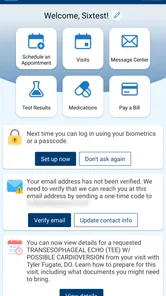
In practical terms, scheduling an appointment is more convenient through a phone than writing down a number and waiting to call. Messaging a doctor also creates a clearer written trail than trying to remember a conversation. I particularly like that these tasks belong together: the app is not asking me to jump between a calendar tool, an email account, and a separate patient website for every step.
Still, convenience should not be confused with instant care. A message is not the same as an emergency service, and an appointment request is not necessarily a same-day solution. Anyone with urgent or severe symptoms should use the appropriate emergency channel instead of waiting for an in-app response. That is an important boundary for any patient portal, including this one.
The current experience is strongest for existing WellSpan patients
MyWellSpan makes the most sense if my doctors, clinics, or other care arrangements are connected to WellSpan Health. The developer is WellSpan Health, and the app’s purpose is closely tied to that network. Someone outside that system may download it easily, but downloading it does not automatically make it a universal gateway to every healthcare provider.
More From Our News Desk

 Instagram
Instagram’s Power Comes From Its Place in Your Phone
A close look at how Instagram turns Meta’s reach, recommendation systems and everyday camera habits into durable platform power—and what that costs users.

 Gmail
GmailGmail in a Busy Inbox: Who Benefits Most?
From first account to crowded workday, Gmail earns its place through dependable search and flexible sorting—but its best fit depends on how much inbox maintenance you can tolerate.

 Prime Video
Switching to Prime Video: What Changes in Your Viewing Routine
Prime Video can make a compelling second home for streaming, but switching means learning a different catalog, rental layer, and route from browsing to playback.

 Universal TV Remote Control
Universal TV Remote Control Works Best as a Reliable Backup
A phone remote earns its place through quick setup and reliable habits. Here is how to get more from Universal TV Remote Control—and where its limits show.

 Weather - By Xiaomi
Weather by Xiaomi Review: Clear at a Glance, Less Clear Up Close
Xiaomi’s weather app makes everyday forecasts quick to scan, but its calm surface can leave useful details and recovery paths harder to find than they should be.

 X
XX Under Pressure: Can It Recover When Posting Goes Wrong?
A resilience-focused review of X, examining setup, mistaken posts, interruptions, weak connections, and the gaps that matter when recovery needs to be dependable.
Latest News



For an existing patient, the benefit is continuity. I can think of the app as a front door to routine care rather than another health account that I have to maintain for no clear reason. That makes it especially appealing to people who have recurring appointments, regular questions for a care team, or several household members whose healthcare tasks are easy to lose track of.
A realistic example is a follow-up appointment that needs to be arranged after a visit. Instead of searching through old paperwork for a phone number, I can open the app, check the available appointment workflow, and handle the request from the same device where I keep my calendar. If I need to clarify a non-urgent question afterward, messaging keeps the topic connected to the provider rather than buried in personal notes.
Another useful scenario is preparing for a busy week. I can review the tasks I need to complete before an appointment, send a question while I still remember it, and avoid making several separate calls. The time saved may be modest, but healthcare administration often becomes frustrating through accumulation. Removing three small obstacles can feel more valuable than adding one impressive feature.
What the current version tells me about the app’s evolution
The current version is 11.7.3, while the app has been available since August 23, 2011. That long lifespan is meaningful. MyWellSpan is not a newly launched experiment trying to prove that a patient portal belongs on a phone. It has had years to remain part of WellSpan’s digital service and has reached a mature stage of development.
I would interpret the version history carefully, though. A higher version number does not by itself tell me that every screen has been redesigned or that every workflow is now frictionless. It does show that the product has continued to evolve rather than remaining frozen in its original form. For existing users, that generally means the app is more likely to reflect current mobile expectations than an abandoned portal wrapped in an old interface.
The practical effect of that evolution is less about novelty and more about trust. A healthcare app has to be dependable enough that I am willing to open it when I am already worried about an appointment or a health question. Continued maintenance helps, but the real test is whether the app lets me complete ordinary tasks without confusion. My impression is that MyWellSpan is built around that dependable, functional role.
There is also a trade-off in mature healthcare software. A patient portal cannot change as freely as a social app because its workflows are connected to clinical operations, scheduling rules, and communication practices. That can make it feel more restrained than consumer apps. I would rather have a calm, predictable appointment process than a flashy interface that hides important details, but I also expect the app to explain each step clearly.
Small workflows that make a real difference
One of the less obvious strengths of a patient app is the written record created by routine communication. When I send a non-urgent message through MyWellSpan, I do not have to depend entirely on memory later. I can refer back to what I asked and what the care team communicated. That is useful when a healthcare conversation includes several instructions or when I am managing care for a family member.
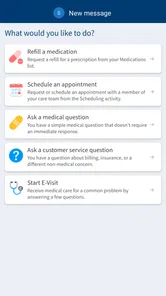
My practical tip is to write messages as compact mini-briefings. I would include the main question first, explain when the issue began, and mention what I am specifically asking the care team to clarify. A short, focused message is easier to understand than a long paragraph that mixes symptoms, scheduling, and unrelated concerns. The app provides the channel, but the quality of the exchange still depends on how carefully I use it.
I would also use the appointment workflow before assuming that a phone call is necessary. Even when I ultimately need staff assistance, checking the app first can help me understand what kind of request I am making. That distinction is valuable: scheduling a routine visit, asking a care team a question, and seeking urgent medical help are different situations and should not be treated as interchangeable buttons.
A further advantage is reducing the number of personal reminders I need to keep. Instead of writing “call the doctor” on a sticky note, I can begin the relevant task from the patient app. That does not eliminate the need for my own calendar, but it shortens the path between remembering something and acting on it. For people who regularly postpone healthcare administration, that small reduction in friction may be the app’s biggest benefit.
Where the experience may still feel limited
MyWellSpan is not a replacement for direct clinical judgment. The app can help me contact a provider and arrange care, but it cannot turn a message into an immediate consultation. Response timing can matter, especially if I am waiting on an answer before making a decision. I would use messaging for appropriate non-urgent communication and choose a faster route when the situation cannot safely wait.
It is also not the right tool for someone who wants all healthcare providers in one independent dashboard. The app’s usefulness depends on the relationship between the user and WellSpan Health. If most of my care happens elsewhere, I may end up maintaining multiple patient portals anyway. In that case, a phone call or the separate portal used by another provider may be more practical for a particular task.
Another limitation is that patient portals can feel administrative rather than personal. The app may help me reach the right place, but I still need to understand what I am asking, select the appropriate kind of appointment, and keep track of what happens afterward. I would not install it expecting it to organize my entire health life automatically. It is a tool for access and communication, not a substitute for my own notes, calendar, or medical advice.
People who dislike account-based healthcare services may also find the setup and ongoing sign-in process less appealing than a simple phone call. That is a fair trade-off. A mobile patient portal needs to protect access to sensitive information, so it cannot behave like a casual public app. The extra step may be worthwhile for frequent users, but occasional patients might prefer calling the office if they only need one appointment a year.
Who should use it, and who should choose another route?
I would recommend MyWellSpan first to current WellSpan patients who want a convenient way to schedule appointments and communicate with their doctors. It is particularly suitable for people who manage recurring care, dislike waiting on hold, or want a written record of routine questions. Caregivers may also appreciate having a single mobile starting point for tasks they otherwise have to coordinate manually, provided their access is properly arranged through the healthcare service.
I would be more cautious about recommending it to someone who expects a complete personal health dashboard independent of provider networks. It is also not the best choice for urgent symptoms, emergencies, or questions that require immediate conversation. In those situations, the right alternative is the appropriate clinical or emergency service, not a patient message that may be answered later.
Compared with calling a clinic, the app offers more flexibility and a written trail, but a phone conversation can be better when the request is complicated or when I am unsure which department should handle it. Compared with using a desktop patient portal, the mobile format is easier to access spontaneously, while a larger screen may be more comfortable for reviewing lengthy information. Compared with email, a dedicated patient channel is more suitable for provider-related communication because it keeps the request within the healthcare service rather than mixing it with ordinary correspondence.
That comparison helps define the app’s proper role. MyWellSpan is not automatically better than every alternative. It is better when I need a convenient, provider-connected workflow and the task is routine enough to handle asynchronously. A phone call remains the stronger option when nuance, immediacy, or staff guidance matters more than convenience.
What existing users should watch as the app continues
Because the app has reached version 11.7.3 after being available for many years, I would watch future changes through the lens of reliability rather than novelty. The most valuable improvements would be clearer appointment steps, easier navigation between communication and scheduling, and explanations that reduce uncertainty about what happens after I submit a request.
I would also pay attention to how well the app handles the transition between mobile self-service and human assistance. A good patient portal should make simple tasks quick without leaving users stranded when a request falls outside the standard workflow. The best update would not necessarily add more buttons; it would make the boundaries between self-service, provider messaging, and direct contact easier to understand.
For current users, the sensible approach is to keep the app updated and judge each release by the tasks they actually perform. If scheduling becomes clearer or messaging feels easier to follow, that is a meaningful improvement even if the interface looks almost unchanged. If a familiar workflow moves, taking a moment to explore the updated screens before a time-sensitive appointment request can prevent avoidable frustration.
The age rating of Everyone makes the app broadly accessible from a store perspective, but healthcare use still calls for personal care. I would avoid sharing sensitive account details through ordinary messages or screenshots, and I would make sure I am using the correct patient account before sending anything. Those habits are not special features, but they matter more here than decorative design.
My recommendation after using WellSpan
MyWellSpan is most convincing as a quiet, practical healthcare utility. It does not need to entertain me or replace every health-related tool on my phone. Its job is to shorten the distance between me and WellSpan Health for appointments and doctor communication, and that is a worthwhile job when I already receive care within that system.
I like the app’s focused purpose, long-running development, free access, and mobile convenience. I also appreciate that its strongest benefit is realistic rather than exaggerated: fewer calls for routine tasks, clearer communication, and a more direct way to begin managing care. The trade-off is that it remains tied to WellSpan, depends on non-urgent workflows for much of its value, and cannot replace immediate medical help or a conversation when a situation is complicated.
My final advice is simple. If WellSpan is already part of your healthcare, install it and use it as the first place to check for appointments or send a suitable routine question. Keep your calendar and other trusted healthcare resources alongside it, and do not treat the messaging feature as emergency care. If your providers are mostly outside WellSpan or you rarely need portal services, a phone call or another provider’s system may serve you better. For the right patient, though, this free medical app is a sensible way to make everyday healthcare administration less scattered.
WellSpan Frequently Asked Questions
Is WellSpan available for my phone, and what should I check before downloading?
WellSpan is a medical app from WellSpan Health for people who want to use the health system’s patient services on a mobile device. Before downloading, check that your device runs iOS 11 or later, the stated minimum operating-system requirement. The app is free to download and is rated for everyone, though you will need a WellSpan account to use its main patient features.
What is the WellSpan app used for?
The WellSpan app is a healthcare companion for patients using WellSpan Health services. It can help you manage appointments, review parts of your medical information, communicate with care teams, access test results when available, view medications, and handle other everyday healthcare tasks. The exact tools you see may depend on your WellSpan provider, location, account status, and the services connected to your patient profile.
How do I sign in or create a WellSpan account?
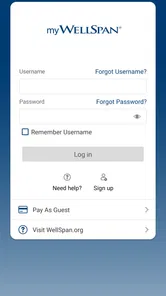
To use the main patient features, you generally need a WellSpan patient portal account and must sign in with your existing credentials. New users may be able to create an account through the app or the WellSpan website using personal verification details provided by the health system. Make sure your information matches your medical records, and use the official password-recovery process if you cannot remember your login.
Can I schedule appointments and communicate with my doctor through WellSpan?
WellSpan may allow eligible patients to request or schedule appointments, review upcoming visits, and send secure messages to participating healthcare providers. Availability can vary by department, clinician, appointment type, and whether your provider supports online scheduling or messaging. The app should not be treated as an emergency communication tool. For urgent symptoms, contact emergency services or use the appropriate local medical service.
Can I view prescriptions, test results, and medical records in the app?
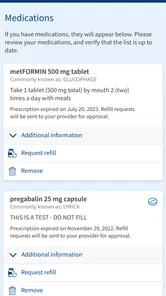
The app can provide access to selected health information, such as medications, allergies, immunizations, visit summaries, laboratory results, and clinical notes, depending on what WellSpan has released to your account. Some results may appear only after they are reviewed or finalized. Information can also be incomplete if care was received outside the WellSpan network, so confirm important details with your healthcare professional.
Pros
- Easy access to appointments
- test results
- and medical records
- Secure messaging helps patients contact their care team remotely
- Prescription details and refill requests are available in one place
- Health information is organized for quick reference on mobile
- Useful for managing care across participating WellSpan facilities
Cons
- Features may be limited for patients outside the WellSpan network
- Some functions require account verification or linked medical records
- Appointment availability depends on each provider’s schedule
- Notifications may require careful setup to avoid missing updates
- The app’s usefulness varies by the services enabled for your account











