

Wedding Planner by MyWed
- 147.00
- 4.4
- Installs
- 1.00M
- Price
- Free

Screenshots

Analysis by Reviewed
When several people are helping plan a wedding, the hard part is often not making a list; it is making sure everyone is working from the same one. Wedding Planner by MyWed is most useful when the couple wants a shared planning hub for guests, tasks, and spending, rather than a collection of notes scattered across phones. I would treat it as an organizer, not as a replacement for talking through decisions together.
A shared wedding project, not a shared phone
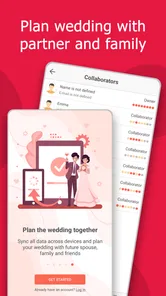
A realistic use case is a couple checking the guest list over breakfast, then reviewing a task later with a relative who is helping with arrangements. Keeping those details in one planning space can make it easier to see what still needs attention and avoid relying on one person’s memory. The app’s option to invite a partner is particularly relevant here: it makes the planning feel less like one person maintaining a private checklist and more like a joint project.
That shared approach works best when you agree on who is responsible for updating what. For example, one person can take the lead on tracking replies while the other keeps an eye on expenses. This is a practical habit rather than a special feature: clear ownership helps prevent duplicate messages, outdated totals, and the familiar “I thought you were handling that” conversation. If your helpers do not need to see every detail, you can keep their role focused on the parts you choose to discuss with them instead of treating the app as a household-wide noticeboard.
Decide what belongs in the planner
Before entering names, costs, or personal plans, I would decide which information genuinely needs to live in a shared wedding tool. A guest list and task progress are useful to coordinate; private conversations or sensitive details may be better kept elsewhere. This matters especially when a phone or tablet is passed around at home. A shared device can make planning convenient, but it also means the person holding it may see whatever is open, so basic care with device access is sensible.
The app is free to start, while optional in-app purchases range from $1.49 to $59.99 per item. I would begin with the planning needs you already know you have and consider paid extras only if they solve a real problem for you. That is a better way to avoid buying features simply because planning feels urgent. The app is developed by Wedding Planner App, and its current version is 5.10.364; as with any organizer, it is worth checking that the version you install runs on your device before building your whole routine around it.
Getting Started with Wedding Planner by MyWed
Once you download the app, you're greeted with a clean and intuitive interface. It's like stepping into a well-organized planner that just makes sense. The app kicks off by asking you a few basic questions about your big day, like the date and the number of guests. It then offers a personalized checklist based on your responses, which is a nice touch for those of us who need a bit of guidance.
Features That Make Planning a Breeze
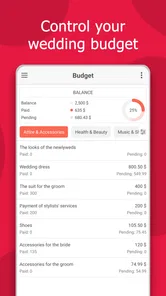
The app is packed with features designed to ease your wedding planning woes. One of my favorites is the budget planner. It lets you track expenses effortlessly, ensuring you don't accidentally blow your entire budget on floral arrangements. You can log every penny spent, and it even provides suggestions on how to allocate funds efficiently.
More From Our News Desk

 Gmail
GmailGmail in a Busy Inbox: Who Benefits Most?
From first account to crowded workday, Gmail earns its place through dependable search and flexible sorting—but its best fit depends on how much inbox maintenance you can tolerate.

 Prime Video
Switching to Prime Video: What Changes in Your Viewing Routine
Prime Video can make a compelling second home for streaming, but switching means learning a different catalog, rental layer, and route from browsing to playback.

 Universal TV Remote Control
Universal TV Remote Control Works Best as a Reliable Backup
A phone remote earns its place through quick setup and reliable habits. Here is how to get more from Universal TV Remote Control—and where its limits show.

 Weather - By Xiaomi
Weather by Xiaomi Review: Clear at a Glance, Less Clear Up Close
Xiaomi’s weather app makes everyday forecasts quick to scan, but its calm surface can leave useful details and recovery paths harder to find than they should be.

 X
XX Under Pressure: Can It Recover When Posting Goes Wrong?
A resilience-focused review of X, examining setup, mistaken posts, interruptions, weak connections, and the gaps that matter when recovery needs to be dependable.

 Clash of Clans
Clash of Clans Is Won Between the Battles
Its raids are quick; its community is a long-term project of coordination, teaching, rivalry, and shared responsibility—with all the friction that entails.
Latest News



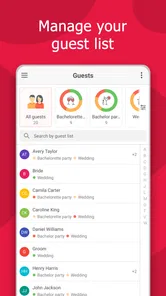
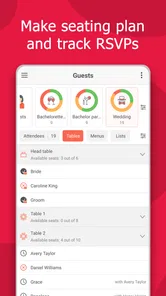
Then there's the guest list manager. It allows you to import contacts, send out invitations, and keep tabs on RSVPs all in one place. No more sifting through endless spreadsheets or chasing down missing responses. Wedding Planner by MyWed handles it all with grace.
Customization and Personalization
Every wedding is unique, and the app recognizes that. It offers a plethora of customization options, from color themes to personalized itineraries. You can even integrate your Pinterest boards to keep your inspiration close at hand. This level of personalization ensures that your wedding day is a true reflection of your style and preferences.
Keeping You on Track
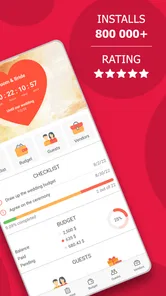
One of the standout features is the countdown timer. It not only reminds you how many days are left until the big day but also nudges you with timely reminders for tasks that need attention. It's like having a personal assistant who gently nudges you to stay on top of things, ensuring nothing slips through the cracks.
And let's not forget the vendor management section. From florists to photographers, you can store all vendor information in one convenient spot. You can even rate and review them, which is super helpful for future brides and grooms looking for recommendations.
Putting the workflow to work
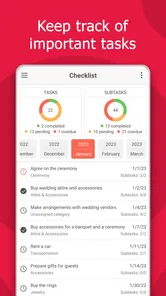
A small routine can make the app more useful than checking it only when something goes wrong. After a planning call, I would update the relevant task and expense while the details are fresh, then use the guest list as a prompt for the next conversation about invitations. If a vendor quote changes, recording the new amount promptly gives the budget tracker a fair chance of reflecting reality. These habits reduce the gap between what the app says and what the couple has actually agreed.
There is a trade-off, though: a digital checklist only helps if someone maintains it. Couples who prefer spontaneous planning, or who already keep careful records in a shared spreadsheet, may find a second system more distracting than helpful. A spreadsheet is often easier for custom columns and detailed sorting, while a paper planner can be more comfortable for sketching ideas or making notes during a meeting. I would choose this app when the guest list, tasks, and costs need to sit together; I would not force it to replace a method the whole group already uses reliably.
Who will feel at home here
This is a good fit for couples juggling many small decisions, especially when both partners want to stay involved and one person does not want to become the sole keeper of every deadline. It can also help someone who is new to planning and appreciates a checklist as a starting point. The app is free, rated for Everyone, and has a 4.3 average from around 12,000 ratings, with over 1 million installs. It was released on August 13, 2018, and supports Android 8.0 and up.
That broad age rating describes the app’s content, not whether every family member should have access to a couple’s planning details. I would keep the account and device boundaries clear, particularly if a shared tablet is used by children or guests. This is a wedding tool, not a child-focused family organizer, so I would not use it as a general household calendar or assume it provides family controls. Couples who want a professional planner to handle decisions, complex vendor negotiations, or day-of coordination should also keep a human planner in the picture where needed; an app can organize information, but it cannot make judgment calls on your behalf.
Everyday coordination without turning it into a second job
For a practical routine, I would use a short check-in rather than expecting everyone to monitor the app all day. Imagine one partner gets a revised catering estimate during a lunch break, while the other is handling guest replies that evening. The person who receives the estimate can record the expense and flag the change for discussion; the couple can then decide together whether it affects another part of the plan. That simple sequence is more useful than treating a budget figure as an automatic decision.
It also helps to separate “entered” from “agreed.” A task can be recorded because someone needs to research a venue, but that does not mean the couple has chosen one. I would use the app to keep the next action visible and reserve meaningful choices for a conversation. This distinction matters when several relatives are offering advice: a list can show what is being considered without giving every suggestion the status of a final plan.
For guest management, a useful habit is to review names in small batches and resolve uncertain details before sending invitations. If one person knows a guest’s preferred name and the other knows whether they are included in a household invitation, discuss that discrepancy first rather than making competing edits. The app can give the couple a shared reference point, but it cannot settle etiquette or family disagreements. Treating it as a record of decisions, not a substitute for making them, keeps collaboration calmer.
Where a dedicated planner beats everyday alternatives
A notes app is still a perfectly reasonable choice when the wedding is small and the couple mainly needs a few reminders. It is quick to open and flexible, but separate notes for names, spending, and deadlines can become hard to reconcile. A spreadsheet gives more control over custom fields and sorting, particularly if someone wants to compare detailed estimates, but it asks the couple to build and maintain that structure themselves. This planner sits between those approaches: it is aimed at wedding tasks specifically, so the couple can start with a wedding-oriented workflow instead of designing a tracking system from scratch.
That middle ground is not automatically best for every wedding. If one partner already has a well-maintained spreadsheet and the other rarely checks apps, moving everything may create duplicate work. Likewise, a professional coordinator may have an established process that should remain the main source of truth for vendor schedules and event-day responsibilities. I would avoid entering the same information into multiple places unless there is a clear reason; conflicting copies are worse than a simpler system everyone actually uses.
The app’s combination of a guest list, expense tracking, tasks, and partner participation makes the most sense when those pieces affect one another. A change in guest count can affect spending and invitations, while a task can depend on a decision the couple has not yet made. Keeping related details close can expose those connections earlier. Still, the value depends on regular, accurate updates, so the best setup is the one that feels light enough to keep current.
Small safeguards for shared devices and accounts
When a household shares a tablet, I would not leave the planner open in a place where anyone can casually browse guest names or costs. Close the app when you finish, and avoid entering details that do not need to be there. If a relative helps with one decision, share only the relevant information through the conversation you choose rather than assuming a shared screen is an appropriate way to involve everyone.
Partner access can make collaboration easier, but it is still worth agreeing on how each person will use it. Decide who makes routine updates, how you will resolve changes, and which decisions should wait until both partners have talked. This is not a technical safeguard; it is a boundary-setting habit. It can prevent a well-meaning edit from being mistaken for a final choice and helps keep the app from becoming another source of household friction.
For families with children, the Everyone content rating should not be read as a reason to make wedding plans a shared activity by default. Children may enjoy helping with an appropriate task, but guest details, spending decisions, and private family arrangements are adult responsibilities. I would keep the planning account under the couple’s control and invite help selectively, just as I would with a paper binder or a laptop. The app’s usefulness comes from organized collaboration, not unrestricted access.
Questions worth settling before you rely on it
One practical question is whether it suits your phone: the Android minimum is version 8.0, so I would check the device before making this the only home for planning notes. Another is whether the free starting point covers the way you intend to plan. Since optional purchases are available, I would explore the basic workflow first and only pay for something after identifying a specific need. That keeps the decision grounded in your actual wedding rather than a fear of missing out.
You may also wonder whether the app can replace a planner or a spreadsheet. My answer is no, not across the board. It can help a couple coordinate routine information and keep tasks visible, while a spreadsheet may be better for unusually detailed comparisons and a person may be essential for negotiation or on-the-day decisions. Finally, if you are coordinating with relatives, agree in advance what they need to know. The app can support a shared process between partners, but good communication still determines how much of the planning should be shared.
Final Thoughts
In the chaotic world of wedding planning, Wedding Planner by MyWed stands out as a reliable and comprehensive tool. It's like having a seasoned planner by your side, guiding you every step of the way. While it may not replace the charm of old-school planning methods, it certainly complements them beautifully.
If you're knee-deep in wedding prep and need a little help keeping everything in check, this app is definitely worth a try. With its user-friendly design and robust features, it takes a significant load off your shoulders, allowing you to focus on what truly matters – celebrating your love story.
My household verdict is straightforward: I would recommend it to a couple who wants one convenient place to coordinate routine wedding details, and I would keep the habit modest—check the tasks, update the budget, and discuss important choices directly. If you only need a guest list, a basic notes app may be simpler; if you need highly tailored project tracking or delegated professional planning, a spreadsheet or human planner may suit you better. For couples who want a shared starting point without turning every wedding decision into a complicated system, it is a sensible free option to try.
Wedding Planner by MyWed Frequently Asked Questions
Is Wedding Planner by MyWed suitable for planning a wedding with a partner?
The app’s store summary highlights an option to invite a partner, which can make it easier to plan together rather than keeping every detail in one person’s hands. Before downloading, consider whether you want shared input on tasks, guests, and expenses; these are central parts of the planning experience described by the app. It is listed as an Events app for everyone.
What features does Wedding Planner by MyWed offer?
Wedding Planner by MyWed provides a comprehensive suite of tools designed to simplify your wedding planning process. It includes budget management, a task checklist, vendor recommendations, guest list management, and a customizable timeline. Additionally, users can explore inspirational ideas and connect with other couples through the app, ensuring a well-rounded and supportive planning experience.
Is Wedding Planner by MyWed free to use?
Wedding Planner by MyWed is free to download, with optional in-app purchases priced from $1.49 to $59.99 per item. It offers both free and premium versions. The free version provides basic features such as checklists and budget tools, while the premium version unlocks additional features like advanced vendor matching and personalized planning insights. Users can choose a plan that best fits their needs and budget, ensuring flexibility in planning.
How user-friendly is the Wedding Planner by MyWed app?
The app is designed with user-friendliness in mind, featuring an intuitive interface that guides users through the planning process step-by-step. Whether you're tech-savvy or a beginner, the app's straightforward navigation and clear instructions make it easy to manage every aspect of your wedding planning efficiently. User reviews often praise its ease of use and helpful features.
Can I use Wedding Planner by MyWed offline?
While certain features of Wedding Planner by MyWed require an internet connection, such as vendor recommendations and syncing across devices, many basic features like checklist updates and budget management can be accessed offline. This ensures that users can continue planning their wedding even without a continuous internet connection, adding convenience to the process.
Pros
- Comprehensive planning tools included.
- User-friendly interface for easy navigation.
- Customizable templates for invitations.
- Collaboration feature with guests.
- Budget tracking and management tools.
Cons
- Limited offline functionality.
- Some features behind paywall.
- Occasional app crashes reported.
- Limited vendor recommendations.
- Interface can feel cluttered.












