Event Planner: Birthday, Party
- 43.00
- 4.1
- Installs
- 100.00K
- Price
- Free

Screenshots

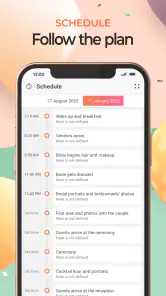
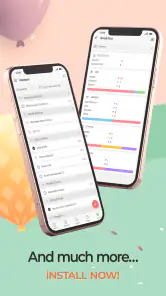
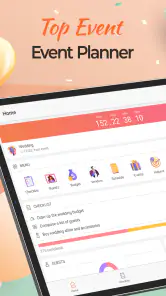
Analysis by Reviewed
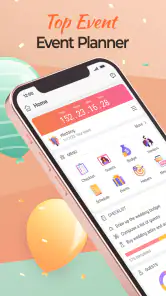
I judge a party-planning app less by how many ideas it promises than by whether it helps me keep the next useful action clear. A birthday can involve a guest list, a spending limit, food, timing and a handful of last-minute changes; the details are easy to scatter across messages and notes. Event Planner: Birthday, Party is aimed at bringing that kind of organizing into one place, and its appeal is strongest when I want a practical plan rather than a complicated event-management system.
Where planning can start to snag
The first challenge is deciding what belongs in the app and what should stay elsewhere. A checklist is most helpful when its tasks are specific: “confirm the cake pickup” is easier to act on than “sort food.” I’d turn broad items into small steps as I go, so the list can guide the week instead of becoming another place to store vague intentions.
Guest details can also become messy when several people are helping. Before adding names, I’d settle on one person responsible for keeping the list current. That simple habit matters more than it sounds: if two relatives separately update attendance in different places, even a well-organized guest list can become hard to trust. Use the app as the shared planning reference, and keep conversations about changes focused on updating that reference.
Setup checks that save time later
I’d begin with the event’s date, the rough number of guests and a realistic spending ceiling, then build the task list around those decisions. For a small birthday at home, that might mean food, invitations, decorations and a cleanup plan; for a larger gathering, transport or a venue may need attention earlier. The useful trick is to distinguish fixed commitments from flexible ideas. A booked activity is not the same as a decoration you can skip if the budget gets tight.
It’s also worth checking how the app behaves on your own device before relying on it during a busy planning stretch. Wedding Planner App develops this free event-planning app, which is rated for Everyone. It has a 4.1 average from around 1.2 thousand ratings, and more than 100 thousand installs. The current version is 4.10.44, and it requires Android 8.0 or later. In-app purchases range from $1.99 to $44.99 per item, so I’d check what is included before paying for anything; you can start without treating a purchase as a necessary part of planning.
A workable routine for the week before
For a realistic example, imagine I’m arranging a birthday dinner for a family member. I’d use the checklist to separate what needs doing days ahead—inviting people, confirming food and choosing decorations—from what belongs on the day itself, such as collecting the cake or setting out supplies. I’d record costs as soon as I commit to them, rather than trying to reconstruct the total later from receipts and chat messages.
Then I’d give helpers clear, limited jobs. One person can confirm who is coming; another can handle a pickup. Sharing event details may help everyone stay aligned, but I’d still make responsibilities explicit rather than assuming that access to the plan automatically assigns work. That small distinction prevents a familiar problem: everyone thinks someone else has taken care of the final detail.
More From Our News Desk

Clash of Clans Is Won Between the Battles

Android Auto Makes the Case for Quieter Car Software

MobiOffice: Transforming Mobile Productivity with Seamless Integration

EA SPORTS FC™ Mobile Soccer: Redefining Mobile Sports Gaming

How Microsoft OneDrive Became a Mobile Productivity Giant

How Google Translate Breaks Language Barriers Effortlessly
Using Event Planner: Birthday, Party for real events
Features That Stand Out
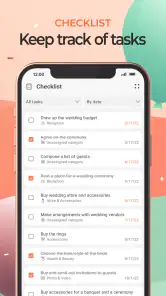
One of the coolest features of the Event Planner: Birthday, Party app is its comprehensive checklist. It covers everything from sending out invitations to arranging catering, entertainment, and decoration. You can customize these lists to suit your event's unique needs. No more scribbling notes on random pieces of paper or trying to juggle details in your head!
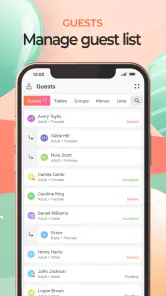
The app also offers a guest management feature, which is a lifesaver. You can track RSVPs, dietary preferences, and even seating arrangements. It's like having a personal assistant in your pocket. Plus, the app sends out reminder notifications, ensuring you don't overlook any important detail as the big day approaches.
Budgeting Made Easy
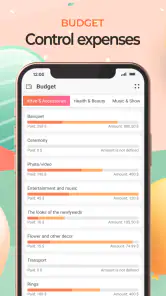
Okay, let's talk money. The budgeting tool is another gem. It lets you set a budget for each category and tracks your expenses as you go. I found this especially helpful to avoid overspending. You can easily adjust the budget if things change, which they often do in party planning. It’s all about flexibility, right?
Making the plan useful to the whole group
The guest and budget tools are most valuable when I use them to answer decisions, not just to collect information. For instance, if the RSVP count rises, I can revisit food spending before making another purchase. If someone has a dietary preference, I’d note it early enough to ask the host or food provider what is workable, rather than treating a note in the app as confirmation that the menu is covered.
There is a trade-off here. Keeping guest details, seating ideas and expenses together reduces the need to hunt through scattered notes, but it also means the plan needs occasional maintenance. I’d review it after each round of replies and after every significant purchase. That is more reliable than waiting for reminders to catch every change, especially when a decision happens in a conversation outside the app.
Adding a Personal Touch
Now, for those who love to add a personal touch to their events, this app has got you covered. It offers a range of themes and templates for invitations and thank-you notes. You can even add your photos and customize texts. It’s a great way to make your event feel unique right from the get-go.
Collaboration and Sharing
Planning an event is hardly ever a solo gig, and that’s where the sharing feature comes in handy. You can collaborate with friends or family members by sharing the event details directly from the app. Everyone stays in the loop, and it reduces the stress of miscommunication. It’s teamwork at its finest!
When a different tool may work better
Compared with a paper checklist, this app can keep guest information and spending notes alongside the tasks, which is useful when plans change. A shared calendar may be better for a group whose main problem is coordinating times, while a spreadsheet can suit someone who wants detailed cost calculations or complete control over formatting. I’d choose this app when the event has several moving parts but does not need a highly specialized system.
It may not be the right fit if you prefer to plan entirely on paper, do not want to maintain a digital guest list, or need a tool tailored to complex professional events. Nor would I rely on any planning app alone for time-sensitive coordination: keep essential addresses, pickup arrangements or urgent contact details somewhere you can reach quickly if your phone is unavailable. The app can organize decisions, but it cannot make those decisions for the group.
Why You’ll Love It
I think the biggest win with this app is how it simplifies the entire planning process. It takes what can be a chaotic mess of details and organizes it all in one place. The app’s reminders and notifications kept me on track, and the customization options allowed the event to reflect my personal style. Plus, the satisfaction of checking off tasks is surprisingly rewarding!
Room for Improvement
Of course, no app is perfect. While using it, I noticed that the app's syncing feature could be a bit slow at times, especially when updating guest lists. It's not a deal-breaker, but something to keep in mind if you're in a time crunch. Additionally, a few more tutorial videos or guides could be beneficial for first-time users navigating all the features.
Recovering when the plan falls behind
If a guest update or another change does not appear as quickly as expected, I would avoid entering the same information repeatedly. First, give the app a moment, then check the event again and confirm which version is current before making another edit. For anything urgent, I’d tell the other helpers directly and agree on the correct detail, then return to the plan once it has settled. This keeps a temporary delay from turning into duplicate or conflicting entries.
When the checklist starts to feel overwhelming, I’d sort tasks by consequence rather than by how enjoyable they are. Confirming attendance or food usually affects other choices; picking a decorative extra may not. Move the dependent decisions forward first, and leave optional touches until the essentials are secure. That approach makes the plan useful even if the celebration changes shape at short notice.
When the problem is outside the app
Not every planning snag is a technical one. A late RSVP, a vendor changing an arrangement, or a family member overlooking a message can leave the plan out of date even when the app is working normally. I’d verify important changes with the person involved, then update the event record. For a shared plan, agree who makes that edit so people are not trying to correct the same item at once.
Likewise, reminders can only help with tasks that have been entered clearly and in time. If I add a task after its deadline has passed, the useful fix is to choose a new next step—not to expect a notification to solve the delay. Keeping a short “must happen today” list beside the fuller plan can help during the final stretch without duplicating the entire event.
Practical choices for different kinds of hosts
I see the best fit as the person hosting a home birthday or anniversary who enjoys having a central place for the moving parts but does not need elaborate event software. It can also help when one organizer is coordinating a small group of relatives: the guest list and shared details give everyone a common reference, while a named person remains responsible for keeping it accurate. That combination is more useful than simply inviting everyone to contribute freely.
For a child’s party, I’d use separate tasks for decisions that depend on attendance: food quantities, party favors and the space needed for activities. I would not treat an RSVP as a guarantee that a guest’s needs are fully handled; dietary notes, for example, still call for a direct check with whoever is preparing the food. The app can preserve the detail so it is not forgotten, but the conversation is what confirms the arrangement.
Small habits that make the tools more useful
A practical way to avoid an overgrown checklist is to write tasks as actions with a clear finish point: “choose the cake” can become “order the cake” once the decision is made. I’d also separate a must-do item from an optional idea instead of giving both the same urgency. That makes it easier to cut back calmly if time or spending becomes tight, without losing track of commitments that affect guests.
For expenses, I’d record the amount when it is agreed or paid and keep the app’s category aligned with the decision I’m making. That makes a budget review more useful than a pile of figures entered at the end. If several people are buying supplies, I’d decide how they should report costs before shopping begins; otherwise, the plan may look incomplete even though the money has already been spent.
One question I’d ask before relying on the sharing workflow is whether every helper actually needs to see every planning detail. For a simple gathering, a small circle is easier to coordinate than a broad group where suggestions and edits can blur responsibility. I’d share what helps people complete their jobs, agree who maintains the central plan, and keep urgent changes in direct contact rather than assuming everyone will notice an update.
My practical verdict
Overall, the Event Planner: Birthday, Party app is a fantastic tool for anyone looking to plan an event with minimal hassle. It's user-friendly, packed with features, and just makes the whole process a lot more enjoyable. So, if you've got a party coming up, give it a try and see how it can transform your planning experience. Happy partying!
I’d recommend it most to someone arranging a birthday, anniversary or another personal gathering who wants checklists, guest tracking and budget notes together. It is free to begin, though optional in-app purchases are available, so I’d review those choices rather than assume they are needed. For a straightforward celebration, the strongest result comes from entering concrete tasks, keeping one person in charge of updates and checking important details with the people responsible. If you need elaborate scheduling or prefer a purely manual system, a calendar, spreadsheet or paper planner may suit you better; for an ordinary host trying to keep a party from becoming a jumble of messages, this app is a practical place to start.
Event Planner: Birthday, Party Frequently Asked Questions
Is Event Planner: Birthday, Party free to download, and are there in-app purchases?
Event Planner: Birthday, Party is free to download, so you can try the app without paying upfront. It also offers in-app purchases, which may be relevant if you want to access paid options while using it. Consider whether those optional purchases fit your needs before downloading, especially if you prefer to keep all event-planning features within a free experience.
What types of occasions can I plan with Event Planner: Birthday, Party?
The app is intended for planning a range of celebrations, including birthdays, weddings, anniversaries, and Christmas parties. That makes it useful if you want one event-planning app for different occasions rather than a tool focused only on birthdays. You can choose the type of event that fits your plans and use the app to organize its details.
What features does the Event Planner: Birthday, Party app offer?
The Event Planner: Birthday, Party app offers a comprehensive suite of features, including guest list management, customizable invitations, RSVP tracking, and budget planning tools. Users can also access a variety of themes and templates to personalize their events and integrate the app with their calendar for seamless scheduling.
Is the Event Planner app suitable for both small gatherings and large events?
Yes, the Event Planner app is designed to accommodate events of all sizes. Whether you're organizing an intimate birthday party or a large-scale celebration, the app provides scalable options to manage guest lists, send invitations, and coordinate every detail efficiently, ensuring a stress-free planning experience.
Can I use the app without an internet connection?
While some features of the Event Planner app, such as initial setup and certain updates, require an internet connection, many core functionalities like guest list management and budget tracking are available offline. This ensures that you can continue planning and organizing even when you don’t have internet access.
Pros
- User-friendly interface for easy navigation.
- Customizable event templates available.
- Syncs with calendar apps seamlessly.
- Built-in guest list management feature.
- Automatic reminders for upcoming events.
Cons
- Limited theme options in free version.
- Occasional sync issues with some calendars.
- Ads can be intrusive in free version.
- No offline access to event details.
- Guest limit on free tier.
- Category
- Events
- Version
- 4.10.44