WeatherGuide: Forecast & Radar
- 5.00
- 4.7
- Installs
- 10.00K
- Price
- Free
Screenshots
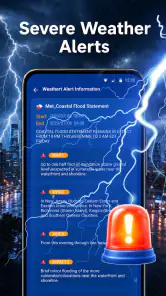
Analysis by Reviewed
Weather decisions are usually made in a hurry. I check the sky while looking for my keys, decide whether a light jacket is enough, and then regret the choice halfway to the bus stop. WeatherGuide: Forecast & Radar is built around that exact moment. It is a free weather app from MacroSmart Tech that combines forecast information, radar, and AI-oriented guidance in a compact “what should I wear or carry?” experience.
After spending time with it, I see the main appeal clearly: this is less about staring at a wall of weather figures and more about turning the forecast into a practical decision. The app is aimed at people who want a quick answer before leaving home, while still offering radar when conditions look uncertain. That makes it more interesting than a basic temperature widget, although it is not automatically the best replacement for a full-featured meteorological service.
How WeatherGuide fits into a connected routine
I’d treat WeatherGuide as one part of a connected routine, not the whole routine: a quick check can help me decide what to take, while the forecast and radar offer more context when plans stretch beyond the next trip. The useful handoff is knowing when to stop relying on a simple suggestion and check a more authoritative source. That distinction matters most when ordinary weather planning turns into a safety decision.
The first check depends on a live connection
The app’s usefulness is closely tied to current information. Forecasts and radar are the kinds of features that need fresh data, so I treat WeatherGuide as a connected tool rather than something to rely on when my phone has no network access. When the connection is good, the experience makes sense: open the app, check the immediate conditions, look at the radar when rain seems possible, and make a decision.
That connection requirement matters most during the exact situations where people tend to reach for a weather app. I might be leaving a basement, walking through a large station, or standing outside a building with an unstable signal. In those moments, I would not assume that a new forecast or radar view will appear instantly. My practical habit would be to check before leaving a reliable Wi-Fi or mobile-data area, especially ahead of a commute or outdoor appointment.
The AI element is useful as an interpretation layer, not as a replacement for the underlying forecast. A suggestion such as carrying an umbrella or choosing a jacket can save time, but I still prefer to glance at the actual conditions when the day is complicated. A short shower, a rapidly changing storm, or a long trip across town can make a simple recommendation less complete than the radar view.
A realistic morning with changing plans
Imagine a weekday morning when the sky looks bright but the forecast hints at rain later. I would open the app before breakfast, check the near-term outlook, and use the radar to see whether the rain appears to be approaching or sitting somewhere else. If I am only walking to a nearby shop, the AI-style recommendation may be enough. If I am going to spend the afternoon outside, I would use the forecast and radar together before deciding what to pack.
More From Our News Desk

Weather by Xiaomi Review: Clear at a Glance, Less Clear Up Close

X Under Pressure: Can It Recover When Posting Goes Wrong?

Clash of Clans Is Won Between the Battles

Android Auto Makes the Case for Quieter Car Software

MobiOffice: Transforming Mobile Productivity with Seamless Integration

EA SPORTS FC™ Mobile Soccer: Redefining Mobile Sports Gaming
That workflow is one of the app’s strongest ideas. It separates the quick question—“Do I need an umbrella now?”—from the planning question—“Will the weather affect the next several hours?” The first can be answered quickly; the second deserves a little more attention. I would not make the mistake of treating one convenient recommendation as a complete plan for a long day outdoors.
Radar is most valuable when the forecast feels vague
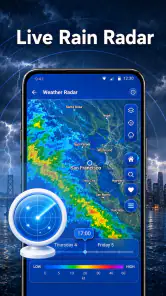
Forecast icons can be too broad for everyday decisions. A cloud with a rain symbol does not tell me whether I should leave immediately, wait a few minutes, or prepare for a wet walk later. Radar can add useful context by showing how precipitation is moving in relation to my location. That is the feature I would open when the weather looks unsettled rather than simply cold or warm.
There is also a trade-off here. Radar is more informative, but it asks more from the user than a single recommendation. I need to interpret direction, timing, and distance instead of accepting one simplified answer. WeatherGuide works best when it lets me move between those two levels: a quick practical suggestion for routine mornings, followed by a visual check when the situation deserves it.
Using it on the move
On a phone, speed and readability matter more than having every possible weather layer. I would use this app while standing at a door, waiting for transport, or deciding whether to change plans. Its concept suits short sessions because the purpose is immediately understandable: check the conditions, look for rain if necessary, and choose what to wear or bring.
That does not mean every mobile context is equally comfortable. A radar view can be harder to read on a small screen when I am walking or holding a bag. I would rather stop for a moment than try to interpret a moving weather map while crossing a street. The app is a decision aid, not a reason to use a phone carelessly in traffic or poor visibility.
For travel, I would check the destination before leaving home rather than waiting until arrival. A weak signal at a station or on a rural road can interrupt the most useful part of the experience. The app’s value is highest when I prepare with current information and then use it for quick updates, not when I expect it to solve every connectivity problem after I am already offline.
What happens when information is interrupted
A weather app has a particular weakness: stale information can look reassuring even when conditions have changed. If a connection drops after I have checked the forecast, I would treat what is already on screen as a previous snapshot, not as a guarantee. That distinction is especially important with fast-moving rain or storms.
My recovery routine would be simple. I would first try the app again when the signal improves, then compare the radar and forecast rather than relying only on the earlier recommendation. If the connection remains unreliable, I would use visible conditions and local common sense until I can refresh the information. For a short walk, that may be enough; for a hike, drive, or outdoor event, I would want a dependable current update before committing.
This is also where WeatherGuide should not be confused with an emergency warning service. Its practical guidance can help with ordinary choices, but I would not use an AI-style suggestion as the sole basis for safety-critical decisions. Severe conditions, flooding, dangerous heat, and travel disruptions deserve official local alerts and direct judgement. The app can sit alongside those sources, not replace them.
Keeping mobile data under control
Because radar is a visual feature, I would be more careful with it on mobile data than with a quick text-based forecast. I would open the map when I genuinely need to understand incoming precipitation, then close it after making the decision. There is little benefit in leaving a radar view open while doing unrelated tasks.
A sensible routine is to use Wi-Fi for broader planning and mobile data for short checks. Before a commute, I might review the forecast and radar at home. Once outside, I would use the app only when the sky or timing makes the update worthwhile. This approach is not about avoiding the app; it is about matching the richer view to situations where it adds information.
I would also avoid repeated refreshing out of habit. Weather changes, but checking every few minutes rarely improves a simple clothing decision. One check before leaving and another when plans change is usually more useful than constantly reopening the same screen. The app’s quick-answer design supports that restrained habit better than a service that encourages endless browsing through layers and charts.
Who will appreciate this approach
WeatherGuide is a good fit for people who want practical guidance rather than a technical weather dashboard. It should appeal to commuters, parents preparing children for school, casual walkers, cyclists who need to judge rain risk, and anyone who regularly asks whether a jacket or umbrella is sensible. The combination of AI assistance and radar gives both convenience and a way to investigate when the simple answer is not enough.
It is also approachable for users who find traditional weather apps cluttered. The store rating sits at a 4.7 average from around 369 ratings, and the app has passed 10K installs, which suggests that its straightforward idea has found an audience. I would read those figures as encouraging interest rather than proof that it will suit every weather workflow.
The Everyone age rating makes it easy to recommend as a general household utility. A child can understand the umbrella question, while an adult can use the radar for planning. Still, younger users should not be left to interpret dangerous weather alone. The app can support a conversation about conditions, but responsibility remains with the adult making the final decision.
Who should choose another kind of weather app
I would look elsewhere if I wanted a specialist tool with extensive technical detail, highly configurable alerts, or a deep archive of observations. WeatherGuide’s strength is the decision in front of me, not an exhaustive analysis of atmospheric data. Someone who enjoys comparing multiple models or monitoring conditions for professional outdoor work may prefer a more advanced service.
I would also hesitate to make it my only weather source for remote travel. The app’s connected nature means I would want a reliable way to obtain current information before entering an area with poor reception. For ordinary city routines, that limitation is manageable. For isolated roads, long hikes, or safety-sensitive work, it becomes a more serious consideration.
Small habits that make the app more useful
My first tip is to separate “now” from “later.” Use the immediate recommendation for the next short trip, then open the radar if your plans extend beyond the current conditions. This prevents a convenient answer about the next few minutes from being mistaken for a full-day forecast.
Second, check the radar when the forecast and the sky disagree. If the app suggests carrying rain protection but the clouds look harmless, the map can help show whether precipitation is nearby or moving toward the area. Conversely, a clear-looking morning should not automatically overrule a radar pattern that indicates incoming rain.
Third, make the network part of the routine. I would refresh before leaving a stable connection, particularly when travelling somewhere unfamiliar. That small step reduces the chance of depending on an old screen at the worst possible moment and makes the app feel more dependable without pretending that a weather service can remove uncertainty.
Finally, treat the AI guidance as a prompt to think, not an instruction. Temperature, wind, humidity, personal comfort, and the amount of time spent outside all matter. A person waiting for a long bus ride may need a warmer layer than someone walking directly to a car, even with identical weather. The app helps start that decision; it does not know every detail of my day.
Version, cost, and everyday practicality
WeatherGuide is free, which lowers the barrier to trying its approach. The current version is 1.1.2, and the minimum operating-system requirement is Android or iOS version 9. That broad compatibility is useful for people who keep an older phone, although the actual comfort of radar viewing will still depend on the device’s screen and connection quality.
The developer, MacroSmart Tech, has focused this release around a clear everyday problem rather than presenting the app as a complete weather laboratory. I appreciate that focus. The experience is easiest to value when I need a quick, understandable decision and can connect long enough to obtain current conditions.
My verdict on connectivity and usefulness
WeatherGuide: Forecast & Radar is a thoughtful choice for quick, practical weather checks. I like the combination of an AI-guided recommendation and a radar view because it covers two different needs: deciding what to carry and understanding why the weather may change. That balance makes it more useful than a bare temperature display without forcing every user into technical charts.
Its main limitation is equally clear: the experience depends on timely connected information. I would check it before leaving a reliable network, avoid treating an old result as current, and use official warnings for serious conditions. With those habits, the app fits neatly into commuting, errands, school runs, and casual outdoor plans.
My recommendation is simple: choose it if you want a free weather companion that turns forecast information into an everyday clothing or umbrella decision. Skip it as your only tool if you need specialist detail, dependable planning in remote areas, or safety-critical alerts. For ordinary mobile use, though, WeatherGuide offers a sensible middle ground between a one-glance forecast and an overloaded weather dashboard.
WeatherGuide: Forecast & Radar Frequently Asked Questions
Is WeatherGuide: Forecast & Radar suitable for everyday planning?
Yes. WeatherGuide is built as an out-the-door weather guide, with forecasts and radar intended to help you decide whether to take an umbrella or wear a jacket. It can also help you check conditions before a commute, outdoor activity, trip, or other daily plans. Its focus is practical preparation, rather than replacing official guidance during emergencies.
What is WeatherGuide: Forecast & Radar used for?
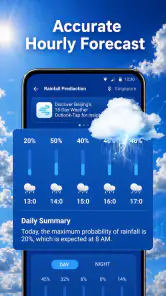
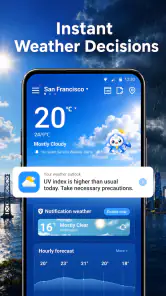
WeatherGuide: Forecast & Radar is designed to provide quick access to current conditions, hourly forecasts, daily outlooks, and radar information. After exploring the app, its main value is the ability to combine basic weather details with visual forecast tools in one place. It can help users plan commutes, outdoor activities, trips, and everyday schedules while keeping an eye on changing conditions.
How accurate are the forecasts and radar information in WeatherGuide?
Forecast accuracy depends on the weather data providers, your location, and how far ahead you are checking. Short-term forecasts are generally more useful than long-range predictions, while radar is especially helpful for observing nearby rain or storm movement. WeatherGuide should be treated as a practical guide rather than a guarantee, particularly during rapidly changing or severe weather conditions.
Does WeatherGuide: Forecast & Radar require location permission?
The app can use your device location to automatically display weather for your current area, which makes setup faster and more convenient. However, users who prefer greater privacy can usually search for and save locations manually instead. Before downloading, check the permission request and privacy information, since location access may be handled differently depending on your operating system and the app version.
Is WeatherGuide: Forecast & Radar free to download and use?
WeatherGuide: Forecast & Radar is free to download. Some features can depend on the app’s current business model, so check the official Google Play or App Store listing for pricing and any in-app purchase details before installing. The app is developed by MacroSmart Tech, and its Everyone content rating makes it suitable for a general audience.
Pros
- Clear hourly and daily forecasts for quick planning.
- Radar maps help track rain and approaching weather systems.
- Useful alerts can warn you about changing local conditions.
- Clean interface makes key weather details easy to find.
- Supports weather checks for multiple saved locations.
Cons
- Some advanced radar features may require a paid subscription.
- Forecast accuracy can vary
- especially several days ahead.
- Frequent alerts may feel excessive without careful customization.
- Location access can increase battery and data usage.
- Advertising may interrupt the experience for free users.
- Category
- Weather
- Version
- 1.1.2











