Weather Real-time Forecast
- 228.00
- 4.6
- Installs
- 500.00K
- Price
- Free
Screenshots

Analysis by Reviewed
My first practical question with any weather app is not whether it can show a forecast, but whether I can get a useful answer quickly when I’m already deciding what to do. Weather Real-time Forecast is a free weather app from StoreVN, built around checking the coming hours and looking ahead across the week. I see it as a companion for everyday choices—what to wear, when to set out, or whether to keep an outdoor plan flexible—rather than a specialist source for urgent weather decisions.
When a weather check becomes a setup problem
The most common friction with a forecast app is often surprisingly basic: I open it expecting a local answer, but the place on screen may not match the place I’m planning around. Before judging a forecast as wrong, I’d confirm that the app is showing the relevant location. A useful routine is to check the place first, then compare the forecast with conditions where I actually am; those can differ, especially when I’m travelling or planning for somewhere else.
I’d also avoid making a firm decision from one glance at a forecast several days away. The longer view is valuable for deciding whether to keep a plan on the calendar, but I’d revisit it closer to the day before treating it as settled. For plans that depend on a narrow weather window, I’d check again shortly before leaving and keep a backup option in mind.
Simple checks before blaming the forecast
If the screen looks stale or the outlook seems out of step with the weather outside, I’d start with two ordinary checks: confirm the phone has an internet connection and reopen the app. Then I’d verify the location and review the forecast again. This order helps separate a connection or location mismatch from a genuine difference between a forecast and local conditions.
I’d keep expectations realistic, too. A general forecast describes conditions for an area and time period; it may not capture every street-level difference. A sheltered route, an exposed hill, or a spot near the coast can feel different from a nearby town reading. I use the app to prepare, not to settle an argument with the sky.
A more dependable way to use short- and long-range views
For a useful workflow, I’d use the weekly outlook to spot days that may need flexibility, then rely on the nearer forecast when making the actual decision. For example, if I’m considering a weekend walk, I can use the longer view to avoid overcommitting early in the week. On the day itself, I’d check the coming hours before setting off and reassess if the timing changes.
That distinction also makes the forecast easier to interpret. The week view is a planning signal, not a detailed promise; the short-range view is more relevant to immediate choices, but still deserves a last look if conditions matter. Checking at the point of decision is more useful than repeatedly refreshing out of habit.
More From Our News Desk

Clash of Clans Is Won Between the Battles

Android Auto Makes the Case for Quieter Car Software

MobiOffice: Transforming Mobile Productivity with Seamless Integration

EA SPORTS FC™ Mobile Soccer: Redefining Mobile Sports Gaming

How Microsoft OneDrive Became a Mobile Productivity Giant

How Google Translate Breaks Language Barriers Effortlessly
Why Weather Real-time Forecast Stands Out
First off, let’s talk interface. The app’s interface is super clean and intuitive. Whether you’re a tech whiz or a casual user, navigating through the app feels like a breeze. Everything is laid out with such clarity that you hardly need to second guess where to tap next. Plus, the color scheme is easy on the eyes, which is always a bonus.
Checking the forecast without overcomplicating the day
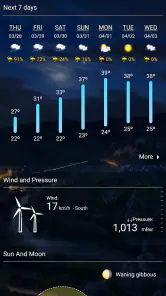
The main value is having a short-range view for immediate plans and a longer forecast for decisions that need more notice. I’d use the next-day outlook to decide what to wear or whether to take an umbrella, then check the week ahead before committing to an outdoor activity. A forecast is still an estimate, so I treat it as a planning aid, not a promise that conditions will stay unchanged.
For a realistic morning routine, I’d check the coming hours before leaving, then look again if plans shift later in the day. That second check is more useful than trying to memorize the whole forecast: weather can change, and a quick refresh before a walk or commute helps me make a current decision. If a plan depends on precise timing, I’d leave room for uncertainty rather than relying on one glance.
Features That Keep You Hooked
Now, onto the features. The highlight? It provides real-time updates without any lag. You know how some apps keep you waiting for ages for a simple update? Well, not this one. It’s like having a personal meteorologist in your pocket, updating you on the fly.
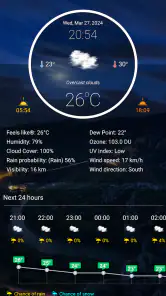
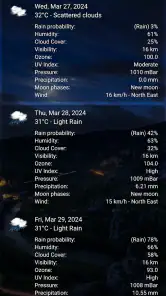
And if you’re someone who loves details, you’ll appreciate the hourly forecasts and the detailed weather maps. They’ve got everything from temperature, humidity, to wind speed. Oh, and did I mention the radar feature? It’s quite nifty for tracking those pesky storms.
One useful way to read those details is to connect them to a decision instead of checking every number out of habit. Wind information can help me think twice about a breezy outdoor activity, while humidity gives extra context to a warm day. Maps and radar can add a visual perspective when conditions look unsettled, but I wouldn’t treat a screen view as a guarantee about exactly when rain will reach my street.
Making the details useful, not distracting
When several weather details are available, I find it helps to decide what question I’m trying to answer first. If I’m choosing clothes, temperature is the obvious starting point; if I’m planning time outdoors, wind and the chance of changing conditions may matter more. That keeps a forecast from turning into a collection of numbers I look at without knowing what to do with them.
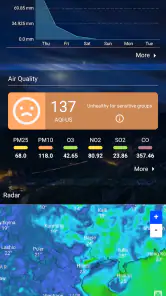
Maps and radar are most useful to me as context. They can help me see whether unsettled weather is worth monitoring, but I wouldn’t use a visual display to make a precise call about the minute rain will begin at my location. If the plan is easy to move, I can wait and check again. If it is difficult to change, I’d use a cautious plan rather than treating the map as certainty.
Where setup and expectations matter
If the forecast seems out of step with what is outside, I’d first check that the app is showing the place I actually care about and reopen it to review the current outlook. It is easy to make a poor comparison by looking at a broad area while standing somewhere with different local conditions. I’d also check that the phone has a working internet connection before deciding the app itself is at fault.
For a smoother routine, I’d keep the app’s role simple: open it when making a weather-dependent decision, and use any available home-screen access only if it genuinely saves a step. Notifications can be handy for someone who tends to forget to check, but I prefer to avoid relying on alerts as my only source of information. If an alert or forecast looks surprising, opening the app and reviewing the outlook is a sensible way to reassess plans.
Recovering when the information seems off
If reopening the app and checking the location do not resolve the mismatch, I’d make the next decision based on the conditions I can observe and check again later. There is no benefit in repeatedly refreshing when the underlying question is whether the local weather has changed. For a routine commute, a small adjustment—carrying a light layer or leaving extra time—can be more sensible than trying to force certainty from a forecast.
For an outdoor plan with other people, I’d share the broad plan and a fallback rather than passing along a single forecast detail as a guarantee. A park visit can become a café stop, for instance, if conditions turn. That is not a special function of the app; it is a practical way to use any forecast responsibly when the cost of changing plans is low.
When the app may not be the cause
A forecast that differs from what I see does not automatically mean the app has failed. Weather is local, conditions shift, and a general outlook cannot describe every sheltered street or exposed route. I’d distinguish between an app showing the wrong place or failing to refresh and a forecast that simply did not match the exact conditions I encountered.
When safety is involved, I would not use a general-purpose weather app as my only source. For dangerous conditions, I’d follow official local warnings and guidance. A quick forecast can help me decide whether to bring a coat; it should not replace a trusted safety source when the consequences of getting the call wrong are serious.
Personal Experience and Opinion
From my personal experience, Weather Real-time Forecast has been a game-changer. I’ve managed to avoid getting drenched more times than I can count, thanks to its accurate predictions. The app also sends timely notifications, which is perfect for someone like me who tends to forget to check the weather before heading out.
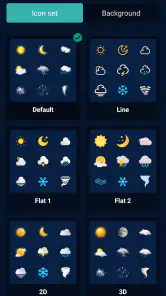
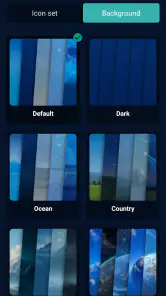
Another thing I love is the customization options. You can tailor the app to show the information you care about the most. Whether it's a daily summary or just severe weather alerts, you get to decide what’s important. Plus, the widget feature is a nice touch, allowing you to have all the essential info right on your home screen without even opening the app.
Who will get the most from it
I think this app suits people who want a quick everyday check and a simple way to compare the next few hours with the coming week. It can fit a commute, a dog walk, or deciding whether to postpone a picnic. Someone who likes a clear overview rather than a dense collection of specialist weather information may find that approach comfortable.
It is especially sensible for someone who wants to check the forecast without turning weather planning into a hobby. A parent deciding whether to pack an extra layer, a commuter choosing between a walk and a ride, or a person arranging a casual outdoor lunch can all make use of a near-term outlook and a week-ahead view. The key is that the decision remains flexible enough to revisit.
I’d be less likely to recommend it to someone who needs technical tools for forecasting, highly localized observation, or a dedicated source for official warnings. It may also be the wrong fit if you want a large dashboard of specialist information and expect to analyze every weather variable. In those cases, a more focused service is a better match than trying to make a general app do everything.
How it fits beside other weather apps
Compared with the usual alternatives, which often compete through extensive dashboards, extra layers, or lots of alerts, this app’s appeal is its straightforward everyday purpose. A simpler check can be quicker when all I need is to decide what to wear. The trade-off is that people who enjoy digging into specialist data may prefer an app built around deeper analysis, while someone who mainly wants a quick outlook may not need that complexity.
The choice also depends on what kind of confidence you need. If I’m deciding whether to take an umbrella on a short errand, a readable outlook is enough. If I’m planning a long trip, coordinating an event that cannot easily move, or responding to potentially dangerous weather, I’d compare more authoritative or specialized sources. The app works best when its convenience matches the modest scale of the decision.
The app is free to download, is rated for Everyone, and has a 4.6 average from around 11,000 ratings, with over 500,000 installs. StoreVN released it on July 5, 2018, and version 1.7.5 requires Android 5.0 or later. In-app purchases are listed at $9.79 per item, so I’d check the purchase details in the app before paying for anything; the basic download itself is free.
What I would check before settling into a routine
For someone trying it for the first time, I’d begin with a simple test: make sure the location matches, check the near-term outlook, and compare it with what is happening outside. Then I’d use the week view for a plan that is still several days away and return closer to the date before committing. This gives a fair sense of whether the app’s approach suits your habits without requiring you to depend on every display or alert.
If you are wondering whether it can replace checking the weather elsewhere, my answer depends on the stakes. For ordinary clothing and schedule decisions, it may be enough to keep your routine simple. For emergency information, a highly local reading, or a plan where a wrong call would be costly, I’d use an appropriate specialist or official source alongside it. That is a useful boundary, not a criticism unique to this app.
Final Thoughts
In a world where the weather can be as unpredictable as ever, having an app like Weather Real-time Forecast in your arsenal is a no-brainer. It’s reliable, easy to use, and genuinely helpful. Whether you’re planning a day out or just curious about the weather trends, this app has got you covered. So, if you haven’t tried it yet, I’d say give it a go and see how it transforms your day-to-day planning!
My practical verdict is that it makes sense for casual planning if you value a readable forecast and want both near-term and weekly context in one place. I wouldn’t make it my sole guide for high-stakes weather, and I’d skip it if I wanted a deeply technical forecasting workspace. For ordinary decisions, though, its straightforward approach is the reason I’d keep it within reach.
Weather Real-time Forecast Frequently Asked Questions
What does Weather Real-time Forecast show at a glance?
Weather Real-time Forecast is a weather app from StoreVN for checking conditions ahead of time. Its central offering is forecasts for the next 24 hours and the next seven days, which can help with everyday planning, such as deciding what to wear or whether to prepare for changing weather. The app is free to download, with in-app purchases available.
What features does Weather Real-time Forecast offer?
Weather Real-time Forecast provides a comprehensive suite of features tailored to weather enthusiasts and casual users alike. Key features include real-time weather updates, detailed hourly and weekly forecasts, severe weather alerts, and customizable weather widgets. The app also includes radar maps, air quality indices, and sunrise/sunset times, making it a versatile tool for planning your day.
Is Weather Real-time Forecast available for both Android and iOS devices?
Yes, Weather Real-time Forecast is available for download on both Android and iOS platforms. Users can find the app on the Google Play Store for Android devices and the Apple App Store for iOS devices. The app is designed to provide a seamless experience across different devices, ensuring that users have access to the latest weather updates and features, regardless of their preferred platform.
How accurate are the weather predictions in the Weather Real-time Forecast app?
Weather Real-time Forecast utilizes advanced meteorological data and predictive modeling to offer highly accurate weather predictions. The app sources its data from reputable weather agencies and leverages machine learning algorithms to refine its forecasts. This ensures that users receive reliable and timely information, aiding them in making informed decisions based on the weather conditions.
Does the Weather Real-time Forecast app support international locations?
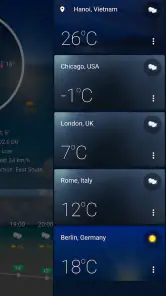
Absolutely, Weather Real-time Forecast supports a wide range of international locations, making it a valuable tool for globetrotters and locals alike. Users can easily switch between different cities and regions to receive weather updates tailored to specific areas. This global coverage ensures that users can stay informed about weather conditions, whether they are at home or traveling abroad.
Pros
- Accurate weather predictions
- Real-time updates
- User-friendly interface
- Customizable alerts
- Global coverage
Cons
- Ads can be intrusive
- Requires internet connection
- Limited free features
- Occasional notification bugs
- Battery consumption
- Category
- Weather
- Version
- 1.7.5












