Weather Forecast (Radar Map)
- 106.00
- 4.6
- Installs
- 1.00M
- Price
- Free
Screenshots
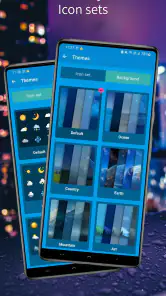
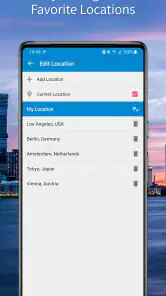
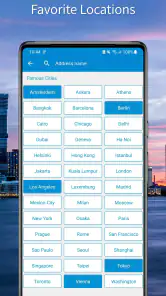
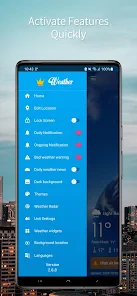
Analysis by Reviewed
I tend to open a weather app for a practical reason: deciding whether to leave now, pack a jacket, or move an outdoor plan indoors. Weather Forecast (Radar Map) is a free weather app from StoreVN, and its appeal is the mix of a visual map with forecasts looking ahead from the next few hours to the coming month. That makes it useful for quick decisions as well as rough planning, though I would treat longer-range outlooks as guidance rather than a promise.
What the current version is good at
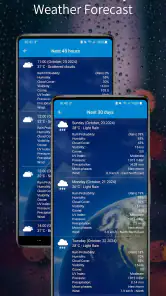
The app is currently at version 2.10.6, following its release on June 20, 2017. That history gives it time in a crowded category, but a version number by itself does not tell me what changed or how often the forecast sources are refreshed. What I can judge from its stated focus is the practical combination: a 48-hour forecast for near-term choices, a 30-day view for broad planning, and air-quality information alongside weather.
The distinction between those time ranges matters. For a commute or an errand, I would check the near-term forecast and radar rather than let a month-long outlook decide what to wear. For a picnic several weeks away, the longer view can help me notice a general pattern, but I would check again closer to the date before making a firm plan. Use each forecast horizon for the decision it can reasonably support.
How I would use the map in everyday planning
Imagine I have a walk planned after work and clouds are gathering. I would look at the short-range forecast, then use the map to see whether precipitation appears to be approaching my area or already passing. That visual check can help me decide whether to leave earlier, take a raincoat, or choose an indoor alternative. It is a useful workflow, but a radar image is not a guarantee that every street will get the same conditions.
Air-quality information adds a different kind of context. On a day when the weather looks pleasant, I would still check that reading before planning a long run or an outing with someone sensitive to air conditions. The app’s mix of weather and air quality is most helpful when I make those checks together, instead of treating a sunny-looking forecast as the whole story.
First Impressions: Layout and Usability
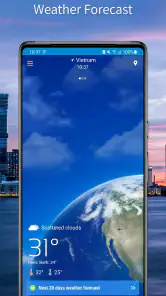
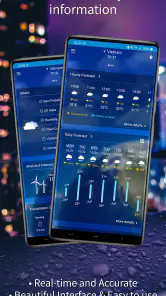
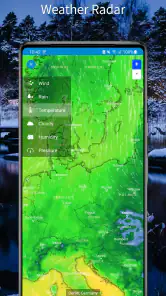
Upon launching the app, the first thing that caught my eye was its sleek and intuitive design. The main screen is clutter-free, offering a radar map that’s both vibrant and informative. Navigating through the app is a breeze, with each section clearly labeled and accessible with just a tap. Whether you're checking the hourly forecast or peeking at the 10-day outlook, everything is laid out in a way that feels almost second nature.
Features That Stand Out
One of the standout features of Weather Forecast (Radar Map) is its highly detailed radar map. It's not just about showing you where the rain is; this radar map gives you a comprehensive view of weather patterns, helping you predict the weather with uncanny accuracy. You can even zoom in and out to see details at a local or global scale, which is incredibly handy for frequent travelers like myself.
More From Our News Desk

Clash of Clans Is Won Between the Battles

Android Auto Makes the Case for Quieter Car Software

MobiOffice: Transforming Mobile Productivity with Seamless Integration

EA SPORTS FC™ Mobile Soccer: Redefining Mobile Sports Gaming

How Microsoft OneDrive Became a Mobile Productivity Giant

How Google Translate Breaks Language Barriers Effortlessly
Another feature I absolutely adore is the severe weather alerts. These timely notifications ensure that you’re never caught off guard by unexpected weather changes. I’ve found them to be extremely accurate, often arriving well ahead of any official warnings.
Personal Experience and User Interaction
Now, let’s talk about my personal experience using the app for a couple of weeks. I’ve been able to plan my weekend hikes and daily commutes more efficiently, thanks to the accurate forecasts. The app also has a community feature where users can share real-time weather updates and photos. It’s like having a mini weather community right in your pocket, offering insights that are sometimes even more on point than the app itself!
Where it fits among weather apps
Compared with a basic forecast app that mainly answers “Will it rain today?”, this one is more appealing if I like to inspect conditions visually and also want a longer planning window. A dedicated radar service may suit someone who wants to study precipitation in depth, while a phone’s built-in weather app may be quicker for a simple temperature check. I would choose this app when the map and the 48-hour view are central to my decision, not just because it offers more screens.
There are trade-offs to keep in mind. A 30-day forecast is inherently less dependable for exact daily plans than a near-term outlook, and maps can feel busy if all I need is a quick glance. I also would not use an app alert as my only safety measure when severe conditions are possible; checking official local warnings is the sensible backup. Anyone who prefers a plain, minimal temperature-and-rain summary may find a simpler alternative easier.
Who may want to try it
I’d consider it for commuters, hikers, and people who routinely make outdoor plans and want a map-based view plus air-quality context. It is also a reasonable option for someone who likes comparing the short-range forecast with a broader monthly trend. The app is free, rated for Everyone, and has a 4.6 average from around 8,100 ratings, with over one million installs. Those figures suggest a substantial audience, though they do not replace deciding whether its map-oriented approach suits your routine.
Before installing, I would also check the device requirement: it runs on Android 5.0 or later. There are in-app purchases at $10.99 per item, so I would look at the purchase details in the app before assuming every option is included at no cost. If you only want a quick daily forecast and never use maps or air-quality readings, you may not get enough value from its broader approach to justify adding another weather app.
Making the forecast useful rather than distracting
I would build a small routine around the app instead of checking it repeatedly. In the morning, I would use the near-term outlook to decide what to wear and whether an umbrella belongs in my bag. Before an outdoor commitment, I would revisit the map nearer to departure. That second check is useful because the map is best treated as a changing snapshot, not a fixed guarantee for the whole day.
For a weekend hike, I would use the longer view only to decide whether a plan still seems plausible. As the date approaches, I would switch to the 48-hour window, check air quality if exertion is involved, and confirm any serious weather concerns through local official warnings. This sequence helps prevent the month-ahead forecast from creating false confidence while still making it useful for early planning.
There is also a practical trade-off in how much detail to keep on screen. A map can make a moving weather pattern easier to understand than a row of temperatures, but it asks me to interpret what I am seeing. If I am already rushing, a short forecast summary is faster. I would open the map when the timing or direction of precipitation could change my plans, not simply because the map is available.
Who may prefer another approach
This app makes more sense for someone who wants several kinds of weather context in one place than for someone who checks only the temperature. A parent arranging an outdoor afternoon, a cyclist choosing when to ride, or a traveler comparing a few days of conditions may get more out of its map and forecast windows. Someone who needs highly specialized storm analysis, however, may be better served by a dedicated radar tool or by official local weather sources.
It is also worth considering whether you want to add a separate app at all. A built-in weather app can be enough for a quick glance and may feel more convenient if your needs are limited to today’s basic conditions. The reason I would try this one is its combination of a map, a near-term forecast, a longer outlook, and air-quality information. If I rarely use more than one of those, the extra choice of views could become clutter rather than a benefit.
For anyone concerned about cost, the app itself is free, but individual in-app purchases are listed at $10.99 per item. I would begin by using the free experience and only consider a purchase after checking exactly what it unlocks and whether I would use it regularly. That is a sensible way to avoid paying for a capability that sounds appealing but does not improve your day-to-day decisions.
Personal Experience and User Interaction
Now, let’s talk about my personal experience using the app for a couple of weeks. I’ve been able to plan my weekend hikes and daily commutes more efficiently, thanks to the accurate forecasts. The app also has a community feature where users can share real-time weather updates and photos. It’s like having a mini weather community right in your pocket, offering insights that are sometimes even more on point than the app itself!
Ending Thoughts: Is It Worth the Download?
So, is Weather Forecast (Radar Map) worth a spot on your phone? In my opinion, absolutely! With its user-friendly interface, detailed radar maps, and reliable alerts, it’s a must-have for anyone who wants to stay ahead of the weather. Whether you’re planning a trip, a day at the beach, or just your daily routine, this app has got you covered. Go ahead, give it a download and see how it transforms your daily planning. You won’t be disappointed!
My recommendation is strongest for people who will actually use the radar, near-term outlook, and air-quality details as part of a routine. I would keep the month-ahead view in perspective, verify serious weather through local official sources, and avoid paying for an in-app item until I know what it adds to my own workflow. Used with those boundaries, it can be a handy companion; for a bare-bones forecast, a simpler app may be the better fit.
What to watch as you keep using it
The current release is 2.10.6, but I would not read a version number alone as evidence of a particular redesign or new forecasting capability. For existing users, the useful question is whether the parts they rely on remain easy to reach and whether the forecast helps them make better decisions in their own location. I would judge changes by checking a few ordinary situations over time: whether the map helps with a planned outing, whether the short-range view is clear enough for a commute, and whether air-quality information affects a decision I would otherwise have made from weather alone.
That kind of personal check is more useful than expecting every forecast to be exact. Weather conditions vary by place, and a broad map can simplify local differences. If a route crosses different neighborhoods or terrain, I would avoid treating one point on the map as a precise description of the whole journey. For a short trip, checking again shortly before setting out is a low-effort habit that makes the visual view more useful.
StoreVN’s app has been available since June 20, 2017, and its 4.6 average from around 8,100 ratings gives a prospective user some sense of how broadly it has been tried. I still would not use popularity as a substitute for testing the interface against my own needs. In particular, someone who depends on accessibility options, frequent travel between locations, or a particular alert workflow should spend time checking that the app fits those habits before relying on it as a main source.
My overall view is that this is a practical choice when weather is something I actively plan around, rather than a number I glance at once. The map encourages a more visual check, while the different forecast horizons invite me to separate immediate decisions from tentative plans. Keep official sources in the loop for serious conditions, treat distant outlooks as provisional, and the app has a clear role: helping me ask better everyday questions about when to go, what to bring, and whether outside is the right choice.
Weather Forecast (Radar Map) Frequently Asked Questions
What information should I know about Weather Forecast (Radar Map) before downloading it?
Weather Forecast (Radar Map) is a weather app from StoreVN, with a free download and an Everyone content rating. It has a 4.6 average from around 8,100 ratings, and more than 1 million installs. The app’s summary highlights forecasts for the next 48 hours and 30 days, along with air quality information, making it worth considering if you want both near-term and longer-range weather details.
What features does the Weather Forecast app offer?
The Weather Forecast app provides a comprehensive suite of features including real-time weather updates, radar maps, severe weather alerts, and detailed forecasts for multiple locations. Users can also view hourly and weekly forecasts, and access additional information such as humidity levels, wind speed, and UV index, making it a versatile tool for planning daily activities. Its summary also highlights forecasts for the next 48 hours and the next 30 days, plus air quality information, giving users several time frames and conditions to check.
Is the Weather Forecast app free to use?
Yes, the Weather Forecast app is free to download and use. However, it may offer in-app purchases or subscription options to unlock premium features, such as ad-free experience or advanced radar map functionalities. Users can enjoy basic weather updates without any cost, but opting for premium features enhances the overall user experience. In-app purchases are listed at $10.99 per item, so check the purchase details in the app before deciding whether to buy anything.
How accurate are the weather predictions provided by the app?
The Weather Forecast app uses advanced meteorological data and algorithms to provide highly accurate weather predictions. It sources data from reliable weather stations and satellites, ensuring users receive timely and precise updates. While no weather app can guarantee 100% accuracy, this app is known for its reliability and consistency in delivering weather information. Forecasts are helpful for planning, but conditions can change, so it is sensible to recheck the app when making plans that depend on the weather.
Can I rely on the radar maps for tracking severe weather conditions?
The radar maps in the Weather Forecast app are designed to help users track severe weather conditions in real-time. With high-resolution imagery and frequent updates, users can monitor storm paths, precipitation levels, and other critical weather patterns. This feature is particularly useful for users living in areas prone to extreme weather events, providing them with crucial information to stay safe. Treat radar as a useful planning aid, and follow local emergency guidance when severe conditions arise.
Pros
- Accurate and timely weather updates.
- User-friendly interface with easy navigation.
- Customizable weather alerts for specific regions.
- Detailed radar maps for precise weather tracking.
- Supports multiple locations for weather monitoring.
Cons
- Contains ads that can be intrusive.
- Requires internet connection for live updates.
- Some features locked behind a paywall.
- Occasional glitches in the radar map.
- High battery consumption during use.
- Category
- Weather
- Version
- 2.10.6












