

WaySense
- 1.00
- 4.2
- Installs
- 10.00K
- Price
- Free

Screenshots
Analysis by Reviewed
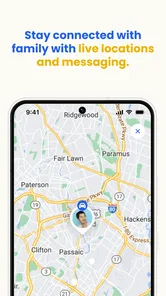
When a teenager starts driving alone, the difficult part is not only teaching the rules. It is giving them room to become independent while still knowing when a situation deserves attention. WaySense is a parenting app from FiglioTech built around that exact tension. I see it as a tool for families who want more context than a simple “arrived safely” message, especially when video evidence and immediate notifications matter.
I approached it as an app for a parent and a newly independent teen, rather than as another general family tracker. Its focus is teen driving: observing what happens on the road, helping coach safer habits, and notifying the parent when something needs a closer look. That makes the experience more purposeful than a broad location-sharing app, although it also means its value depends heavily on how comfortably a family handles monitoring.
The app is free to install and is rated for Everyone, while optional purchases range from around twelve dollars to around one hundred fifty dollars per item. That pricing detail matters because a family should decide early whether the free starting point is enough for its intended routine or whether the more advanced parts of the experience may become a larger commitment. I would not begin by assuming that installing it automatically replaces a conversation about privacy, responsibility, and trust.
From the first drive to a useful outcome
I’d start by agreeing on what should happen after an alert, before the first solo trip: whether the parent will wait to review it, how the teen can explain the situation, and what counts as a useful follow-up. That small plan can keep a safety tool from becoming a running commentary on every drive. With those expectations in place, the next section can look at how to turn an individual trip into a constructive outcome.
Starting with the family’s actual concern
The best way to begin with WaySense is to define the problem before opening the app. Are you worried about a new driver being distracted? Do you want a way to review an incident after receiving an alert? Are you trying to coach calmly after a difficult trip instead of relying on a teenager’s incomplete memory? Those are different needs, and the app makes more sense when the family agrees on which one it is addressing.
In my view, the strongest starting condition is a teen who already understands basic driving but is still building judgment. A parent can explain that the app is not intended to criticize every small mistake. Its purpose is to create a clearer handoff between what happens during a drive and the conversation afterward. That distinction is important. If the teen believes every trip is a hidden test, the technology can damage cooperation even when its alerts are useful.
I would set expectations before the first trip: what kinds of events deserve a discussion, who will review the information, and whether the parent will check every journey or only respond to alerts. This is one of the less obvious parts of using a driving-monitoring app well. The technical setup may take minutes, but the family agreement determines whether the result feels like coaching or surveillance.
More From Our News Desk

 Gmail
GmailGmail in a Busy Inbox: Who Benefits Most?
From first account to crowded workday, Gmail earns its place through dependable search and flexible sorting—but its best fit depends on how much inbox maintenance you can tolerate.

 Prime Video
Switching to Prime Video: What Changes in Your Viewing Routine
Prime Video can make a compelling second home for streaming, but switching means learning a different catalog, rental layer, and route from browsing to playback.

 Universal TV Remote Control
Universal TV Remote Control Works Best as a Reliable Backup
A phone remote earns its place through quick setup and reliable habits. Here is how to get more from Universal TV Remote Control—and where its limits show.

 Weather - By Xiaomi
Weather by Xiaomi Review: Clear at a Glance, Less Clear Up Close
Xiaomi’s weather app makes everyday forecasts quick to scan, but its calm surface can leave useful details and recovery paths harder to find than they should be.

 X
XX Under Pressure: Can It Recover When Posting Goes Wrong?
A resilience-focused review of X, examining setup, mistaken posts, interruptions, weak connections, and the gaps that matter when recovery needs to be dependable.

 Clash of Clans
Clash of Clans Is Won Between the Battles
Its raids are quick; its community is a long-term project of coordination, teaching, rivalry, and shared responsibility—with all the friction that entails.
Latest News



WaySense has attracted a modest but meaningful audience, with more than ten thousand installs and an average rating of 4.2 from a small group of raters. I read that as encouraging rather than conclusive. It suggests that the concept is useful to some families, but the limited volume means I would still test the workflow personally before making it central to household safety routines.
Moving through a normal driving session
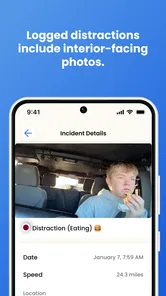
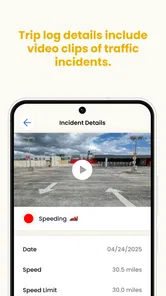
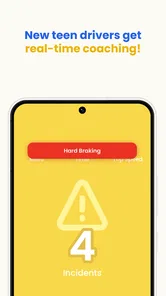
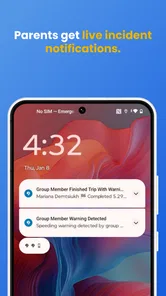
Once the family has agreed on the purpose, the practical flow is straightforward in concept: the teen drives, the app observes relevant driving context, and the parent receives an alert when something calls for attention. The important difference from a basic location-sharing tool is the role of video evidence. Instead of seeing only where the car is or whether it reached a destination, the parent can have more material for understanding what happened.
That evidence changes the tone of a follow-up conversation. A location map may show that a route took longer than expected, but it cannot explain whether traffic, a confusing junction, or a moment of distraction caused the delay. Video can make a discussion more concrete. At the same time, I would avoid treating a clip as a complete explanation. A short visual record can show context, but it does not automatically reveal what the driver was thinking or what happened immediately before and after an event.
A realistic weekday example would be a teenager leaving school during a busy afternoon. The parent is at work and does not want to call repeatedly. During the trip, WaySense can serve as a quiet layer of oversight rather than requiring constant messages. If an alert arrives, the parent can wait until the teen is safely stopped before starting a conversation. Later, they can review the evidence together and focus on one behavior, such as scanning earlier at an intersection, rather than turning the entire drive into an argument.
That workflow is more useful than reacting emotionally to a notification. I would save questions for a safe moment: “What was happening here?” is better than an immediate accusation. The app can provide a starting point, but the parent still supplies judgment and empathy. In practice, that human step is where most of the coaching value is created.
Using alerts without creating alert fatigue
Real-time alerts sound reassuring, but they can also become noisy if the parent treats every notification as urgent. My recommendation would be to use an alert as a prompt to assess, not as proof that the teen has done something seriously wrong. A parent who responds dramatically to every event may teach the teen to hide information or dismiss future warnings.
A better routine is to separate immediate safety from later coaching. If the alert suggests a situation that may still be unfolding, the parent should prioritize whether the teen is safe and avoid distracting them with a call while the vehicle is moving. If the event is already over, the parent can note it and discuss it at the destination. This small change prevents the monitoring system from becoming another source of distraction.
There is also a useful trade-off between constant attention and selective review. Families with a particularly anxious parent may be tempted to watch every alert as it arrives. That can make the app feel powerful at first, but it is not sustainable. I would use the notifications to identify patterns, then choose a short weekly conversation around recurring issues. A single isolated event may need context; repeated behavior deserves a plan.
Handling the handoff between teen and parent
The handoff is the heart of this app’s workflow. The teen produces the driving situation, WaySense supplies an alert or video context, and the parent decides how to respond. If any part of that chain is handled poorly, the technology loses much of its benefit.
For the teen, the handoff should happen after reaching a safe place. They need to know that responding to a parent’s message while driving defeats the purpose of safer monitoring. For the parent, the handoff means resisting the urge to reach a conclusion from a notification alone. The most productive next step is often a calm review later, with the teen invited to describe the road, traffic, and decision-making.
I also think families should agree on who receives the information. If several adults have access, the teen should know that in advance. A driver may accept oversight from a parent but feel betrayed if clips or alerts are casually forwarded to relatives or discussed in a group chat. WaySense is therefore not just a driving app; it becomes part of a family’s information-sharing habits.
Another practical handoff happens when the teen becomes more experienced. The parent should periodically ask whether the same level of monitoring is still appropriate. A system introduced for the first solo trips may need a lighter role later. Keeping the arrangement open to review makes independence part of the plan rather than something the app unintentionally delays.
Turning an alert into coaching
The result I want from WaySense is not a pile of recorded incidents. It is a clearer coaching loop: notice a situation, understand it, discuss it, and agree on a better response for next time. Video evidence can help avoid arguments based entirely on memory, but it should support learning rather than become a scorecard.
One useful technique is to choose one behavior per conversation. If a clip shows several things that could have been better, focusing on all of them at once will probably make the teen defensive. Pick the most important issue, ask what they noticed, and agree on a specific habit. For example, the goal might be to reduce phone temptation by putting it out of reach before starting the car, or to slow down earlier when approaching a complicated junction. The app supplies context; the family supplies the habit.
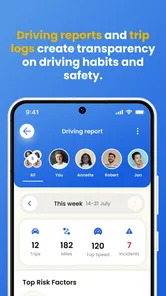
I would also keep a simple mental distinction between a mistake and a pattern. A single alert during an unfamiliar route may be a learning moment. Similar alerts across different trips suggest that the driver needs more practice, a revised route, or a direct conversation about readiness. This is where WaySense can be more useful than a one-time check-in, because it gives the parent a basis for observing change over time rather than relying on one story.
Still, evidence is not the same as certainty. Camera perspective, timing, road conditions, and the limits of any automated alert can affect interpretation. I would never use one clip as the sole basis for punishment or a major decision. The fairest outcome comes from combining the app’s information with the teen’s account and the wider circumstances of the trip.
Where the flow breaks down
The first weak point is trust. Families who strongly oppose active driving oversight may find that the app creates more conflict than safety. If a teenager installs it only because they feel forced, the parent may receive information but lose honest communication. In that situation, a simple location-sharing arrangement or scheduled check-in could be a better fit, even if it offers less detail.
The second issue is attention. Real-time monitoring can encourage parents to stare at their phones, especially during the first weeks of solo driving. That is not a good trade. I would set a rule that alerts are reviewed only when the parent is free to do so safely, and that no message should pressure the teen into interacting while driving. The app cannot solve the distraction problem if the adults use it impulsively.
There is also a cost decision. Although the app is free to start, optional purchases can reach around one hundred fifty dollars per item. A family should think about the complete intended workflow before paying: who needs access, how often the evidence will be reviewed, and whether the added capability addresses a genuine safety concern. If the goal is only to know that a teen arrived, paying for a specialized driving-monitoring experience may be unnecessary.
Technical friction can also appear at the worst moment in any safety workflow. A parent should not assume that a notification will always be the only source of truth. Before relying on WaySense for a long trip or a particularly important drive, I would test the family’s routine, confirm that everyone understands what to do after an alert, and keep ordinary communication available as a backup. That is not a criticism of this particular app so much as a sensible boundary for any digital safety tool.
Who will get the most from WaySense
I think WaySense is best suited to parents of newer teen drivers who want more than a map pin but less than constant direct supervision. It is especially appealing when video context would make coaching conversations more specific, or when a parent cannot personally accompany every practice drive. The combination of observation, alerts, and follow-up evidence gives the family a process rather than a single feature.
It may also help families who disagree about how serious an incident was. Instead of arguing from two different memories, the parent and teen can review the same event and discuss what should change. That does not remove emotion, but it gives the conversation a more concrete starting point.
I would be more cautious about recommending it to families looking for a completely passive experience. This is not the right choice if nobody intends to review alerts, discuss driving habits, or maintain clear boundaries around the information. It is also not ideal for parents who want a broad family-safety app covering every household member and situation. A general location-sharing service may be simpler when driving evidence is not central.
My conclusion after following the workflow
WaySense makes the most sense when I view it as a bridge between a teen’s independent drive and a later coaching conversation. The starting point is a family concern, the middle is a drive supported by alerts and video context, and the outcome is supposed to be better judgment rather than tighter control. That is a thoughtful direction for a parenting app, and it gives the product a clearer purpose than ordinary check-in tools.
FiglioTech has positioned the app in a focused parenting category, and the current version is 1.12.0 with support for operating systems from version 9 onward. Its release on May 6, 2025, also places it among relatively recent options, so I would approach it as a tool to test within the family’s routine rather than an unquestioned replacement for established habits.
My honest recommendation is to try it when both parent and teen can agree on the rules of engagement. Use alerts as prompts, review evidence calmly, protect the driver from unnecessary interruptions, and reassess the arrangement as confidence grows. If those conditions are present, WaySense can turn vague worry into practical coaching. If the family cannot agree on privacy or follow-up, its strongest features may become the very source of friction that makes driving conversations harder.
WaySense Frequently Asked Questions
Is WaySense suitable for a parent who wants to support a teen driver?
WaySense is a parenting app from FiglioTech focused on helping families track, coach, and protect teen drivers. Its store summary highlights video evidence and real-time alerts, making it relevant to parents who want more visibility into a teen’s driving. It is best viewed as a support tool for communication and coaching, rather than a substitute for supervision or safe-driving habits.
What is WaySense and what does it do?
WaySense is a navigation and travel-oriented app designed to help users understand their surroundings and make more informed route decisions. Depending on the available features and permissions, it may provide location-based guidance, contextual information, alerts, or recommendations while you are moving. Before downloading, review the current store description because supported tools can vary by device, operating system, region, and app version.
Does WaySense require access to my location?
WaySense may need location access to deliver navigation, nearby information, route assistance, or other context-aware features. During setup, you should be able to choose whether access is granted only while using the app or more continuously, depending on your phone’s settings. If privacy is important to you, check the permission list and privacy policy, and disable background location access unless the app genuinely needs it.
Can I use WaySense without an internet connection?
Offline functionality depends on the specific version of WaySense and the feature you want to use. Basic screens or previously downloaded information may remain available without a connection, but live navigation, updated route data, online searches, alerts, and location-based recommendations commonly require mobile data or Wi-Fi. If you plan to travel, test the app beforehand and confirm whether maps or essential content can be saved offline.
Is WaySense free to download, and are there in-app purchases?
WaySense is free to download, with in-app purchases priced from $11.99 to $149.99 per item. Before installing, review the purchase details shown in your app store and consider whether any paid options suit your family’s needs. Check billing terms carefully before confirming a purchase, particularly if the option involves a recurring charge.
Pros
- Provides useful location-based safety alerts while traveling.
- Simple interface makes key information easy to find.
- Can help users prepare for unfamiliar routes and destinations.
- Useful companion for commuters
- tourists
- and frequent travelers.
- May increase awareness of potential risks in nearby areas.
Cons
- Accuracy depends on the quality and freshness of available data.
- Location features may increase battery and mobile data usage.
- Some alerts may feel overly broad or lack useful context.
- Requires location permissions that privacy-conscious users may avoid.
- Coverage and usefulness can vary significantly by region.











