Wave AI Note Taker & Recorder
- 234.00
- 4.5
- Installs
- 100.00K
- Price
- Free
Screenshots
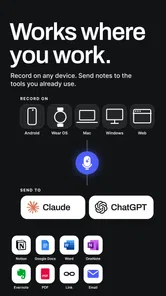
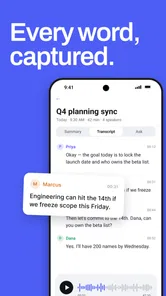
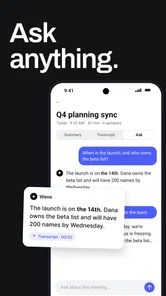
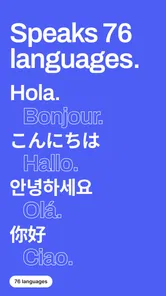
Analysis by Reviewed
I usually notice the same problem with note-taking apps: recording is easy, but turning a long conversation into something useful later is where the work begins. Wave AI Note Taker & Recorder takes a more focused approach. It is a productivity app from Mohrer Associates built around capturing spoken information and turning it into written notes, whether that comes from a meeting, a voice memo, or a lecture.
After spending time with it, I see the appeal immediately. You can start with a single tap instead of preparing a complicated notebook structure, and that makes it suitable for moments when your attention needs to stay on the speaker. The important question is not whether it can replace every note-taking tool, though. It is whether its recording-and-transcription workflow fits the way you actually work.
My short version is this: Wave AI is most useful when you regularly need to revisit spoken information, but it still rewards careful setup and a quick review afterward. Transcription can save a lot of typing, yet it should be treated as a first draft rather than a perfect record.
Where the first recording can go wrong
The biggest source of frustration is often not the app itself but the moment before recording begins. A user may tap the record control while the phone is in a pocket, place it too far from a speaker, or assume that a quiet room will automatically produce a flawless transcript. In practice, the quality of the source audio matters greatly. A clear phone position and a short pause before speaking can make the resulting notes much easier to use.
I would also avoid treating the one-tap design as permission to skip preparation entirely. Before an important meeting or class, I would open the app, check that the intended recording screen is ready, and make sure the phone has enough battery and storage for the session. These are ordinary checks, but they prevent the most annoying kind of failure: discovering afterward that the recording never started or stopped earlier than expected.
Another easy mistake is expecting the transcript to understand context that was never spoken aloud. If several people use short references such as “that option” or “the second point,” the written result may be less clear when read later. I find it helpful to say key names, decisions, and deadlines plainly during the conversation. That improves the usefulness of the notes without requiring extra work inside the app.
Wave AI is also not a substitute for consent and good meeting etiquette. If I am recording other people, I would tell them first and follow the rules that apply in that setting. The app makes capture convenient, but convenience does not remove the responsibility to use recordings appropriately.
More From Our News Desk

Weather by Xiaomi Review: Clear at a Glance, Less Clear Up Close

X Under Pressure: Can It Recover When Posting Goes Wrong?

Clash of Clans Is Won Between the Battles

Android Auto Makes the Case for Quieter Car Software

MobiOffice: Transforming Mobile Productivity with Seamless Integration

EA SPORTS FC™ Mobile Soccer: Redefining Mobile Sports Gaming
What the app is good at capturing
The strongest use case is information that would otherwise disappear into memory. A lecture can be difficult to follow while writing every sentence, and a meeting can force you to choose between listening and documenting. With Wave AI, I can concentrate on the speaker and return to the recorded material later. That is a meaningful advantage over ordinary handwritten notes, especially when the discussion moves quickly.
Voice memos are another practical fit. Instead of typing an idea while walking or commuting, I can speak it naturally and let the app provide a written version to organize afterward. This works best for thoughts with a clear beginning and end: a shopping reminder, a project idea, a list of questions, or a summary I want to revisit at my desk.
It is less convincing as a complete knowledge-management system. The app’s central strength is getting spoken material into a usable form. If you need elaborate folders, detailed project boards, collaborative editing, or a large research database, a dedicated notes platform may still be the better home for the finished information.
Setup checks that save time later
My preferred setup is deliberately simple. I give the recording a recognizable purpose before starting, keep the phone close enough to hear the main speaker, and avoid placing it beside objects that could block or distort sound. For a lecture, a stable position near the front is more useful than holding the phone while taking other notes. For a meeting, a central location can be preferable when several people need to be heard.
I would also test the complete path with a short, unimportant recording. Start a brief memo, speak a few sentences at a normal pace, stop it, and inspect what Wave AI produces. This small trial answers practical questions before the real session: whether the controls feel clear, whether the phone is picking up your voice, and whether the written result is easy for you to scan.
That test is especially valuable for people who plan to use the app for lectures. A lecture is not always a single speaker in a quiet room; there may be distance, echo, audience noise, or slides being discussed without their text being spoken. A transcript can preserve the explanation, but it cannot automatically replace visual material that was never verbalized. I would still keep a light outline of slide titles, page references, or questions.
For meetings, I recommend deciding in advance what you want from the recording. If the goal is a searchable memory of the discussion, capture the whole conversation and review it afterward. If the goal is only action items, use the recording as support while writing a short final checklist yourself. That second step is important because a raw transcript can contain useful detail without clearly separating decisions from speculation.
How I recover when a session is incomplete
If a recording appears shorter than expected, I would first check the simple possibilities: did I actually start it, did I stop it accidentally, and was the phone still positioned where it could hear? Repeating the action once in a short test is more useful than immediately assuming the transcription engine failed. It also helps distinguish a control problem from an audio-quality problem.
When the audio exists but the text is messy, I would not discard the session. I would listen to the difficult section again and add a compact manual correction. Names, technical terms, numbers, and acronyms deserve particular attention because they can be hard for any automatic transcription system when spoken quickly or against background noise.
A practical recovery habit is to create a short spoken recap at the end of a meeting. I can say the decisions, owners, and next steps clearly in a few sentences before stopping the recording. Even if the earlier discussion is crowded or disorganized, that final summary gives me a cleaner section to consult later. It is one of the most useful ways to work with transcription rather than expecting it to organize everything by itself.
For a voice memo, I would also repeat the main point near the end if the idea changed while I was speaking. Spoken brainstorming tends to wander, and the first version may not represent the conclusion. A final sentence such as “the actual plan is…” gives the transcript a clearer anchor and makes later review faster.
When the phone or environment is really the problem
Not every failed result should be blamed on Wave AI. If the microphone is covered, the room is loud, or people speak over one another, the app has poor material to interpret. The same recording would challenge a built-in voice recorder, a meeting platform, or a different transcription service. Moving closer to the main speaker and reducing competing noise can be more effective than changing apps.
Network conditions and device behavior can also complicate a workflow that depends on processing. If a result takes longer than expected, I would keep the original recording and avoid repeatedly starting new copies. Closing unrelated apps, reconnecting to a stable network when appropriate, and trying again later are sensible general steps. I would not erase the source audio until I had confirmed that the written result was available and usable.
There is another limitation that matters for students and professionals: transcription is not the same as understanding. The app may capture a sentence accurately while still leaving the reader to decide whether it was a fact, an example, a question, or an offhand comment. I always recommend a review pass for anything that will guide a decision, become study material, or be shared with someone else.
This is where Wave AI differs from a traditional notebook in both directions. It preserves more of the original spoken detail, which is valuable when memory matters. At the same time, it can leave you with more material to sort through. A handwritten page may be incomplete but already filtered by the writer; a transcript is broader but usually needs editing.
Who will get the most from it
I think Wave AI is a strong match for students who want to stay engaged during lectures, people who attend frequent meetings, and anyone who thinks more clearly by speaking than typing. It also suits users who need occasional voice memos but want more than an audio file they will never revisit. The free entry point makes it easy to test whether this style of capture fits your habits.
The app has reached over one hundred thousand installs and holds a 4.5 average from around 2.7 thousand ratings, which suggests that the basic idea is resonating with a meaningful group of users. It is rated for Everyone, so the presentation is accessible to a broad audience. Still, popularity does not remove the need to test it with your own voice, rooms, and routines.
I would be more cautious if you need guaranteed word-for-word accuracy, advanced editing, or a fully structured archive. Someone who already has a reliable workflow based on typed notes may gain little from adding recordings and transcripts. Likewise, if you mainly need reminders, calendars, or task management, a specialized productivity tool will probably be more direct.
Cost, expectations, and everyday value
Wave AI is free to start, while in-app purchases range from around six dollars to around one hundred forty dollars per item. That makes it sensible to begin with a low-risk personal test rather than committing to it as the center of your workflow immediately. I would first record the kinds of sessions I genuinely handle each week and judge the time saved after reviewing and correcting the results.
The real value is not simply having a transcript. It is the time between the conversation and the moment you can act on it. If the app helps me find a decision, recover a forgotten idea, or prepare a concise summary without replaying everything, it earns its place. If I still have to listen repeatedly and rebuild the notes manually, the advantage becomes much smaller.
One useful habit is to schedule a review immediately after an important session. I would scan the transcript while the discussion is still fresh, correct names and key terms, and turn the final decisions into a short personal note. This prevents the common failure where an impressive recording becomes an untouched archive.
My practical verdict after using the workflow
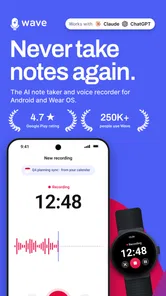
Wave AI Note Taker & Recorder is a focused productivity app rather than an all-purpose digital notebook. Its best quality is reducing the pressure to type while someone is speaking. The one-tap approach makes spontaneous capture approachable, and the combination of audio with written notes can be genuinely helpful for meetings, lectures, and spoken ideas.
My main reservation is that the app cannot remove the need for good recording conditions or human review. Clear speech, sensible phone placement, and a short cleanup pass still matter. Users who expect a perfect transcript with no editing may be disappointed, while users who see the result as a searchable working draft are more likely to appreciate it.
Mohrer Associates has positioned this app in a useful space between a basic voice recorder and a conventional notes app. I would recommend trying it if spoken information is a regular part of your day and you are willing to check important transcripts. I would skip it in favor of a more specialized alternative if your priority is complex organization, collaboration, or polished document editing rather than quick capture.
For me, the deciding test is simple: record one ordinary meeting, lecture, or voice memo, then see whether the written result helps you act faster the next day. If it does, Wave AI can become a practical part of your routine. If it only creates another pile of material to manage, the familiar method of concise manual notes may still serve you better.
Wave AI Note Taker & Recorder Frequently Asked Questions
Can I use Wave AI Note Taker & Recorder for meetings, lectures, and personal voice memos?
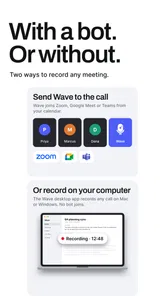
Yes. Wave AI Note Taker & Recorder is aimed at capturing meeting notes, lecture notes, and voice memos with a one-tap recording workflow. It can be useful when you want to preserve spoken information and have it transcribed for later review. As with any recording app, make sure the phone is positioned to capture clear audio, especially when several people are speaking.
What is Wave AI Note Taker & Recorder, and what can it do?
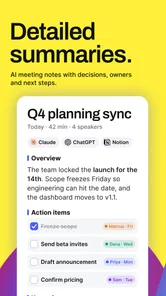
Wave AI Note Taker & Recorder is designed to record conversations, meetings, lectures, interviews, and personal voice notes, then use artificial intelligence to convert the audio into text. After recording, users can typically review a transcript, search through spoken content, and create a shorter summary. Its usefulness depends on recording quality, language support, and whether the speaker’s voice is clear enough for accurate transcription.
Does Wave AI Note Taker & Recorder require an internet connection?
An internet connection may be required for important features, especially uploading recordings, processing audio with cloud-based artificial intelligence, generating transcripts, and creating summaries. Basic recording could work without constant connectivity, but the full workflow may not. If you plan to use the app during travel, classes, or meetings with unreliable service, it is worth checking whether recordings can be saved locally and synchronized later.
How accurate are the transcripts and AI-generated summaries?
Transcription accuracy can be good when the recording has clear speech, limited background noise, and speakers who use a supported language. However, accents, overlapping conversations, technical vocabulary, distant microphones, and poor audio can produce mistakes. AI summaries should be treated as a convenient overview rather than a perfect record. Important names, figures, deadlines, and decisions should always be checked against the original recording.
Is Wave AI Note Taker & Recorder free to use?
Wave AI Note Taker & Recorder is free to download, with in-app purchases ranging from about six dollars to around 140 dollars per item. The app may offer free access with limits, such as a restricted number of recording or transcription minutes, fewer export options, or access to only basic features. Before downloading or starting a trial, review the current pricing, renewal terms, included minutes, and cancellation instructions shown in the official Google Play Store or Apple App Store listing.
Pros
- Accurately captures key points during meetings and interviews.
- Audio recordings can be reviewed alongside the generated notes.
- Searchable transcripts make finding specific details much easier.
- Useful for students
- journalists
- and professionals on the go.
- Reduces the need to write notes manually while listening.
Cons
- Transcription quality may drop with background noise or multiple speakers.
- AI summaries can occasionally miss context or important details.
- Some advanced features may require a paid subscription.
- Long recordings can take time to upload and process.
- Recording conversations may require consent depending on local laws.











