Voxist: read your voicemail
- 3.19K
- 4.2
- Installs
- 100.00K
- Price
- Free

Screenshots
Analysis by Reviewed
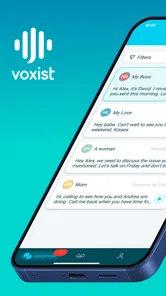
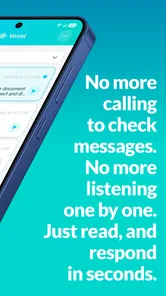
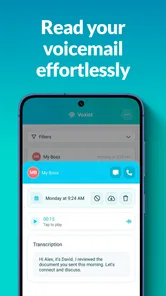
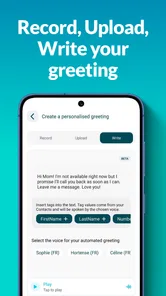
Voxist is the kind of productivity app I appreciate most when I am busy enough to miss a call but still need to understand why someone reached me. Instead of treating voicemail as a pile of audio clips, it is built around visual voicemail and voicemail-to-text, with customized greetings as part of the experience. I found that idea genuinely useful, especially when I was in a meeting, on public transport, or somewhere noisy where listening to a recording was inconvenient.
The important thing is to approach it as a call-management tool rather than a replacement for every part of your phone service. The app, developed by Voxist, can make messages easier to scan and organize, but its usefulness depends heavily on the initial setup and on how your mobile service handles voicemail. That is where many people are likely to get stuck. In my experience, the app is most satisfying once the phone number, voicemail routing, notifications, and greeting are all behaving correctly.
It is free to install, with optional in-app purchases ranging from $2.49 to $14.99 per item. The Everyone age rating makes it approachable for a broad audience, and the current version is 1.100.2 for devices running Android 7.0 or later. With a 4.2 average from around 11 thousand ratings and more than 100 thousand installs, it has attracted a meaningful user base without feeling like an obscure experiment.
Where the first-call experience can go wrong
The most common frustration with any visual voicemail app is not necessarily the app itself. A voicemail service sits between your phone network and your device, so a small mismatch can make the whole experience look broken. You might receive a normal call but no message, see an empty inbox after someone says they left a voicemail, or receive an alert without the expected text. Those symptoms can have different causes, and treating them all as one problem usually wastes time.
I would begin by separating three questions: did the call reach voicemail, did the message arrive in the app, and did the transcription appear? These are different stages. If the caller never reached voicemail, there is nothing for the app to display. If the message exists as audio but the text is missing, the issue is more specific to processing or presentation. This simple distinction makes troubleshooting much less confusing.
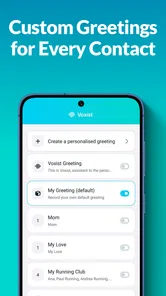
Customized greetings deserve attention too. A greeting is not just decoration; it tells callers whether they have reached the right person and whether leaving a message is worthwhile. I recommend recording one that is short, clear, and easy to understand in poor signal conditions. Avoid giving callers several instructions at once. A concise greeting is more useful than an elaborate one that makes people wonder whether they should wait for another prompt.
There is also a practical social issue. People do not always leave neat, complete sentences in voicemail. They may speak quickly, use names that are difficult to recognize, or leave background noise. A text version can help me decide which messages deserve immediate attention, but I would not treat every transcription as a perfect record. For important details, I still listen to the original audio when it is available and when accuracy matters.
More From Our News Desk

Weather by Xiaomi Review: Clear at a Glance, Less Clear Up Close

X Under Pressure: Can It Recover When Posting Goes Wrong?

Clash of Clans Is Won Between the Battles

Android Auto Makes the Case for Quieter Car Software

MobiOffice: Transforming Mobile Productivity with Seamless Integration

EA SPORTS FC™ Mobile Soccer: Redefining Mobile Sports Gaming
What I check before blaming the app
First, I make sure the phone can receive calls normally and that the intended number is the one connected to the voicemail setup. If calls are being diverted elsewhere, or if the carrier's voicemail arrangement has changed, Voxist cannot display a message it never receives. This is particularly important after changing phones, SIM cards, mobile plans, or call settings.
Next, I test the complete route with a short call from another phone. I leave a simple message containing an unmistakable phrase, then wait long enough for the message to appear. Testing with a short recording removes unnecessary variables such as long pauses, loud surroundings, or several speakers talking over one another.
I also check whether notifications are enabled for the app and whether the phone is restricting background activity. A voicemail can be present even when an alert does not appear immediately. On Android, battery-saving behavior and notification controls can affect how quickly an app tells you about new activity. I do not assume that a missing notification means the voicemail itself is missing.
Finally, I open the app directly rather than relying only on an alert. This is a useful distinction: an inbox that updates after opening points toward a notification or background-refresh issue, while an inbox that remains empty after a confirmed test message points toward setup, network, or voicemail routing.
Setup checks that save time later
I recommend completing setup somewhere with a stable connection and enough time to make a test call. Rushing through the process while moving between networks makes it harder to tell whether a delay is normal or whether a step failed. Keep the phone available during the test, because you may need to confirm the greeting, call behavior, or message arrival in sequence.
After choosing a greeting, I would call the number and listen to the entire greeting as a caller hears it. This catches mistakes that are easy to miss while recording, such as a clipped opening, an unexpectedly long pause, or a voice level that is too quiet. Hearing the greeting from another phone is more revealing than replaying it from inside the setup screen.
It is also worth deciding how you want to use the text view. I use it as a triage layer: scan the message first, identify the reason for the call, and then listen when the wording is unclear or the subject is important. That approach is more reliable than expecting transcription to replace audio completely. It also keeps the app useful when I am in a place where listening would be awkward.
If you are installing the app on an older Android device, remember that Android 7.0 is the minimum operating system listed for this version. Compatibility alone does not guarantee a smooth experience, though. Older phones may handle background notifications differently, and their system settings can be more aggressive about limiting apps that are not currently open.
A better workflow for everyday voicemail
My preferred routine is to glance at the text preview when a message arrives, decide whether it is urgent, and use the audio recording to verify anything sensitive. For a delivery, appointment, school call, or work request, this saves time because I can often understand the purpose of the call without finding a quiet place to listen.
There is a less obvious benefit when several people call during the same busy period. Visual voicemail gives me a way to compare messages by their written content instead of replaying every recording from the beginning. I can prioritize the message that needs a response and leave low-priority calls for later. That is a better workflow than treating every missed call as equally urgent.
For people who receive calls from customers or clients, the customized greeting can also set a boundary. I would use it to state when a return call is likely, rather than promising an immediate response. That small change can reduce repeated calls and make the inbox easier to manage. It is not a full customer-support system, but it can make a personal number feel more organized.
Another useful habit is to keep greetings stable unless there is a real reason to change them. Frequent changes create a new point of failure and can confuse regular callers. I would update the greeting for holidays, travel, or a sustained period of limited availability, then return to a dependable default afterward.
Recovering when a message does not appear
When a caller says they left a message but I cannot see it, I work backward. I repeat the test with a very short recording, confirm that the caller reached the intended greeting, and then check the app directly. If the second test succeeds, the original recording may have been affected by a caller hanging up too early, poor reception, or an unusual audio condition.
If the test fails as well, I avoid repeatedly changing several settings at once. Changing the greeting, notification controls, and phone call settings together makes it impossible to know which adjustment helped. I prefer one change followed by one test call. That is slower for a few minutes but much faster than guessing.
Closing and reopening the app can be a reasonable first step when the inbox looks stale, especially after a network change. I would also confirm that the phone has a working internet connection and that the app is not being prevented from running in the background. These are general checks, but they matter because voicemail text and alerts need more than an incoming cellular call alone.
When a message arrives as audio but the text seems incomplete, I treat the transcription as a convenience rather than the authority. Names, addresses, numbers, accents, and noisy recordings are exactly the areas where a quick text rendering may need verification. My practical rule is simple: use the text to decide whether to listen, not to replace listening when the consequences of an error are high.
When the network or phone service is the real problem
Voxist cannot correct a carrier-side voicemail failure. If callers are unable to leave messages, calls go straight to an unrelated mailbox, or voicemail behaves differently from the configured greeting, the mobile provider may be controlling the problem. In that situation, reinstalling the app is unlikely to help.
The same applies when the phone itself is blocking or diverting calls. Call forwarding settings, a weak connection, a full device, or system-level notification restrictions can all change what the app appears to receive. I would test ordinary incoming calls first and then test voicemail. If ordinary calls are unreliable, visual voicemail is not the first place I would investigate.
There is also a difference between delayed processing and total failure. A message that appears later suggests a timing, connection, or background-activity issue. A message that never appears after repeated controlled tests suggests that the voicemail path is not connected as expected. Recognizing that difference prevents the common mistake of waiting indefinitely for a notification that the phone service never generated.
For privacy-conscious users, the decision deserves extra thought. A voicemail-to-text service is attractive because it makes messages searchable and readable, but voicemail can contain personal, financial, or work information. I would avoid relying on automated text for confidential details unless I was comfortable with the service arrangement and with verifying sensitive messages through audio or another channel.
How it compares with ordinary voicemail
Traditional carrier voicemail is usually the simpler choice when all you want is a recording and a familiar dial-in process. It has fewer moving parts and may be easier for someone who rarely checks messages. If your calls are infrequent and you do not care about reading a quick summary, the extra visual layer may not justify changing your routine.
Voxist makes more sense when missed calls are frequent or when listening is inconvenient. The text view changes voicemail from an audio-only task into a quick sorting task. That is its strongest distinction in everyday use. I can decide whether to respond now, listen later, or ignore a low-priority message without replaying every recording.
It is not the right fit for someone expecting a complete business phone platform. The app focuses on voicemail handling, greetings, and text conversion rather than replacing a full communication suite. A team that needs shared inboxes, advanced call routing, or broader customer-management tools would be better served by a dedicated business system.
I also would not recommend it solely because a person dislikes phone calls. The app helps manage missed calls; it does not remove the need to return them. Its value is strongest for people who receive useful messages but need a faster way to understand and prioritize them.
Who should use it, and who should skip it
I think it is a good match for freelancers, parents, students, field workers, and anyone who regularly misses calls while unable to listen to audio. It is especially practical for people who move between quiet and noisy environments, because the text view can provide a quick first impression before they find privacy.
It can also suit people who want a more personal greeting than the default carrier message. A clear customized greeting makes the number feel intentional, and it can tell callers what kind of response to expect. That is a small feature with a noticeable effect when the phone is used for appointments, side work, or family coordination.
I would skip it if your carrier voicemail already gives you everything you need, if you rarely receive messages, or if you are uncomfortable with voicemail being converted into text. I would also be cautious if your phone has unreliable notifications or if you are unwilling to perform a test call after setup. The app rewards a little initial attention; it is not a completely invisible layer.
The free entry point makes trying it less demanding, while the optional purchases mean some users may eventually encounter paid choices. I would use the free experience long enough to test the complete workflow before deciding whether any purchase is worthwhile. The important question is not whether the app looks useful in theory, but whether it consistently receives, presents, and helps you act on your own messages.
My practical verdict after using the workflow
The real strength of Voxist is not simply turning voicemail into text; it is reducing the number of recordings I must listen to before I know what deserves attention. That makes it a focused productivity tool rather than a flashy replacement for the phone app. When the setup is correct, the combination of visual messages, text conversion, and customized greetings feels much more manageable than ordinary voicemail.
My recommendation comes with one condition: test the full path before trusting it for important calls. Call the number, leave a clear message, check the text, listen to the audio, and confirm that notifications behave as expected. That short test tells you more than a quick installation does and exposes whether the problem is in the app, the phone, or the mobile service.
Voxist is worth considering if you want voicemail to fit around your day instead of interrupting it. It is less compelling for light voicemail users, people seeking a full business communications platform, or anyone who wants to avoid text processing altogether. For my use, though, it offers a sensible middle ground: faster scanning than traditional voicemail, enough flexibility to make greetings feel personal, and a workflow that becomes genuinely helpful once the underlying call routing is working properly.
Voxist: read your voicemail Frequently Asked Questions
What phones can run Voxist: read your voicemail?
Voxist is a productivity app for Android and iOS, and its listed minimum operating system is version 7.0. Before downloading, check that your device meets the platform’s requirements and has enough space for the app. The developer is Voxist, and the app is rated for Everyone, so its content is intended for a broad audience.
What is Voxist: read your voicemail?
Voxist is a visual voicemail application that converts voicemail messages into readable text, allowing you to review them without listening to every recording. After setup, the app can organize messages in one place and may provide transcriptions, notifications, and options for managing calls. It is especially useful when you are busy, in a meeting, or unable to play audio aloud.
How accurate are Voxist voicemail transcriptions?
Transcription quality is generally good for clear speech, but it is not perfect. Accuracy can change depending on the caller’s accent, background noise, speaking speed, call quality, and the use of technical or unusual words. After testing the app, I would treat the text as a convenient summary rather than an official record, and listen to the original voicemail whenever an important detail is unclear.
Does Voxist work with every mobile carrier and phone number?
Voxist availability depends on your country, carrier, phone number, and the voicemail features supported by your mobile service. The app may require call forwarding or a specific voicemail configuration during setup, so compatibility should be checked before relying on it. Some functions, including business features or additional voicemail capacity, may also vary by region and subscription plan.
Is Voxist free to download and use?
Voxist is free to download, but free access may include limits on transcription, storage, features, or the number of voicemail messages handled. The app offers in-app purchases, priced from $2.49 to $14.99 per item, for expanded functionality. Before activating a trial or subscription, review the current pricing, renewal terms, and cancellation instructions shown in the App Store or Google Play.
Pros
- Transcribes voicemails into readable text for quick scanning.
- Lets you listen to messages directly within the app.
- Supports visual voicemail organization with a clean inbox.
- Can help separate important messages from unwanted calls.
- Useful when listening to voicemail is inconvenient or impossible.
Cons
- Transcription accuracy may drop with accents
- noise
- or unclear speech.
- Some features may require a paid subscription or premium plan.
- Requires access to voicemail and personal call-related information.
- Setup can depend on carrier support and voicemail configuration.
- Notifications may be delayed when network or service issues occur.











