

Volume Booster Bass Booster EQ
- 332.00
- 4.6
- Installs
- 100.00K
- Price
- Free

Screenshots
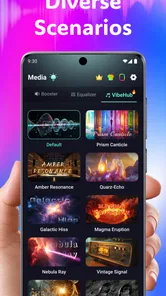
Analysis by Reviewed
I spent time with Volume Booster Bass Booster EQ as a practical sound-enhancement tool rather than treating it like a replacement for a full music player. It is a free medical-category app from Best Translate LLC, although its purpose is clearly audio control: it aims to make playback feel louder and gives you access to bass and equalizer adjustments. That unusual store categorization is worth noticing before you install it, because someone searching for a health utility may encounter it unexpectedly.
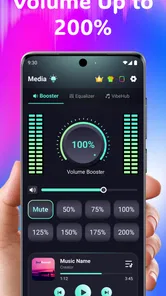
My first impression was straightforward. The app is built for the moment when your phone, headphones, or a particular recording feels too quiet, thin, or lacking in low-end weight. The appeal is immediate: instead of digging through several system menus, I can open one place and adjust the listening experience. The store summary promises more than double the usual volume, bass enhancement, equalizer controls, and headphone support, but I would treat that as an upper possibility rather than a guaranteed result on every device.
How Volume Booster Bass Booster EQ behaves in everyday listening
I find it most useful to treat the booster as a small adjustment, not a switch to leave cranked up: the same setting can suit a quiet podcast but make a music track harsh or muddy. In the next section, I’ll look at how I’d choose among its controls for different kinds of listening, and why starting low makes it easier to hear what is actually improving.
Quick changes are its main strength
The most useful quality here is the short path between noticing a problem and trying a solution. When a podcast sounds distant, a video has a weak mix, or music lacks impact, I can raise the booster and then shape the sound instead of accepting the phone's default output. That makes it more convenient than repeatedly switching between a system volume slider and an audio player's own equalizer.
In my experience, perceived speed matters more than an impressive maximum setting for this kind of app. A volume tool should respond without making me wait, and its value comes from quick experiments: raise the level slightly, add a little bass, listen again, and back off if the result becomes harsh. The app's current version is 1.3.0, so it presents itself as a relatively focused utility rather than a large, complicated media suite.
I would not assume that a higher slider position automatically creates clean extra volume. The phone's amplifier, the headphones, the recording itself, and the operating system all place limits on what can come out. If the source is already distorted, boosting it only makes the distortion more obvious. The best results usually come from modest adjustments, especially when I am listening for speech rather than music.
What happens when I use the controls for different content
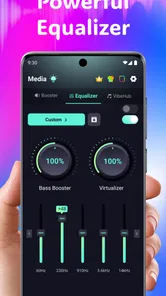
Music is where bass control can feel most rewarding. A thin track may gain more body, while a small speaker can sound less empty when the lower frequencies are adjusted carefully. However, extra bass is not universally helpful. It can blur vocals, make older recordings muddy, and cause compact speakers to struggle. I prefer to increase it gradually, then reduce it as soon as the kick drum or spoken voice loses definition.
More From Our News Desk

 Instagram
Instagram’s Power Comes From Its Place in Your Phone
A close look at how Instagram turns Meta’s reach, recommendation systems and everyday camera habits into durable platform power—and what that costs users.

 Gmail
GmailGmail in a Busy Inbox: Who Benefits Most?
From first account to crowded workday, Gmail earns its place through dependable search and flexible sorting—but its best fit depends on how much inbox maintenance you can tolerate.

 Prime Video
Switching to Prime Video: What Changes in Your Viewing Routine
Prime Video can make a compelling second home for streaming, but switching means learning a different catalog, rental layer, and route from browsing to playback.

 Universal TV Remote Control
Universal TV Remote Control Works Best as a Reliable Backup
A phone remote earns its place through quick setup and reliable habits. Here is how to get more from Universal TV Remote Control—and where its limits show.

 Weather - By Xiaomi
Weather by Xiaomi Review: Clear at a Glance, Less Clear Up Close
Xiaomi’s weather app makes everyday forecasts quick to scan, but its calm surface can leave useful details and recovery paths harder to find than they should be.

 X
XX Under Pressure: Can It Recover When Posting Goes Wrong?
A resilience-focused review of X, examining setup, mistaken posts, interruptions, weak connections, and the gaps that matter when recovery needs to be dependable.
Latest News



For films and short videos, the equalizer can be more useful than maximum loudness. Dialogue often benefits from a clearer midrange, while an aggressive bass setting may overpower quiet conversation. This is one of the app's more practical use cases: it lets me tune a general listening profile around the content instead of chasing raw volume every time.
Headphone use deserves a careful approach. The app supports headphones, which makes it relevant for commuting, studying, and late-night listening. Yet headphones can deliver a strong perceived increase even when the slider movement looks small. I would test changes with a familiar track at a comfortable level, not with a sudden maximum boost. That workflow helps reveal whether the improvement is clarity or simply louder sound.
Heavy-use moments reveal the trade-offs
The demanding situations are not necessarily long music sessions. They are the moments when I combine a strong volume boost, noticeable bass, and a busy audio source. A compressed video with loud effects can become tiring quickly, and an already bright headphone can sound sharp after equalizer adjustments. The app gives me more control, but control also means I have to listen critically instead of leaving every enhancement at its highest setting.
I would be especially cautious during calls, voice messages, or navigation prompts. A setting that works for a song may make speech boomy or less intelligible. If the app affects another audio stream, returning to a neutral position before a call is a sensible habit. This is not a criticism unique to this utility; it is the normal trade-off of applying broad sound changes across different kinds of content.
There is also a practical recovery routine I found useful. Before troubleshooting a strange sound, I lower the booster, reduce bass, and return the equalizer toward a neutral arrangement. Then I check the source app and the phone's ordinary volume control. That sequence helps separate a problem in the recording from a problem created by aggressive processing. It is faster than assuming the phone's speaker has suddenly failed.
Stability and recovery in normal use
A volume enhancer has to be predictable more than feature-packed. I judge reliability by whether the sound remains understandable after switching between music, video, and headphones, and whether I can recover easily when the output becomes too loud or distorted. Volume Booster Bass Booster EQ is most comfortable when used as an on-demand adjustment layer: make a change, listen, and return to a safer level when the listening situation changes.
I would not leave a strong boost running unattended. If another app starts playback, the same audio treatment may not suit it. A neutral reset is therefore part of my normal workflow, particularly before handing the phone to someone else or moving from headphones to the built-in speaker. The ability to recover through simple control changes is more valuable to me than chasing the strongest possible effect.
Because the app is free to install, trying this workflow does not require an upfront purchase. It does include in-app purchases ranging from $6.99 to $69.99 per item, so I would look carefully at any upgrade screen before confirming anything. The free entry point makes experimentation easy, but the presence of paid items means I would not assume every control or future convenience is included without checking what the app presents on the device.
Device limits matter more than the headline boost
The promise of a very large volume increase should be read alongside hardware reality. A phone speaker has a physical ceiling, and pushing beyond a comfortable range can produce clipping instead of useful detail. Some headphones may also sound worse when driven too hard. In other words, the app can change the signal reaching the output, but it cannot turn a small speaker into a larger one or repair a poor recording.
Operating-system compatibility is reasonably broad for older supported devices, with a minimum requirement of Android or iOS version 9. That is helpful if I am using an older phone, but compatibility does not mean identical behavior across every model. Different manufacturers manage audio routing and background processing differently. A setting that works neatly through headphones may behave differently through a phone speaker, Bluetooth device, or another connected output.
Bluetooth is a good example of why expectations should stay realistic. Wireless headphones and speakers may apply their own processing, volume limits, or equalization. If the result is weaker than expected, I would compare the app's adjustment with the accessory's own controls rather than immediately pushing the booster higher. This layered approach can prevent an overprocessed sound and makes it easier to identify which control is actually helping.
Resource demands are also best considered in practical terms. This is a focused audio utility, not a game or a video editor, so I would expect its main burden to come from maintaining audio control while I use other apps. Still, I would avoid assuming that every phone handles continuous processing identically. If playback becomes unusual after multitasking, closing and reopening the affected player, then resetting the audio adjustment, is a sensible recovery step.
Who will get the most from it
I see the strongest fit for someone who regularly finds that particular recordings are too quiet or lack warmth, especially when the phone's built-in audio controls feel too limited. It can also suit a listener who wants one accessible place for volume, bass, and equalizer experimentation rather than switching among separate utilities.
A realistic example is a commuter watching a dialogue-heavy video through headphones. The listener can begin with a moderate volume increase, use the equalizer to improve vocal presence, and keep bass restrained so engine noise does not turn speech into a blur. Afterward, the same person might create a different adjustment for music, but should remember to reduce it before listening to a voice note or taking a call.
It may also help when sharing a device with family members who prefer different sound profiles. Instead of changing the phone's entire audio setup permanently, I can make a temporary adjustment for a film or playlist and then restore a neutral level. That temporary mindset is important: the app is more useful as a listening aid than as a permanent excuse to keep output at maximum.
When another option is the better choice
I would skip this app if the real problem is damaged hardware, a loose headphone connection, a faulty Bluetooth link, or a recording that is badly mixed. Boosting cannot repair those issues. I would also choose the equalizer built into a trusted music player when my listening is limited to that player and I want settings tied specifically to albums, genres, or saved profiles.
Someone who wants studio-style sound shaping may find a dedicated audio player more suitable. A system-level control panel can also be preferable when the phone already offers reliable built-in equalizer and accessibility options. The advantage here is convenience and a concentrated set of adjustments, not professional mastering or guaranteed improvement for every output.
Safety should guide the decision as well. Louder is not automatically better, and extended listening at high levels can be uncomfortable. I would use the smallest boost that solves the problem, take breaks, and lower the setting when moving to quieter surroundings. The app is rated for Everyone, but that age rating does not remove the need for sensible listening habits.
My performance verdict after using its approach
Volume Booster Bass Booster EQ succeeds when I treat it as a quick, adjustable sound tool. Its perceived speed comes from the simple idea of changing loudness and tone in one place, while its usefulness depends on restraint. Bass enhancement can add welcome weight, and the equalizer can improve the balance of certain recordings, but neither control guarantees cleaner sound when the source or hardware is the limiting factor.
The app has attracted a 4.7 average from around 1.4 thousand ratings and has passed over 100 thousand installs, which suggests that its straightforward purpose resonates with a meaningful group of listeners. Those figures do not replace personal testing, particularly because audio output varies so much between phones and headphones. I would use the free version first, test it with speech and music, and pay attention to how easily I can return to a neutral setting.
My recommendation is measured but positive. If you want a convenient way to experiment with extra loudness, bass, and equalizer shaping, this app is worth trying. If you need a carefully managed music library, advanced audio production, or a fix for defective hardware, a dedicated alternative will serve you better. The best results come from moderate changes, frequent resets between listening situations, and an understanding that the app can shape sound but cannot overcome every device constraint.
For me, that makes it a useful specialist rather than an essential app for every phone. It is at its best in those small everyday moments when a recording feels just slightly wrong and I want to correct it quickly. Used thoughtfully, it can make headphones, videos, and music feel more balanced; used aggressively, it can simply make unwanted noise louder.
Volume Booster Bass Booster EQ Frequently Asked Questions
What devices and operating systems can run Volume Booster Bass Booster EQ?
Volume Booster Bass Booster EQ is available for Android and iOS, with the minimum operating system requirement listed as version 9. Before downloading, check your device’s software version and make sure there is enough room for another app. The app is developed by Best Translate LLC, and its current version is 1.3.0.
What is Volume Booster Bass Booster EQ, and what does it do?
Volume Booster Bass Booster EQ is an audio-enhancement app designed to make music, videos, games, podcasts, and other media sound louder and more powerful. It typically combines a volume amplifier with bass enhancement and an equalizer, allowing you to adjust different frequency ranges. The app’s summary promotes 200%+ volume boosting, bass enhancement, equalizer controls, and headphone support. The exact result depends on your phone, headphones, speakers, and the quality of the original audio.
Can Volume Booster Bass Booster EQ make my phone louder than its normal maximum volume?
The app may increase perceived loudness beyond the standard system setting by applying software amplification and audio effects. However, it cannot overcome every hardware limitation, and the improvement may vary considerably between devices. Excessive amplification can also cause distortion, especially with inexpensive speakers or low-quality recordings. Increase the level gradually and reduce it if the sound becomes harsh, clipped, or uncomfortable.
Does the app work with headphones, Bluetooth speakers, and built-in phone speakers?
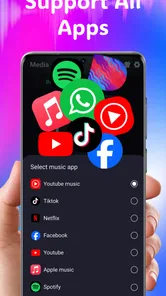
Volume Booster Bass Booster EQ may work with several output methods, including the phone’s internal speaker, wired headphones, Bluetooth headphones, and external speakers. Its summary specifically mentions headphone support. Compatibility and effectiveness can differ depending on the operating system, the connected accessory, and the media app being used. Some streaming services or Bluetooth devices may limit how strongly the equalizer and booster effects are applied.
Is Volume Booster Bass Booster EQ safe for my hearing and phone speakers?
The application itself is generally intended to modify audio output, but using very high volume levels for long periods can damage your hearing and may strain or distort small phone speakers. The safest approach is to begin with moderate settings, avoid sudden increases, and take regular listening breaks. If you notice ringing, discomfort, muffled hearing, or persistent distortion, stop using the booster and lower the volume.
Pros
- Simple controls make volume adjustments quick and easy.
- Bass enhancement adds extra punch to music and videos.
- Equalizer presets help tailor sound for different content.
- Works with headphones
- speakers
- and many Bluetooth devices.
- Compact interface uses few device resources during playback.
Cons
- Results vary depending on the phone
- headphones
- and audio source.
- Boosting volume too much may cause distortion or clipping.
- Some features may require ads or an in-app purchase.
- Audio effects can increase battery use during extended listening.
- It may conflict with other equalizer or sound-enhancement apps.











