Voicenotes
- 146.00
- 3.9
- Installs
- 100.00K
- Price
- Free

Screenshots



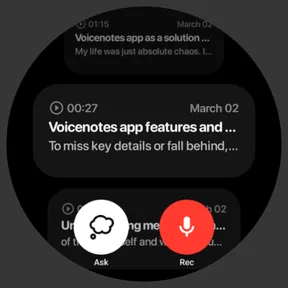
Analysis by Reviewed
I came to Voicenotes with a simple question: can recording an idea and asking AI about it genuinely improve the way I work, or is it just another place for unfinished thoughts to collect dust? After using it as a productivity app, I found that its strongest value is not the recording itself. The useful part is the short distance between speaking a thought, saving it, and turning it into something I can revisit.
That makes it especially interesting for people who think faster than they type. A quick voice note can capture a meeting thought, a reminder, a rough plan, or a question before it disappears. Instead of treating every note as a document that must be carefully organized immediately, I can leave it in a more natural form and return to it when I have time to ask what matters.
The app is free to start, is suitable for Everyone, and comes from Coping Hard Inc. It has reached over 100 thousand installs, with an average rating of 3.9 from around 2.7 thousand ratings. Those figures suggest a useful but not universally effortless experience, which matches my impression: the central idea is appealing, while the quality of the workflow depends heavily on how consistently I review and refine what I record.
Speaking first, understanding later
I find the most useful way to approach this app is to think about what happens after I press record. A spoken thought can be easy to capture but harder to turn into a dependable next step, so I’ll look at how the AI questions fit into that gap—and where I still need to check the original note before acting.
The capability that changes the note-taking habit
The defining capability here is the combination of voice recording and AI questions. Many note apps make me choose between writing a tidy entry or saving a raw recording. Voicenotes is more comfortable with the messy middle. I can speak naturally, preserve the original thought, and use AI as a way to interrogate that material afterward.
That distinction matters because the first version of an idea is rarely organized. During a walk, I might remember three tasks, a concern about a project, and a possible solution in the same breath. Typing that out would slow me down and encourage me to edit before I even know what is important. Recording lets me capture the whole thought. The AI step then gives me a reason to return to it.
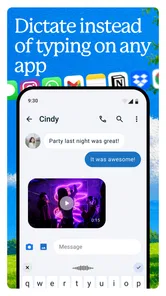
I found this more useful than simply dictating text into a conventional notes field. Dictation is excellent when I already know the sentence I want. Voicenotes makes more sense when I am thinking aloud. The recording becomes a small source of context rather than only a line of text, and questions can help expose the practical parts of what I said.
More From Our News Desk

Weather by Xiaomi Review: Clear at a Glance, Less Clear Up Close

X Under Pressure: Can It Recover When Posting Goes Wrong?

Clash of Clans Is Won Between the Battles

Android Auto Makes the Case for Quieter Car Software

MobiOffice: Transforming Mobile Productivity with Seamless Integration

EA SPORTS FC™ Mobile Soccer: Redefining Mobile Sports Gaming
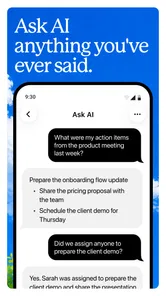
For example, after recording a rough project idea, I would not want to listen to the entire note every time. I would rather ask for the main decisions, the next actions, or the unresolved points. That is the real productivity promise: less time replaying an unstructured thought and more time extracting the part I can act on.
What the AI changes in practice
The AI is most valuable when I use it as a follow-up layer, not as a replacement for my own judgement. A question such as “What did I commit to?” is more useful than a vague request to improve the note. Narrow questions give the recording a job. They also make it easier to notice when I have talked around a subject without reaching a decision.
This creates a helpful habit. I can record freely first, then return later with a specific purpose. One note might support several passes: a summary when I am trying to remember the conversation, a task-focused question when I am planning the day, and a risk-focused question when I am preparing for a review. That is a more flexible use of a note than a fixed title and a block of dictated text.
There is an important trade-off, though. AI answers should be treated as an aid to navigation, not proof that every detail was captured correctly. If the original recording is vague, the answer may also be vague. If the note contains several topics, a short summary can hide the one detail I actually needed. I would always check the source before relying on an important commitment, especially after a meeting or a conversation involving names, dates, or responsibilities.
My practical tip is to end a recording with a clear closing sentence. Saying what I think the next step is, or naming the question I still have, gives the later AI interaction a stronger anchor. This small habit improves the value of the note without forcing me to organize everything at the moment of capture.
A realistic workday example
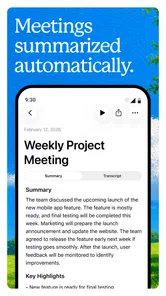
Imagine leaving a meeting with a phone full of half-formed thoughts. I might record a few minutes while walking away: a customer concern, a change someone suggested, and my own uncertainty about who should handle the follow-up. Later, instead of trying to reconstruct the meeting from memory, I can use the note to identify the decisions, separate them from my personal reactions, and pull out the actions that belong to me.
That workflow is particularly useful when the meeting was not formal enough to produce polished minutes. It also helps when I was participating rather than acting as the designated note-taker. I can stay engaged in the conversation and capture my immediate understanding afterward. The result will not automatically become perfect minutes, but it can become a reliable starting point for a follow-up message or task list.
There is a second, less obvious use: recording a decision before I change my mind about it. When I explain why I chose one approach, the recording preserves the reasoning that might otherwise vanish. Asking the AI to surface the assumptions behind that decision can reveal whether I made a clear choice or merely postponed one.
For personal planning, I can use the same method without turning it into a formal journaling routine. A quick note about errands, an upcoming conversation, or a creative idea remains low effort. Later, I can ask which parts are actionable and which are simply observations. That separation is valuable because not every thought needs to become a task.
Where it fits beside ordinary alternatives
A standard notes app is still better when I need precise formatting, quick visual scanning, or a carefully maintained reference page. Typed notes are easier to edit line by line, compare side by side, and share in a polished form. If I already know the final structure, writing is usually more direct than speaking.
A basic voice recorder is better when the original audio is the important thing, such as preserving a long personal reflection for later listening. Voicenotes appeals more when I want to do something with the recording afterward. The distinction is not about replacing every recorder or notes app; it is about adding a question-and-review stage to spoken capture.
Traditional task managers also remain stronger for deadlines, recurring responsibilities, and visible project status. I would not use a voice note as my only system for important due dates. Instead, I would use it to think through the work and then transfer the confirmed actions into the task system I already trust. In that arrangement, Voicenotes is the thinking layer, not necessarily the final filing cabinet.
This is also why I would not recommend it to someone who dislikes reviewing notes. The app can make capture easier, but it cannot create the discipline to return to what was captured. If I record everything and never ask a question, I have simply built a more convenient backlog. The benefit appears when recording and retrieval become one repeatable routine.
Friction, cost, and confidence
The free entry point makes experimentation easy. I can test whether speaking is more natural than typing without committing to a subscription at the beginning. At the same time, the app includes in-app purchases ranging from $8.99 to $999.99 per item, so I would look carefully at the purchase screen before choosing anything. The wide range means the free starting point should not be confused with an unlimited assumption about every possible use.
That pricing structure is one reason I would begin with a small, clearly defined trial: use it for meeting reflections or daily ideas, see whether I actually revisit those recordings, and only then consider spending money. The right question is not whether AI notes sound impressive. It is whether the app saves enough mental effort in my particular routine to justify the purchase option I am considering.
Accuracy and interpretation are the other practical concerns. Spoken notes often include unfinished sentences, background context, and words that only make sense to me. An AI response may make the material look cleaner than it really is. I would therefore use it confidently for brainstorming, summaries, and prompts for reflection, but more cautiously for sensitive records or anything where a mistaken interpretation could cause trouble.
I also prefer a deliberate naming habit. A short spoken opening such as “Project idea,” “meeting follow-up,” or “personal plan” makes later retrieval easier than beginning with a long stream of context. This is not glamorous, but it reduces the chance that a useful recording becomes anonymous audio. The best results come from combining the app’s low-friction capture with a little structure at the beginning and end.
Who gets the most from it
Voicenotes is a strong fit for people who collect ideas while moving, dislike interrupting their thinking to type, or regularly need to turn conversations into actions. Students could use it to speak through a difficult concept and then ask for the key points they should review. Freelancers could capture client-call reflections before details blur together. Managers could record decisions and later check which follow-ups they personally accepted.
It can also suit creative work. When an idea arrives as a scene, explanation, product concept, or rough argument, speaking preserves momentum. The later AI interaction can help separate the promising core from the extra material. I would not expect it to replace a full writing environment, but it can protect the early stage from the pressure to sound finished.
People who prefer exact control may be less satisfied. If I want every note manually edited, neatly categorized, and immediately converted into a structured database, a conventional notes system may feel more predictable. Likewise, anyone who mainly needs alarms, calendars, or recurring task management should choose tools built around those jobs rather than expecting a voice-and-AI notebook to handle them alone.
The app’s Everyone content rating makes it approachable for a broad audience, but suitability is not the same as fit. A younger user, a busy professional, and someone keeping a private journal may all use the same core function differently. I would still think carefully before recording confidential conversations or personal information, and I would make sure my workflow does not treat an automatically generated answer as an official record.
My recommendation after using the workflow
Released on April 23, 2024, Voicenotes presents a focused idea rather than merely another blank page for typing. Its best contribution is the bridge from spontaneous speech to useful follow-up. I found that bridge worthwhile when I had a clear reason to revisit a note, especially after a meeting, during planning, or while developing an idea that was not ready to be written properly.
My main recommendation is to judge it by the quality of your review habit, not by the ease of recording. Capture three kinds of thoughts for a few days, return to them with specific questions, and notice whether the answers help you act. If they do, the app can become a practical thinking companion. If you only accumulate recordings, a simpler recorder may be the more honest choice.
Overall, I see Voicenotes as a useful productivity app for people who want to speak first and organize later. It does not eliminate the need for judgement, editing, or a proper task system, and its purchase options deserve attention before spending. Still, the combination of natural voice capture and AI-guided retrieval gives it a meaningful advantage over ordinary notes when the hardest part is not writing something down, but figuring out what the thought means afterward.
Voicenotes Frequently Asked Questions
Can Voicenotes help me capture ideas while I’m busy or away from my desk?
Voicenotes is designed for speaking ideas aloud rather than stopping to type, making it a practical option for quick thoughts, reminders, and meeting notes. Its focus is recording notes and asking AI, so it may suit people who want to preserve spoken information and revisit it later. As with any voice note app, check that recording fits the situation and the people involved.
Who makes Voicenotes, and what kind of app is it?
Voicenotes is a productivity app developed by Coping Hard Inc. Its purpose is centered on recording spoken notes, meetings, and using AI with those notes. It may appeal to students, professionals, or anyone who prefers talking through an idea instead of typing it out. The app is rated for Everyone, though users should still consider their own privacy and recording habits.
What is Voicenotes and what can I use it for?
Voicenotes is a voice-first note-taking application designed to help you quickly record thoughts, ideas, reminders, meetings, and personal reflections. Instead of typing everything manually, you can speak naturally and save your recordings for later. Depending on the version and available features, the app may also transcribe audio, organize notes, and make saved content easier to search or review.
Does Voicenotes automatically transcribe voice recordings?
Voicenotes is primarily built around capturing spoken notes, and transcription availability can depend on the app version, subscription plan, device, language, and internet connection. Before downloading, users should check the current feature list and supported languages. If transcription is important to you, confirm whether it is included, how accurate it is with accents or background noise, and whether processing happens online or directly on the device.
Is Voicenotes free to download and use?
Voicenotes is free to download, although some features may involve in-app purchases. The listed purchase range runs from $8.99 to $999.99 per item, so it is worth checking the current pricing and what each purchase unlocks before committing. Review any subscription or trial terms carefully, including renewal details, so you understand which tools are included at no cost and which may require payment.
Pros
- Quick voice capture makes recording ideas effortless.
- Accurate transcription helps turn recordings into searchable notes.
- Simple interface is easy to navigate for first-time users.
- Useful for meetings
- reminders
- interviews
- and personal journaling.
- Cloud syncing keeps notes accessible across supported devices.
Cons
- Transcription accuracy can drop with background noise or strong accents.
- Some advanced features may require a paid subscription.
- Voice recordings can use significant storage over time.
- Privacy-conscious users may hesitate to upload recordings to the cloud.
- Limited editing tools may not replace a full-featured notes app.











