Voice & Transcribe - QuickVox
- 52.00
- 4.4
- Installs
- 100.00K
- Price
- Free

Screenshots
Analysis by Reviewed
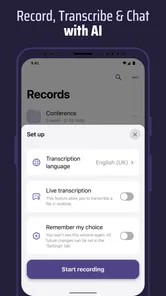
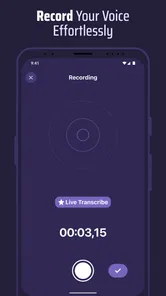
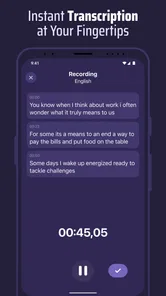
Voice & Transcribe - QuickVox is the kind of productivity app I would reach for when typing is too slow but recording a long audio file is not enough. It brings live transcription, voice recording, and speaker recognition into one mobile workspace, which makes it useful for meetings, interviews, lectures, quick ideas, and conversations I need to revisit later. I found its appeal less about replacing every note-taking tool and more about reducing the gap between hearing something and turning it into usable text.
The app is free to install, carries an Everyone age rating, and comes from B1 Group OU. Its current version is 1.0.73, and it works on devices running Android 7.0 or later. With a 4.4 average from over 750 ratings and more than 100,000 installs, it has already attracted a meaningful audience without feeling like an overcomplicated enterprise product. There are optional in-app purchases, ranging from $3.99 to $69.99 per item, so I would treat the free experience as a starting point and check the purchase screen carefully before relying on it for frequent, heavy transcription.
Where the internet changes the experience
The most important practical point is that QuickVox is built around a task that can be affected by connectivity. Live transcription is not just a recording button; it is a process that has to capture speech, interpret it, and present words quickly enough to follow along. In real use, that means I would open it with the same awareness I bring to any mobile tool that may need a network connection: if the conversation matters, I prepare before the conversation starts rather than discovering a problem halfway through.
This matters especially in places where the signal moves between strong and weak. A meeting room with thick walls, a crowded event, a train platform, or a campus building can all produce an uneven connection. Even when the phone appears connected, the quality of that connection can change from one corner of a room to another. I would not judge the app only by a perfect desk test. Its real value is whether it remains useful during the imperfect moments that make mobile transcription difficult in the first place.
My preferred workflow is to launch the app early, select the recording and transcription task I need, and give it a short moment before the important conversation begins. That small habit helps expose connection trouble before a speaker starts. It also gives me time to place the phone where voices are clearer instead of leaving it buried in a bag or at the far end of a table. The best results begin with preparation, not with pressing record at the last second.
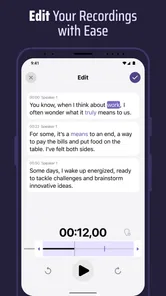
QuickVox is more compelling than a basic voice recorder when I need to search or scan the substance of a conversation quickly. A recording preserves everything, but it also forces me to listen through pauses, repeated phrases, and unrelated comments. A transcript gives me a faster route to the main points. The trade-off is that transcription depends on speech being understandable, and connectivity can become part of that trade-off. For critical material, I would keep the audio as a reference rather than treating the text as the only record.
A useful meeting routine
Consider a realistic example: I am leaving a client meeting with several action points, but I do not want to interrupt the discussion every few minutes to type. I can place the phone near the group, start a recording, and use the live text as a rough visual guide while people speak. Afterward, I can review the transcript alongside the audio, identify commitments, and turn them into a short task list. This is faster than replaying the entire conversation from the beginning, especially when I remember a phrase but not the exact moment it was said.
More From Our News Desk

Weather by Xiaomi Review: Clear at a Glance, Less Clear Up Close

X Under Pressure: Can It Recover When Posting Goes Wrong?

Clash of Clans Is Won Between the Battles

Android Auto Makes the Case for Quieter Car Software

MobiOffice: Transforming Mobile Productivity with Seamless Integration

EA SPORTS FC™ Mobile Soccer: Redefining Mobile Sports Gaming
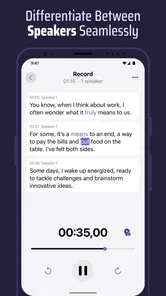
Speaker recognition adds another useful layer in group situations. It can help me distinguish who contributed to a discussion instead of receiving one undifferentiated block of text. I would still review names and speaker changes, particularly when people interrupt one another, speak from different distances, or have similar voices. The feature is most valuable as an organizing aid, not as a reason to stop checking the transcript.
There is also a privacy and courtesy angle that is easy to overlook. Recording and transcribing a conversation affects other people, not just the person holding the phone. I would tell participants what I am doing and confirm that recording is appropriate before starting. That is good practice in any setting, and it becomes even more important when a transcript makes the conversation easier to copy, share, or search later.
Using it in genuinely mobile situations
QuickVox makes the most sense when my hands are busy or my attention is divided. I can imagine using it while walking between appointments to capture an idea, during a lecture where typing would make me miss the next sentence, or during an interview where maintaining eye contact matters more than filling a notebook. These are situations where a normal notes app creates friction because every thought has to pass through the keyboard.
For short personal reminders, voice recording alone may be enough. The advantage of transcription appears when I expect to do something with the material later. A spoken idea such as “compare the two suppliers, check the delivery window, and ask about the revised quote” becomes more useful when I can read it and pull out separate actions. I would use the transcript as a first draft, then edit it into concise notes rather than expecting it to become a polished document automatically.
On a phone, placement makes a bigger difference than many people expect. A microphone near the speaker usually produces a more workable result than a phone inside a jacket pocket. Wind, traffic, music, and overlapping conversations can all reduce clarity. In a busy café, I would keep the device close to the people whose words matter and avoid moving it around while recording. This is not a special setting hidden inside the app; it is a simple workflow adjustment that can save a lot of cleanup later.
The app is also a reasonable fit for people who think aloud. I often find that a spoken explanation contains more detail than I would write in a note, but a long audio file becomes difficult to revisit. Transcription turns that stream of thought into something I can skim. The important discipline is to speak in complete ideas and pause between topics. A few seconds of structure while recording can make the resulting text far easier to use.
When it is better than familiar alternatives
Compared with a standard notes app, QuickVox removes the typing bottleneck and is better suited to spoken material. Compared with a plain recorder, it offers a quicker path to reading and organizing what was said. Compared with a dedicated meeting platform, its strength is its mobile simplicity: I can use a focused tool for an in-person conversation instead of building the whole workflow around a scheduled online meeting.
That comparison also shows where another option may be better. If I need a full project system with calendars, assignments, document collaboration, and long-term team organization, a transcription app alone will not replace it. If I need studio-quality audio editing, a specialist recorder or audio editor is more appropriate. If a conversation has legal, medical, or financial consequences, I would use QuickVox as an aid and verify every important sentence against the recording and the original speaker.
Its speaker recognition is particularly useful when the recording contains several voices, but it should not be confused with perfect identification in every environment. Fast exchanges, background noise, and people speaking over one another create difficult conditions for any automated system. I would use labels to speed up review, then correct them when the identity matters. That approach gives me the convenience without handing over final responsibility to the app.
What happens when the workflow breaks
The most frustrating failure would be discovering a connectivity problem after an important exchange has already begun. My recovery plan would be simple: stop depending on the live text, continue with the voice recording if the app allows the recording task to proceed, and take a few manual notes containing names, decisions, and timestamps. That way, a weak transcription session does not automatically become a lost conversation.
I would also avoid repeatedly closing and reopening the app in the middle of a discussion unless necessary. Every extra interruption risks distracting the speakers and losing the natural flow. A better approach is to keep the recording as the primary safety net, mark the moment when the text becomes unreliable, and return to that section later. Even a rough note such as “decision about delivery date” can make the later audio review much faster.
Another failure mode is a transcript that looks plausible but contains subtle mistakes. Names, numbers, technical terms, addresses, and short words are all worth checking. A sentence can appear fluent while changing the meaning of a commitment. I would never copy a critical figure directly into an email or contract without listening to the corresponding audio. This is one of the main differences between an assistant for review and a source of record.
Recovery is easier when I organize my recordings immediately. After a meeting, I would add a clear note about the subject, identify the people involved, and separate decisions from background discussion. QuickVox can help create the raw material, but it does not remove the need for a personal filing habit. The app is strongest at capture and first-pass understanding; the final organization still benefits from deliberate human editing.
There is also a practical purchase consideration. Since the app is free but includes optional purchases, I would test it with the kind of short recordings I actually make before committing to a paid item. Someone who only needs occasional reminders may find the free entry point sufficient, while a student, journalist, researcher, or frequent interviewer should examine how the available purchase options fit their routine. I would not buy simply because transcription sounds useful; I would first confirm that the app’s workflow matches the volume and importance of my recordings.
Being careful with mobile data and sensitive conversations
Connectivity is not only about speed. It can also affect how comfortable I feel using the app for private material. Before recording personal conversations, workplace discussions, or interviews, I would review the app’s current permissions and privacy information and make sure participants understand the recording. I would also avoid assuming that a transcript is harmless just because it is text. Written words can expose names, plans, contact details, and opinions more quickly than a long audio file.
For data-conscious use, I would reserve live transcription for moments when the immediate text genuinely helps. If I only need a reminder to myself, a short voice note may be the more sensible choice. It reduces the amount of processing I am asking for and keeps the workflow simple. When I need searchable wording or speaker separation, transcription earns its place. This distinction helps prevent every casual thought from becoming a large, unnecessary archive.
On a limited mobile plan, I would prefer to prepare important sessions while connected to a trusted Wi-Fi network and avoid starting a long recording in a place where the signal is uncertain. I am not treating that as a guarantee of offline operation; it is simply a way to reduce surprises before using a network-sensitive feature. I would also keep the phone charged, because live capture and extended recording are poor companions for an already low battery.
For interviews, I would tell the guest what the app is doing and explain how I plan to use the transcript. For workplace meetings, I would follow the organization’s rules rather than assuming that personal convenience overrides them. For lectures or public talks, I would check the venue’s expectations. These steps are not obstacles to using QuickVox; they are part of using any recording tool responsibly.
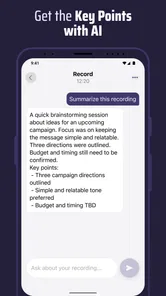
A useful advanced habit is to separate capture from interpretation. During the conversation, I would focus on getting clear audio and letting the transcript provide orientation. Afterward, I would create my own summary, list uncertainties, and replay only the sections that affect decisions. This prevents the common mistake of treating an automated transcript as a finished set of notes. It also makes the app more efficient because I am using it to narrow my attention rather than forcing myself to read every line equally.
My connectivity verdict
After looking at the way QuickVox fits into real mobile routines, I see it as a focused productivity companion rather than a complete replacement for notes, recorders, or team software. Its combination of live text, audio capture, and speaker recognition gives it a clear purpose: helping me move from spoken conversation to reviewable information with less manual typing.
I would recommend it to students, interviewers, meeting participants, researchers, and anyone who regularly remembers ideas faster than they can type them. It is especially appealing when I need to stay engaged with people instead of staring at a keyboard. The app’s free entry point makes it easy to try, while the optional purchases mean frequent users should think about their expected workload before paying for more.
I would skip it when I need guaranteed professional transcription, advanced audio production, a full collaborative workspace, or a tool that I can confidently use without considering connectivity. I would also choose a simpler recorder for private, low-value reminders where a transcript adds no real benefit. In noisy rooms or conversations with heavy overlap, I would treat the text as a helpful draft and keep the audio for verification.
My final view is positive but practical: QuickVox is most useful when I plan for imperfect conditions. I start early, place the phone well, tell people I am recording, keep the audio as a backup, and review important details instead of trusting every line automatically. Used that way, Voice & Transcribe - QuickVox turns a phone into a more capable bridge between listening and organized notes, while still leaving the final judgment where it belongs—with me.
Voice & Transcribe - QuickVox Frequently Asked Questions
Can I use QuickVox to record audio as well as transcribe speech?
Yes. QuickVox is presented as a voice recorder and live transcription tool, so it can help capture spoken ideas and turn them into text in one workflow. Its speaker-recognition feature may also help distinguish voices. These tools can be useful for notes or conversations, but listen back and review the transcript before relying on it for important details.
Who develops QuickVox, and what devices can run it?
QuickVox is developed by B1 Group OU and is a productivity app for Android. It requires Android 7.0 or later, which makes the operating-system version an important compatibility check before downloading. The app is free to download and is rated for Everyone, though optional purchases are available. Check that your device meets the minimum requirement and that you are choosing the correct app.
What is Voice & Transcribe - QuickVox used for?
Voice & Transcribe - QuickVox is designed to turn spoken words into written text quickly. It can be useful for creating notes, drafting messages, recording ideas, preparing meeting summaries, or transcribing short conversations. The app is especially convenient when typing is impractical, although the final text may still require proofreading when speech is unclear or the recording contains background noise.
Does Voice & Transcribe - QuickVox support multiple languages?
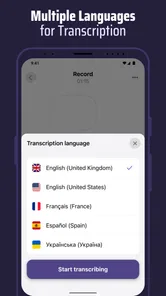
The app may offer voice recognition and transcription in several languages, but the exact selection can depend on the version, device settings, and available speech-recognition services. Before relying on it for multilingual work, check the language list inside the app and confirm that your preferred language and regional accent are supported. Recognition quality can vary between languages.
Does QuickVox require an internet connection to transcribe audio?
An internet connection may be required for some transcription functions because speech recognition can be processed through online services. Certain devices or operating-system configurations may support limited offline dictation, but this should not be assumed. If you plan to use QuickVox while traveling or without mobile data, test the app beforehand and review its permissions and connectivity requirements.
Pros
- Converts short voice notes to text quickly.
- Useful for drafting messages without typing.
- Simple interface with minimal setup required.
- Can help capture ideas while you are on the go.
- Text output is easy to copy into other apps.
Cons
- Accuracy may drop with background noise or unclear speech.
- Strong accents and multiple speakers can affect transcription.
- Some features may require in-app purchases or a subscription.
- Transcription quality depends on the supported language.
- Long recordings may take more time or face length limits.











