Vincen - Your Super AI Agent
- 14.00
- 4.5
- Installs
- 10.00K
- Price
- Free

Screenshots
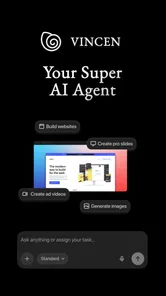
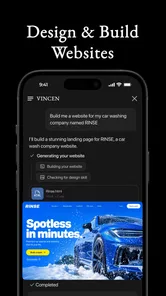
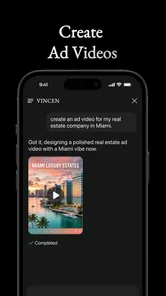
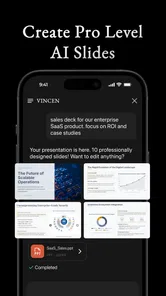
Analysis by Reviewed
I approached Vincen - Your Super AI Agent as a productivity app rather than as a collection of flashy tools. Its promise is broad: helping with websites, slides, and videos from one place. That makes it interesting for people who regularly turn rough ideas into presentable material, but it also means the quality of the experience depends heavily on how clearly you describe what you want.
After using it, my main impression is that Vincen works best as a starting point in a larger workflow. I would not treat it as a complete replacement for every specialist editor or office tool. Instead, I see it as a way to move from a blank page to a usable first version more quickly, then refine the result with a human eye. That distinction matters, especially if you expect one tap to produce finished professional work.
Where Vincen fits before the work begins
Before an app like this becomes useful, there is usually a familiar problem: the idea exists, but it is scattered. I might have a few notes for a small business website, a rough outline for a presentation, or a phone recording that needs to become a short video. The usual approach is to open several different apps, copy material between them, choose templates, and spend time deciding where to begin.
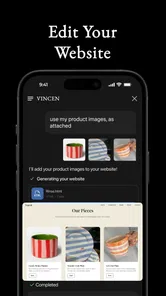
Vincen is appealing because it places those creative tasks under one productivity-oriented roof. The developer, Apptribe Dijital, has positioned it around creating websites, slides, and videos, so the app feels aimed at the moment when planning turns into production. I found that the biggest benefit is not simply having multiple output types. It is the reduced hesitation at the start of a project.
That said, I would begin with a specific goal rather than a vague request. “Make something for my business” is too open-ended to produce a dependable result from any assistant. A better starting note includes the audience, purpose, tone, essential information, and the action you want people to take. Even when Vincen helps generate the material, the quality of that preparation still shapes the outcome.
For example, if I were preparing a presentation for a local class, I would first write down the class level, the learning objective, the number of main ideas, and the preferred mood. I would then decide whether the result should be a slide deck, a simple web page, or a video script. This small decision prevents the app from becoming a place where unfinished thoughts accumulate without direction.
Turning a scattered idea into a usable brief
My practical advice is to treat the first interaction as a brief, not a conversation. Put the important facts together before asking for an output. Separate information that must appear from suggestions about style. This gives you something to check later: if the result feels wrong, you can identify whether the problem came from missing content, unclear priorities, or an unsuitable format.
More From Our News Desk

Weather by Xiaomi Review: Clear at a Glance, Less Clear Up Close

X Under Pressure: Can It Recover When Posting Goes Wrong?

Clash of Clans Is Won Between the Battles

Android Auto Makes the Case for Quieter Car Software

MobiOffice: Transforming Mobile Productivity with Seamless Integration

EA SPORTS FC™ Mobile Soccer: Redefining Mobile Sports Gaming
This is one of the less obvious ways to get more from Vincen. The app can make creation feel easy, but easy generation can encourage careless input. I get better results when I spend a minute deciding what success looks like. That habit also makes the app more sustainable because I am not repeatedly regenerating work simply because the initial request was incomplete.
The app is free to install, which lowers the barrier to trying this workflow. It is rated for Everyone, so its presentation is approachable for a broad audience. At the same time, the presence of in-app purchases ranging from $9.99 to $499.99 per item means I would examine the available purchase choices carefully before building an important project around the service. The free entry point is useful, but it should not be confused with unlimited access to every possible capability.
Capturing material without creating another messy inbox
A productivity assistant is only helpful if its outputs can be found and reused. I would use Vincen alongside a simple capture habit: keep one short note for each project, collect source material there, and turn the note into a clear request when I am ready to create something. The goal is to avoid treating every generated result as a final answer or every idea as an urgent task.
For a website, my capture note might contain the service description, opening hours, contact details, audience, and the three questions visitors ask most often. For slides, I would collect the central argument and supporting examples. For a video, I would write the intended viewer, the opening message, and the final action. These details give the app useful boundaries while keeping the process easy to repeat.
A particularly useful trade-off is deciding what not to include. More information is not always better. A long dump of unrelated notes can blur the main purpose and result in a bloated draft. I prefer to separate background material from must-use material, then ask for a focused first version. This makes reviewing faster and helps me notice whether the structure is actually serving the audience.
I also recommend naming projects by outcome rather than by the app or format. “New client welcome page” is more useful than “website draft,” while “five-minute lesson recap” is more informative than “video idea.” This small organizational choice matters when several versions exist. It keeps the app connected to a real workflow instead of turning it into a warehouse of anonymous experiments.
One repeatable routine for websites, slides, and videos
I would use a three-pass routine. In the first pass, I ask Vincen to shape the raw material into a draft. In the second, I check the result for accuracy, missing context, and whether the structure fits the intended audience. In the third, I polish the presentation and remove anything that sounds generic or unnecessary.
The first pass should be deliberately modest. For a website, I would begin with the page structure and wording rather than trying to solve every visual decision immediately. For slides, I would ask for a clear sequence of ideas before worrying about decoration. For video work, I would focus on the spoken flow and the order of scenes. This prevents attractive formatting from hiding weak content.
The second pass is where I think human judgment is most important. An AI-generated draft may sound confident while still making an assumption that does not fit the project. I would verify names, claims, dates, instructions, and calls to action line by line. I would also read the result aloud. Awkward wording is much easier to spot when heard than when skimmed on a screen.
In the final pass, I would ask whether the chosen format is still the best one. A short explanation might work better as a web page than as a video. A sequence of comparisons may be clearer in slides. Vincen’s range is valuable because it encourages this choice, but the app should support the decision rather than make it automatically.
One concrete workflow I can recommend is a weekly content session. I would collect several ideas during the week, select one on a scheduled day, and use Vincen to produce a first draft in the most suitable format. I would then edit that draft, save the approved version separately, and note what should be improved next time. The important part is the rhythm: capture, choose, create, review, and archive.
This routine also limits unnecessary experimentation. If every request becomes a new project, the apparent speed of generation can be cancelled out by endless comparison. A fixed review point gives me a reason to stop. I would rather publish or share a carefully checked simple result than keep regenerating versions in search of a perfect one.
Where the experience can break down
The broad scope is both Vincen’s attraction and its main limitation. A specialist website builder may offer deeper controls for layout, hosting, forms, or brand consistency. A dedicated slide application may provide more precise editing and collaboration. A focused video editor may be better for detailed timing, transitions, audio work, and finishing. I would choose those alternatives when control over the final production matters more than speed at the beginning.
There is also a risk of sameness. When a tool helps many people create quickly, the first draft may naturally resemble familiar patterns. I would not publish a generated website, presentation, or video without adding specific examples, local knowledge, personal wording, and a clear point of view. Those details are what make the result useful rather than merely polished.
Another failure point is the gap between generation and maintenance. A website can become outdated, a presentation can contain old assumptions, and a video can continue circulating after the information changes. Vincen can help produce material, but I would still keep a small maintenance note for each project: what needs checking, who owns the update, and when to review it. That practice is more important than generating the first version quickly.
I would also be cautious with sensitive or private material. Even when an app feels conversational, I would avoid casually placing confidential customer details, personal records, or internal information into a creative request. I would summarize what is needed and remove identifying details whenever possible. This is a sensible boundary for any assistant used in a personal or professional workflow.
Performance expectations should be realistic as well. A tool that creates several kinds of content may feel less focused than a simple notes app, and a creative request can require more review than a straightforward checklist. If your main need is recurring reminders, task sorting, or a lightweight daily planner, Vincen may be more than you need. I would choose a conventional task manager for those jobs and bring Vincen in when the work involves turning information into a deliverable.
Who should adopt it, and who should skip it
I think Vincen is a good match for a solo creator, student, small business owner, teacher, or busy professional who often starts projects from rough notes. It is especially suitable when the first draft is the bottleneck. If you know what you want to communicate but dislike beginning with a blank document, the app can provide useful momentum.
It may also suit someone who switches between formats. A person planning a workshop might need a simple web page for registration information, slides for the session, and a video for follow-up. Having one app associated with all three stages can make the process feel less fragmented. I would still export or preserve important final work in a dependable place rather than relying on one tool as the only copy.
I would skip Vincen if your priority is deep manual control from the first minute. Designers who need exact layout behavior, editors who work frame by frame, and teams with established production systems may find a general AI assistant too limiting. The same is true for users who want a basic, distraction-free organizer. In those cases, a specialist tool is likely to feel clearer and more predictable.
The app’s current version is 1.0.7, and it requires Android 7.0 or later. That makes it accessible to many Android users, but I would still check that the device and operating system fit your normal working setup before committing to a regular routine. The app has passed ten thousand installs and holds a 4.5 average from 729 ratings, which suggests a positive early reception, though I would treat those figures as a starting signal rather than proof that every workflow will suit every person.
My practical verdict after building a system around it
What I like most about Vincen is the way it can shorten the distance between an idea and a reviewable draft. That is a meaningful productivity gain when the real obstacle is getting started. I also like the possibility of choosing between a website, slides, and video according to the message instead of forcing every idea into the same format.
What keeps me from calling it a complete production environment is the need for careful checking and finishing. The app is strongest when I give it a well-shaped brief, use it for an initial creation pass, and then make deliberate editorial decisions. It is weaker when I expect it to understand an underdeveloped idea, preserve a detailed personal style automatically, or replace a specialist tool.
My recommendation is to try it with a low-risk project first: a short presentation, a simple information page, or a brief explanatory video. Prepare the source material, define the audience, and judge the result by how much useful editing remains rather than by how impressive the first output looks. If the app consistently helps you reach that review stage faster, it deserves a place in your routine.
For me, Vincen - Your Super AI Agent makes the most sense as a flexible creation layer inside a sustainable productivity system. Capture ideas elsewhere or in a disciplined project note, use the app to shape them, review every important detail, and archive the finished version with a clear name. Used that way, Vincen is not a shortcut around thinking; it is a practical way to give your thinking a more usable form.
Vincen - Your Super AI Agent Frequently Asked Questions
Who develops Vincen, and what kind of app is it?
Vincen is a productivity app developed by Apptribe Dijital. Its store summary highlights creating websites, slides, and videos, presenting it as a tool for making different kinds of digital content. If you are considering it for a particular project, think about the kind of output you need and explore the app’s available tools to see whether they suit your workflow.
What is Vincen - Your Super AI Agent, and what can it do?
Vincen is an AI-powered assistant designed to help with everyday questions, writing, brainstorming, summarizing, planning, and other productivity tasks. Depending on the version and available features, it may also support conversational interactions, personalized assistance, and help with organizing information. It is best viewed as a flexible digital helper rather than a replacement for professional advice or human judgment.
Is Vincen - Your Super AI Agent free to download and use?
Vincen is free to download, but the app also offers in-app purchases ranging from $9.99 to $499.99 per item. That means some options or features may involve extra costs, so check the purchase details shown in the app before proceeding. Review any subscription or payment terms carefully, including renewal conditions, before committing to a paid option.
Does Vincen protect my conversations and personal information?
When using any AI assistant, avoid entering passwords, financial details, identity documents, confidential work material, or other sensitive information unless you have confirmed how the service handles it. Vincen’s privacy practices, data retention, and use of conversations can depend on its current policy and platform settings. Read the official privacy policy and permissions list before relying on the app for private or professional content.
Can Vincen provide accurate and reliable answers?
Vincen can be useful for generating ideas, explaining topics, drafting text, and completing routine tasks, but its responses should not automatically be treated as fact. Like other AI tools, it may misunderstand a request, produce outdated information, or confidently give an incorrect answer. Verify important details through trustworthy sources, especially for medical, legal, financial, academic, or safety-related decisions.
Pros
- Handles multiple tasks from one conversational interface.
- Can help organize ideas
- notes
- and everyday information quickly.
- Useful for drafting messages
- summaries
- and other written content.
- May reduce the need to switch between several productivity tools.
- Simple chat-based interaction is approachable for first-time AI users.
Cons
- AI responses may occasionally be inaccurate or require fact-checking.
- Some advanced capabilities may depend on a subscription or usage limits.
- Privacy details should be reviewed before sharing sensitive personal information.
- Performance and answer quality can vary depending on the task and prompt.
- The app may require a stable internet connection for most features.











