

VideoDownloaderPro
- 10.00
- 3.7
- Installs
- 100.00K
- Price
- Free

Screenshots
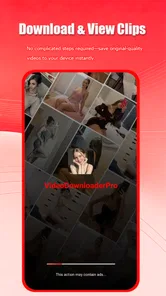
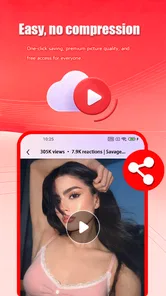
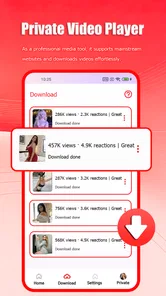
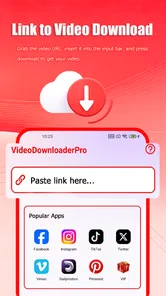
Analysis by Reviewed
I approached VideoDownloaderPro as a practical video tool rather than as a simple app to install and forget. Its focus is clear: helping me bring video onto a mobile device and watch it through an Ultra HD-oriented player. That makes it relevant to people who collect reference clips, review footage away from a desk, or need a straightforward way to manage viewing during a creative project.
The app comes from Dituo Technology and sits in the video players and editors category, although my experience is that its strongest role is playback and downloading rather than full creative editing. It is free to install, rated for Everyone, and works on devices running Android 8.0 or later. The current version is 1.11, and the app has passed 100K installs. Those details put it in the accessible, lightweight-tool part of the mobile video market rather than the professional editing suite space.
Starting a creative project with a video downloader
The most useful way to think about this app is as an early-stage companion for a video workflow. Before I edit, publish, or send anything to someone else, I often need to watch material carefully. A downloader and player can help with that first stage by making clips available for viewing when a connection is inconvenient or when I want to inspect them repeatedly without returning to a browser.
A realistic example is a creator preparing a short social video while travelling. I might save legitimate reference material, review the visual rhythm, and compare it with footage already on my phone. In that situation, the value is not that the app replaces an editor. The value is that it reduces the distance between finding a clip and studying it closely. I can use it to think through framing, pacing, or the general feel of a project before opening a dedicated editing application.
That distinction matters. The store summary presents a fast downloader and Ultra HD player, but I would not choose it as my main tool for trimming, adding captions, arranging a timeline, or mixing sound. Anyone looking for a complete production workspace should start with a proper mobile editor instead. This app makes more sense when the creative starting point is collecting and reviewing video efficiently.
I also found that a downloader changes how I organize ideas. Instead of relying on a stream that may buffer or disappear from a feed, I can keep selected material available for a focused review session. That can be useful for a filmmaker checking visual references, a student studying presentation examples, or a small business owner reviewing clips before deciding what kind of promotional video to make.
What I would check before downloading
My first practical habit would be to confirm that I have the right to save the video. A convenient download button does not change copyright, platform rules, or the creator’s wishes. I would use the app for my own recordings, openly downloadable material, or content where permission is clear. That is not just a legal precaution; it also keeps the library useful instead of filling it with random clips I cannot responsibly reuse.
More From Our News Desk

 Instagram
Instagram’s Power Comes From Its Place in Your Phone
A close look at how Instagram turns Meta’s reach, recommendation systems and everyday camera habits into durable platform power—and what that costs users.

 Gmail
GmailGmail in a Busy Inbox: Who Benefits Most?
From first account to crowded workday, Gmail earns its place through dependable search and flexible sorting—but its best fit depends on how much inbox maintenance you can tolerate.

 Prime Video
Switching to Prime Video: What Changes in Your Viewing Routine
Prime Video can make a compelling second home for streaming, but switching means learning a different catalog, rental layer, and route from browsing to playback.

 Universal TV Remote Control
Universal TV Remote Control Works Best as a Reliable Backup
A phone remote earns its place through quick setup and reliable habits. Here is how to get more from Universal TV Remote Control—and where its limits show.

 Weather - By Xiaomi
Weather by Xiaomi Review: Clear at a Glance, Less Clear Up Close
Xiaomi’s weather app makes everyday forecasts quick to scan, but its calm surface can leave useful details and recovery paths harder to find than they should be.

 X
XX Under Pressure: Can It Recover When Posting Goes Wrong?
A resilience-focused review of X, examining setup, mistaken posts, interruptions, weak connections, and the gaps that matter when recovery needs to be dependable.
Latest News



I would also decide whether I need a permanent local copy or only a temporary viewing aid. If the goal is simply to watch a clip once, downloading may add unnecessary storage pressure. If I am comparing several references over a few days, local access becomes more valuable. This trade-off is easy to overlook because the action feels quick, but video files can accumulate rapidly even when the app itself is free.
The Everyone age rating makes the app approachable for a broad audience, but it should not be confused with a guarantee that every video reached through a downloader is suitable for every viewer. The rating describes the application, while the material a user chooses to access can vary. I would still treat source selection and file management as part of the workflow.
Using the app during the making process
Once I have a clear reason to save a clip, the next question is whether the experience supports a clean making process. The app’s two-part identity is helpful here: downloading brings the material closer, while the player lets me inspect it. I would use that combination to review references before moving into an editor, especially when I need to watch the same section more than once.
For a small creative job, I might create a rough checklist before opening the player. I would note what I am looking for: camera movement, opening seconds, transitions, spoken delivery, or the relationship between music and image. Watching with a specific question is more productive than casually scrolling through saved videos. The app is most useful when it becomes part of that deliberate review habit.
The Ultra HD positioning is appealing for close inspection, but I would keep my expectations practical. A player cannot restore detail that was never present in the original file. If a source video is compressed or low quality, viewing it in a high-resolution player does not turn it into production-grade footage. The benefit is better examination of suitable material, not automatic improvement of every download.
That is one of the more important trade-offs for creators. A high-quality viewing experience can help me judge sharpness, small visual details, and overall presentation, but it also encourages larger files and more storage use. For quick reference, a smaller file may be perfectly adequate. For checking fine detail before an edit or presentation, higher quality is more worthwhile. I would choose based on the job rather than downloading the largest available version every time.
A workflow for reference clips
My preferred workflow would be simple. I would first save only the clips connected to a current project, then watch them in a focused session, and finally remove material that has no continuing purpose. This prevents the app from becoming an unsearchable archive. Even without treating it as a full asset-management system, a little discipline makes the player much more useful.
I would separate reference material from videos intended for final use. A reference clip may influence an idea without appearing in the finished work. Keeping that distinction clear helps avoid accidental reuse and makes handoff easier later. It also means I can discuss inspiration with a collaborator without implying that every downloaded file is cleared for publication.
Another useful habit is to watch a clip both with sound and silently. Silent viewing reveals whether the visual story works on its own, while audio review exposes speech, timing, and background problems. A downloader cannot fix those problems, but it gives me a convenient place to identify them before I waste time building an edit around weak material.
The app is less convincing if I expect it to perform every stage of production. I would not install it hoping to replace a timeline editor, a color tool, or a dedicated publishing platform. Its contribution is earlier and narrower: getting video into a convenient viewing context. That narrowness is a strength when I want a focused utility, but a limitation when I want one application to handle the entire project.
Iteration: reviewing, comparing, and deciding
Creative work improves through comparison, and this is where a downloader-player can quietly earn its place. I can review several possible references, pause to examine choices, and decide which ideas are actually useful. Rather than copying a style immediately, I would look for patterns: how quickly a clip establishes context, where attention drops, and whether the visual treatment supports the message.
I would use the app as a checkpoint before editing. If a reference looks impressive only because of music or fast browsing, that becomes obvious when I watch it carefully. If a shot still communicates clearly after repeated viewing, it may offer a stronger lesson. This kind of slower inspection is a more valuable use than simply collecting attractive videos.
There is also a practical benefit for remote collaboration. Suppose I am preparing a draft for a colleague and need to explain why a certain approach works. Having the relevant reference available for playback can make that conversation easier than relying on a live page that may load slowly. I would still send properly cleared assets through the agreed project channel, but local review can make the discussion more focused.
My main caution during iteration is duplication. Downloading several versions of nearly identical videos can make comparison harder, not easier. I would keep the version that answers the project question best and remove the rest. This is a small but non-obvious workflow improvement: the app becomes more valuable when I treat saved files as decisions, not as a pile of possibilities.
The average rating is 3.7 from about fifty ratings, with ten written reviews, so the public response looks mixed rather than conclusive. I would interpret that as a reason to test the app against my own workflow instead of assuming it will suit everyone. Someone who only needs occasional playback may find it useful, while a creator expecting polished editing controls may feel restricted quickly.
Handoff, publishing, and storage decisions
When a project moves toward delivery, I would use this app mainly for review rather than final publishing. It can help me inspect a downloaded or locally available video before I pass it to an editor, client, teacher, or collaborator. That makes it a useful checkpoint: does the file play as expected, does the image look right on a phone, and does the material still make sense away from the original platform?
I would not treat a downloaded copy as automatically ready for publication. Before handing anything off, I would verify rights, file identity, and whether the version is actually the one intended for delivery. A reference file, preview file, and final export can look similar in a crowded folder. Clear naming outside the app remains important because a player alone does not provide a complete production handoff system.
Storage is another consideration. The free price makes experimentation easy, but free does not mean cost-free in practical terms. Larger video files consume device space, and in-app purchases ranging from $0.99 to $4.99 per item may affect the overall experience depending on what a user chooses to buy. I would check the purchase prompt carefully and avoid paying for anything until I knew the basic workflow solved a real problem for me.
For a creator with limited phone storage, I would download only working copies and move finished material elsewhere when the project is complete. For someone with a large device and a habit of reviewing footage offline, the trade-off may be worthwhile. The right choice depends less on the app’s installation price and more on how many videos I plan to keep available at once.
Compared with a browser, the app’s appeal is a more dedicated viewing path and the possibility of local access. Compared with a full editor, it is simpler and much less suitable for transforming footage. Compared with a cloud-based media library, it may feel more direct for individual viewing, but it should not be mistaken for a collaborative archive. I would choose it when the missing features of those alternatives are not the features I need.
Who should use it, and who should skip it
I can recommend VideoDownloaderPro to someone who wants a focused way to download and watch video on an Android device, especially when offline review is part of the routine. It may suit a student collecting permitted study material, a creator examining references, or a traveller who wants selected videos available without depending on a stable connection.
I would be more cautious recommending it to a professional editor who expects a complete creative pipeline. If your work depends on layered timelines, precise cuts, captions, transitions, audio mixing, color correction, or direct publishing controls, you will need another application. Installing this one may still help with viewing, but it should be considered a companion rather than the center of the workflow.
I would also skip it if I do not have a clear downloading need. For occasional streaming, the original service may be simpler and may preserve the context around a video. Downloading introduces file organization and storage decisions, so it is only an improvement when local access genuinely saves time or solves a connection problem.
Device compatibility is reasonably broad for older Android hardware because the minimum requirement is Android 8.0, but performance will still depend on the phone, the file, and the source quality. I would test a representative clip before building a large library. That quick test can answer the questions that matter most: does playback feel smooth, is the image acceptable for my purpose, and does the app fit naturally into the way I already handle files?
My creator-focused verdict
After looking at it as part of a complete creative process, I see VideoDownloaderPro as a useful front-end utility. It helps with the moment before editing: collecting legitimate material, inspecting it, and deciding what deserves attention. The Ultra HD player angle gives it a clear reason to exist, particularly for users who care about reviewing visual detail rather than merely letting videos play in the background.
Its limits are equally clear. It is not the place where I would build a finished video, manage a complex asset library, or coordinate a full publishing pipeline. The free entry point is attractive, but I would still watch storage use and read any in-app purchase prompt carefully. I would also keep copyright and file organization in my own hands rather than assuming a downloader handles those responsibilities.
For me, the strongest use case is a compact review loop: save permitted material, watch it with a question in mind, compare it with my own footage, and then move only the relevant assets into a dedicated editor or handoff folder. That workflow makes the app feel purposeful instead of redundant. If your creative process begins with careful video inspection, this is a sensible tool to try; if it begins with editing and delivery, choose a fuller production app instead.
Overall, I would recommend it as a focused Android companion for offline video access and playback, not as an all-in-one studio. Dituo Technology has kept the central idea easy to understand, and the app’s value comes from using that idea deliberately. Start with a small, legitimate set of clips, test how well it fits your device and storage habits, and keep your expectations centered on downloading and viewing. Used that way, VideoDownloaderPro can make the early stages of a video project more convenient without pretending to replace the tools needed for the finished result.
VideoDownloaderPro Frequently Asked Questions
Is VideoDownloaderPro compatible with my phone, and where can I download it?
VideoDownloaderPro is an app in the Video Players & Editors category, developed by Dituo Technology. It is listed as compatible with operating systems from version 8.0 onward, so check your device’s software version before installing. It is free to download, and the app is rated for Everyone. Choose an official app store to get the version intended for your device.
How popular is VideoDownloaderPro, and what should I make of its ratings?
VideoDownloaderPro has over 100,000 installs and an average rating of 3.7 from 52 ratings, alongside 10 written reviews. These figures offer a quick sense of how people have responded, but individual experiences can differ depending on device compatibility and the services a user wants to access. Reading recent reviews can help you decide whether the app suits your needs.
What is VideoDownloaderPro and what can it do?
VideoDownloaderPro is designed to help users save online videos for later viewing on a compatible device. Depending on the platform and supported services, it may offer video downloading, file management, format or quality selection, and offline playback. The exact features can vary between Android and iOS versions, so users should review the app listing carefully before installing.
Is VideoDownloaderPro safe and legal to use?
The application itself should be downloaded only from an official app store or the developer’s verified website to reduce the risk of modified or harmful versions. Whether downloading a particular video is legal depends on the platform’s terms, copyright ownership, and local laws. VideoDownloaderPro should be used only for content you own, have permission to save, or that is explicitly offered for offline use.
Which websites and video platforms are supported?
Support can differ according to the app version, device operating system, and changes made by third-party platforms. Some websites may block downloading, require an account, or restrict access to protected content. Before installing VideoDownloaderPro, check its current store description and supported-service information. Do not assume that every website or social media platform will work reliably.
Pros
- Downloads videos for offline viewing with a straightforward process.
- Supports saving content directly to your device’s local storage.
- Useful when traveling or facing unreliable mobile internet connections.
- Simple interface makes core download tools easy to find.
- Can reduce repeated streaming and help limit mobile data usage.
Cons
- Downloaded videos may use substantial storage space on your device.
- Compatibility can vary depending on the website and video format.
- Some downloads may fail when source sites change their restrictions.
- The app may include ads or in-app prompts during regular use.
- Downloading copyrighted content may violate platform rules or local laws.












