

Video (.GIF;.MP4) to Wallpaper
- 819.00
- 4.4
- Installs
- 1.00M
- Price
- Free

Screenshots
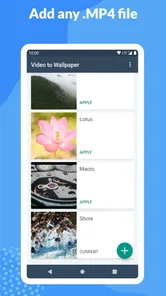
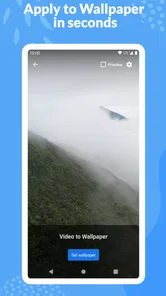
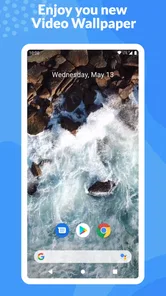
Analysis by Reviewed
I like personalization tools that solve one clear problem without forcing me to rebuild my whole phone setup. Video (.GIF;.MP4) to Wallpaper takes that focused approach: it lets me turn a compatible video into a moving wallpaper instead of settling for a static image. That sounds simple, but it is useful when I want a lock-screen or home-screen background that feels more personal than a downloaded picture.
After using it, I see this as a practical choice for Android users who already have a short clip they want to keep visible. It is not a full wallpaper marketplace, a video editor, or a general customization suite. Its value comes from the direct path between a saved video and a live wallpaper. If that is the exact task you have in mind, the app is easy to understand. If you want a large collection of ready-made animated backgrounds or detailed visual controls, another type of personalization app may suit you better.
What I looked for before recommending it
My first decision criterion was whether the app made the conversion process feel less complicated than the usual Android alternatives. A phone may support live wallpapers, but the built-in options usually focus on still images, manufacturer themes, or a limited set of animated choices. Video (.GIF;.MP4) to Wallpaper is more interesting when the source is your own material: a family moment, a calm landscape clip, a favorite animation, or a short design made for your phone.
The second criterion was format flexibility. The app is built around GIF, MP4, and MOV video, which covers several common ways people save short clips. That matters because a person may receive a video through messaging, export one from an editing app, or keep an animation as a GIF. Instead of converting everything manually before trying to set it as a wallpaper, this app is intended to handle those formats in one place.
I also judged it by the result rather than the novelty. A moving wallpaper should still feel appropriate after several days. A clip that looks impressive once may become distracting, drain attention, or make the phone feel cluttered. My best experiences came from short, visually simple videos with a clear subject and limited movement. Busy clips can work, but they are less comfortable behind icons and widgets.
There is also a practical compatibility question. This is an Android personalization app, with support beginning at Android 7.0. It is free to install, carries an Everyone age rating, and includes optional in-app purchases priced at $0.99 per item. I would still treat the phone itself as part of the equation: Android manufacturers handle live wallpapers differently, so the exact placement and behavior can vary between devices.
The app comes from Audrius Koncius, and its current version is 1.1.12. Those details are useful when checking whether the application fits an older Android phone or whether the version shown on the device matches the one being discussed. I would not choose it solely because of version information, but it is reassuring that the app is aimed at a broad range of Android users rather than only the newest hardware.
More From Our News Desk

 Instagram
Instagram’s Power Comes From Its Place in Your Phone
A close look at how Instagram turns Meta’s reach, recommendation systems and everyday camera habits into durable platform power—and what that costs users.

 Gmail
GmailGmail in a Busy Inbox: Who Benefits Most?
From first account to crowded workday, Gmail earns its place through dependable search and flexible sorting—but its best fit depends on how much inbox maintenance you can tolerate.

 Prime Video
Switching to Prime Video: What Changes in Your Viewing Routine
Prime Video can make a compelling second home for streaming, but switching means learning a different catalog, rental layer, and route from browsing to playback.

 Universal TV Remote Control
Universal TV Remote Control Works Best as a Reliable Backup
A phone remote earns its place through quick setup and reliable habits. Here is how to get more from Universal TV Remote Control—and where its limits show.

 Weather - By Xiaomi
Weather by Xiaomi Review: Clear at a Glance, Less Clear Up Close
Xiaomi’s weather app makes everyday forecasts quick to scan, but its calm surface can leave useful details and recovery paths harder to find than they should be.

 X
XX Under Pressure: Can It Recover When Posting Goes Wrong?
A resilience-focused review of X, examining setup, mistaken posts, interruptions, weak connections, and the gaps that matter when recovery needs to be dependable.
Latest News



The workflow is best when the video is already prepared
The most convenient scenario is one where the clip is already on the phone and does not need editing. I choose a video, use the app to prepare it as a wallpaper, and then follow the phone’s wallpaper confirmation steps. That is much more direct than opening a video editor, exporting a special file, searching for a separate live-wallpaper utility, and then trying to connect the two.
A useful tip is to review the clip before importing it. I prefer videos with movement near the center or edges that will not be hidden by app icons. A portrait-oriented clip often makes more sense on a phone than a wide landscape recording, because cropping a wide video can remove the part that made it appealing. This is not a replacement for editing, so choosing the right source saves time.
Another small but important habit is to test the wallpaper with the actual home-screen layout. A video that looks excellent on an empty preview can become visually noisy once widgets, folders, and notification badges are added. I found that simple backgrounds with darker or less detailed areas behind icons are easier to live with. The strongest result is not always the most animated one; it is the clip that remains readable beneath the rest of the interface.
Where it wins over ordinary wallpaper choices
The clearest strength is ownership. Many wallpaper apps offer attractive collections, but they still ask me to browse someone else’s catalog. This tool starts with something I already care about. That makes it especially appealing for personal memories, custom motion graphics, pet videos, travel clips, or a short recording that has meaning beyond its appearance.
It also reduces the number of separate tools involved. If all I need is to use a GIF, MP4, or MOV as a moving background, installing a full video editor would be unnecessary. The app’s narrow purpose is a benefit here. I do not have to learn a large interface just to get a video onto the wallpaper layer.
Its broad format focus is another practical advantage. GIF users are not pushed toward MP4 first, while people with ordinary phone videos have a direct route as well. That makes the app more useful for mixed personal libraries, where the files were created in different ways and are not all stored in one consistent format.
The adoption picture also suggests that this is not an obscure experiment. It has passed one million installs, carries an average rating of 4.4 from around thirteen thousand ratings, and has 819 written reviews. I see that as a useful sign of real-world interest, although ratings cannot guarantee that every phone will behave identically.
Everyday situations where I would use it
One realistic example is a short clip from a weekend trip. I might have a few seconds of waves, trees moving in the wind, or city lights at night. Rather than using the entire recording, I would pick the calmest segment and make that the wallpaper. The result gives the phone a personal atmosphere without requiring a themed launcher or a complete visual overhaul.
Another use is a custom animation created for a small business, club, or personal project. If the animation is already exported as a GIF or video, the app can make it visible whenever the phone is unlocked. That can be more memorable than a static logo, although I would keep the motion restrained so it does not compete with the phone’s controls.
I can also see it working for children or family devices, where a favorite animation makes the phone feel more familiar. The Everyone rating makes the app broadly approachable, but the content of the chosen video still matters. The rating applies to the application, not to every video a user may import.
Limitations I noticed in the concept
The same focus that makes the app simple also limits it. This is not the right choice if I want to discover professionally designed wallpapers inside the app. A dedicated wallpaper catalog is better for browsing, filtering, and changing themes regularly. Video (.GIF;.MP4) to Wallpaper is strongest when I already know what I want to use.
I would also avoid treating it as a video-editing solution. If a clip needs trimming, resizing, color correction, text, or a soundtrack change, I would prepare it elsewhere first. Trying to make the wallpaper app perform the job of an editor can turn a quick task into a frustrating one. The efficient workflow is to create a wallpaper-ready clip in advance, then use this app for the final conversion.
Battery and performance are sensible concerns with any moving background. I would not assume that every phone will handle every video equally well, especially if the source is long, visually complex, or unnecessarily large. A short, optimized clip is the safer choice. If battery life is a priority, a static wallpaper remains the more sensible option, and no live-wallpaper converter can change that basic trade-off.
There is also a difference between setting a wallpaper and controlling how it behaves. People who expect advanced playback choices, elaborate transitions, or deep per-screen customization should compare this app with more specialized live-wallpaper tools. I would choose this one for the conversion step, not for a large collection of animation controls.
How it compares with the usual alternatives
Compared with built-in phone wallpaper tools, this app offers a more personal starting point because the source can be a video from my own library. The built-in option is usually preferable when I want maximum simplicity, minimal movement, and the most predictable behavior. It is also the better route for someone who only wants a still image.
Compared with wallpaper catalog apps, this one wins on personal media and loses on discovery. Catalog apps are convenient when I want to browse many finished designs without preparing anything. This app is convenient when the finished design is already sitting in my gallery. The choice depends less on which app is “better” and more on whether I am selecting from a library or creating from my own material.
Compared with video editors, it is lighter and more focused. An editor gives me control over the clip itself, but adding one just to set a background is excessive. I would use an editor first when the video needs work, then use this app for the wallpaper conversion. That two-step combination is more sensible than expecting either tool to do everything.
Compared with advanced live-wallpaper applications, this option is easier to understand but may feel less ambitious. A specialist tool can be a better fit for users who want detailed animation behavior or a broader customization system. I would recommend Video (.GIF;.MP4) to Wallpaper to someone who values a short path from personal video to phone background over a deep collection of controls.
What the price means in practice
The app is free, which makes it easy to try with a single clip before deciding whether it belongs in a regular personalization routine. Optional purchases cost $0.99 per item. I would pay attention to the purchase prompts during use and decide whether the free experience already covers my needs, rather than assuming every available option is essential.
The cost of switching is low in one sense: if I decide the app is not for me, I can return to a static wallpaper, the phone’s built-in tools, or another live-wallpaper solution. The more significant cost is preparation time. If I have already edited several videos specifically for this workflow, moving to another app may mean learning a new process or recreating those files in a format it prefers.
That is why I recommend keeping the original videos. The wallpaper version is only one use for the source clip, and retaining the original makes it easier to try another tool later. I would also keep a small folder of short, portrait-friendly clips rather than repeatedly searching through the entire gallery whenever I want to change the background.
Who should choose it
I would recommend it to Android users who want a personal moving background and already have GIF, MP4, or MOV files ready to use. It is particularly suitable for someone who finds wallpaper catalogs repetitive, wants a meaningful clip on the phone, or does not want to install a large editing suite for a single task.
I would skip it if my main goal is a huge selection of premade designs, advanced animation control, or the longest possible battery life. In those cases, a catalog app, a specialist live-wallpaper tool, or a static image will be a better match. I would also skip it if I rarely change my wallpaper and have no personal video that I genuinely want to see every day.
My recommendation after using it
Video (.GIF;.MP4) to Wallpaper is a focused personalization app that earns its place by making a specific conversion more approachable. I like it because it respects the user’s own media instead of trying to replace it with a catalog. The experience is most rewarding when the source clip is short, thoughtfully framed, and already close to the final result.
My advice is to start with one calm video, test it against your real home-screen layout, and judge it after several days rather than only during the first preview. If it remains pleasant and readable, the app has done its job. If the motion becomes distracting or the clip needs too much editing, return to a static wallpaper or use a more specialized alternative.
With over one million installs and a 4.4 average, it has clearly found an audience, but its real appeal is narrower than those figures suggest. This is a practical bridge from personal video to live wallpaper, not an all-purpose customization platform. For that exact need, I would be comfortable recommending it, especially because trying the free app requires little commitment.
Video (.GIF;.MP4) to Wallpaper Frequently Asked Questions
Is Video (.GIF;.MP4) to Wallpaper free to download?
Video (.GIF;.MP4) to Wallpaper is free to download and use as a personalization app. It also offers in-app purchases, so check the purchase details shown in the app before choosing any paid option. The app is rated for Everyone, making it suitable for a general audience, though parents should still supervise how younger users access device media and purchase features.
What Android version do I need to use the app?
The app requires Android 7.0 or later. Before downloading, check your phone’s Android version in its settings to avoid compatibility issues. If your device meets that requirement, you can choose a video or animated GIF and try setting it as a live wallpaper; the exact options and results can still depend on your phone’s manufacturer and Android’s wallpaper settings.
What is Video (.GIF;.MP4) to Wallpaper?
Video (.GIF;.MP4) to Wallpaper is an app that lets you turn videos or animated GIF files into live wallpapers for your phone. After selecting a compatible file from your gallery, you can usually preview the result, adjust basic settings, and apply it to the home screen, lock screen, or both, depending on your Android device and system version.
Which video and GIF formats are supported?
The app is designed primarily for common video files such as MP4 and animated GIF images. However, compatibility can vary according to the device, Android version, file encoding, resolution, and file size. If a video does not load correctly, converting it to a standard MP4 format with a widely supported codec may solve the problem. It is also worth checking the app’s file access permissions.
Can I use the wallpaper on both the home screen and lock screen?
This depends mainly on your phone manufacturer and Android version rather than the app alone. Some devices allow live wallpapers on the home screen and lock screen, while others restrict them to the home screen or require separate confirmation during setup. The app normally provides the available placement options, but the final result may differ between Samsung, Xiaomi, Motorola, Google Pixel, and other devices.
Pros
- Turns personal videos and GIFs into eye-catching live wallpapers.
- Supports common MP4 and GIF formats for easy importing.
- Lets you preview the wallpaper before applying it.
- Adds a personal touch to your home or lock screen.
- Simple setup makes it accessible for casual users.
Cons
- Live wallpapers may consume more battery than static images.
- Some devices may not support video wallpapers on the lock screen.
- Large videos can take longer to load or process.
- Free features may be limited depending on the device or version.
- Wallpaper playback can affect performance on older phones.











