

Video Downloader, Download All
- 2.52K
- 4.5
- Installs
- 50.00M
- Price
- Free

Screenshots




Analysis by Reviewed
I often want a video available offline when I’m somewhere with patchy reception, and a downloader can make that practical—provided the source allows saving. Video Downloader, Download All is a free video-player and editing-category app from Shotcut Video Workshop, focused on finding and downloading online videos. Its central appeal is simple: it aims to make saving a video feel like a short task rather than a technical project.
What the download-first approach changes
The app’s core idea is to help you locate a video online and bring a copy onto your device. In everyday use, that is most useful when you have a legitimate reason to keep a video offline, such as watching your own uploads or material offered for download. It is not a substitute for a streaming subscription, and a video being visible on a site does not automatically mean it is yours to save. I’d check the source’s rules and respect creators’ rights before downloading.
That distinction matters because downloaders are often compared with browser save options or the offline viewing tools built into streaming services. Those built-in options are usually the better fit for subscription content; this app is more relevant when you need a separate local copy of a video that you’re permitted to download. Keeping the intended use narrow makes the app’s purpose clearer and avoids expecting it to bypass a site’s restrictions.
Easy Peasy Video Downloading
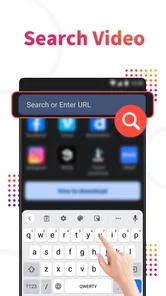
One of the first things you'll notice with Video Downloader, Download All is how straightforward it is to use. The user interface is as simple as pie, which means you won’t need a tech degree to navigate through it. Just pop in the URL of the video you want to download, and voila, it's like magic! The app does all the heavy lifting for you, and in just a few taps, that video is yours to keep.
A sensible workflow for everyday saving
For a less frustrating result, I’d start by opening the video at its original source, checking that it is available for download, and then using its address in the app. After the download, I’d confirm that the file plays before relying on it for a commute or trip. That small check is especially useful when you are saving something for later and may not have a dependable connection when you need it.
It also helps to think ahead about storage. A collection of videos can take up space quickly, so I would save only the clips I expect to watch and clear out files once they are no longer useful. If you are preparing for travel, try downloading on a stable connection well before leaving rather than waiting until you are already on the move. Those habits make offline viewing more dependable without assuming every site or video will work the same way.
Compatibility and Versatility
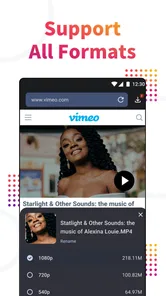
This app isn’t just a one-trick pony. Whether you’re downloading from social media platforms or various streaming sites, Video Downloader, Download All has got your back. It supports a wide range of formats, so no worries about compatibility issues. Plus, it works seamlessly on both Android and iOS, making it accessible no matter your device preference.
More From Our News Desk

 Gmail
GmailGmail in a Busy Inbox: Who Benefits Most?
From first account to crowded workday, Gmail earns its place through dependable search and flexible sorting—but its best fit depends on how much inbox maintenance you can tolerate.

 Prime Video
Switching to Prime Video: What Changes in Your Viewing Routine
Prime Video can make a compelling second home for streaming, but switching means learning a different catalog, rental layer, and route from browsing to playback.

 Universal TV Remote Control
Universal TV Remote Control Works Best as a Reliable Backup
A phone remote earns its place through quick setup and reliable habits. Here is how to get more from Universal TV Remote Control—and where its limits show.

 Weather - By Xiaomi
Weather by Xiaomi Review: Clear at a Glance, Less Clear Up Close
Xiaomi’s weather app makes everyday forecasts quick to scan, but its calm surface can leave useful details and recovery paths harder to find than they should be.

 X
XX Under Pressure: Can It Recover When Posting Goes Wrong?
A resilience-focused review of X, examining setup, mistaken posts, interruptions, weak connections, and the gaps that matter when recovery needs to be dependable.

 Clash of Clans
Clash of Clans Is Won Between the Battles
Its raids are quick; its community is a long-term project of coordination, teaching, rivalry, and shared responsibility—with all the friction that entails.
Latest News



What’s more, the app allows you to choose the quality of the video you’re downloading. Whether you’re looking to save space on your device with a lower resolution or want the full HD experience, the choice is yours.
Quality, storage, and expectations
Quality choice is a practical trade-off, not just a settings detail. For a short clip you plan to watch on a phone, a smaller file may be enough; for a video you want to view on a larger screen, you may prefer a clearer version if the source offers one. I would avoid choosing the highest option automatically, since a bigger file is not useful if it fills storage or the source itself is low quality.
Compatibility can also depend on the website and the way its video is delivered. If a link does not lead to a downloadable file, trying a different permitted source or its own offline feature may be the more sensible route. I would not treat a failed attempt as proof that the app can save every video across the web; restrictions and formats can vary.
Choosing a useful file, not just a smaller one
When I’m deciding what to keep, I think about where I’ll watch it and whether I need the whole video. A short reference clip for later may be worth saving at a modest quality, while a tutorial with small on-screen text deserves a clearer version if one is available. This is a useful way to avoid paying storage for detail you will never notice—or sacrificing detail that matters.
I’d also give downloads a clear purpose before starting a batch. If the videos are instructions, recipes, or material for a presentation, a quick check that each one opens and has the expected content can prevent an awkward surprise later. Keeping a few well-chosen files is often more useful than building a large offline library that becomes difficult to manage.
Safe and Secure
In a world where online safety is paramount, this app ensures that your downloads are secure. There’s no shady business here—just reliable downloading at your fingertips. The developers have built in security features that safeguard your data, so you can download with peace of mind.
Additionally, the app is free from annoying ads that tend to plague similar applications. Nothing interrupts the experience more than constant pop-ups, and thankfully, that’s not something you’ll have to deal with here.
What to weigh before installing
I would still use ordinary caution with any download tool: stick to familiar sources, avoid files that seem unrelated to the video you intended to save, and keep your device’s available space in mind. The app is free to install, but it also offers in-app purchases, with items priced from around four to twenty-four dollars. That makes it worth checking what an optional purchase does before paying; occasional downloading may not justify spending extra.
The app is rated for Everyone, and its current version is 1.82.8, with Android 7.0 as the minimum operating-system requirement. It has an average rating of 4.6 from around 152,000 ratings, and more than 10 million installs. Those figures suggest broad interest, but they cannot tell you whether a particular site will work for your own needs, so I’d judge it by trying a permitted, familiar video first.
When a link doesn’t behave as expected
A common question with URL-based saving is whether any video address will work. I would treat the link as a starting point, not a guarantee: some pages are designed for playback inside a service rather than saving as a separate file, and access rules vary. If the app cannot retrieve a video, I’d first return to the source and look for an official download option instead of repeatedly trying variations of the same restricted link.
For practical planning, that means testing one representative video before relying on the app for a whole journey or project. If it works, then queue the remaining authorized material and leave time to check the results. If it does not, the source’s own offline viewing tool or a direct download provided by the creator is likely to be less troublesome.
Save Time with Batch Downloads
If you’re like me and love binge-watching, the batch download feature will be your best friend. You can queue up multiple videos to download at once, saving you precious time. This is especially handy if you’re prepping for a long flight or road trip and want to stock up on entertainment.
A realistic use for that queue is gathering several short, authorized clips before a trip, then checking the files while you still have time to retry anything that failed. For a single video, a browser’s own download control may be quicker; for subscription shows, the service’s official offline mode is usually the cleaner choice. Batch downloading is most valuable when you already have several eligible videos and want to handle them together.
A low-stress travel routine
Imagine I’m leaving early for a day of travel and want a few permitted clips to watch during stretches without reception. I’d collect the links beforehand, choose a quality that suits my phone and available storage, then start the downloads while I’m on a dependable connection. Before leaving, I’d open each file once and remove any that are incomplete or no longer needed. That simple routine turns the app into a useful preparation tool rather than something I’m troubleshooting on the platform.
There is a trade-off here: batching saves repeated effort, but it does not remove the need to check the source, file quality, and playback. For a trip with only one video, that extra preparation may be more work than using an official offline control. For several independent clips that are actually downloadable, doing the checks together can make the process worthwhile.
Who is likely to get the most from it?
I’d recommend this app to someone who regularly saves videos they own or have permission to download, wants a straightforward URL-based workflow, and values choosing between file size and viewing quality. It may be less suitable if you only need occasional offline access to streaming subscriptions, expect every website to allow downloads, or prefer not to manage local files. In those cases, built-in browser or streaming-app tools are often simpler and more predictable.
It also makes sense for someone who prepares their own material for offline reference, provided the source permits saving. A student revisiting a creator-provided lesson or a traveler keeping a few allowed clips on hand may appreciate having the files available without a live connection. By contrast, anyone who mainly watches subscription libraries will generally get a smoother experience from those services’ own offline features, which keep downloads inside the service instead of asking the user to manage separate files.
Where I’d draw the line
I would skip this kind of tool if the main goal is to save videos from sources that do not permit it, or if I need a dependable archive of material whose links and availability might change. A downloader is not a replacement for permission, a creator’s original files, or a proper backup. For videos I own, keeping the original source files in an organized backup is a safer long-term plan than depending on a copy retrieved from a web page.
It is also not my first choice for someone who wants editing controls, a full media library, or a hands-off streaming experience. The app sits in the video-player and editing area, but its appeal here is the download workflow; I would not install it expecting a complete editing suite. If your need is simply to watch a show offline, use the streaming app. If your need is to save an eligible web video as a local file, this app’s approach is more relevant.
Overall, Video Downloader, Download All is a solid choice for anyone looking to easily download videos from the internet. It's user-friendly, versatile, and secure. So, why not give it a whirl? You might just find it becomes one of your go-to apps!
Video Downloader, Download All Frequently Asked Questions
Who develops Video Downloader, Download All, and what is it designed to do?
Video Downloader, Download All is developed by Shotcut Video Workshop and is designed to search for and download videos from the internet. Its description highlights automatic video detection and safe downloading, making it relevant for users who want a dedicated video-downloading tool. It is also categorized among video players and editors, so consider whether that combination of browsing and video features matches what you are looking for.
Is Video Downloader, Download All free to download?
Yes. Video Downloader, Download All is free to download, so you can try it without paying an upfront price. Optional in-app purchases are also available, with prices ranging from $3.99 to $23.99 per item. If you decide to explore paid extras, review the purchase details carefully before confirming anything, and consider whether those options offer value for the way you plan to use the app.
What should I check before downloading Video Downloader, Download All?
Video Downloader, Download All is a video player and editing app from Shotcut Video Workshop. It is free to download, is rated for Everyone, and is designed for searching for and downloading videos from the internet, with automatic detection. Check that your device meets the app’s requirements before installing, and consider whether its downloading features suit the sites and content you intend to use.
What features does Video Downloader, Download All offer to users?
Video Downloader, Download All is a versatile application designed to help users download videos from various platforms effortlessly. It allows for batch downloading, supports multiple formats, and provides the ability to pause and resume downloads. With a user-friendly interface, it also includes a built-in browser for easy navigation and a secure folder to keep your downloaded content safe.
Is Video Downloader, Download All safe to use on my device?
Yes, Video Downloader, Download All is designed with user safety in mind. It incorporates secure protocols to protect your device from malicious threats while downloading content. However, users are always advised to download apps from official app stores to ensure they are getting a legitimate and secure version of the app.
Pros
- Simple and user-friendly interface.
- Supports multiple video formats.
- Fast download speeds.
- Allows batch downloading.
- Built-in video player.
Cons
- Contains ads frequently.
- Limited features in free version.
- May not support all websites.
- Occasional download failures.
- No integrated video editor.













