

VicoHome: Smart Home Camera
- 4.91K
- 4.5
- Installs
- 1.00M
- Price
- Free

Screenshots
Analysis by Reviewed
I judge a home camera app less by its first impressive alert than by whether it remains useful once checking the feed becomes routine. VicoHome: Smart Home Camera is built around keeping an eye on connected cameras from a phone, and its appeal is easy to understand in the first few days: setup feels approachable, and checking in from elsewhere can be reassuring. The harder question is whether that reassurance fits your everyday habits rather than becoming another stream of notifications to manage.
Your Personal Guardian Angel
Installing VicoHome: Smart Home Camera is like having a guardian angel watching over your home. From the moment I set it up, I was impressed by how incredibly easy it was to get started. No fumbling around with complicated instructions or tech jargon. Just download the app, connect your camera, and you're good to go!
Simplicity at Its Finest
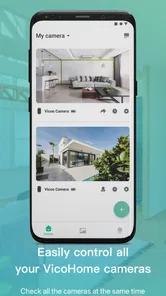
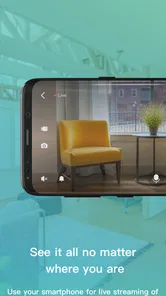
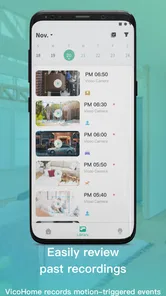
One of the standout features of this app is its simplicity. The user interface is clean, intuitive, and just plain easy to navigate. Whether you're tech-savvy or a complete newbie, you'll find everything you need right at your fingertips. I loved how I could quickly access live feeds, adjust settings, and even review past footage without any hassle.
That straightforward approach makes a difference during the first week, when you are still learning where the useful controls are. I would start by deciding what you actually want the camera to help with: checking the front door, keeping an eye on a shared room, or seeing whether a pet is settling down. A camera is most useful when each check answers a specific question; opening the feed repeatedly without a reason can quickly turn reassurance into a habit that adds little value.
Features That Pack a Punch
Now, let’s talk about what makes this app truly special. The motion detection feature is on point. I mean, it’s like having a sixth sense! The app sends real-time alerts to your phone whenever it detects movement, keeping you in the loop no matter where you are. Plus, the night vision capability is a game changer. I was genuinely surprised at how clear the footage was, even in total darkness.
Motion alerts are also where a little restraint pays off. Before relying on them, I would watch how often ordinary activity generates a notification and adjust the camera’s placement or available settings to suit the space. A view that includes a busy walkway may create more interruptions than useful warnings. For a calmer routine, treat alerts as prompts to check a situation, not as proof that something is wrong. Night vision helps with after-dark viewing, but it does not remove the need to choose a sensible camera angle and keep the lens unobstructed.
Another feature worth mentioning is the two-way audio. This came in handy when I wanted to communicate with someone at my door without actually opening it. It’s like having a virtual intercom system, but smarter!
More From Our News Desk

 Instagram
Instagram’s Power Comes From Its Place in Your Phone
A close look at how Instagram turns Meta’s reach, recommendation systems and everyday camera habits into durable platform power—and what that costs users.

 Gmail
GmailGmail in a Busy Inbox: Who Benefits Most?
From first account to crowded workday, Gmail earns its place through dependable search and flexible sorting—but its best fit depends on how much inbox maintenance you can tolerate.

 Prime Video
Switching to Prime Video: What Changes in Your Viewing Routine
Prime Video can make a compelling second home for streaming, but switching means learning a different catalog, rental layer, and route from browsing to playback.

 Universal TV Remote Control
Universal TV Remote Control Works Best as a Reliable Backup
A phone remote earns its place through quick setup and reliable habits. Here is how to get more from Universal TV Remote Control—and where its limits show.

 Weather - By Xiaomi
Weather by Xiaomi Review: Clear at a Glance, Less Clear Up Close
Xiaomi’s weather app makes everyday forecasts quick to scan, but its calm surface can leave useful details and recovery paths harder to find than they should be.

 X
XX Under Pressure: Can It Recover When Posting Goes Wrong?
A resilience-focused review of X, examining setup, mistaken posts, interruptions, weak connections, and the gaps that matter when recovery needs to be dependable.
Latest News



In practice, two-way audio is most useful for brief exchanges: asking a visitor to wait, or letting someone know you will be there shortly. I would not treat it as a substitute for a proper conversation or as a reason to open the door without checking who is outside. If other people share the home, it is also worth agreeing on when the camera and its audio should be used, so monitoring feels like a household choice rather than a surprise.
Stay Connected, Stay Secure
With VicoHome, staying connected to your home has never been easier. I found the cloud storage options to be incredibly convenient. No more worrying about losing important footage; everything is safely stored and easily accessible. And for those who are a bit concerned about privacy, rest assured that the app uses encryption to protect your data.
For longer-term use, the practical question is not only whether footage can be reviewed, but whether you will know what to do when an alert arrives. I would make a simple routine of checking the live view when it matters and reviewing saved footage only when there is a reason, rather than scrolling through recordings out of habit. Cloud storage can be convenient, but it is also a reason to check the app’s current storage options and any associated costs before depending on it for something important.
From the First Week to the Everyday Routine
A realistic use case is checking the entryway while you are away for the day: a movement notification arrives, you open the live view, and two-way audio lets you respond to a visitor without interrupting what you are doing. The benefit is less about watching constantly and more about having a useful way to check a specific moment. If you mainly want to keep an eye on a pet, the same approach works best when you check at set moments instead of reacting to every bit of movement.
Compared with a basic camera viewer, VicoHome is more appealing if you want alerts and camera interaction in one place. A general video player is better for watching local media, not monitoring a home. Conversely, someone already invested in another camera ecosystem may prefer its existing app if it brings their devices together; changing apps is worthwhile only if the camera support and daily controls match the setup they already own. The app is for camera monitoring, not a replacement for a broader smart-home control system.
Choosing It for the Right Home
I think this app is most useful for someone who already has a compatible camera and wants a direct phone-based way to check it, rather than for someone shopping for a complete smart-home platform. That distinction matters: an app can make camera checks convenient, but it cannot turn an unsupported device into a compatible one or make it the right fit for every household. Before building a routine around it, confirm that your camera works with the app and that the controls you need are available for that device.
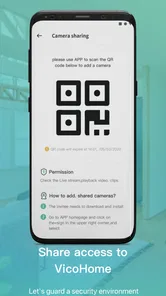
For a household with a clear purpose—such as checking the entrance when a delivery is expected—the camera can earn its place without demanding constant attention. I would set expectations with anyone else who may use the app, too. Agreeing on who receives alerts and who can view the feed avoids duplicate checks and confusion about whether someone has already responded. This small coordination step can make the difference between a helpful shared tool and a source of repeated notifications.
It is less suited to people who want one dashboard for every smart device, or who primarily need to organize, edit, and play personal videos. Those jobs call for different tools. It may also be a poor match if you do not want a camera in the relevant space, dislike phone alerts, or are not willing to check settings and access from time to time. In those cases, a simpler doorbell or a camera-free approach may be more comfortable than trying to make camera monitoring fit.
Maintenance, Privacy, and the Sources of Fatigue
Keeping the experience useful takes a little attention after setup. I would periodically check that notifications are still enabled as intended, the camera has not been moved, and the view still covers what matters. If an alert is repeatedly irrelevant, reconsider the angle or settings rather than accepting a constant stream as normal. When you move home or change how a room is used, revisit the camera’s position and who should have access to it.
Privacy deserves the same ordinary upkeep as camera placement. Encryption is a helpful safeguard, but I would still use a strong account password, keep access limited to people who need it, and avoid pointing a camera at areas where household members expect privacy. If you are uncomfortable with cameras in shared spaces or do not want to manage alerts and access, a door viewer or a camera-free home routine may suit you better.
There is also a less obvious maintenance task: deciding what counts as an alert worth acting on. A notification that interrupts work for routine movement may lose its meaning over time, and then a genuinely useful alert can be easier to dismiss. I would review the pattern after the first few days, not just the camera image. If the same harmless activity keeps prompting checks, adjusting the view or available alert settings is more sustainable than leaving the phone to buzz and hoping I get used to it.
It helps to make the camera serve a small number of defined jobs. For example, I might use the live view to check whether a visitor is at the entrance, but not leave it open in the background all day. If a concern requires constant watching, the app is not a substitute for being present or contacting someone who can help. That boundary keeps a convenient monitoring tool from creating a false sense that every situation is under control simply because a feed is available.
The app is free, is rated for Everyone, and comes from vicohome team. It sits in the video players and editors category, though its purpose is camera monitoring rather than editing or watching a personal video library. It has a 4.6 average from around 40,000 ratings and over 1 million installs. Version 2.80.0 requires Android 7.0 or later, and optional in-app purchases range from $0.99 to $999.99 per item, so I would check what is included before committing to paid extras. It was released on November 12, 2020, and its continued value depends more on whether your camera checks stay purposeful than on how novel the live view feels at first.
What to Check Before Relying on It
A practical question is whether the app costs anything to try. It is free to install, but optional purchases are listed, so I would inspect the purchase details inside the app before assuming that every storage or service option is included. The broad price range makes it especially sensible to understand what a paid item provides and whether you actually need it. I would not pay for an add-on just because the camera is new; first see whether your ordinary checks work well without it.
Another useful question is whether it suits an older phone. On Android, the listed minimum is version 7.0, so a device below that requirement is not a good candidate. If your phone meets it, I would still check that notifications are allowed at the system level and that the app can reach the camera when you need it. A camera app can only be dependable in practice if the phone is set up to receive the alerts you intend to use.
For people considering it alongside a camera maker’s own app, I would compare the daily tasks rather than the number of buttons. Can you reach the live feed quickly, understand an alert, and find the footage you need? If the manufacturer’s app already handles those jobs and also manages other devices you own, switching may add little. If you value a focused place for camera checks, VicoHome has a clearer case, provided your device is supported.
The Final Verdict
So, is VicoHome: Smart Home Camera worth it? Absolutely! Whether you're looking for a reliable security solution or just want to keep an eye on things at home, this app has got you covered. It blends functionality with ease of use in a way that makes home security accessible to everyone.
In a world where peace of mind is priceless, having a tool that offers reliable security can make a world of difference. Trust me, once you try VicoHome, you'll wonder how you ever lived without it. Happy watching!
My more measured recommendation is to give it a place in your routine only if you can name the checks it will help with. For an entryway or a pet, purposeful alerts, quick live viewing, and occasional footage review can provide recurring value after the first-week novelty fades. The app is less compelling if you expect it to unify a whole smart home or if managing camera access feels like a chore. I would start with one camera and a modest routine, then keep using it only if it makes those specific checks easier without adding more noise to the day.
VicoHome: Smart Home Camera Frequently Asked Questions
Can VicoHome connect to smart devices when I am away from home?
VicoHome is designed to help you connect with and control smart devices anytime and anywhere. That makes it useful when you want to check in or manage connected devices while away from home. The experience will depend on having compatible devices and a working connection, so it is sensible to consider how you plan to use the app before downloading.
What kind of app is VicoHome, and who is it intended for?
VicoHome is a smart-device and camera app for people who want to connect and control devices from a phone. It sits in the video players and editors category, and its content rating is suitable for everyone. If you are looking for one place to manage supported smart devices, the app’s stated purpose makes it worth considering.
Is VicoHome: Smart Home Camera free to download, and are there optional purchases?
VicoHome is free to download, so you can install the app without paying an upfront price. It also offers in-app purchases, with options ranging from small purchases to substantially higher-priced items. Since costs can vary by selection, review the purchase details in the app before confirming anything, particularly if you plan to use optional services alongside your camera.
What should I check before installing VicoHome on my phone?
Check that your device meets the app’s operating-system requirement before downloading. VicoHome is intended for a general audience, and its purpose is to help connect and control smart devices from wherever you are. The app is developed by the VicoHome team and is categorized among video players and editors. Confirming compatibility first can help avoid problems during installation.
What features does the VicoHome: Smart Home Camera offer?
The VicoHome: Smart Home Camera offers a range of features including high-definition video recording, night vision, motion detection, and two-way audio communication. It also supports cloud storage and can connect with other smart home devices for an integrated experience. Users can monitor their home in real-time through the app, ensuring enhanced security and peace of mind.
Pros
- Easy setup process
- User-friendly interface
- High-quality video streaming
- Real-time motion alerts
- Cloud and local storage options
Cons
- Requires stable internet connection
- Limited free storage
- Subscription needed for advanced features
- Occasional connectivity issues
- Privacy concerns with cloud storage












