

Vico Nature: Smart Nature View
- 201.00
- 4.1
- Installs
- 100.00K
- Price
- Free

Screenshots
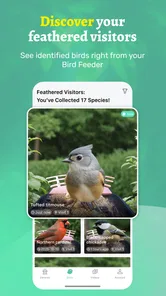
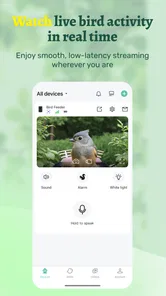
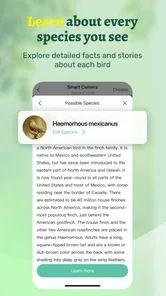
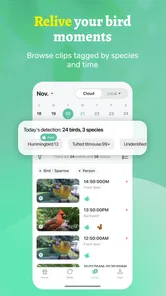
Analysis by Reviewed
I installed Vico Nature: Smart Nature View because I wanted a simple way to pay closer attention to birds around my home without turning the hobby into a complicated research project. It is a free tools app from VicoTech, built around seeing and recording birds whether I am at home or somewhere else. That basic purpose sounds modest, but it gives the app a useful place in a birdwatcher’s routine: it can sit between noticing a bird and keeping a reliable personal record of the moment.
My overall impression is that this is best understood as a lightweight companion for observation, not a complete replacement for specialist birding software. The appeal is its directness. I can open it when something catches my attention, look back at what I have recorded, and keep my interest in local nature organized. The experience is more valuable when I use it consistently rather than expecting one short session to reveal everything the app can offer.
From a sudden sighting to a useful record
I find that a memorable sighting becomes more useful when I decide what I want to remember before the details fade: the place, the bird’s appearance, or simply the fact that it returned. That small choice can keep a quick entry from becoming a vague note later. It also makes the next step—building a reliable record over time—feel manageable rather than like extra paperwork.
The starting condition matters more than the app
The most realistic way to use Vico Nature begins with an ordinary situation: I am near a window, walking through a park, or visiting a place away from home, and I notice a bird before I have time to prepare. In that moment, the main challenge is not finding an advanced feature. It is preserving enough information before the sighting disappears. A bird may move behind a branch, fly away, or become difficult to distinguish from another species.
That is where the app’s focus on seeing and recording birds makes sense. I can treat it as a quick landing place for observations instead of relying on memory, a paper notebook, or scattered photos in my phone gallery. The important habit is to record the sighting soon after it happens. Waiting until later makes small details less dependable, especially when several birds were seen during the same walk.
I found it helpful to decide what I am trying to capture before opening the app. If the goal is simply to remember that a bird appeared in the garden, a brief record may be enough. If I am comparing visits to the same area, I need to be more disciplined about keeping observations separate. This distinction is easy to overlook, but it changes whether the app becomes a meaningful log or just another place where isolated notes accumulate.
A practical step-by-step flow
My preferred workflow is deliberately short. First, I open the app while the sighting is still fresh. Next, I review the bird information available through the app and record the observation in a way that I can understand later. Finally, I return to the saved record when I want to compare what I have seen at home with what I noticed while away. The strength of this approach is not complexity; it is reducing the distance between seeing and saving.
More From Our News Desk

 Instagram
Instagram’s Power Comes From Its Place in Your Phone
A close look at how Instagram turns Meta’s reach, recommendation systems and everyday camera habits into durable platform power—and what that costs users.

 Gmail
GmailGmail in a Busy Inbox: Who Benefits Most?
From first account to crowded workday, Gmail earns its place through dependable search and flexible sorting—but its best fit depends on how much inbox maintenance you can tolerate.

 Prime Video
Switching to Prime Video: What Changes in Your Viewing Routine
Prime Video can make a compelling second home for streaming, but switching means learning a different catalog, rental layer, and route from browsing to playback.

 Universal TV Remote Control
Universal TV Remote Control Works Best as a Reliable Backup
A phone remote earns its place through quick setup and reliable habits. Here is how to get more from Universal TV Remote Control—and where its limits show.

 Weather - By Xiaomi
Weather by Xiaomi Review: Clear at a Glance, Less Clear Up Close
Xiaomi’s weather app makes everyday forecasts quick to scan, but its calm surface can leave useful details and recovery paths harder to find than they should be.

 X
XX Under Pressure: Can It Recover When Posting Goes Wrong?
A resilience-focused review of X, examining setup, mistaken posts, interruptions, weak connections, and the gaps that matter when recovery needs to be dependable.
Latest News



For a beginner, that sequence is less intimidating than starting with a large database or a highly technical identification tool. I do not have to begin with a long-term project. I can use one sighting as a test, then decide whether keeping records adds value. In my experience, this makes the app easier to approach than a conventional notebook when I am already carrying my phone and want the record to stay connected to the rest of my digital routine.
A useful tip is to keep the observation honest when identification is uncertain. I would rather save a cautious note about what I saw than force a confident label that I may later regret. Vico Nature works better as a record of personal observation than as a tool that encourages me to turn every brief glimpse into a definitive conclusion. That is an important trade-off for anyone who enjoys accuracy more than speed.
Another practical habit is to review records after a few outings instead of only adding new ones. Looking back can reveal patterns in my own attention: perhaps I record birds near home but forget to record them while travelling, or perhaps I notice familiar species and overlook less obvious visitors. The review stage turns the app from a capture button into a small feedback loop. It helps me improve how I observe, not merely how I store observations.
What happens when the record moves to someone else
The handoff in this workflow is usually from the real world to the phone, and then from the phone back to my own memory. That sounds simple, but it introduces friction. A sighting is visual and temporary, while a saved record is structured and permanent enough to influence what I believe I saw. I need to slow down for a moment and make sure the entry reflects the actual observation rather than a guess made under pressure.
This also affects shared birdwatching. If I am with a friend or family member, one person may notice the bird while another handles the phone. In that situation, the app becomes a shared reference point, but the quality of the record depends on communication between us. I would confirm the location in ordinary language, distinguish a bird that was seen from one that was only suspected, and avoid treating the app as an authority that settles every disagreement automatically.
For a parent introducing a child to birdwatching, this handoff can be especially useful. The child can focus on spotting movement and describing colors, while the adult helps preserve the observation. Later, the saved record can become a prompt for another walk. The app does not need to turn the activity into a lesson plan; it simply gives the family a way to keep the child’s curiosity from disappearing after the bird flies away.
Home use and away-from-home use are different
At home, Vico Nature fits naturally into repeated observation. A window, balcony, yard, or nearby street can become a familiar starting point. Because the setting is stable, I can pay attention to changes in what appears there rather than constantly learning a new environment. The app is useful here as a personal history of small encounters that might otherwise feel too ordinary to document.
When I am away, the priority changes. I am less interested in building a detailed picture of one familiar place and more interested in preserving context before the trip becomes a blur. A short visit to a park or a different neighborhood may produce only a few memorable sightings, so recording them promptly matters. The app’s ability to support observations at home or away gives it a broader role than a garden-only log.
The trade-off is that a mobile workflow can tempt me to focus on the screen when I should be watching the surroundings. I would not keep the app open continuously during a walk. I use it after the sighting, then put the phone away. That approach protects the main pleasure of birdwatching: being present enough to notice movement, sound, and behavior that no record can fully reproduce.
Where the app sits beside usual alternatives
The usual alternatives each solve part of the problem. A paper notebook is flexible and distraction-free, but it can be forgotten at home and is harder to search later. A phone’s camera preserves visual evidence, but a gallery quickly becomes a pile of images without a clear observation trail. A general notes app is adaptable, although it requires me to design my own structure. Specialist birding services may be better for people who want deeper identification guidance, community interaction, or more formal tracking.
Vico Nature appeals to me when I want something more focused than general notes without committing to a heavyweight birding system. Its position in the tools category is revealing: I see it as an aid for a real activity rather than the activity itself. It supports a habit, but it does not remove the need for observation, judgment, and a little organization from the user.
The key trade-off is simplicity versus depth. Someone who wants a quick, approachable way to record birds may appreciate the narrower purpose. Someone who expects a complete scientific archive, extensive social functions, or a highly specialized identification workflow should compare it carefully with dedicated alternatives before making it their main tool.
The result after using it consistently
The most satisfying outcome is not a single impressive entry. It is the gradual change in how I pay attention. Once I know I can record a sighting, I become more likely to notice repeat visitors, compare familiar locations, and remember the details of a walk. The app gives those moments a little more weight without requiring me to treat every outing as a formal survey.
For a casual user, that may be enough. I can open the app when I want to preserve a memory, then return weeks later and see that my interest has a shape. For a more committed observer, the value depends on consistency. The app cannot create a useful personal record from occasional, vague entries. The outcome improves when I use the same care each time and separate confirmed observations from uncertain impressions.
One non-obvious benefit is that the app can help me decide what to learn next. If I repeatedly record birds that I cannot confidently distinguish, that points to a knowledge gap. I can then study those birds outside the app and use future outings to test whether I recognize them more accurately. In that sense, the record becomes a learning checklist rather than a passive archive.
Where the flow breaks down
The workflow is not frictionless. A fast-moving bird may vanish before I can make a useful record, and a poor view can leave too little information for a confident identification. No app can recover details I never saw. Vico Nature is therefore less suitable for users who expect the software to do all the observational work or transform every uncertain glimpse into a dependable result.
There is also a difference between recording a bird and understanding a sighting. A record may remind me that I saw something in a particular moment, but it does not automatically replace personal field notes, careful comparison, or specialist guidance. If my goal is formal study, detailed ecological analysis, or a large collaborative project, I would look for a more specialized solution. This app makes more sense as a practical starting point or companion.
The payment model is worth noticing before installing. The app is free to start, while in-app purchases range from under a dollar to almost one hundred dollars per item. That wide range means I would check the purchase screen carefully and avoid assuming that every useful capability is included at no cost. For someone who only wants a basic personal record, the free entry point may be attractive; for someone planning intensive use, the possible spending deserves attention.
Device compatibility is also straightforward but important: the app requires Android 7.0 or later. That covers many older Android devices, though anyone using an especially old phone should check the operating system before planning a birdwatching trip around it. The current release is version 1.1.0, so I would keep expectations realistic and judge it as a focused, developing tool rather than a mature platform with every possible birding workflow.
Who will get the most from it
I would recommend Vico Nature to someone who is beginning to notice birds and wants a dedicated place to keep those moments. It is also a good fit for a casual observer who moves between a home garden and local walks, or for a family that wants to make birdwatching more memorable without carrying a notebook. The Everyone age rating makes it approachable for a broad audience, although younger users may still benefit from an adult helping with careful recording.
I would be more cautious recommending it as the only app for an experienced birder with demanding cataloging needs. If detailed metadata, advanced identification, community validation, or formal reporting is central to your routine, a specialist alternative may serve you better. Vico Nature is strongest when the desired outcome is simple: notice a bird, preserve the observation, and make it easier to remember what happened.
My final view after the complete workflow
After following the process from a sudden sighting to a saved record and then reviewing the result, I see Vico Nature: Smart Nature View as a focused tool for turning casual encounters into a personal birdwatching habit. VicoTech has kept the central idea clear, and the app’s free starting point lowers the barrier for people who are curious but not yet committed to a complex system.
Its limitations are part of the same design choice that makes it approachable. It does not eliminate uncertainty, replace careful observation, or automatically become a complete field journal. I would use it when I want a convenient bridge between the world outside and a record I can revisit later. I would choose something more specialized when my needs move beyond that bridge.
The app has an average rating of 4.1 from around 500 ratings, with more than 200 written reviews, and it has passed the 100K-plus install mark. Those figures suggest that it has found an audience, but my recommendation is based more on the workflow than on popularity: if you regularly say, “I wish I had remembered that bird,” this is the kind of focused tool worth trying. If you already maintain a detailed birding system and need advanced depth, it may be better as a small companion than as your main record.
Vico Nature: Smart Nature View Frequently Asked Questions
Who develops Vico Nature: Smart Nature View, and what does it focus on?
Vico Nature: Smart Nature View is a Tools app developed by VicoTech. Its focus is seeing and recording birds at home or away, so it may suit people who want a nature-related activity they can access through a mobile device. The app is free to download, and its content rating is Everyone. Check that the app is compatible with your device before installing it.
What is Vico Nature: Smart Nature View?
Vico Nature: Smart Nature View is an app designed to help users observe and explore the natural world through their mobile device. It presents nature-focused information and visual content in a convenient format, making it useful for people who enjoy plants, landscapes, wildlife, or outdoor discovery. Before downloading, users should check the store description and screenshots to confirm which features are available in their region and on their specific device.
How does Vico Nature: Smart Nature View work?
The app appears to combine a nature-oriented viewing experience with smart mobile features, allowing users to interact with or learn from natural scenes using their phone or tablet. Depending on the version, some functions may require access to the camera, location services, internet connection, or other device permissions. It is worth reviewing the permission requests during installation and disabling any access that is not necessary for the way you plan to use the application.
Is Vico Nature: Smart Nature View free to download and use?
Vico Nature: Smart Nature View is free to download, but users should not assume that every feature is included without charge. In-app purchases are available, with listed prices ranging from $0.99 to $99.99 per item. Before downloading, read the current Google Play or App Store listing carefully, especially the sections covering in-app purchases and subscriptions, since pricing and available features can change with future updates.
Does Vico Nature: Smart Nature View require an internet connection?
The basic viewing experience may work in some situations without a constant connection, but online access could be needed for downloading content, updating nature information, loading images, using location-based functions, or accessing additional services. Performance can also depend on the speed and stability of your connection. If you intend to use the app while hiking or traveling, test its offline behavior first and avoid assuming that all content will remain available without mobile data or Wi-Fi.
Pros
- Calming nature scenes can help create a relaxing atmosphere at home.
- Simple controls make it easy to start viewing without a lengthy setup.
- Useful as background ambience during meditation
- work
- or quiet breaks.
- Nature-focused visuals offer a pleasant alternative to standard wallpapers.
- Suitable for users who want a low-effort way to enjoy outdoor scenery indoors.
Cons
- Video quality and scene variety may depend on the selected content or device.
- Continuous playback can consume noticeable battery on phones and tablets.
- A larger screen provides a much better experience than a small smartphone display.
- Some users may find the experience too passive compared with interactive nature apps.
- Availability of certain viewing features may vary between Android and iOS versions.









