

Verily Me
- 95.00
- 4.5
- Installs
- 100.00K
- Price
- Free

Screenshots
Analysis by Reviewed
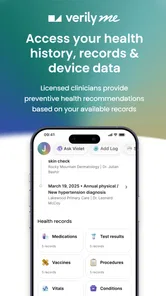
I found Verily Me most useful when I stopped thinking of it as a general wellness app and treated it as a personal health workspace. That distinction matters in a household, especially when several people use the same tablet, share a phone occasionally, or coordinate appointments and health tasks without wanting everyone to see everything. Developed by Verily Health Inc., this free medical app is built around the idea of bringing health-related activity into one place. In my experience, its value comes less from flashy motivation and more from having a single point of reference.
The app’s store summary is “One app to unlock your health,” while its short description is simply “Verily Me.” I would not read those phrases as a promise that the app replaces a doctor, a medical record system, or a specialist service. I see it instead as a companion for people who want a more organized way to engage with their health information and routines. That makes it potentially helpful, but also means the quality of the experience depends on how clearly you define what you expect it to do.
How Verily Me fits into a shared household
A realistic example is a home where one person is managing their own appointments and health goals while another family member occasionally borrows the device. The practical question is not only whether the app is useful; it is whether the person using it can keep their health activity separate from someone else’s. I would avoid treating a shared device as a shared health account. Each person should approach the app as an individual space, using their own account details wherever the app asks for them and signing out or switching users when appropriate.
That boundary is especially important because medical information is more sensitive than a shopping list or a shared calendar. A partner may help with reminders or transportation, but that does not automatically mean they should have unrestricted access to personal health details. I found it helpful to decide in advance which tasks are genuinely collaborative and which should remain private. For example, coordinating an appointment time is a household task; reading private notes or personal health information is not necessarily one.
Verily Me can make conversations more orderly because it gives the user a place to return to instead of scattering health-related details across messages, paper notes, and unrelated apps. Still, I would not install it on a family tablet and assume that the device itself provides a meaningful privacy boundary. The safer habit is to use the device’s own user profile, screen lock, and account controls, then treat the app as personal even when the hardware is shared.
There is also a subtle household advantage to having one person maintain their own information consistently. Family members often become informal administrators when someone is busy, unwell, or overwhelmed. A central health app may reduce the number of times they need to ask, “Where did you put that?” But that only works if the primary user remains in control of the account and decides what to share. I would use Verily Me to support coordination, not to turn another household member into an automatic administrator.
Start by defining the account boundary
My first recommendation is simple: set up the app for one person at a time and avoid creating a casual “family” identity just because the device is shared. A health profile should represent the person whose information is being managed. If two adults use the same phone, I would keep their app sessions distinct and avoid entering one person’s details while logged into the other person’s account.
More From Our News Desk

 Instagram
Instagram’s Power Comes From Its Place in Your Phone
A close look at how Instagram turns Meta’s reach, recommendation systems and everyday camera habits into durable platform power—and what that costs users.

 Gmail
GmailGmail in a Busy Inbox: Who Benefits Most?
From first account to crowded workday, Gmail earns its place through dependable search and flexible sorting—but its best fit depends on how much inbox maintenance you can tolerate.

 Prime Video
Switching to Prime Video: What Changes in Your Viewing Routine
Prime Video can make a compelling second home for streaming, but switching means learning a different catalog, rental layer, and route from browsing to playback.

 Universal TV Remote Control
Universal TV Remote Control Works Best as a Reliable Backup
A phone remote earns its place through quick setup and reliable habits. Here is how to get more from Universal TV Remote Control—and where its limits show.

 Weather - By Xiaomi
Weather by Xiaomi Review: Clear at a Glance, Less Clear Up Close
Xiaomi’s weather app makes everyday forecasts quick to scan, but its calm surface can leave useful details and recovery paths harder to find than they should be.

 X
XX Under Pressure: Can It Recover When Posting Goes Wrong?
A resilience-focused review of X, examining setup, mistaken posts, interruptions, weak connections, and the gaps that matter when recovery needs to be dependable.
Latest News



This sounds obvious, but shared-device mistakes usually happen during rushed moments. Someone opens the app to check something, another person hands over the phone, and information gets entered under the wrong profile. The best prevention is a short routine: check whose account is active, complete the task, then close the session or return the device to its protected user profile. That small pause is more valuable than trying to untangle mixed information later.
Parents and caregivers should also be careful not to blur assistance with ownership. Helping an older relative navigate a medical app can be worthwhile, especially if reading small text or remembering steps is difficult. However, the relative should understand whose account is open and what is being entered. I would explain each action as I go, rather than quietly managing everything on their behalf. That preserves trust and makes it easier for them to use the app independently later.
Because this is a medical app, I would also keep the phone’s general security in good shape before relying on it. A strong device passcode, current operating-system security, and cautious handling of notifications are sensible foundations. I would not photograph sensitive screens for convenience or leave the app open on a coffee table. These are not shortcomings unique to Verily Me; they are part of using any digital health tool on a device that other people can reach.
The app is available for devices running Android 8.0 or later, which gives it a reasonably broad technical reach. I would still check the device before planning a household workflow around it. An older phone may support installation but offer a less comfortable experience if its screen, storage, or general performance is limited. For a caregiver helping another person, a larger screen can make setup easier, but that convenience should not come at the cost of leaving a personal session visible.
Use it as a coordination layer, not a replacement for care
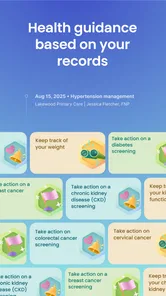
One of the strongest ways to use Verily Me is as a coordination layer between personal routines and real-world conversations. Before a medical visit, I would spend a few minutes reviewing what I have entered or tracked, then write down the specific questions I want to ask. The app can help me arrive more prepared, but the clinician remains the right person to interpret symptoms, decide on treatment, or explain a diagnosis.
This distinction prevents a common mistake with health apps: assuming that organized information is automatically medically complete. A tidy record can still miss context, and a health trend can be misunderstood without professional guidance. I would use the app to notice what I need to discuss, not to self-diagnose from isolated details. If something feels urgent or serious, I would contact an appropriate medical service rather than waiting for an app workflow.
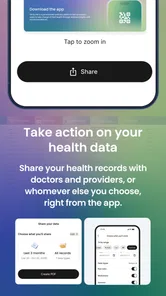
For households, coordination works best when each person has a defined role. One person might keep track of their own information, another might help with scheduling, and a third might provide transportation. Verily Me can sit in the middle of that arrangement, but it should not become an excuse to share every detail with everyone. I prefer a “minimum necessary” approach: share the information needed for the task and keep the rest within the account owner’s control.
A useful routine is to review health tasks at a calm time instead of during a crisis. If I know an appointment is coming, I can prepare questions, check what information I want to discuss, and tell a family member only what they need to help. This makes the app more useful than opening it only when something has already gone wrong. It also reduces the pressure on a caregiver who might otherwise be expected to remember everything from memory.
Another practical trade-off is consistency. A personal health workspace is only as helpful as the information I actually maintain. I would rather enter a small amount of accurate, relevant information regularly than create a large, incomplete record once and never return. The app may encourage a more organized habit, but it cannot supply the discipline for me. That is why I see it as a tool for follow-through rather than a passive solution.
What the mature age context means at home
Verily Me carries a Mature 17+ content rating, so I would not treat it as a children’s health app or hand it to a young teenager without adult judgment. The rating is a useful reminder that medical information involves adult privacy, sensitive subjects, and decisions that should be handled with care. In a household with children, I would keep the app associated with the adult’s protected profile rather than placing it in a shared space where a child can browse it casually.
That does not mean a young person can never be involved in their own health management. It means the arrangement should be deliberate. A parent or guardian can decide what level of assistance is appropriate, explain why information is private, and make sure the child knows when to speak with a trusted adult or clinician. I would not use an adult-oriented medical app as a substitute for age-appropriate professional support.
Trust becomes especially important when one person helps another. If I were assisting a parent, partner, or relative, I would ask permission before opening the app and say what I intend to do. I would also avoid reading unrelated information while helping with one task. That habit may seem overly formal in a family, but health information can affect relationships, finances, and personal decisions. Clear consent protects both sides from awkward misunderstandings.
For older adults, the app may be appealing if it reduces the number of places they need to check. The challenge is not necessarily the concept but the setup and ongoing confidence. I would sit beside the person during the first sessions, make sure they know how to recognize their own account, and let them perform the steps themselves. If they cannot comfortably navigate it, a paper backup or direct communication with a clinic may remain the better option.
I would also be cautious about using Verily Me for someone who does not understand what is being collected or why. A health app should not be installed simply because a family member finds it convenient. The person whose information is involved deserves a clear explanation and a meaningful choice. In my view, that is one of the most important differences between helpful household support and unwanted monitoring.
Where it stands beside familiar alternatives
The usual alternatives in this category are a clinic’s patient portal, a general notes app, a calendar, a paper folder, or a device’s built-in health tools. Each has a different strength. A patient portal is usually the natural place for official messages and clinical records. A calendar is excellent for appointments. A notes app is flexible. Paper is easy to understand and does not depend on battery life. Verily Me is most interesting when I want a health-focused space rather than a collection of unrelated tools.
That focus can reduce mental clutter, but it does not make the app automatically superior. If my main need is to read a lab result sent by a clinic, I would start with the clinic’s own portal. If I only need an appointment reminder, a calendar may be faster. If a relative is uncomfortable with apps, a clearly labeled paper folder might produce better results. The reason to choose Verily Me is the desire to bring personal health activity into a dedicated environment, not the assumption that one app can replace every other method.
Compared with a general wellness tracker, a medical app feels more appropriate for users who want health management to remain the central purpose. Compared with a clinical portal, it may feel more personal and less tied to one provider. That difference can be useful for people who deal with more than one part of the healthcare system. At the same time, I would not assume that a personal health workspace has the same authority or completeness as a provider’s official record.
For a shared household, the comparison is even more specific. A family calendar is better for showing everyone when an appointment happens, while Verily Me is better kept for the individual’s health context. I would use both only when the boundary is clear: put the appointment logistics in the shared calendar and keep sensitive details in the personal app. This division avoids forcing one tool to serve two conflicting purposes.
Small habits that make the app more useful
The first non-obvious tip is to separate preparation from sharing. I would review my own information privately before deciding what a family member needs to know. That prevents an accidental overshare during a rushed conversation and makes coordination more precise. Instead of saying, “You can look at the app,” I would explain the exact task: confirm the time, help prepare a question, or accompany me to an appointment.
The second is to create a household backup plan. Digital tools are convenient, but a phone can be lost, a battery can run out, or an account can become temporarily inaccessible. For important appointments and contact details, I would keep a minimal offline note that does not reproduce every sensitive detail. The goal is continuity during a practical problem, not duplication of the entire health profile.
The third is to review the app after a major change in household roles. If a partner becomes a caregiver, if an older relative begins managing their own appointments, or if a child starts handling more of their health routine, the account boundaries should be discussed again. What worked when everyone was independent may not work when someone needs assistance. Verily Me can support a new routine, but the people involved still need to agree on access and responsibility.
A fourth useful habit is to avoid entering information while distracted by conversation. Shared-device use encourages multitasking, and that is exactly when a wrong account or incomplete entry can slip through. I would finish one health task before handing the phone to someone else. This takes a little longer but creates a cleaner record and reduces the chance of exposing something unintentionally.
Finally, I would judge the app by whether it reduces friction over several weeks, not by how impressive the first opening feels. The initial setup may seem worthwhile, but the real test is whether I can return to it naturally, find what matters, and use it to prepare for real conversations. If the app becomes another place I forget to check, then a simpler method may serve me better.
Who should choose it, and who should skip it
I think Verily Me is a good fit for an adult who wants a dedicated medical app and is willing to maintain their own information. It also makes sense for a household where one person needs occasional help but wants to remain the owner of their health decisions. The free price removes one obvious barrier to trying it, and its presence on Android 8.0 and later makes it accessible to many existing devices.
I would be more hesitant to recommend it to someone looking for emergency guidance, a complete replacement for a patient portal, or a tool that a whole family can freely share. It is also not my first choice for a child-focused experience, given the Mature 17+ rating. People who strongly prefer paper, dislike account-based services, or rarely need to organize health information may gain little from adding another app.
The app has a 4.5 average from around 673 ratings, with over 100K installs, so it has attracted a meaningful user base without being something I would describe as universal. Its current version is 3.8.13, and that gives me some confidence that the product is being maintained as an active app rather than abandoned software. Even so, popularity does not remove the need to decide whether its approach matches my privacy expectations and daily habits.
My household verdict
After using Verily Me as a personal health workspace, I would recommend it to a friend who wants more structure around their own medical information and routines, especially if they sometimes coordinate help from a partner or relative. I would emphasize one condition: keep the account personal, even when the device is shared. That single decision shapes whether the app feels organized and respectful or confusing and intrusive.
Its best household role is quiet coordination. I can prepare for a conversation, organize what I need to discuss, and share only the practical details another person needs. It is less suitable as a communal dashboard, a child’s health tool, or a substitute for clinical care. Those limits do not make it weak; they define where it belongs.
My final view is positive but measured. Verily Me is free, focused on medical use, and developed by Verily Health Inc., yet its usefulness depends on thoughtful setup rather than simply installing it. If you protect account boundaries, involve relatives with consent, and compare it honestly with a patient portal, calendar, notes app, or paper record, it can become a sensible part of a personal health routine. If your priority is shared access for everyone in the home, I would choose a dedicated coordination tool for logistics and keep sensitive health information separate.
Verily Me Frequently Asked Questions
Who develops Verily Me, and what kind of app is it?
Verily Me is a medical app developed by Verily Health Inc. Its short description is simply “Verily Me,” while its store summary presents it as “One app to unlock your health.” These details can help you identify the app before installing it and distinguish it from other products with similar names. It has an average rating of 4.5 from over 600 ratings.
What is Verily Me, and what can I use it for?
Verily Me is designed to help users present themselves online in a more authentic and personal way. Depending on the available features, you can create a profile, share information about your interests, and connect with other people or communities. Before downloading, review the app’s current description and supported features, since functionality may differ between Android and iOS versions or change with future updates.
Is Verily Me free to download and use?
Verily Me is free to download. Before creating an account, check the pricing details shown in the Google Play Store or Apple App Store so you understand any costs associated with using it. Reviewing the app’s current terms before you begin can help you make an informed decision about whether it meets your needs.
Does Verily Me require an account or personal information?
Verily Me may ask you to create an account and provide details such as an email address, username, profile information, or other data needed to personalize the experience. Before signing up, read the privacy policy and consider which information you want to share publicly. Avoid posting sensitive details, and check whether the app lets you control profile visibility, permissions, and data deletion.
Is Verily Me safe and suitable for all users?
Safety depends on how the app handles profiles, communication, content moderation, and personal data. If Verily Me includes social or community features, users should be cautious when interacting with strangers and report suspicious behavior through the available tools. Verily Me is rated Mature 17+, so parents should check the app’s age rating and privacy settings before allowing younger users to install it or create a profile.
Pros
- Simple way to explore personality and self-discovery content.
- Short activities make it easy to use during brief free moments.
- Can encourage reflection on personal habits and preferences.
- Clean
- approachable design is suitable for casual users.
- May help users find common interests with friends or partners.
Cons
- Some insights may feel broad rather than deeply personalized.
- Results can depend heavily on the accuracy of your answers.
- Limited value for users seeking professional psychological guidance.
- Repeated activities may become less engaging over time.
- Privacy details should be checked before sharing personal information.











