

VectorMotion - Design/Animate
- 108.00
- 3.2
- Installs
- 100.00K
- Price
- Free

Screenshots
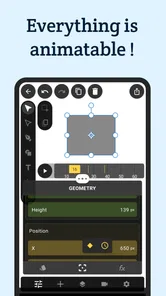
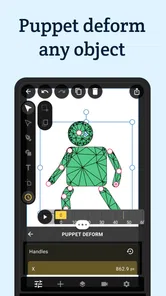
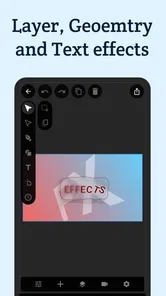
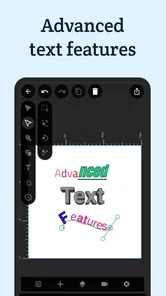
Analysis by Reviewed
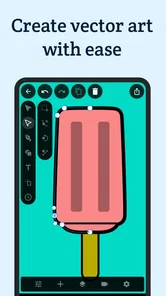
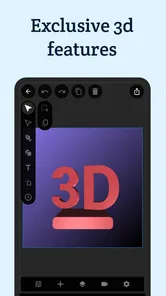
I approached VectorMotion as a compact design workspace rather than just another drawing app, and that distinction matters. Its promise is to bring vector creation and animation into one place, which makes it appealing when I want to move from a clean graphic idea to something with motion without constantly switching tools. After spending time with it, my view is positive but measured: it is a useful free option for experimenting, learning, and producing lightweight visual work, yet it is not a complete replacement for a mature desktop design suite.
That balance is the main thing I would tell a friend. The app is most interesting when a project needs both crisp shapes and movement. If I am sketching a logo concept, preparing a social graphic, or testing a simple animated visual, keeping those steps together feels more convenient than exporting between separate vector and animation apps. The trade-off is that a mobile interface can make detailed editing slower, especially when a project becomes crowded or requires very exact control.
How VectorMotion feels in everyday creative work
VectorMotion is an Art & Design app from ReMotion Apps, available free for users who want to explore vector-based artwork and animation on a mobile device. The age rating is Everyone, and the app runs on Android starting with version 6.0, so its technical reach is broader than many newer creative tools. It was released on October 4, 2022, and the current version is 1.2.7.
I like the basic idea because vector work is often about structure rather than brush texture. Shapes, lines, curves, and repeated elements can be adjusted without treating every mark as a fixed collection of pixels. That is useful for icons, diagrams, lettering experiments, interface concepts, and simple illustrations. Adding animation to that kind of work gives the app a more practical identity than a basic sketchpad.
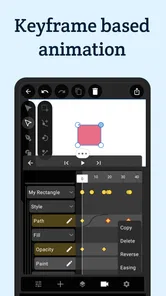
The first strong point is the relationship between design and motion. In a typical mobile workflow, I might create artwork in one app, save it, open another app for animation, discover that the export does not behave as expected, and then return to the original file for corrections. A combined workspace can reduce that back-and-forth. Even when the final result is modest, the shorter path from idea to moving preview is valuable.
A realistic example would be preparing a short announcement for a community group. I could assemble a simple title, a few geometric accents, and a visual transition, then review the composition as motion instead of judging only a still image. That changes design decisions early. A shape that looks balanced in a static layout may feel too distracting once it moves, while a plain background element may work well as a subtle animated layer.
For that kind of task, I would use the app in stages. I would begin with a small canvas and only the essential elements, establish the visual hierarchy, and then introduce movement one object at a time. This is more reliable than trying to animate a complicated composition immediately. On a phone, reducing clutter is not just an aesthetic choice; it also makes selecting and editing the right object less frustrating.
More From Our News Desk

 Gmail
GmailGmail in a Busy Inbox: Who Benefits Most?
From first account to crowded workday, Gmail earns its place through dependable search and flexible sorting—but its best fit depends on how much inbox maintenance you can tolerate.

 Prime Video
Switching to Prime Video: What Changes in Your Viewing Routine
Prime Video can make a compelling second home for streaming, but switching means learning a different catalog, rental layer, and route from browsing to playback.

 Universal TV Remote Control
Universal TV Remote Control Works Best as a Reliable Backup
A phone remote earns its place through quick setup and reliable habits. Here is how to get more from Universal TV Remote Control—and where its limits show.

 Weather - By Xiaomi
Weather by Xiaomi Review: Clear at a Glance, Less Clear Up Close
Xiaomi’s weather app makes everyday forecasts quick to scan, but its calm surface can leave useful details and recovery paths harder to find than they should be.

 X
XX Under Pressure: Can It Recover When Posting Goes Wrong?
A resilience-focused review of X, examining setup, mistaken posts, interruptions, weak connections, and the gaps that matter when recovery needs to be dependable.

 Clash of Clans
Clash of Clans Is Won Between the Battles
Its raids are quick; its community is a long-term project of coordination, teaching, rivalry, and shared responsibility—with all the friction that entails.
Latest News



Another useful workflow is to treat the app as a planning tool even when the final production will happen elsewhere. I can test a visual direction, compare a few arrangements, and decide whether an idea has enough energy before investing time in a larger desktop project. That makes VectorMotion worthwhile for early concepts, especially when inspiration arrives away from a computer.
Where the combined workflow earns its place
The app makes the most sense for creators who value immediacy. A student learning the difference between vector construction and ordinary painting can use it as a hands-on environment. A social media creator can explore a moving badge or title treatment. A hobbyist can build a small animated illustration without first learning several unrelated programs.
I also see value for people who think visually but do not want to begin with a blank professional interface full of specialized panels. A focused mobile tool can encourage experimentation. I can duplicate an idea, simplify it, try a different arrangement, and judge the result quickly. That low-pressure process is one of the app’s better qualities.
Its free price strengthens that role. Someone curious about vector animation can try the workflow without making an immediate financial commitment. That does not automatically make the app the best choice for serious production, but it lowers the barrier to discovering whether this type of design suits them.
The audience size also suggests that the app has found some traction: it has passed one hundred thousand installs, while its average rating sits at 3.2 from around one thousand three hundred ratings. I read that combination as a reason to approach it with realistic expectations. There is enough interest to make it worth exploring, but the rating indicates that the experience may not feel equally polished for everyone.
I would not use that rating as a final judgment by itself. Creative apps are particularly sensitive to device size, editing habits, project complexity, and expectations formed by desktop software. Still, it reinforces my impression that VectorMotion is better understood as an accessible mobile workspace than as a flawless professional replacement.
The practical strengths I noticed
The strongest advantage is conceptual simplicity: design and animation belong to the same creative process here. I do not have to think of a still image and its motion as completely separate projects. That encourages me to make animation part of the design decision rather than an afterthought.
A second strength is the suitability of vector thinking for reusable visual elements. If I am creating a symbol, badge, diagram, or geometric illustration, I want clean edges and controlled proportions. Vector-based construction is a better fit than painting every area manually. It also makes experimentation more deliberate because I can focus on relationships between shapes rather than brush behavior.
A third strength is portability of thought. A phone is always nearby, so the app can be useful during a commute, between classes, or while waiting for an appointment. I would not choose a small screen for every detailed project, but I appreciate being able to capture and develop an idea before it disappears. That is a genuine advantage over workflows that require a full computer from the beginning.
One non-obvious benefit is that animation can expose weak composition earlier than a static preview. When I test a movement, I notice whether the eye knows where to look, whether the timing feels unnecessarily busy, and whether an element has enough contrast to remain readable. Even a simple motion test can reveal design problems that would otherwise survive until export.
My tip is to keep early projects intentionally small. Use a limited number of elements, name or organize them consistently if the interface allows it, and preview frequently. Mobile editing becomes much easier when I avoid building a dense scene before understanding how each part behaves. This approach also makes it easier to isolate whether a problem comes from the artwork or from the animation.
Where the experience becomes less comfortable
The same compactness that makes VectorMotion approachable can become a limitation. Precise work is harder on a phone than on a large screen with a mouse, keyboard shortcuts, and room for multiple panels. Aligning small objects, selecting the correct layer in a busy composition, or adjusting a curve with confidence can require patience.
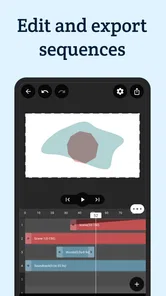
I would be cautious about using it for brand assets that demand exact specifications, complex illustrations with many objects, or production work that must pass through a strict professional pipeline. In those situations, a desktop vector editor usually offers better control, clearer organization, and more efficient revision. A dedicated animation program may also be preferable when timing, sequencing, and export control are the central concern.
The app’s broad description can create an expectation that it will cover every design and animation need equally well. In practice, I would interpret that promise more modestly. It is a unified place for exploring both areas, not proof that every specialized feature found in separate professional tools is present at the same depth.
Another point of friction is the learning curve created by combining two disciplines. A newcomer may understand how to draw a shape but feel less certain about turning that shape into convincing motion. The app can support experimentation, but it cannot replace practice in composition, timing, spacing, and visual hierarchy. I found that the quality of the result depends as much on restraint as on the available tools.
My practical workaround is to storyboard movement before editing. I decide which object should attract attention first, what should remain still, and where the eye should finish. This avoids the common mistake of animating every element simply because animation is available. Motion is most effective when it explains structure or adds emphasis.
I would also save versions at natural checkpoints rather than making many unrelated changes in one session. That habit is useful in any creative app, but it matters more on mobile because a small interface can make it easy to lose track of which adjustment caused a problem. A simple progression such as base layout, refined layout, and motion test keeps experimentation manageable.
Who should install it, and who should look elsewhere
I recommend VectorMotion to beginners who want a welcoming way to investigate vector design and animation together. It is also a good fit for students, hobbyists, and creators who need quick visual studies rather than a complete studio environment. If the goal is to make a simple animated graphic, test a concept, or learn how shape-based artwork behaves in motion, the free entry point is compelling.
It may suit a social content creator who works with short visual ideas and values speed over elaborate production controls. It can also help a designer collect mobile sketches before refining the strongest concept on a computer. In both cases, the app is valuable because it shortens the distance between a thought and a visible experiment.
I would skip it as a primary tool if I already depend on advanced desktop workflows, strict file handoffs, extensive typography controls, or highly detailed timeline editing. I would also choose a more specialized alternative when the project is primarily photo manipulation, natural-media painting, or complex character animation. VectorMotion’s focus is most convincing when the artwork is built from clean, structured forms and needs some movement.
The right comparison is not simply “this app versus a professional suite.” It is also “one combined mobile workspace versus several simpler apps.” For quick studies, VectorMotion can be more convenient than moving between separate tools. For large, exacting projects, separate specialized applications usually win because each one can devote more interface space and control to its particular job.
Before committing to a serious project, I would make a small test piece that resembles the intended final work. Try the shapes, attempt the kind of movement you need, and check whether editing on the device feels comfortable. This is a better test than judging the app with a generic doodle, because the real question is not whether it can produce something attractive; it is whether its workflow matches the way you work.
My final take after using it
VectorMotion is a worthwhile free experiment for mobile creators who want vector artwork and animation in the same creative space. Its clearest strength is the way it encourages me to judge a design as both an image and a moving composition. That makes it more useful than a basic drawing app for certain projects, particularly icons, geometric illustrations, visual studies, and lightweight animated content.
Its limitations are equally clear. A phone cannot offer the same precision and workspace as a desktop setup, and combining design with animation does not mean the app replaces every specialized alternative. The moderate average rating of 3.2 is consistent with my balanced view: there is a useful idea here, but users should approach it as an accessible tool with boundaries rather than an all-purpose professional suite.
For me, the best way to use it is deliberately: start with a small composition, keep movement purposeful, preview often, and move to a larger tool when the project demands exact control. If that matches your needs, I think ReMotion Apps has made a practical choice by putting these creative steps together. My recommendation is to try it for learning, planning, and compact animated designs, but not to depend on it blindly for complex production work.
With an Everyone rating, support for Android 6.0 and above, and no purchase price, it is easy to test without much risk. I would install it when I wanted to explore an idea immediately, especially one involving clean shapes and simple motion. I would keep a desktop editor in reserve for the final, demanding stages. That combination gives VectorMotion a clear and useful role: not the answer to every design problem, but a handy place to begin turning a visual idea into something that moves.
VectorMotion - Design/Animate Frequently Asked Questions
Can I use VectorMotion - Design/Animate on my device?
VectorMotion - Design/Animate is available for Android devices running Android 6.0 or later. The app is free and is categorized as Art & Design, with an Everyone content rating. Before downloading, check that your device meets the operating-system requirement and has enough available storage for your projects and any exports you create.
Who develops VectorMotion - Design/Animate, and what do users think of it?
VectorMotion - Design/Animate is developed by ReMotion Apps. It has an average rating of 3.2 from around 1,300 ratings, with 108 written reviews, and has reached over 100,000 installs. Those figures offer a general sense of its reception, but individual experiences can differ depending on what you want to create and how comfortable you are with mobile design and animation tools.
What is VectorMotion - Design/Animate used for?
VectorMotion - Design/Animate is a mobile design and animation app for creating vector-based graphics, animated illustrations, motion effects, and short visual compositions. It is aimed at users who want to work with shapes, paths, layers, colors, and keyframe-style animation directly on a mobile device. It can be useful for social media content, logos, presentations, animated icons, and creative experiments.
Is VectorMotion - Design/Animate suitable for beginners?
The app can be approachable for beginners who are willing to spend time learning its interface, although animation and vector design concepts may initially feel unfamiliar. Basic projects can usually be started with simple shapes, layers, and timeline controls, while more advanced results require practice with positioning, timing, paths, and transitions. Tutorials or experimentation are recommended before attempting complex animations.
Can I create professional-quality animations with VectorMotion - Design/Animate?
VectorMotion - Design/Animate can support polished and visually appealing projects, particularly for short animations, motion graphics, icons, illustrations, and lightweight promotional content. However, the final quality depends on your design skills, the complexity of the project, and the capabilities of your device. Users working on highly detailed productions may still prefer desktop software with broader editing, export, and asset-management tools.
Pros
- Intuitive timeline makes keyframe animation easy to learn.
- Supports smooth vector motion graphics for polished results.
- Useful templates speed up the creation of social media content.
- Projects can be refined precisely with layers and editing controls.
- Works well for designers seeking animation without complex software.
Cons
- Some advanced tools may require a paid subscription.
- Large projects can feel demanding on older mobile devices.
- Export options may be limited depending on the selected format.
- The interface can take time to master for first-time animators.
- Cloud or sharing features may depend on a stable internet connection.











