USPS MOBILE®
- 20.43K
- 4.7
- Installs
- 1.00M
- Price
- Free

Screenshots
Analysis by Reviewed
When I need to check a delivery or sort out an outgoing parcel, I’d rather go straight to the postal service handling it than dig through a collection of unrelated tools. That is where USPS MOBILE® makes sense: it puts USPS-focused tasks on my phone and is most useful when postal errands are a regular part of my week.
Free access, with a clear distinction
USPS Mobile is a free business app from the United States Postal Service®, and that makes it easy to try for occasional postal errands without paying for an app first. I’d think of that as free access to the app, not a promise that every postal service or mailing task is free. The useful question is whether its USPS tools match the job you need to do.
If you are deciding between this and a general delivery-tracking app, the distinction is simple: a broad tracker may be more convenient when you follow parcels from several carriers in one place, while USPS Mobile is the more direct choice when your task is specifically connected to USPS. For me, keeping the official postal tools close at hand is worthwhile when I regularly check USPS deliveries or prepare outgoing mail.
Practical postal tools for everyday routines
One of the things I love about the USPS MOBILE® app is that it brings all postal services right to your fingertips. I mean, who has time to stand in long queues at the post office these days? With this app, you can track packages, schedule pickups, and even order stamps without leaving your couch! It's like having a mini post office in your pocket, ready to cater to your whims at any given moment.
A practical way to use it is to handle postal jobs in one sitting: check a delivery, then take care of an outgoing package rather than switching between a carrier’s website, a notes app, and a separate reminder. That kind of continuity matters most when you mail things repeatedly. If you only need to locate a nearby post office or check one parcel once in a while, opening the app may be more effort than using a quick web search.
Getting around without making a small task complicated
I'm all about apps that are easy to use, and this one doesn’t disappoint. The interface is super intuitive, making it simple for even the least tech-savvy person to navigate. Everything is laid out nicely, so you won't find yourself playing hide and seek with the features. Plus, it’s pretty fast, which is a huge plus when you’re trying to get things done quickly.
One helpful habit is to keep the tracking number available before starting, especially if you are checking a parcel for someone else. It avoids stopping halfway through to search an email or a receipt. For household use, I’d also separate “checking a delivery” from “taking action on a delivery”: status information helps you plan, but it does not replace arranging a safe handoff or being available when a package needs attention.
More From Our News Desk

Weather by Xiaomi Review: Clear at a Glance, Less Clear Up Close

X Under Pressure: Can It Recover When Posting Goes Wrong?

Clash of Clans Is Won Between the Battles

Android Auto Makes the Case for Quieter Car Software

MobiOffice: Transforming Mobile Productivity with Seamless Integration

EA SPORTS FC™ Mobile Soccer: Redefining Mobile Sports Gaming
Tracking is most useful when it changes a decision
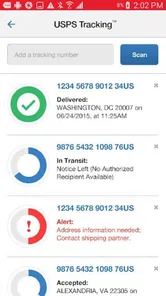
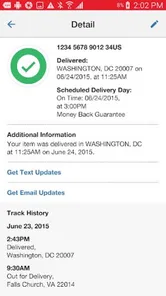
Tracking packages has never been easier. Just enter your tracking number and boom, you have real-time updates on your package's whereabouts. It's like having your own personal detective keeping tabs on your shipments. Whether it's something you ordered online or a gift from Grandma, you’ll always know exactly when it's going to arrive at your doorstep.
In an everyday scenario, I’d check a shipment before leaving for errands, then use its latest status to decide whether to stay nearby or head out. The trade-off is that tracking is only useful when the status is current and the number is at hand; it is not a guarantee that an estimated arrival will fit your schedule. If you are monitoring orders across multiple delivery companies, a multi-carrier tracker can be more convenient, though it may not offer the same direct USPS focus.
Preparing a pickup before you tap through
This feature is a game-changer, especially for those of us who send out packages regularly. You can schedule a pickup at your convenience, and the mail carrier will come right to your door to collect your package. It's especially handy during busy times or when you're just feeling a bit lazy (no judgment here!).
For a smoother routine, I’d prepare the parcel and its mailing details before arranging the pickup, rather than treating the app as a substitute for packing or labeling. That is particularly useful for a small home seller or someone sending gifts during a busy week: the app can make the handoff easier, but it does not remove the need to get the shipment ready. If you rarely mail packages, visiting a post office when you already have another errand may be simpler.
Using delivery alerts without letting them run your day
The app provides timely notifications about any changes or updates regarding your packages. You'll receive alerts for delivery statuses, so you're always in the loop. This means no more missed deliveries or having your package sent back because you weren’t home to receive it. You can plan your day better knowing exactly when your package will arrive.
I’d use alerts as prompts to check the current status, not as a reason to assume every delivery can be controlled from a phone. They are most valuable when a package matters enough that a change in progress should alter your plans. If you prefer not to receive frequent delivery updates, you can simply check tracking when needed and keep the app as an occasional tool.
Small workflows that make the app more useful
For a busy household, I’d make the person expecting a package responsible for keeping its tracking number somewhere easy to find, rather than asking everyone to search through separate order emails. That simple habit makes a quick status check genuinely quick, especially when a family member is handling errands for someone else. It also keeps the app in its proper role: a place to check USPS activity, not a substitute for knowing which order or recipient a number belongs to.
If I were preparing several outgoing parcels, I’d do the physical work first—pack each item, confirm its destination, and keep the parcels together—then use the app for the USPS-related steps. This order helps avoid the frustrating situation of starting an online task and discovering that the package itself is not ready. For someone who sells from home, the value is less about eliminating packing work and more about reducing unnecessary trips and keeping routine postal actions in one place.
There is also a useful distinction between convenience and certainty. A pickup request or tracking check can make planning easier, but I would still leave room for the ordinary uncertainty of a delivery schedule. If an item is time-sensitive, I would not build an entire day around an estimated status alone; I’d use the app as one input and make a backup plan where possible. That is a more realistic way to benefit from mobile postal tools without expecting them to control every part of a shipment.
Who will get the most value
This is a good fit for people who send USPS parcels often, track deliveries from the service, or want a single official place to handle common postal tasks. It is less compelling for someone who uses several carriers equally and mainly wants one combined feed, or for someone who rarely mails anything and is happy using a browser. The app is rated for Everyone, and its 4.7 average across around 62,000 ratings suggests many users find it useful, though my choice would still depend on how often USPS is part of my routine.
The app has more than a million installs and is currently at version 6.2.1, with Android support starting at version 6.0. Those details make it accessible to many Android users, but I’d still check compatibility on the device I plan to use. The central value is convenience rather than a reason to change how you ship: if official USPS access saves you repeated steps, it earns its place; if not, it may sit unused.
It is also worth asking what “one place” means for your own routine. The app can be a sensible home base for USPS-related checks and tasks, but it is not automatically the best organizer for every order you have placed. If you shop through several retailers and use different carriers, a multi-carrier service may give you a cleaner overview; if nearly all the postal activity you care about involves USPS, the official app avoids adding another intermediary. I’d choose based on the mix of services I actually use, not on the assumption that a single app must do everything.
Another practical question is whether you need an account or other setup for a particular task. I would approach the app by opening the feature I need and following its prompts, rather than assuming every tool works identically or that tracking alone prepares an outgoing parcel. That keeps expectations grounded: the app brings postal tasks onto a phone, while the details of each task still matter. For a one-off errand, a browser may remain perfectly adequate; for repeated checks and mailing routines, a dedicated app can be easier to return to.
Where the convenience has limits
The strongest reason to keep this app is repeated use, and that also explains its main limitation: the value falls quickly if USPS is only an occasional part of your life. A person who receives few parcels and sends mail rarely may not gain much from installing a dedicated tool. Likewise, anyone who wants one consolidated view of shipments from multiple carriers may prefer a broader tracker and use USPS Mobile only when they need a service-specific task.
I would also avoid treating notifications as a complete delivery-management system. A status alert is a useful nudge, but it cannot make a parcel available sooner or guarantee that a delivery will match a convenient moment. If alerts feel noisy, checking only when you need an update is a reasonable alternative. That choice makes the app less intrusive while preserving its value for the occasions when you are actively planning around a shipment.
The cost question is pleasantly straightforward: the app itself is free to download and use as an app, so trying it does not require an upfront purchase. That is meaningful for someone who wants to see whether the USPS tools fit their habits. It does not mean postage or other postal services are free; those are separate from access to the app. I see the free access as a low-risk way to test the workflow, not as a reason to assume every mailing task has no cost.
My buy-or-skip verdict
Overall, the USPS MOBILE® app is a must-have for anyone who frequently uses postal services. It's reliable, efficient, and makes managing your postal activities a breeze. Whether you're tracking a package or scheduling a pickup, this app simplifies the process and saves you a ton of time. So go ahead, give it a try, and say goodbye to your postal woes!
My recommendation is a little more specific: I’d install it if USPS tracking, pickups, or other postal errands come up often enough that I’m tired of repeating the same searches. It is especially useful when I can combine a delivery check with an outgoing-mail task and keep both connected to the service handling them. If I mainly want a cross-carrier dashboard, or I rarely deal with mail, I’d skip making it part of my daily setup and use a broader tool or the web when needed. Since the app itself is free, trying it is an easy decision; keeping it is worthwhile only if its official USPS focus makes your own routine simpler.
USPS MOBILE® Frequently Asked Questions
Does USPS MOBILE® require an account, and can I use it without signing in?
USPS MOBILE® brings USPS.com tools to your phone, including features for checking package progress and finding postal services. Some tasks may involve your USPS account or shipment details, so it is sensible to have the information needed for the service you want to use. You can still consider the app as a convenient place to access postal tools while away from a computer.
How can I check whether USPS MOBILE® will work on my phone?
Before downloading, check that your device meets the app’s operating-system requirement. USPS MOBILE® requires Android 6.0 or later, and it is also available for iOS devices. Keeping your phone’s software reasonably up to date can help with compatibility. The app is free, so checking your device first is a practical way to avoid installing something your phone cannot run.
Who publishes USPS MOBILE®, and what is the app designed for?
USPS MOBILE® is published by the United States Postal Service® and brings popular USPS.com tools to a mobile app. It is intended for people who want to handle common postal tasks while away from a computer, such as checking package progress or finding postal services. The app is free to download, so you can explore its tools without paying an app purchase fee.
What features does the USPS MOBILE® app offer?
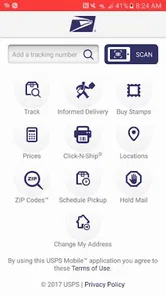
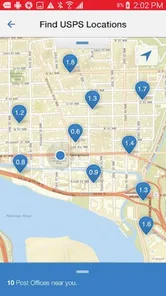
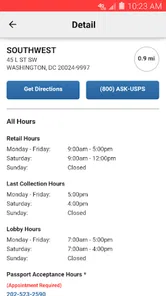
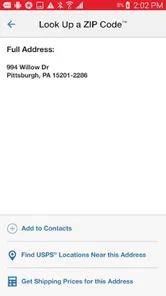
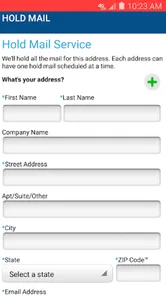
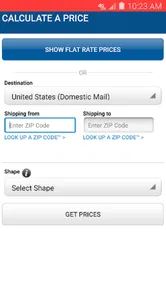
The USPS MOBILE® app offers a wide range of features designed to make managing your mail easier. Users can track packages, schedule pickups, find USPS locations, calculate postage, and hold mail for vacation. Additionally, the app provides access to informed delivery, allowing you to preview incoming mail and manage deliveries all in one place.
Is the USPS MOBILE® app free to use?
Yes, the USPS MOBILE® app is completely free to download and use. There are no subscription fees or hidden charges. However, standard data rates from your mobile carrier may apply when using the app, especially if you're accessing its features via a mobile network instead of Wi-Fi.
Pros
- Track packages easily with real-time updates.
- Access to USPS services anytime
- anywhere.
- User-friendly interface for smooth navigation.
- Notifications for important delivery updates.
- Calculate shipping prices within the app.
Cons
- Limited features compared to website.
- Occasional glitches in package tracking.
- Requires stable internet connection.
- Some users report login issues.
- No detailed shipment history available.












