Informed Delivery® Mobile
- 698.00
- 4.7
- Installs
- 500.00K
- Price
- Free

Screenshots
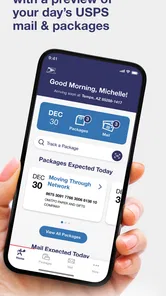
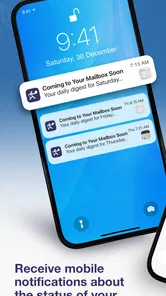
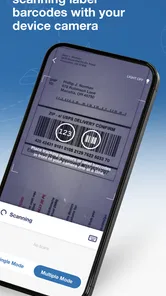
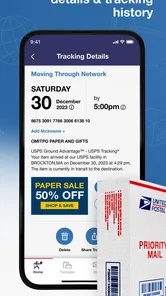
Analysis by Reviewed
I approached Informed Delivery® Mobile as a practical question rather than a novelty: can it make everyday mail and package checking easier without asking me to give up control over my account? That is the right way to judge this Business app from United States Postal Service®, because its value depends less on entertainment and more on whether its information appears when I need it, whether its controls are understandable, and whether I feel comfortable using it for routine postal tasks.
My overall impression is positive, with an important qualification. The app is most useful for people who already want a clearer view of incoming USPS mail and packages. It gives that activity a dedicated place on a phone instead of making me rely on memory, paper notices, or several unrelated delivery tools. At the same time, I would not treat it as a complete replacement for every carrier app, a guaranteed delivery timetable, or a substitute for checking a physical mailbox.
What I found when using the USPS mobile experience
The first thing that establishes trust is the developer name: United States Postal Service®. That matters here because I am not handing a postal-tracking task to an unfamiliar third party. The app is free, carries an Everyone age rating, and has reached over 500 thousand installs. Its 4.8 average from around 3.2 thousand ratings suggests that many users find the basic idea worthwhile, although a rating alone cannot tell me whether every individual delivery situation will work smoothly.
The app was released on September 11, 2025, and the current version is 1.2.0. I mention that because a relatively new mobile experience deserves a little patience. A clean interface can still have rough edges, and postal information itself may be affected by scanning, processing, or delivery events outside the app. I would judge it by whether it helps me understand what is happening, not by expecting every package movement to appear instantly.
In practical terms, the service is aimed at viewing USPS mail and packages from a phone. That makes it different from a generic parcel organizer, which usually gathers tracking details from multiple carriers, and different from a retailer’s order screen, which focuses on purchases from that retailer. The USPS app has a narrower purpose, but that narrower purpose can be an advantage when most of my deliveries arrive through the postal service.
I found the strongest reason to use it in the small moments between leaving home and checking the mailbox. If I am expecting an important envelope, I can use the app as a reminder to pay attention to incoming mail rather than discovering it only after returning home. For packages, the benefit is similar: the phone becomes a convenient place to review postal activity instead of searching through old messages or receipts.
Why the official source changes the trust question
For a postal app, identity is not a minor detail. I would be cautious about installing an app that merely copied USPS branding or asked me to enter account details without making its purpose clear. Here, the named developer is the postal service itself, which gives the product a clearer trust context than an unofficial tracking dashboard. That does not mean I should stop thinking about privacy, but it does make the basic relationship easier to understand.
More From Our News Desk

Weather by Xiaomi Review: Clear at a Glance, Less Clear Up Close

X Under Pressure: Can It Recover When Posting Goes Wrong?

Clash of Clans Is Won Between the Battles

Android Auto Makes the Case for Quieter Car Software

MobiOffice: Transforming Mobile Productivity with Seamless Integration

EA SPORTS FC™ Mobile Soccer: Redefining Mobile Sports Gaming
I also appreciate that the app’s promise is relatively focused. It is not presented as a general social platform or an all-purpose shopping assistant. A focused purpose helps me decide what information I expect the app to handle and what I do not need it to do. If my only goal is to view USPS mail and packages, a dedicated postal tool is easier to evaluate than a broad app filled with unrelated services.
Still, official branding should not lead to automatic trust in every screen. I would read sign-in prompts carefully, check that I am using the expected USPS account flow, and avoid entering credentials after following a suspicious message or unexpected notification. The safest habit is simple: open the installed app directly, review what it asks me to do, and stop if a screen feels unrelated to viewing postal activity.
Account controls deserve attention before daily use
The most important setup decision is not whether the app looks polished; it is which account I use and how much personal information I want associated with postal activity. Mail can reveal routines, purchases, correspondence, and household patterns. Even when the app’s purpose is legitimate, I would avoid treating the account as disposable or sharing access casually.
I would also make sure that the account belongs to the person who should see the information. This is especially important on a shared tablet, a family phone, or a device used by several people. A postal dashboard can feel harmless when it shows only delivery updates, but the surrounding context may still be personal. Logging out when necessary and keeping the device protected are sensible steps, particularly if other people can unlock it.
One useful habit is to separate “I want to know something is coming” from “I need to act on this delivery.” The app can help with awareness, but I would still verify the details before making a decision such as waiting at home, contacting a sender, or assuming a letter has arrived. That distinction prevents a preview or status entry from becoming stronger evidence than it really is.
Permissions and visible choices should guide confidence
My preferred approach with any mobile app is to grant only what is clearly necessary and to revisit those choices later. I would inspect the permission prompts rather than approving everything automatically. If a permission does not make sense for viewing USPS mail and packages, I would pause and look for an explanation before continuing. The important point is that the user should remain the decision-maker at each prompt.
I would apply the same care to notifications. Alerts can be useful when I am waiting for a time-sensitive package, but constant notices can turn a helpful tool into background noise. If the app offers notification controls, I would tailor them to my routine: keep the alerts that help me act, and silence those that merely repeat information I can check manually. A quieter setup is often more useful than leaving every alert enabled.
There is also a practical privacy trade-off in notifications. A message displayed on a lock screen may be convenient, but it can expose delivery information to anyone who sees the phone. I would choose a lock-screen display that matches my circumstances, especially when the device is used in a workplace, shared home, or public setting. Convenience is valuable, but it should not automatically win over discretion.
Because the app is rated for Everyone, families may be more comfortable seeing it in a household device. That rating describes suitability for a broad audience; it does not remove the need to supervise account access. I would still make sure that younger users do not accidentally change account settings or view information that belongs to another household member.
Where personal data becomes more sensitive
The sensitive part of this experience is not only the content of a letter. The pattern of incoming mail and packages can itself be revealing. A user may be able to infer when something is expected, whether a household is away, or which purchases are in transit. I would therefore treat the app as a personal account tool, not as a casual screen to leave open for anyone nearby.
That concern becomes clearer in an everyday scenario. Imagine I am waiting for a replacement bank card while working away from home. I check the app during a break and see that postal activity has appeared. That helps me remember to check the mailbox later, but I would not assume the card is already in my possession or leave it unattended based only on the app. The useful workflow is to use the information as a prompt, then confirm the physical delivery and handle the item securely.
A similar situation applies to a package needed for a trip. I might use the app to keep the delivery in mind, but I would still allow room for processing changes or a status that does not update at the exact moment something moves. This is where the app is helpful as an awareness layer, while the physical mailbox, delivery notice, or sender remains important for final confirmation.
I would be especially careful when someone else asks me to share a screenshot. A screenshot may include more context than intended, including names, dates, or other visible items. If I need to communicate about a delivery, I would share only what is necessary and crop unrelated details. That is a small but meaningful user-controlled step that many people overlook.
How it compares with familiar alternatives
The usual alternative is to check mail manually and track packages through retailer emails. That approach costs nothing extra and may be enough for someone who receives little mail. Its weakness is fragmentation: one order may be in an email, another in a retailer account, and postal mail is handled separately. Informed Delivery® Mobile is more appealing when I want USPS activity gathered into one focused place.
A multi-carrier tracking app can be better for a household that receives frequent deliveries from several shipping companies. It may offer a broader view across carriers, while this app is specifically centered on USPS mail and packages. I would choose the broader tool if my main problem is managing many carriers at once. I would choose the USPS app if postal visibility is the gap I want to solve.
Retailer apps are often better for order context, such as the item purchased, the seller, or a return process. The USPS experience is better suited to the postal side of the journey. In other words, I would not expect it to replace the store where I bought something. I would use the retailer’s app for purchase details and this one for the USPS portion of delivery awareness.
Email notifications remain a reasonable alternative for people who dislike installing dedicated apps. They can be easier to search and may already be part of an established routine. The trade-off is that an inbox mixes delivery notices with everything else. A separate postal app gives the information its own space, but it also creates another account and another place to review.
Small workflows that make the app more useful
My first practical tip is to check the app at a deliberate time instead of repeatedly refreshing it. A morning review can help me plan around expected mail, while an evening check can remind me to look in the mailbox. This reduces the temptation to interpret every unchanged status as a problem and keeps the app in its proper role: a planning aid.
My second tip is to use it alongside, not instead of, a delivery routine. If I am expecting something important, I would note the sender, protect the account, and confirm the physical item when it arrives. The app can reduce forgetfulness, but it cannot make a mailbox secure or resolve every delivery issue by itself.
My third tip is to review notification and device settings after the first few days. The best configuration depends on whether I live alone, share a phone, work in public, or receive urgent packages. A setting that feels convenient at home may reveal too much on a lock screen at work. Adjusting the phone’s visible alerts is a practical form of control, not an unnecessary extra step.
Another useful trade-off involves expectations. If I need a complete history across every carrier, I would not force this app to become something it is not. I would pair it with a broader tracking method. If I mainly want a USPS-focused view and a reminder that mail or packages are relevant today, its limited scope becomes a strength rather than a weakness.
Who should use it, and who should pass
I think the app is a good fit for people who receive regular USPS mail, want package awareness on a phone, and prefer an official source over a general tracking service. It is also useful for anyone who tends to forget to check the mailbox or who wants a clearer separation between postal activity and retailer emails.
I would recommend caution for users who already have a reliable manual routine and do not want another account or another stream of alerts. The app may add little value if nearly all deliveries come through other carriers. It is also not the right choice for someone expecting a universal delivery command center; a multi-carrier tool may suit that need better.
People who share devices should think carefully before enabling visible notifications or leaving the account signed in. The app can still be useful in a family, but only when everyone understands whose information is being displayed and who is allowed to manage the account. That is a social and privacy decision, not merely a technical setup step.
My cautious recommendation
After using it as a focused postal companion, I see a clear benefit: it makes USPS mail and package awareness easier to incorporate into an ordinary day. The official developer, free access, Everyone rating, and strong user response all support trying it when the purpose matches your needs. The current version, 1.2.0, also gives users a concrete version context when deciding whether to install or update.
My recommendation is to start with a controlled setup. Install it from the expected official source, sign in only through the normal account flow, inspect permission and notification choices, and keep lock-screen visibility appropriate for your situation. Then use it for a week as a reminder and overview, not as an absolute promise about the exact moment a letter or package will arrive.
The app earns my recommendation when USPS visibility is the problem I am trying to solve, but not when I need every carrier, every order detail, or a guarantee that postal events will update instantly. Used with that boundary in mind, Informed Delivery® Mobile is a sensible, focused Business app: helpful for awareness, strongest when paired with good account habits, and best judged by the control it gives the user rather than by the convenience of seeing one more status screen.
Informed Delivery® Mobile Frequently Asked Questions
Who publishes Informed Delivery® Mobile, and is it intended for personal use?
Informed Delivery® Mobile is published by the United States Postal Service® and is a business-category app focused on USPS mail and packages. It is intended for people who want to check eligible incoming mail and package activity through their USPS account. Before downloading, consider whether you regularly receive mail at an address that can enroll in Informed Delivery, since access to its main features depends on eligibility.
What devices can run Informed Delivery® Mobile?
The app requires iOS 8.0 or later, so check your device’s operating system before downloading. If your device meets that requirement, you can install the app and sign in with your USPS account to use its supported features. Keeping your operating system and app current can also help you benefit from available fixes and improvements.
What is Informed Delivery® Mobile and what can I do with it?
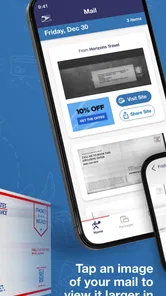
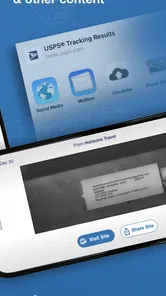
Informed Delivery® Mobile is the official USPS app for managing and viewing eligible incoming mail and packages in one place. After signing in, you can preview grayscale images of certain letter-sized mailpieces, check package tracking updates, receive delivery notifications, and manage related USPS services. Availability depends on your address, mail type, and the features currently supported by USPS.
Is Informed Delivery® Mobile free to download and use?
Yes. The Informed Delivery® Mobile app is generally free to download and use, and USPS does not charge a separate fee for basic Informed Delivery notifications or mail previews. However, normal mobile data charges may apply depending on your carrier and plan. Some optional USPS shipping services, postage purchases, or other transactions accessed through the app may involve their own fees.
Do I need a USPS account to use the app?
Yes, you normally need a USPS.com account and must enroll in Informed Delivery before using its main features. USPS may require identity verification to confirm that you are associated with the eligible residential address. During setup, the service checks whether your address and mail delivery area support Informed Delivery. Not every address, mailbox, or mailpiece is eligible.
Pros
- Preview incoming mail and packages before they arrive.
- Conveniently access delivery notifications in one place.
- Helps track expected deliveries without opening a browser.
- Useful for organizing household mail and shipment arrivals.
- Official USPS service provides reliable delivery information.
Cons
- Availability depends on eligible addresses and USPS enrollment.
- Scanned mail images may be unclear or incomplete.
- Some packages may not appear immediately in the app.
- Requires a USPS.com account and personal verification.
- Features can vary depending on the type of delivery.












