US Open Tennis Championships
- 1.06K
- 4.6
- Installs
- 1.00M
- Price
- Free

Screenshots

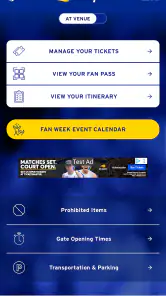






Analysis by Reviewed
I installed US Open Tennis Championships expecting a focused companion for one of tennis’s biggest events, and that is exactly how it feels: a sports app built around following the US Open rather than trying to become a general tennis hub. The United States Tennis Association develops it, and the store summary points directly to the 2026 US Open Tennis Championships. I like that narrow purpose because it keeps the experience easier to understand than a broad sports app packed with unrelated leagues, teams, and headlines.
My overall impression is positive, especially for someone who wants the tournament close at hand while moving through a normal day. It is free, rated for Everyone, and has reached over a million installs, so it is clearly aimed at a wide audience rather than only serious tennis statisticians. The average rating sits at 4.6 from around fourteen thousand ratings, which matches my sense that the app succeeds best when used as a convenient event companion.
How the app fits into following a major tennis event
The first thing I noticed is that the app works best when I treat it as a live reference point, not as a replacement for watching tennis. A television broadcast gives me atmosphere, commentary, replays, and the feeling of being inside a match. This app serves a different need: checking what is happening, orienting myself around the tournament, and returning to the event from a phone without opening several unrelated sports services.
That distinction matters because a tournament application can easily become frustrating if a reader expects every feature of a full sports network. I would choose this app when my priority is the US Open itself. I would choose a broader sports app when I want tennis mixed with football, basketball, motorsport, or other competitions. The focused approach is a strength for fans who dislike clutter, but it can feel limited if the US Open is only one small part of their sports routine.
The app comes from a recognizable tennis authority rather than an anonymous score aggregator. That gives the product a clear identity and makes it feel more appropriate for following the event than a generic search result or a collection of third-party pages. I still recommend keeping expectations practical: the value is in quick access and tournament context, not in turning a mobile screen into a complete courtside production.
Its history also gives it some perspective. The app was released on August 25, 2011, while the current version is 16.6.2051. That long presence suggests an application maintained through multiple tournament cycles rather than a temporary experiment. On Android, the minimum operating-system requirement is Android 9, so owners of older devices should check compatibility before planning around it.
Why connectivity changes the experience
Because this is an event-focused sports app, the most useful moments are naturally tied to current information. When I have a reliable connection, the phone becomes a handy second screen. I can check the app between errands, glance at tournament information before opening a broadcast, or use it during a conversation when somebody asks what is happening at the US Open.
More From Our News Desk

Clash of Clans Is Won Between the Battles

Android Auto Makes the Case for Quieter Car Software

MobiOffice: Transforming Mobile Productivity with Seamless Integration

EA SPORTS FC™ Mobile Soccer: Redefining Mobile Sports Gaming

How Microsoft OneDrive Became a Mobile Productivity Giant

How Google Translate Breaks Language Barriers Effortlessly
The connected experience is also where the app makes more sense than a static article. A prewritten preview can explain players and storylines, but it does not serve the same purpose when I want to return to the event during the day. The app’s usefulness comes from being a place I can revisit as the tournament develops. That makes network quality part of the experience, even though the interface itself remains simple to open.
On a strong home or office connection, checking information feels natural. On a crowded mobile network, the experience becomes more dependent on patience. I do not see that as a reason to reject the app, but I do see it as a reason to use it thoughtfully. If I am about to leave Wi-Fi and know I will be somewhere with uncertain reception, I avoid assuming that every current detail will appear instantly when I need it.
A realistic day with the app
Imagine a weekday when I cannot watch the tournament continuously. Before leaving home, I open the app to get oriented. During a lunch break, I return to see what has changed. Later, while travelling, I use it as a quick tennis check rather than spending time searching through a browser. At home, I switch back to a broadcast or another viewing option for the match itself.
That routine shows the app’s strongest use case: short, repeated visits. I would not necessarily sit with it for an entire evening, but I would keep it available for those small moments when I want the tournament to remain part of my day. The focused design makes more sense in those brief sessions than a general-purpose sports platform that asks me to filter through many competitions first.
There is a useful trade-off here. A dedicated app can make the event easier to find, while a browser may be faster for a one-time question. If I only want to know one isolated fact and do not plan to follow the tournament, opening a search engine may be more efficient. If I expect to check the US Open repeatedly, the dedicated app becomes the more comfortable habit.
Using it on a phone, not just at home
The mobile setting is central to the app’s appeal. I used it with the mindset of checking tennis in ordinary places: on a break, while waiting for an appointment, or before deciding whether a match was worth watching live. The small screen favors concise visits, and I found that the app is more helpful when I already know what I want to check.
For example, I might open it because I want a quick sense of the day’s tournament activity, then close it after finding my bearings. That is different from browsing a large sports portal, where headlines and unrelated competitions can pull me away from the original question. The US Open focus reduces that distraction.
At the same time, a phone is not always the ideal place for deep tennis analysis. If I want to compare long stretches of results, read extensively, or watch detailed coverage, a larger screen and a dedicated broadcast service are more comfortable. The app works as a portable companion, not as the only screen I would use for every part of my tennis interest.
I also appreciate the Everyone content rating because it makes the app approachable for households where different ages follow the tournament. That does not mean every family member will use it in the same way. A committed fan may return frequently, while a casual viewer may only open it during the event. The simple audience positioning makes sense for both, although the app’s real value still depends on how closely someone follows the US Open.
What happens when the connection is unreliable
Connectivity is the main practical limitation I would explain to a friend before recommending it. Current sports information is only useful when the app can reach the service behind it. If a page takes time to load or an update does not appear immediately, I do not treat that as a tennis problem; it is a reminder that a live event companion depends on the network around me.
My preferred recovery habit is simple: I wait briefly, retry once, and then switch to a more stable connection if one is available. I avoid repeatedly tapping every control because that can make a slow session feel more confusing than it needs to be. When I am back on dependable Wi-Fi, I reopen the relevant area and verify the information before relying on it.
This is especially important when I am travelling or moving through buildings with inconsistent reception. A phone may show the app interface while the current content is still waiting to load, which can create the impression that something is missing. I would not make a decision about a match based on a single stalled screen. I would give the connection a moment and then check again.
The app is therefore a poor fit for somebody who expects a fully dependable source during every network interruption. If uninterrupted access is essential, I would pair it with another way of following the tournament rather than depending on one mobile application. That is not a criticism unique to this product, but it matters more here because the app’s purpose is tied to an active championship.
Making repeated checks kinder to mobile data
I recommend using Wi-Fi for longer browsing sessions and reserving mobile data for quick checks. That is the most sensible way to use any current-event app, particularly when I am checking it several times across a day. I also avoid reopening the app out of habit when I have no specific reason to look; short, intentional visits are both more efficient and less distracting.
My practical routine is to check once before leaving a reliable connection, then use the app only when I genuinely need an update. If I am watching a match elsewhere, I do not keep refreshing the phone at the same time unless I am looking for a particular piece of information. The app is more useful when it complements my viewing instead of becoming a second source of constant tapping.
People sharing a limited data plan should be especially deliberate. I would not assume that a free download means the complete experience has no network cost. The app itself does not charge an entry price, but connecting to current sports content can still use the phone’s data allowance. That is why I see Wi-Fi as the default for preparation and longer sessions, with cellular access reserved for convenience.
Another small tip is to keep the phone’s battery situation in mind. Repeatedly opening a live sports companion while travelling can become less attractive when the battery is already low. I use it in short bursts and close it when I am finished rather than leaving it as an always-open window. That keeps the app in its proper role: useful when needed, invisible when it is not.
Where it beats the usual alternatives
Compared with a browser search, the app offers a more dedicated route into the US Open. I do not need to begin with a vague query and sort through general results every time I want to reconnect with the tournament. That convenience becomes more valuable when I am following the event over several days rather than asking one isolated question.
Compared with a broad sports application, the advantage is focus. A general service may be better for users who want one place for many sports, but it can also surround tennis with information I do not need. This app makes more sense for someone whose immediate interest is the US Open and who prefers a direct event-specific experience.
Compared with television or streaming coverage, the app is lighter and more flexible but less immersive. I use it when I cannot give a match my full attention or when I need a quick orientation before choosing what to watch. I would not install it expecting commentary, the emotional atmosphere of a broadcast, or the comfort of a large display.
Compared with social media, it is potentially a calmer way to check the tournament. Social feeds can be fast, but they also mix reactions, spoilers, arguments, and unrelated posts. A focused sports app is better when I want to stay close to the event without turning every update into a noisy conversation. Someone who enjoys live fan discussion may still prefer social platforms as a companion.
Who should install it, and who should skip it
I recommend it to US Open followers who want a free, focused mobile companion and expect to check the tournament more than once. It is particularly suitable for people who follow tennis around work, study, commuting, or family commitments. The app’s value is highest when a phone is the most convenient screen available and the user wants event-specific information without navigating a larger sports ecosystem.
I would also consider it for a casual fan who watches the US Open only during the most important matches. The install is easy to justify because there is no purchase price, and the Everyone rating keeps the audience broad. Still, a casual viewer who will open it only once may find a browser search quicker than maintaining a dedicated app.
I would skip it as a primary choice if my main goal were comprehensive coverage across many sports, extensive tennis history, or a full video-watching experience. In those cases, a broad sports platform, a specialist tennis resource, or a streaming service may suit me better. The app is strongest when its narrow focus is exactly what I want, not when I expect it to cover every possible tennis need.
The audience size supports its role as an established choice: it has over a million installs and around one thousand one hundred written reviews. Those figures do not guarantee that every phone or connection will feel identical, but they do show that the app is not an obscure experiment. I would still judge it by my own routine, because a frequent tournament follower and a one-time visitor need different things.
My final connectivity verdict
After using it as a mobile US Open companion, I see the strongest experience as connected, brief, and intentional. The app is convenient when I want to return to the tournament throughout the day, and its event-specific focus helps it avoid the clutter of a general sports portal. The United States Tennis Association gives it a clear purpose, while the free entry point makes trying it straightforward.
The main caution is equally clear: I would not treat it as a guaranteed substitute for every other way of following tennis, particularly in places with weak reception. I would use Wi-Fi for longer sessions, avoid unnecessary refreshing on mobile data, and keep another viewing or information option available when a match matters to me. Those habits make the app feel more reliable without pretending that connectivity is invisible.
For me, this is a worthwhile install when the US Open is the event I care about and I want a dedicated place to check it from a phone. It is less compelling as an all-purpose sports application, and it cannot replace the atmosphere of live coverage. Within its proper role, though, it does what I want: it keeps the tournament close, fits naturally into short mobile moments, and gives me a focused alternative to searching through a crowded sports landscape.
US Open Tennis Championships Frequently Asked Questions
Is the US Open Tennis Championships app free to download?
Yes. The US Open Tennis Championships app is free to download, and its general audience rating is Everyone. Its sports coverage is aimed at tennis fans who want tournament information on a mobile device. Before installing, check that your device meets the operating system requirements and that you are downloading the app published by the United States Tennis Association.
Can I follow the tournament without watching live video?
Yes. The app is useful for following the US Open through match schedules, scores, results, draws, player information, news, and tournament updates. These features can help you keep track of matches even when you are away from a television or unable to watch a video stream. Availability of particular content may vary by location and broadcast arrangements.
Who develops the US Open Tennis Championships app, and is it the official app?
The app is developed by the United States Tennis Association, making it the official mobile companion for the US Open Tennis Championships. It is intended for tennis fans who want tournament information in one place, whether they are following matches from home or planning a visit. Its sports-focused features center on scores, schedules, news, player information, and updates during the event.
Will the app work on my Android or iOS device?
The US Open Tennis Championships app is available for mobile devices, and its current version is 16.6.2051. On Android, the minimum supported operating system is version 9. Before downloading, check that your device meets the platform requirements and has enough available storage. Keeping the app updated can also help you access its latest features and tournament information.
What is the US Open Tennis Championships app used for?
The US Open Tennis Championships app is designed to keep fans updated throughout the tournament. It typically provides match schedules, live scores, results, draws, player information, news, videos, venue details, and tournament updates. It is especially useful for following matches while away from a television, checking court assignments, and keeping track of favorite players during the final Grand Slam event of the tennis season.
Pros
- Official scores
- draws
- schedules
- and match updates in one place.
- Useful venue information helps fans plan their visit to the tournament.
- News and editorial content provide context beyond live match results.
- Player and match details make it easy to follow the entire competition.
- A convenient companion for fans attending or following the US Open remotely.
Cons
- Some features may be less useful outside the US Open tournament period.
- Frequent alerts can become distracting unless notification settings are adjusted.
- Content may focus mainly on tournament coverage rather than broader tennis news.
- Live updates can depend on a stable internet connection for timely delivery.
- Some information may be tailored to New York visitors and less relevant elsewhere.

- Category
- Sports
- Version
- 16.6.2051