Unroll.Me - Inbox Mail Cleaner
- 9.57K
- 4.5
- Installs
- 1.00M
- Price
- Free

Screenshots
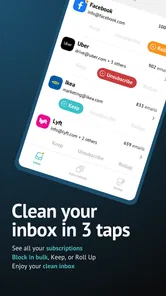
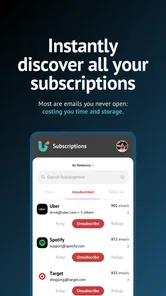
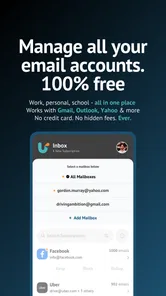
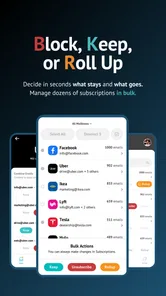
Analysis by Reviewed
Before handing any inbox-cleanup app my email account, I ask what it actually costs and what I’m giving up in exchange. Unroll.Me is free, which makes trying it less of a financial commitment, but email access is still a meaningful trade-off. I’d decide based on whether its subscription tools solve a problem I regularly have, not simply because there is no price to pay.
Where the free access can be useful
The practical value is time and attention: instead of hunting through old messages for subscription controls, I can review subscriptions in one place and decide which ones I still want. That is especially handy after signing up for several mailing lists while shopping, planning a trip, or following a new hobby. I would treat the first cleanup as a sorting session, not a reason to unsubscribe from everything in sight.
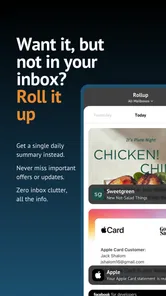
The Rollup can suit a different kind of reader: someone who wants to keep newsletters but would rather check them together than have each arrive separately. For example, I might leave useful store updates and reading material subscribed, then use a digest to make them easier to catch up on. It is not the same as deleting messages or fixing every source of inbox clutter, so I’d still handle personal correspondence and important account notices separately.
A sensible routine, with a few checks
For a realistic weekday routine, I’d review the subscription list when I have a quiet moment, remove only senders I recognize and no longer value, and keep anything tied to purchases or account activity until I’m sure it is safe to drop. Then I’d use the Rollup for subscriptions I genuinely want to read, rather than treating it as a dumping ground. That small distinction helps prevent a tidy-looking inbox from turning into a digest I never open.
Compared with unsubscribing manually in each email app, Unroll.Me brings subscription decisions together, which can save effort when the list is long. The built-in controls in Gmail or another mail service may be preferable if you want to keep everything within the tools you already use, while filters and folders offer more control over how messages are sorted. Those alternatives take more setup or ongoing attention; this app is most appealing when quick subscription review matters more than fine-grained inbox rules.
I would not choose it if I’m uncomfortable granting an outside service access to my email, or if I need a detailed system for work messages, receipts, and personal mail. The app’s focus is subscriptions, so it shouldn’t be mistaken for a complete email client or a substitute for careful account security. Before connecting an inbox, I’d read the current access and privacy details, decide whether the convenience is worth that access, and remember that revoking access is an option if I change my mind.
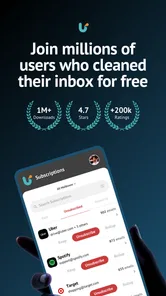
Unroll.Me is a free productivity app from developer Unroll.Me, rated for Everyone, and its Android version 3.3.25 requires Android 8.0 or later. Its 4.6 average from around 85,000 ratings and more than 1 million installs suggest that many people have tried it, though popularity alone cannot tell me whether its approach fits my inbox. I’d recommend it to someone with a backlog of newsletters who wants a straightforward cleanup and a way to bundle subscriptions; I’d skip it if privacy boundaries or advanced mail organization are the priority.
More From Our News Desk

Weather by Xiaomi Review: Clear at a Glance, Less Clear Up Close

X Under Pressure: Can It Recover When Posting Goes Wrong?

Clash of Clans Is Won Between the Battles

Android Auto Makes the Case for Quieter Car Software

MobiOffice: Transforming Mobile Productivity with Seamless Integration

EA SPORTS FC™ Mobile Soccer: Redefining Mobile Sports Gaming
When a quick pass is better than a sweeping cleanup
I find it useful to separate the task into two passes rather than trying to make every decision at once. On the first pass, I would remove only obvious mailing lists I no longer read. On a later pass, I would look at the less familiar senders and check whether they relate to a receipt, a membership, or a service I still use. This slower approach is less dramatic, but it lowers the chance of losing messages I may need later.
A practical example is the morning after a busy weekend of online shopping and travel planning. Promotional mail can pile up alongside booking messages and delivery updates, and those categories can look similar at a glance. I’d use the subscription view to identify recurring newsletters, but I would leave order and travel messages alone until the related plans are complete. For me, the useful distinction is not simply “wanted” versus “unwanted”; it is whether a message is recurring marketing or something tied to an active task.
That is also why I would not treat a successful unsubscribe as proof that every future message from a company will disappear. A sender may use separate lists for different kinds of communication, and a service-related notice is not necessarily the same thing as a newsletter. If an organization continues to send messages I do not want, I would check its own preferences or use the mail provider’s blocking and filtering controls where appropriate. Unroll.Me is most helpful for cleaning up subscriptions, not for replacing judgment about individual senders.
Making the Rollup worth opening
The digest only helps if it matches the way I actually read. I would keep the Rollup limited to newsletters I’m genuinely curious about, not every subscription I hesitate to remove. If I bundle too much, I have merely moved the clutter into a different place, and the digest can become another item I postpone. A small, intentional selection makes it easier to scan and gives me a better chance of noticing the articles or offers I meant to keep.
I’d also make a quick check of the Rollup after using it for a while: which subscriptions do I open, and which ones do I repeatedly skip? The skipped items are candidates for removal rather than permanent residents in a catch-all digest. This is a useful maintenance habit because a cleanup is rarely a one-time fix; new sign-ups gradually recreate the same problem. The app can make that review more convenient, but I still have to decide what deserves my attention.
There is a trade-off between reducing interruptions and seeing messages promptly. A bundled digest can make routine newsletters easier to manage, but it may be a poor fit for time-sensitive updates that I want to notice as they arrive. I would keep those senders out of a delayed reading routine and use the normal inbox or provider settings instead. That distinction matters for deal alerts with short deadlines, event information, or any recurring message where timing is part of its value.
What to consider before connecting an inbox
The central question for me is not just whether an app is convenient, but whether the convenience is worth linking it to an email account. Email can contain personal conversations, account notices, and purchase details, so I would review the permissions and privacy terms shown during setup before proceeding. If I am unsure, I would pause rather than approve access just to see what happens. A free price removes a payment decision; it does not remove the need to make an informed privacy decision.
I would also think about which inbox to connect. Someone who uses one account mostly for newsletters may find the approach easier to evaluate than someone whose only account mixes work, family, banking, receipts, and subscriptions. Keeping those uses separate can make the cleanup less confusing, but only if the user already has a suitable account and is comfortable connecting it. I would not create a new account solely to avoid thinking about access; the right choice depends on how the inbox is used and what the app asks permission to do.
If I stop using the app, revoking its access is a sensible part of closing the loop. I would check the email provider’s account settings rather than assume that deleting an app from a phone automatically changes account access. That is a general account-management step, not a reason to expect trouble; it simply gives me a clear way to revisit the decision. Anyone who prefers not to grant an outside service access in the first place can use the email provider’s own unsubscribe controls and manual sorting instead.
How it compares with built-in email tools
For a handful of unwanted newsletters, the usual unsubscribe link or a mail app’s built-in controls may be enough. That route keeps the process familiar and avoids adding another service, but it can be tedious when subscriptions have accumulated over a long period. Unroll.Me is more compelling when the problem is the volume of subscription decisions, not when a person needs a comprehensive filing system. I see it as a focused shortcut rather than a replacement for Gmail, another email provider, or a dedicated email client.
Filters and folders are the stronger choice when the goal is precise organization: for instance, sending invoices to one folder, receipts to another, and selected newsletters somewhere easy to browse. They can handle many kinds of mail, but rules need to be configured and sometimes adjusted. Unroll.Me’s appeal is a more direct subscription-centered workflow. If I mostly want recurring newsletters out of the main stream, I would favor that simplicity; if I need predictable handling for many types of messages, I would invest time in provider rules instead.
Blocking a sender is another option, but I would reserve it for a different situation. Unsubscribing is a better fit when I once opted in and want to stop a recurring list; blocking or filtering may make more sense for unwanted messages that do not respond to ordinary preference controls. These approaches are not interchangeable, and using the wrong one can make a legitimate message harder to find. My first step would be to identify what kind of mail I am dealing with, then choose the control that fits.
Who is likely to get the most from it
I think the best match is someone who has accumulated subscriptions across shopping, reading, hobbies, or other sign-ups and now wants a clearer way to review them. It is especially useful for a person who would rather make a series of quick choices than open messages one by one to find each sender’s settings. The Rollup can also suit readers who like newsletters but want to reserve a specific moment for them instead of seeing each arrival compete for attention.
It is less suitable for people who rarely receive subscription mail, already manage newsletters comfortably through their email provider, or need detailed organization for a mixed personal and professional inbox. A privacy-conscious user who does not want to connect an outside service should skip it, even if the app would save time. Likewise, anyone expecting a full inbox manager—with custom rules for every kind of message—will probably be happier setting up filters in their existing mail service.
For Android users, the app is listed for devices running Android 8.0 or later, and the current version is 3.3.25. The Everyone age rating makes it broadly accessible, while the free price makes experimentation possible without an upfront purchase. I would still start by checking the account connection choices and then test the workflow with conservative decisions. If the subscription list is not useful or the privacy trade-off feels wrong, there is no need to force the app into a routine that does not suit you.
My recommendation after weighing the trade-offs
The appeal here is specific: a subscription-focused cleanup workflow and a way to gather newsletters, rather than a universal fix for email overload. I would try it if recurring mailing lists are the part of my inbox that consumes the most attention and I am comfortable with the access involved. I would skip it if my main need is advanced sorting, if important messages must remain highly visible, or if I prefer to keep email management entirely within my provider’s tools.
If you’ve ever felt overwhelmed by the sheer volume of emails cluttering up your inbox, then Unroll.Me might just be the app for you. This nifty little tool promises to streamline your email management by helping you easily unsubscribe from unwanted emails and organize the ones you want to keep. So, let’s dive into what makes this handy option worth considering for your smartphone.
Getting Started with Unroll.Me
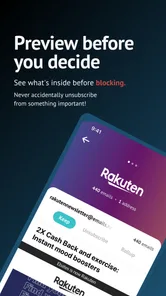
Setting up Unroll.Me is as easy as pie. Simply download the app, and in a few quick steps, you’re all set to start decluttering. The app scans your inbox and presents you with a list of all your subscriptions. Talk about having your own personal email assistant!
Unsubscribing Made Simple
One of the standout features of this app is how effortlessly it allows you to unsubscribe from emails you no longer want to receive. With just a tap, you can say goodbye to those pesky newsletters that seem to flood your inbox daily. It’s like decluttering your inbox without the hassle of manually searching for that tiny unsubscribe link buried at the bottom of emails.
The Rollup Feature
Ever wished you could just bundle all your subscription emails into one neat package? Enter the Rollup feature. This allows you to combine all your favorite subscriptions into a single daily digest. You choose when you want to receive it, and voila! Your inbox feels lighter already. This feature is a lifesaver if you’re someone who likes to keep tabs on their subscriptions without letting them take over your inbox.
Privacy Concerns
Now, I know what you’re thinking. How safe is it to allow an app access to your email? Well, Unroll.Me assures users that privacy is a top priority. The app uses secure protocols to access your emails, and you can always revoke access if you’re feeling uneasy. It’s always good to be cautious, but from my experience, the benefits far outweigh any concerns.
To sum it up, if you’re tired of feeling overwhelmed by your inbox, Unroll.Me is the app you didn’t know you needed. With its easy setup, efficient unsubscribing, and handy Rollup feature, managing your emails has never been more straightforward. So why not give it a try and see if it can help bring some order to your digital life?
Unroll.Me - Inbox Mail Cleaner Frequently Asked Questions
Is Unroll.Me free to download, and what does it help me do?
Unroll.Me is free to download and focuses on cleaning up a crowded inbox. Its main tools are designed to help you find subscription emails, unsubscribe from messages you no longer want, and collect selected subscriptions into a digest. It is a productivity app rather than a replacement for your email service, so it is most useful if managing recurring messages is a regular task for you.
What should I check before connecting my inbox to Unroll.Me?
Before connecting an inbox, consider whether you are comfortable giving an email-management app access to the account it needs to scan for subscriptions. Unroll.Me’s purpose is to identify recurring messages so you can manage them, and that requires access to email information. Reviewing the app’s privacy policy and the permissions shown during setup can help you decide whether its approach suits your expectations.
Is Unroll.Me available for my phone, and what age group can use it?
Unroll.Me is an app for Android, with a minimum operating system requirement of Android 8.0. Its content rating is Everyone, so it is not restricted to adults. Before downloading, check that your device runs a compatible version of Android; the app’s email-management features are most useful when you can connect an inbox you actively use.
Who develops Unroll.Me, and which version should I look for?
Unroll.Me is developed by Unroll.Me, and the current version is 3.3.25. When checking the app before installation, you can compare the version shown on its download page with the version installed on your phone. The app is a productivity tool focused on email cleanup, so its main purpose is organizing subscriptions and reducing inbox clutter rather than replacing your regular email service.
What is Unroll.Me and how does it work?
Unroll.Me is an email management app designed to help users declutter their inboxes by allowing them to unsubscribe from unwanted emails and consolidate subscriptions into a single daily digest. Once you sign up and connect your email account, Unroll.Me scans your inbox for subscription emails and presents them in a list. You can then choose to keep, unsubscribe, or 'roll up' each subscription into a single digest email.
Pros
- Efficiently declutters your inbox.
- User-friendly interface.
- Quick setup process.
- Supports multiple email services.
- Free to use.
Cons
- Limited customization options.
- Occasional syncing issues.
- Ads can be intrusive.
- Privacy concerns with data handling.
- Not available on all platforms.











