United Airlines
- 39.67K
- 4.7
- Installs
- 10.00M
- Price
- Free

Screenshots


Analysis by Reviewed
When I have a United trip coming up, I want one place to check the itinerary, handle the airport steps, and notice changes before they catch me off guard. That is the role the United Airlines app aims to fill. It is United Airlines’ free travel app, and its 4.7 average from around 894,000 ratings suggests many travelers find it useful. I see it as most valuable when United is already part of the journey, rather than as a general-purpose tool for comparing every airline.
Start with the trip you need
For a traveler who has not booked yet, the app lets you search and book flights, with filters that help narrow the options by fare or route speed. I’d use those filters to make the trade-off visible: the lowest price may not suit a tight connection, while a faster itinerary can be worth considering when arrival time matters. Before committing, I would compare the itinerary details with my plans for getting to and from the airport; a good flight time is only useful if the whole day works.
After choosing a flight, the app’s booking flow includes seat selection, baggage choices, and upgrade options. Saved personal details can spare repeat typing on later bookings, though I’d still review each passenger and trip detail before paying. That small check is especially worthwhile when booking for someone else or arranging more than one traveler, where a quick tap can otherwise lock in the wrong selection.
Choosing the app for the job
I would not install an airline app just because I am browsing destinations. For that early stage, a general travel search tool is usually more useful: it lets me compare carriers and schedules before I decide which airline fits the trip. The United app becomes more valuable after United is a serious option or a booking is already made, because its purpose is to help manage that airline-specific journey rather than act as a neutral marketplace.
That distinction matters for travelers who fly several airlines. Keeping every carrier’s app installed can clutter a phone, while relying on one broad travel planner may not provide the same direct access to United booking and account tasks. I’d keep this app if I take United flights often enough to benefit from checking the airline’s own trip information; for a one-off flight, installing it shortly before travel and removing it later is a perfectly reasonable approach.
Your Travel Companion
Once you open the United Airlines app, you’re greeted with a clean, intuitive interface that’s incredibly easy to navigate. It’s like the app already knows what you need, from booking flights to checking in, and even managing your MileagePlus account. You can effortlessly search and book flights, and the best part? It offers a range of filters to help you find exactly what you’re looking for—whether it’s the cheapest fare or the fastest route.
Booking Made Easy
Let’s talk about booking flights. The app makes it ridiculously simple. After selecting your flight, you can choose your seat, add extra baggage, and even upgrade your experience if you’re feeling fancy. And for those who hate the hassle of entering personal information repeatedly, the app saves your details for future bookings—one less thing to worry about!
More From Our News Desk

Weather by Xiaomi Review: Clear at a Glance, Less Clear Up Close

X Under Pressure: Can It Recover When Posting Goes Wrong?

Clash of Clans Is Won Between the Battles

Android Auto Makes the Case for Quieter Car Software

MobiOffice: Transforming Mobile Productivity with Seamless Integration

EA SPORTS FC™ Mobile Soccer: Redefining Mobile Sports Gaming
Make booking details work for you
One useful habit is to treat the booking screen as a planning checkpoint, not just a path to payment. I’d compare the seat and baggage selections with the actual needs of the trip before confirming, especially when traveling with another person or packing for a longer stay. A low fare can look attractive until a separately selected extra changes the overall value, so I prefer to think through the whole itinerary rather than focus on the first price I see.
Saved passenger information is convenient, but it also makes a final review more important. When I book for family or colleagues, I would pause to confirm the traveler attached to each ticket and the selected flight before completing the purchase. This is a small, practical safeguard: saved details reduce typing, but they do not replace checking that the right details are being used for this particular trip.
Real-Time Updates
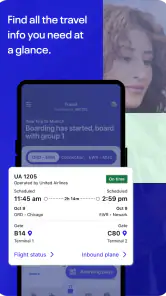
One of the standout features is the real-time updates. You know how stressful it can be when your flight gets delayed or your gate changes at the last minute. The app sends you notifications faster than you can say "boarding pass", keeping you in the loop at all times. Plus, the interactive airport maps are a lifesaver when you’re rushing through unfamiliar terminals.
Make alerts useful, not noisy
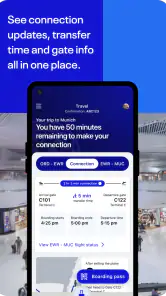
For a practical airport routine, I’d enable the travel notifications I actually want, then check the itinerary in the app before leaving home and again when I arrive. On a connection day, that gives me a simple handoff: the itinerary helps me plan, while updated flight and gate information can guide the next step. I would still watch airport displays and listen for announcements, especially when a gate change happens while my phone is offline or notifications are delayed. A map is most useful when I already know the next task—finding a gate, service, or route through an unfamiliar terminal—rather than as a substitute for asking airport staff when I’m genuinely lost.
Use airport information as a second check
For a tight connection, I would use the map to get oriented as soon as I know where I have landed, then check the gate information again before setting off. That order avoids one common mistake: walking confidently toward a gate shown in an earlier view while an update has arrived since. The app can make the next move easier to understand, but the airport’s own screens and announcements remain useful cross-checks when time is short.
There is also a sensible limit to how much I would rely on any phone-based airport workflow. A low battery, weak connection, or a notification I miss can interrupt the handoff between the app and the physical airport. I’d keep the key itinerary details easy to retrieve and make sure I have enough battery for the travel day. If the app and a display appear to disagree, I would verify with airport staff rather than guess.
MileagePlus and More
If you’re a MileagePlus member, you’ll love how seamlessly the app integrates with your account. You can view your miles, check your status, and even book award flights without any hassle. It’s like the app was designed with MileagePlus members in mind, making it easier to reap the rewards of your travels.
That account connection is particularly handy when I’m deciding whether to use miles or pay for a ticket: I can check my balance and look at award booking in the same travel environment. It is less compelling if I rarely fly United or do not use MileagePlus, because those account tools matter most when the airline is already central to my plans. For occasional travelers, the app can still support a booked trip, but it need not become a permanent home screen fixture.
When loyalty tools change the decision
If I already collect MileagePlus miles, having the balance and award-booking option close to the trip details makes the app more than a digital boarding aid. It gives me a convenient place to consider whether miles make sense for a particular booking. I would still compare the available choices carefully rather than assume that using miles is automatically the best value; the useful part is being able to make that decision within the same airline-focused workflow.
On the other hand, someone who does not care about airline loyalty can ignore this part without losing the app’s basic usefulness for a United booking. That is an important difference between a frequent flyer’s setup and a casual traveler’s: the former may keep the app for ongoing account management, while the latter may only need it around departure and arrival.
And let’s not forget the in-flight experience. The app offers a selection of movies, TV shows, and music to keep you entertained at 35,000 feet. Just plug in your headphones, and you’re set for the journey.
What happens between booking and boarding
A realistic use case is a traveler booking a United flight for a work visit, choosing a seat, then checking the trip again on the morning of departure. If a gate changes, a notification can prompt a revised walk through the terminal; if the trip includes a connection, the map can help orient the traveler after landing. That flow is convenient because the same airline app follows the trip from purchase to airport, but it still depends on keeping the phone charged and having access to the app when needed. I’d save the essentials I need for the airport in a way I can reach quickly, rather than assuming a phone will always have a reliable connection.
A full travel-day routine
Imagine leaving home for a work visit with a connection along the way. I would first open the trip and make sure I have the right itinerary in front of me, then check for changes before heading to the airport. At the terminal, I would use the current flight details to confirm where I need to go, and after landing I would look again before following the map to the next gate. Once aboard, the in-flight entertainment gives the app another purpose beyond logistics.
The useful handoff is not that the app replaces every other source of information; it is that it keeps several United-specific parts of the day together. I can move from the booking and seat choices to airport updates, then to account or entertainment features without switching to a broad travel planner for each airline task. If something unexpected happens, though, I would treat the app as one part of my response: check the latest information, then use airport staff or the displayed notices when I need confirmation or help.
Where the workflow can break
The main friction is the same thing that makes a single-airline app focused: it is not built to be the only travel tool for every trip. If I am still comparing carriers, I would rather start elsewhere. If I have a United itinerary, the app is more directly useful, but a change in connectivity or battery can make a mobile-first routine less comfortable. I would not count on notifications alone to manage a connection, and I would avoid waiting until I am already rushing to open the app for the first time.
It is also worth remembering that easy booking does not make every choice self-explanatory. A traveler should read the itinerary and review any selected seat, baggage choice, or upgrade before paying. If I am arranging a trip for someone else, I would slow down at the passenger details rather than assuming saved information has selected the right person. The app can make a process quicker, but quick taps are exactly when a deliberate final check helps.
Where a single-airline app is the right fit
Compared with general travel apps, United’s app is naturally more focused on United-specific tasks: booking with the airline, managing a MileagePlus account, and following its flight updates. A broader flight-search tool may be better at comparing carriers across a whole trip, especially if price or schedule matters more than loyalty. I would use a comparison service to choose among airlines, then turn to this app once I have a United itinerary to manage. That division keeps the strengths clear and avoids expecting one airline’s app to be a neutral travel planner.
It suits people who want direct access to a United trip, especially travelers who fly the airline repeatedly, use MileagePlus, or appreciate keeping booking and airport information in one place. It is less essential for someone who flies different carriers each time, rarely travels, or mainly needs to compare fares before making a choice. In those cases, a general travel planner or the relevant airline’s own app may be a better fit for the immediate task.
The app is listed for everyone, has more than 10 million installs, and is currently version 4.2.57, with Android 10 as its minimum operating system requirement. It has been available since August 23, 2011, and has around 40,000 written reviews. Those figures give useful context, but they do not remove the everyday trade-off: an airline app is most helpful when its airline is part of your trip. I’d skip it if I only need broad fare comparisons or do not expect to fly United, and use a general travel planner instead.
Who should keep it installed?
For a regular United traveler, keeping the app available can make sense because it connects recurring airline tasks with trip-day information. Someone who has an upcoming United booking may also find it worthwhile to install for that journey, even if they do not use it every week. The app is free, so the decision is less about an upfront purchase and more about whether its focused tools justify taking space and attention on a phone.
Before installing, Android users should check that their device meets the app’s minimum operating system requirement. The app is rated for everyone, and its current version is 4.2.57. United Airlines has developed it as a travel and local app; it has been available since August 23, 2011, and has more than 10 million installs. Alongside its average of 4.7 from around 894,000 ratings, those details show that it is an established option, while the best reason to use it remains practical: you have a United trip to manage.
In conclusion, the United Airlines app is more than just a tool for booking flights. It’s a comprehensive travel companion that makes every aspect of flying easier and more enjoyable. Whether you’re a seasoned traveler or flying for the first time, this app is a must-have. So next time you’re planning a trip, give it a try, and you might just find yourself wondering how you ever traveled without it.
United Airlines Frequently Asked Questions
Is the United Airlines app free to download, and what age group is it for?
The United Airlines app is free to download and has an Everyone age rating, making it suitable for a broad audience. It is a travel app from United Airlines, so its main value is for people who want travel information or need to manage a United trip. You can decide whether it fits your needs before installing, and check your device’s operating-system requirements first.
Which phones can run the United Airlines app?
The app is available for Android and iOS devices, with a minimum operating-system requirement of version 10. Before downloading, check your phone’s software version and make sure it can install the current release. If your device meets that requirement, you can look for United Airlines in your device’s app store and confirm the developer name before installing.
Can I use the United Airlines app without creating an account?
The app is designed to help travelers manage United trips, and signing in gives you access to personal itinerary details and related travel tools. If you are considering downloading it just to browse, you can explore its general travel information, but features tied to a booking or passenger profile may require your account details. Keep your login information private, especially when using a shared device.
What is the United Airlines app and what can I do with it?
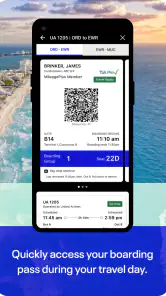
The United Airlines app is a comprehensive tool designed to enhance the travel experience for passengers flying with United Airlines. It allows users to book flights, check flight statuses, and manage their travel itinerary. Additionally, the app provides real-time updates, mobile boarding passes, and even lets users track their checked baggage, making the travel process smoother and more efficient. It is a travel app from United Airlines, and its purpose is to put valuable travel information in the palm of your hand.
Is the United Airlines app available for both Android and iOS devices?
Yes, the United Airlines app is available for download on both Android and iOS platforms. Users can easily find it on the Google Play Store for Android devices and the Apple App Store for iOS devices. This ensures that a wide range of users can access its features regardless of their preferred mobile operating system. The app is free, and its age rating is Everyone; check your device’s operating-system requirements before installing.
Pros
- User-friendly interface
- Wide range of flight options
- Real-time flight updates
- Easy mobile check-in
- Loyalty rewards program
Cons
- Frequent app crashes
- Limited customer support
- Occasional booking issues
- Inconsistent seat maps
- High data consumption
- Category
- Travel & Local
- Version
- 4.2.57