

UNC Health
- 88.00
- 4.3
- Installs
- 100.00K
- Price
- Free

Screenshots
Analysis by Reviewed
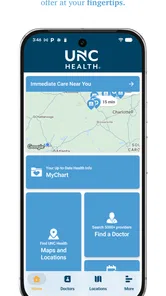
Using a health system’s mobile app is a different experience from downloading a weather tool or a casual game. I am trusting it during moments when I may be worried, rushed, or dealing with personal medical information. UNC Health is built for that setting: it is a free medical app from UNC Health Care that brings wayfinding, appointment-related tasks, and virtual urgent care into one mobile place. My overall impression is that its value comes less from flashy design and more from reducing the number of separate steps involved in dealing with UNC Health.
That focus matters. A general map can help me reach a hospital, and a phone call can still solve many scheduling questions, but neither alternative is organized around the UNC Health experience. The app is most useful when I already interact with this health system and want a quicker route to practical information. It is less compelling as a general health companion for someone who does not use UNC Health services.
Trust starts with knowing what role the app actually plays
I found it helpful to think of UNC Health as a front door to a healthcare organization rather than as a replacement for a doctor, emergency service, or independent medical reference. Its store summary points to wayfinding, scheduling, virtual urgent care, and related services. Those are operational tasks: finding the right place, managing a visit, and choosing an appropriate care route. That distinction sets a sensible expectation before installing it.
The developer is UNC Health Care, which gives the app a clear institutional identity. It is not presented as a universal diagnosis tool or a social health platform. That makes the trust question more concrete: can I understand what the app is helping me do, recognize when I am moving into a sensitive healthcare workflow, and keep control over decisions that should remain mine?
The app has an average rating of 4.3 from roughly 287 ratings, with about 88 written reviews. It has passed the 100K+ install mark, so it is not an obscure experiment with no visible audience. Those figures do not prove that every user will have a smooth visit, but they do suggest that the app has found a practical role for a meaningful group of UNC Health users.
I also appreciate that it is free to install and marked for Everyone. In practical terms, that lowers the barrier for a family member helping someone else navigate care, or for a patient who only needs the app around appointments. The age label should not be confused with a promise that every medical situation is suitable for mobile handling; the seriousness of the task still depends on the symptoms and the care needed.
What I would check before relying on it
My first step would be to confirm that I am using the official UNC Health Care application and that the name matches the health system I intend to visit. That sounds obvious, but healthcare apps deserve a slower installation habit than ordinary utilities. I would also read the permission prompts instead of accepting them automatically, especially if the app asks for access that seems unrelated to a specific task.
More From Our News Desk

 Instagram
Instagram’s Power Comes From Its Place in Your Phone
A close look at how Instagram turns Meta’s reach, recommendation systems and everyday camera habits into durable platform power—and what that costs users.

 Gmail
GmailGmail in a Busy Inbox: Who Benefits Most?
From first account to crowded workday, Gmail earns its place through dependable search and flexible sorting—but its best fit depends on how much inbox maintenance you can tolerate.

 Prime Video
Switching to Prime Video: What Changes in Your Viewing Routine
Prime Video can make a compelling second home for streaming, but switching means learning a different catalog, rental layer, and route from browsing to playback.

 Universal TV Remote Control
Universal TV Remote Control Works Best as a Reliable Backup
A phone remote earns its place through quick setup and reliable habits. Here is how to get more from Universal TV Remote Control—and where its limits show.

 Weather - By Xiaomi
Weather by Xiaomi Review: Clear at a Glance, Less Clear Up Close
Xiaomi’s weather app makes everyday forecasts quick to scan, but its calm surface can leave useful details and recovery paths harder to find than they should be.

 X
XX Under Pressure: Can It Recover When Posting Goes Wrong?
A resilience-focused review of X, examining setup, mistaken posts, interruptions, weak connections, and the gaps that matter when recovery needs to be dependable.
Latest News



The store summary makes the main purpose easy to understand, but a short summary cannot explain every account screen, notification choice, or data-handling detail. I would therefore treat the first sign-in as a review point, not a hurdle to click through. If a screen asks me to share information, I would look for the reason, decide whether it is necessary for the feature I want, and avoid granting broader access simply because it is convenient.
This is one of the app’s important trust boundaries. A healthcare app can be useful while still requiring careful attention from the person using it. Clear purpose is reassuring; automatic consent is not the same thing as informed consent.
Controls matter more than a polished welcome screen
For an app connected with medical care, I care about visible choices more than decorative design. I want to know when I am entering scheduling, urgent-care, or location-related functions, and I want those areas to feel distinct enough that I do not accidentally treat a general navigation tool as medical advice.
In my experience, the most sensible workflow is to use the app for one task at a time. If I need to find a facility, I would begin with wayfinding rather than opening unrelated health sections. If I need to arrange care, I would move into scheduling and review the details before confirming anything. Separating those intentions reduces mistakes when I am tired or distracted.
Notifications deserve the same attention. Appointment reminders can be useful, but medical notifications may appear on a lock screen or shared device. I would check the phone’s notification settings and decide whether previews are appropriate. This is not a criticism unique to UNC Health; it is a practical privacy habit for any healthcare application. The important point is that convenience should not silently determine how much personal context appears where other people can see it.
I would also avoid assuming that staying signed in is always the best choice. On my personal, protected phone, it may save time. On a family tablet, work device, or phone that other people regularly borrow, signing out after use is the safer routine. The right choice depends on who can physically reach the device, not only on how often I use the app.
Where the app becomes useful in real life
I find this section most useful when thinking beyond the first download: the app’s value grows when I connect a specific task to a repeatable habit, such as checking directions before leaving or reviewing appointment details as soon as they are arranged. Those small routines can make a stressful visit feel more manageable, while also clarifying which situations call for a different route.
A hospital visit is where wayfinding earns its place
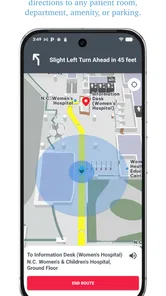
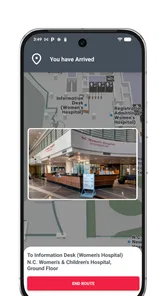
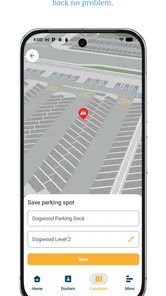
Hospital campuses can be stressful even when I know the city well. Multiple entrances, buildings, parking areas, and departments can turn a simple appointment into a race against the clock. A general map may show the campus, but an app designed around UNC Health can make the visit feel more connected to the destination I actually need.
A realistic use case would be preparing for an appointment the evening before. I would open the wayfinding area, identify the relevant location, and note the route before leaving home. I would also save time for parking and walking rather than assuming that arriving at the campus entrance means arriving at the department. That small preparation step can be more valuable than trying to search while standing outside a large building.
The trade-off is that wayfinding is only as helpful as the information presented for the particular facility and the conditions on the day. Construction, temporary entrances, crowded parking, or a weak connection can still complicate the trip. I would keep the appointment details available separately and use ordinary signs or staff directions when they conflict with what I see on the phone.
Another useful habit is to send the destination information to the person driving only when it is safe to do so. If I am the driver, I would set up the route before moving. The app can reduce uncertainty, but it should not create a new distraction in the car.
Scheduling is convenient, but confirmation still matters
Scheduling tools are attractive because they can replace phone tag. I can imagine using UNC Health when I know roughly what kind of visit I need and want to handle the administrative part outside office hours. The benefit is not merely speed; it is being able to review the appointment details in a quieter moment instead of trying to remember instructions from a call.
Still, I would read every date, location, department, and visit type before finalizing. A fast digital workflow can make it easy to select the wrong option, particularly when several clinics or appointment reasons look similar. I would take a screenshot or note the final details only if doing so fits my privacy habits, and I would check for any confirmation message rather than assuming that tapping a button completed the booking.
This is also where the app may not be the best alternative. If my situation is unusual, urgent, or difficult to describe through available choices, speaking with staff may be more efficient. A scheduling interface works well for recognizable administrative needs; it is not a substitute for explaining a complicated history or asking a nuanced clinical question.
Virtual urgent care needs careful judgment
Virtual urgent care is potentially the most sensitive part of the experience because it combines convenience with a decision about how quickly and in what format I should seek help. The app can make a remote route easier to find, but it cannot turn every symptom into a suitable virtual visit. I would use it only when my condition seems appropriate for remote care and when I understand that a clinician may still direct me elsewhere.
I would not use a virtual urgent-care option as a way to delay emergency help. Severe or rapidly worsening symptoms call for immediate local emergency assistance, not a search through an app. That is an important limitation of every digital care gateway: it can organize access, but it cannot safely make the full triage decision for me without the right clinical context.
For a less urgent problem, the app may be useful when travel is difficult, the issue is time-sensitive, and a remote consultation is a reasonable starting point. Before beginning, I would make sure I am somewhere private and have enough time to describe symptoms accurately. A rushed consultation from a noisy public place can undermine the very convenience that made the virtual option appealing.
I would also keep a short list of current medicines, allergies, recent symptoms, and relevant questions nearby. That preparation is a concrete advantage: it improves the quality of the conversation without asking the app to do more than it is designed to do. The phone becomes an access tool, while I remain responsible for presenting the information clearly.
Privacy is most important when the task feels routine
People often become less cautious when an app is helping with ordinary logistics. Yet appointment details, location searches, and urgent-care choices can reveal sensitive information even when I am not typing a long medical history. I would avoid discussing private details aloud while using the app in public, and I would be careful about screenshots, shared calendars, and notification previews.
I would also review the app’s privacy information inside the store and during setup, paying attention to the categories of information involved and the choices offered. I am not comfortable treating a healthcare app as trustworthy merely because it carries a familiar name. Trust should come from understandable explanations, appropriate controls, and my ability to make deliberate choices.
That cautious approach does not mean avoiding the app. It means matching access to the task. If I only need directions, I would not assume that every account or notification option is necessary. If I need scheduling or virtual care, I would expect a more personal workflow and give it the attention that deserves.
How it compares with the usual alternatives
Compared with a standard maps app, UNC Health is more specialized for navigating a health-system visit, while a general maps app is usually stronger for broad driving directions, traffic context, and destinations outside UNC Health. I would use the healthcare app to understand the facility-related task and a general navigation tool when I need a wider road route or a backup.
Compared with calling a clinic, the app can be less frustrating for straightforward scheduling and can let me work at my own pace. A phone call remains better when I need clarification, have an unusual request, or cannot find an appropriate digital option. The choice is not about replacing staff; it is about using self-service when the task is well defined.
Compared with independent telehealth services, UNC Health is more naturally suited to someone already connected with UNC Health Care. An independent service may be preferable for people without that relationship or for those who want to compare providers across systems. The specialized nature that makes this app useful for UNC patients also limits its value for everyone else.
Compared with searching the web for symptoms, the app’s virtual-care pathway is a more direct route to a healthcare interaction, but neither option should be treated as a diagnosis by itself. Web searches can create confusion; an app can create false confidence if I assume that finding a care button means my situation is appropriate for that route. Good judgment remains essential.
Device and version details worth noting
UNC Health was released on September 10, 2019, and the current version is 3.11.0. The listed minimum operating-system requirement is version 10, so I would check the phone’s software before planning to depend on it for an appointment. Compatibility is a small detail until the app is needed at the worst possible moment.
I would install or update it before the day of care, while I have a reliable connection and time to sign in. That gives me a chance to review the interface, check notification behavior, and make sure I can reach the feature I need. Waiting until I am outside a hospital or feeling unwell adds avoidable pressure.
I would also keep a backup plan. For directions, that might mean knowing the facility address and entrance. For scheduling, it could mean having the clinic’s contact route available. For urgent symptoms, the backup is not another app; it is appropriate immediate medical help. Digital convenience is strongest when it supports a plan rather than becoming the only plan.
Who should use it, and who should skip it?
I would recommend UNC Health to people who regularly use UNC Health Care facilities, especially those who value a single place for finding locations, handling scheduling tasks, and reaching virtual urgent-care options. It may also help caregivers who coordinate visits, provided they pay close attention to whose account is active and where notifications appear.
I would be more hesitant to recommend it to someone who rarely interacts with UNC Health, wants a provider-neutral health app, or mainly needs general symptom education. Installing a system-specific app for one occasional trip may not be worth the setup unless the wayfinding or scheduling benefit is significant.
I would also skip relying on it as the sole tool during an emergency, for complex clinical questions, or when a phone conversation is clearly needed. Its strengths are access and organization. Its limits appear when the situation requires broad medical judgment, immediate intervention, or detailed human explanation.
My cautious verdict
After looking at UNC Health through the lens of trust and user control, I see a practical medical app with a clearly defined audience. Its free availability, Everyone age rating, and established presence make it easy to try, while the combination of wayfinding, scheduling, and virtual urgent care gives it more everyday usefulness than a simple facility directory.
My recommendation comes with a condition: use it deliberately. Check the official identity, read permission and privacy choices, control notification previews, protect the account on shared devices, and confirm appointment details before relying on them. Those habits are especially important because healthcare tasks can look routine while carrying personal consequences.
The app is at its best when it removes administrative friction without pretending to replace clinical judgment. For an existing UNC Health user, that is a worthwhile balance. For someone outside the system, a general map, direct clinic contact, or broader telehealth option may be a better fit. I would install it before a planned visit, test the relevant section calmly, and keep a non-app backup for anything time-sensitive.
In short, I would recommend UNC Health to the right patient rather than to everyone. It earns trust through a focused purpose and useful access points, but the safest experience still depends on the choices I make around privacy, notifications, account access, and the seriousness of my symptoms.
UNC Health Frequently Asked Questions
Is the UNC Health app free, and what devices can I use it on?
The UNC Health app is free to download and is listed for users of all ages. It is a medical app from UNC Health Care, with a current version of 3.11.0 and a minimum operating-system requirement of 10. Check that your device meets that requirement before installing. The app has been available since September 10, 2019, and its store summary highlights wayfinding, scheduling, virtual urgent care, and more.
What is the UNC Health app used for?
The UNC Health app is designed to help patients manage many healthcare tasks from a mobile device. Depending on your location and connected UNC Health services, you may be able to find providers, schedule or request appointments, review portions of your medical record, check test results, manage prescriptions, view bills, and communicate with care teams through secure messaging. Available features can vary by facility and account type.
How do I sign in to UNC Health, and do I need an account?
Most personal health features require you to sign in with an eligible UNC Health patient portal account, commonly connected with MyChart services. New users may need to complete an activation process using information provided by UNC Health or request assistance from the organization. Keep your login details private, enable device security, and remember that the app may not offer the same functions when used without an authenticated account.
Can I schedule appointments and communicate with my doctor through the app?
The app may allow you to search for UNC Health providers, request or schedule certain appointments, and send secure messages to participating care teams. However, not every specialty, appointment type, or clinic supports online scheduling or messaging. Some requests may require a phone call, referral, insurance verification, or staff approval, so the app should be viewed as a convenient option rather than a replacement for every scheduling method.
Can UNC Health be used for urgent or emergency medical problems?
UNC Health should not be relied on for emergencies or rapidly worsening symptoms. If you believe you are experiencing a life-threatening condition, call your local emergency number or go to the nearest emergency department immediately. Secure messages and appointment requests are not continuously monitored and may take time to receive a response. For non-emergency concerns, use the app’s available care-navigation or scheduling options.
Pros
- Find doctors
- clinics
- and hospitals within the UNC Health network.
- Access appointment details and upcoming visit information in one place.
- Review test results and portions of your medical record securely.
- Use digital check-in features to save time before eligible visits.
- View medication information and request prescription renewals when available.
Cons
- Some features require an active UNC Health patient account.
- Appointment options depend on provider availability and location.
- Certain records or services may not appear immediately after a visit.
- The app is most useful for patients already using UNC Health services.
- Some functions may redirect you to web pages instead of staying in-app.











