UDisc Disc Golf App
- 4.76K
- 4.7
- Installs
- 1.00M
- Price
- Free

Screenshots

Analysis by Reviewed
I’d choose UDisc Disc Golf when I want one place to plan a disc golf outing, keep the score, and look back at how I played. Its real strength is the way those jobs connect: course information can help before a round, a scorecard keeps play organized, and saved results give practice more context. It is not a replacement for paying attention to the course or enjoying the people you play with, though. I get the most from it when I use the phone briefly and deliberately, rather than checking every tool just because it is there.
Who gets the most from it
The app suits regular players who visit different courses, practise with a goal, or like keeping a record without maintaining a separate notebook. It can also make a first outing less confusing for a newcomer: a shared scorecard gives the group one place to follow results, while course information can help with the basic question of where to go next. A casual player can use it too, but the benefits are smaller if every round is on a familiar course and nobody cares about scores or stats.
I would think about the group before making the app the center of a round. If friends enjoy comparing results, the scorecard and competitive features can add a welcome structure. If they mainly want an unhurried walk and a few throws, a phone-free game or a paper card may be a better fit. Keeping the tool optional is part of using it well: one person can handle the score without asking everyone else to spend the afternoon looking at screens.
A round where the details matter
Picture arriving at a course you have not played before after work, with daylight fading and a friend who is new to disc golf. I would check the course information before setting off, then look at the map at the start and again only if the route becomes uncertain. During play, I would enter scores at a natural pause rather than after every throw. That small routine helps the group keep moving and prevents scorekeeping from taking over the conversation.
After the round, the record can be more useful than a quick memory of whether the game felt good. If the result seems unusual, I would compare it with another round on the same course before deciding that my play has changed. This is a practical way to avoid mistaking a new layout or a distracted social game for a real trend. Consistent records are more informative than a single standout score.
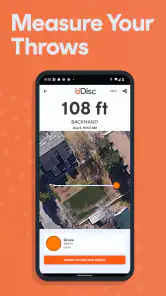
For practice, I would decide on one question before opening the stats: am I trying to understand how my rounds are changing, or do I just want to remember what I played? That keeps the review focused. When measuring throws, I would use the result as a rough point of reference for later practice, not as a verdict on technique. A measurement can help compare attempts under similar conditions, but it cannot explain by itself why one throw travelled farther.
Choosing between a phone, paper, and general maps
A paper scorecard is the simplest alternative when the goal is only to write down results. It has no screen to distract the group and no need to manage a phone during play, though it does not bring course discovery and saved records together in the same way. A notes app can be just as suitable for someone who wants a personal log and is comfortable arranging it themselves. I would choose UDisc over those options when I expect to use its disc-golf-specific course and scoring tools, not merely because a digital scorecard sounds more modern.
You May Like

Clash of Clans Is Won Between the Battles

Android Auto Makes the Case for Quieter Car Software

MobiOffice: Transforming Mobile Productivity with Seamless Integration

EA SPORTS FC™ Mobile Soccer: Redefining Mobile Sports Gaming

How Microsoft OneDrive Became a Mobile Productivity Giant

How Google Translate Breaks Language Barriers Effortlessly
A general mapping app is useful for reaching a venue, but it is not the same as having information intended to help with the course itself and movement between tees. Even so, UDisc does not need to replace every tool. I would use a general map for the journey if that is already part of my routine, then turn to UDisc for the round. Players who only need directions to a known location may find that adding another app does not solve a problem they actually have.
Practical habits that make it easier to use
Before leaving, I would check the course details I expect to need and make sure the phone is charged enough for an outdoor outing. On the course, I would avoid keeping it in hand while walking, throwing, or talking with the group. Checking the next tee while finishing a hole is a useful compromise: it gives me a moment to orient myself without turning navigation into a running distraction.
For a group scorecard, agree in advance who will enter the results and make sure everyone understands how the group is keeping score. It is a small step, but it avoids a mid-round pause over whose turn it is to update the phone. If there is disagreement about a score, settle it with the players involved rather than assuming the app can resolve a question about what happened on the hole.
When reviewing stats, I would keep comparisons as fair as possible. Looking at rounds on the same course gives a more useful reference than mixing a familiar layout with an unfamiliar one. I would also be cautious about drawing strong conclusions from a round played in a very different mood or group setting. The app can preserve results; deciding what they mean still takes judgement.
Where the app can feel like too much
UDisc’s range of tools is useful, but a new player may not need to explore all of them at once. I would start with course-finding and scorekeeping, then add maps, stats, or measuring only when a specific need comes up. That approach keeps the learning curve manageable and makes it easier to tell which features are genuinely useful to you.
There is also a social trade-off. A phone can make shared scoring clearer, but repeated checks can interrupt the flow of a relaxed round. For a solo practice session, detailed attention to records may be exactly the point; for a casual walk with friends, it can become an unnecessary extra task. Players who dislike tracking or want a deliberately screen-free outing may be happier with paper—or with no scorecard at all.
Course information and maps are only helpful when they fit the place and the situation. On an unfamiliar or spread-out course, they can save uncertainty; on a compact layout I know well, I may not need to open them. I would treat any course guide as a helpful aid, not a reason to stop observing signs, paths, and the people around me. That is especially important when the group is moving and the next tee is not immediately obvious.
A practical tool for planning a round
Before heading out, I’d use the course-finding tools to check what is nearby and get a sense of the layout. When visiting an unfamiliar course, a map can make the first few holes less of a guessing game; I still recommend looking around rather than relying on a phone screen while walking or throwing. A useful habit is to check the next tee while finishing a hole, then put the phone away and focus on the group. That keeps navigation helpful without letting it interrupt the pace of play.
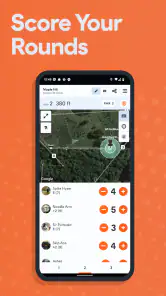
For a typical after-work round with friends, the value is straightforward: open a scorecard, keep everyone’s results together, and review the round afterward. If the group is new to disc golf, that shared record can help everyone follow the scoring without one person having to remember each hole. For solo practice, recording rounds over time gives you a more grounded view than judging progress by one unusually good or bad day.
Where it fits among disc golf options
Compared with a basic notes app or paper scorecard, UDisc brings course information, scoring, and personal records into one place. Those simple alternatives can be better if you want to avoid using your phone during a round or only need to jot down a score. A general maps app may help you get to a venue, but it is not a disc-golf-focused guide to moving between tees. I find UDisc most worthwhile when I play often enough to use more than one of these tools.
It is less compelling for someone who plays rarely, already knows their local course, and has no interest in reviewing stats. A phone also needs enough battery for a day outdoors, and checking it too often can distract from the people you came to play with. I’d keep score efficiently, save deeper browsing for before or after the round, and avoid treating rankings as a measure of whether a casual game was successful.
Why UDisc Stands Out in the Disc Golf World
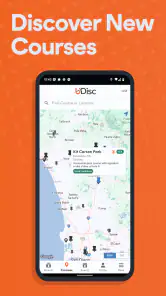
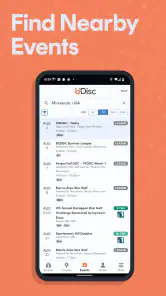
First off, the UDisc Disc Golf App is not just your average scorekeeper. It's a full-fledged disc golf companion that brings a ton of features to the table. From finding courses to keeping stats, it's got the full spectrum covered. One of the coolest features is the course directory. With over 10,000 courses listed worldwide, you can find a course wherever you are. Trust me, it’s a lifesaver when you're traveling or just exploring new areas.
Tracking Your Progress Like a Pro
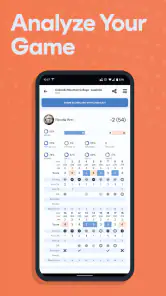
Now, if you're anything like me, you like to see your progress. UDisc's stat tracking is phenomenal. You can keep an eye on every single round you play, and it even breaks down your performance in ways you didn’t know you needed. I've found this super helpful for identifying areas where I need to improve. Plus, it’s kind of fun to look back and see how far I’ve come.
My advice is to use those records to ask a specific question, rather than just checking a summary after every game. If your scores vary, compare rounds on the same course before drawing conclusions; unfamiliar layouts, weather, and casual group play can all make a single result a poor benchmark. The goal is to spot a recurring pattern you can work on, not to turn every round into a test.
Course Mapping and Navigation
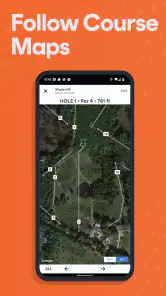
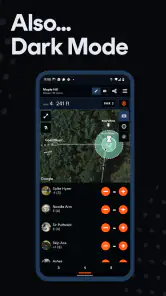
Another feature that I can't get enough of is the course mapping. It’s like Google Maps for disc golf. You can view detailed maps of courses, and the navigation tool even helps you find the next tee. This feature saves so much time and frustration, especially on those sprawling courses where the next hole isn’t always obvious.
For a new course, I’d glance at the map before starting and use it mainly when the route becomes unclear. That small change keeps the phone from becoming a constant companion in your hand. Course maps are most helpful when tees are spread out or the paths are unfamiliar; on a compact course you already know, they may add little to the experience. Measuring throws can also be useful for a practice session, but I’d treat a measurement as a reference point rather than a perfect assessment of throwing form.
Community and Competitive Edge
UDisc also has a community aspect that brings an added layer of excitement. You can participate in leaderboards and even challenge friends. It’s a neat way to add a bit of competitive spirit to your game. Plus, seeing where you rank can be a great motivator to get out there and throw a few more rounds.
That competitive layer is optional, and I think it works best when everyone involved wants it. If friends prefer an informal round, a simple shared scorecard is enough; leaderboards are better for players who enjoy comparing results. I would not use a ranking as a universal measure of skill, since the course and the people playing affect how meaningful a comparison feels.
In addition, the app offers tournament features for those who take their disc golf seriously. Whether you're organizing a local tournament or just participating, this app has the tools you need to make it a success. The scorecard feature alone is worth its weight in gold for keeping things organized and professional.
For someone organizing play, I’d settle the scoring routine with the group before the first tee: decide who enters results and make sure everyone understands the format being used. That avoids stopping mid-round to resolve confusion. A casual player who never joins organized events may not need tournament tools, but having scoring and round records together can still be handy for friendly matches.
What to expect as a new or returning user
The app is a free sports app from UDisc LLC, with a 4.7 average from around 59,000 ratings and more than a million installs. It is rated for Everyone, and it has been available since March 11, 2012, with support for operating systems from version 9 onward. Optional in-app purchases are listed at $29.99 per item, so I’d check what a purchase covers before paying rather than assume every tool is included at no cost.
UDisc has been around long enough to become a familiar name in disc golf, but the confirmed release information alone does not tell me which features have changed over time. If you already use it, the practical question is whether the current tools still suit your routine; if you are new, start with the free scorekeeping and course-finding workflow and decide whether you need anything beyond that. I would watch for changes to the course information and the tools I rely on, while judging them by how useful they are on an actual round.
One small trade-off is that a feature-rich companion can feel like more than a beginner needs. You do not have to use every option: begin with a scorecard, then explore stats or maps when a real question comes up. If your main priority is simply throwing without tracking, paper may feel lighter and more sociable. If you want a disc-golf-specific way to plan courses and keep a record, UDisc makes a stronger case than a generic notes or mapping app.
Overall, the UDisc Disc Golf App is like having a personal caddie, scorekeeper, and strategist all in your pocket. Whether you’re a seasoned pro or a newbie, this app adds value to every game. So next time you're heading out to the course, make sure UDisc is loaded up on your phone. You won't regret it!
UDisc Disc Golf App Frequently Asked Questions
Can UDisc Disc Golf App help me keep score during a round?
Yes. Keeping score is one of UDisc Disc Golf App’s central uses, making it a practical option if you want to record a round on your phone rather than rely on paper. The app is designed for disc golf, so its scorekeeping sits alongside course-finding and stats tools. If you are new to the sport, it can bring several useful tasks together in one place.
Can I use UDisc Disc Golf App to track my throws and playing progress?
UDisc’s store summary highlights tracking stats and measuring throws, in addition to keeping score and finding courses. That makes the app relevant both during a round and when you want to look back at your play. If you mainly want a simple scorecard, you may not need every tool, but players interested in following their performance over time may appreciate having those features together.
Is UDisc Disc Golf App suitable for someone new to disc golf?
UDisc can be useful for newcomers because its main tools cover practical parts of playing: finding courses, keeping score, tracking stats, and measuring throws. You do not need to be an experienced player to understand why those tools might help. The app is free to download, so you can explore its basic appeal before deciding whether any paid option is relevant to the way you play.
Who develops UDisc Disc Golf App, and is it intended for all ages?
UDisc Disc Golf App is developed by UDisc LLC and is categorized as a sports app. It has an Everyone content rating, which makes it broadly suitable for users of different ages. As with any app, parents can decide whether its features fit their family’s needs, but its focus is disc golf rather than age-restricted entertainment.
Is UDisc Disc Golf App free to download, and what should I know about paid features?
UDisc Disc Golf App is free to download, so you can get started without paying upfront. The app also offers in-app purchases, with items priced at $29.99 each. Whether you need a paid option depends on how you plan to use the app, so check the purchase details in your app store before buying and consider whether its course-finding and scorekeeping tools meet your needs.
Pros
- Comprehensive course directory
- Accurate GPS mapping features
- User-friendly interface
- Detailed score tracking
- Offline course capability
Cons
- Limited free features
- Occasional GPS signal loss
- Requires account login
- Ads in free version
- Somewhat high subscription cost

- Category
- Sports
- Version
- Varies with device