

Twin Health
- 170.00
- 4.6
- Installs
- 100.00K
- Price
- Free

Screenshots
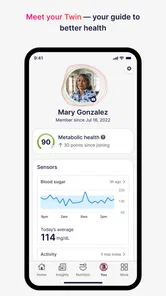
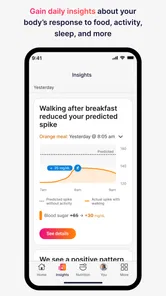
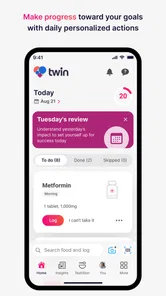
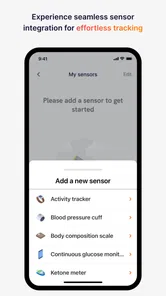
Analysis by Reviewed
I approached Twin Health as a tool for people who want more than a general wellness checklist. Its focus is metabolic health, and that gives the experience a more specific purpose than a typical calorie counter, step tracker, or meal-planning app. The central idea is precision: instead of treating every user as if the same advice will work, the app is designed to support decisions around an individual’s health patterns.
That focus immediately makes it more interesting, but also more demanding. This is not the kind of app I would open only when I need a quick recipe or a motivational quote. I see it as something that works best when I am willing to pay attention to my routines, notice how my choices affect my energy and habits, and use the guidance consistently. The developer is Twin Health, and the app sits in the medical category rather than being presented simply as a fitness accessory.
The app is free and rated for Everyone, which makes it easy to consider without an upfront purchase. It has an average rating of 4.6 from around 2.4 thousand ratings, with more than 100 thousand installs. Those figures suggest that it has reached a meaningful audience, while still leaving room for a personal trial rather than assuming it will suit every lifestyle.
Personalized metabolic support is the real point
The capability I found most important is the attempt to turn metabolic health into an ongoing, personalized process. Many health apps give me a fixed target and expect me to fit my life around it. Twin Health takes a different direction by framing health support around my own patterns and the choices that may influence them.
That distinction matters because metabolic health is not only about body weight or exercise minutes. Sleep, meal timing, daily movement, stress, and consistency can all affect how manageable a routine feels. A useful system should help me connect those areas instead of forcing me to track them as unrelated tasks. Twin Health’s precision-health approach is valuable when it helps make those connections understandable and practical.
I would not describe the app as a replacement for a doctor, a diagnosis, or prescribed treatment. Its most sensible role is supportive: it can help me organize information, recognize habits, and stay engaged with a plan. Anyone managing diabetes, medication, or another medical condition should treat the app as an additional resource and discuss important decisions with a qualified clinician.
The strongest benefit is therefore not a single dramatic feature. It is the possibility of receiving guidance that feels more relevant than generic health advice. When recommendations reflect my actual routine, I am more likely to understand why a change is being suggested and more likely to keep trying after an imperfect day.
More From Our News Desk

 Instagram
Instagram’s Power Comes From Its Place in Your Phone
A close look at how Instagram turns Meta’s reach, recommendation systems and everyday camera habits into durable platform power—and what that costs users.

 Gmail
GmailGmail in a Busy Inbox: Who Benefits Most?
From first account to crowded workday, Gmail earns its place through dependable search and flexible sorting—but its best fit depends on how much inbox maintenance you can tolerate.

 Prime Video
Switching to Prime Video: What Changes in Your Viewing Routine
Prime Video can make a compelling second home for streaming, but switching means learning a different catalog, rental layer, and route from browsing to playback.

 Universal TV Remote Control
Universal TV Remote Control Works Best as a Reliable Backup
A phone remote earns its place through quick setup and reliable habits. Here is how to get more from Universal TV Remote Control—and where its limits show.

 Weather - By Xiaomi
Weather by Xiaomi Review: Clear at a Glance, Less Clear Up Close
Xiaomi’s weather app makes everyday forecasts quick to scan, but its calm surface can leave useful details and recovery paths harder to find than they should be.

 X
XX Under Pressure: Can It Recover When Posting Goes Wrong?
A resilience-focused review of X, examining setup, mistaken posts, interruptions, weak connections, and the gaps that matter when recovery needs to be dependable.
Latest News



What using it feels like day to day
In practical use, I would approach Twin Health as a companion for repeated check-ins rather than a one-time assessment. The value builds when I return often enough to see patterns. A single entry or isolated decision tells me very little; several days of consistent attention can reveal where my routine is stable and where it keeps breaking down.
My advice is to begin with one clear goal. For example, I might use the app to improve the regularity of my meals or to become more aware of how sedentary work affects my afternoon energy. Trying to overhaul food, sleep, exercise, and stress at the same time would make it difficult to know what actually helped. A focused starting point gives the guidance a fairer test.
This is also where the app’s precision angle can change my behavior. Instead of asking whether I followed a perfect plan, I can ask a more useful question: which small decision was easiest to repeat, and which one created friction? That shift prevents the familiar cycle of setting ambitious targets, missing them, and abandoning the entire routine.
One realistic scenario would be a person who works at a desk, eats at inconsistent times, and feels tired in the afternoon. Rather than downloading another generic workout app, that person could use Twin Health to examine the whole pattern. A practical routine might involve recording relevant habits, reviewing the guidance, and choosing one adjustment that fits the workday. The important result would not be an impressive first week; it would be discovering a change that remains possible during busy weeks.
How to get more from the guidance
I would keep a short personal note alongside the app, especially during the first phase of use. Writing down unusual workdays, travel, late meals, or poor sleep gives context to what I see in the app. Without that context, I might mistake a temporary disruption for a permanent problem or blame the wrong habit for how I feel.
Another useful approach is to review patterns at a fixed time rather than checking constantly. A brief review at the end of the day or week can turn scattered observations into a decision for the next period. The app is more useful when it supports reflection than when it becomes another source of notifications or self-judgment.
I would also resist the urge to treat every recommendation as equally urgent. Metabolic health is a broad area, and the most sustainable improvement may come from a modest change that solves a real obstacle. If the app suggests several areas to consider, I would choose the one that fits my current schedule and revisit the others later.
This workflow is a non-obvious strength of a personalized health tool: the user can use the information to improve decision-making, not merely to collect records. It also exposes a weakness. If I do not engage honestly or consistently, the experience becomes much less informative. Precision cannot compensate for incomplete attention.
Where it compares well with ordinary health apps
A standard calorie tracker is often better when my only goal is to log food quickly. A step counter is simpler when I only want a daily movement total. A workout app may be the better choice when I need structured exercise sessions. Twin Health appeals to me when those isolated measurements are not enough and I want to think about metabolic health as a connected routine.
The trade-off is simplicity. Specialized guidance can require more thought than tapping a completed workout or entering a meal. Someone who wants instant feedback may find a basic tracker more comfortable. Someone who wants help understanding how several habits interact may find the broader approach more useful.
I also would not choose it as my only tool for urgent symptoms or clinical monitoring. A medical professional remains the right source for diagnosis and treatment decisions. The app’s role is strongest between appointments, when I need help staying aware of daily behavior and preparing better questions for a healthcare conversation.
The best scenario for using Twin Health
The ideal user is motivated but not satisfied with generic advice. I picture someone who has already tried making healthier choices, yet struggles to understand why progress stops or why a plan works for a short time and then becomes unrealistic. The app can be useful in that gap because it encourages a more individual view of the problem.
It may be especially helpful for someone who prefers gradual changes. Instead of treating health as a challenge with a finish line, I can use the app to build a repeatable routine and learn from setbacks. A missed day is not automatically failure; it can show that the plan depends on conditions I cannot reliably control.
For the best experience, I would use it during a relatively stable period first. Starting while traveling, changing jobs, or dealing with a major disruption makes it harder to judge the guidance. Once I understand the normal rhythm of my week, I can see whether the app helps me adapt when circumstances change.
People who need an extremely lightweight app may prefer something else. If I dislike recording habits, reviewing recommendations, or thinking about long-term patterns, the precision-health concept may feel like work. Likewise, users looking mainly for bodybuilding programs, detailed running plans, or recipe discovery should look toward tools built specifically for those purposes.
Trade-offs that deserve attention
The first limitation is commitment. Personalized support only becomes meaningful when I give it enough information and attention to reflect my real life. That can feel demanding compared with a simple app that asks for one number a day. The benefit is potentially more relevant guidance; the cost is a higher level of participation.
The second limitation is interpretation. Health information can sound authoritative even when it is only one part of a larger picture. I need to avoid turning every fluctuation into a conclusion. If something feels medically concerning, I should not wait for an app-based suggestion before seeking professional advice.
The third is emotional. Metabolic health is closely connected to eating, weight, energy, and self-image, so tracking can become stressful for some people. I would stop or reduce use if the app made me feel punished by ordinary variations. A good health routine should improve understanding without creating constant guilt.
There is also a practical trade-off between breadth and speed. A tool that considers a wider health picture may take longer to understand than a narrow tracker. That is not automatically a flaw, but it means I would judge it over a sustained period rather than after a few minutes. The question is whether the guidance helps me make better choices, not whether the interface produces an instant thrill.
The current version is 4.200.0, and the app supports operating systems from version 9 onward. That makes it accessible to many users with older devices, although the quality of any health-app experience can still depend on the phone, the user’s routine, and how consistently the app is used.
Questions I would ask before starting
If I am wondering whether it costs anything to try, the answer is straightforward: Twin Health is free. That removes one common barrier, but I would still consider the time required to use it properly. Free does not mean effortless, and the real investment is attention to the process.
If I am asking whether it is suitable for a family member, the Everyone age rating makes it broadly accessible from an age-classification perspective. That should not be confused with personalized medical suitability. A child, older adult, or person with a complex condition may need guidance from a clinician about how to use any health-support app responsibly.
If I want to know whether it can replace my doctor, I would say no. I would use it to support everyday awareness, not to interpret serious symptoms, change medication, or make a diagnosis. Its best contribution is helping me notice routines and discuss them more clearly with a professional when needed.
If I am unsure how long to test it, I would give myself enough time to observe ordinary weekdays and at least one disrupted routine. The point is to see whether the guidance remains practical when life is busy. A short burst of enthusiasm can make almost any wellness app appear effective; consistency gives a more honest answer.
Finally, if I already use a food, exercise, or sleep tracker, I would not automatically replace it. I would compare the roles. A specialized tracker may remain better for detailed logging, while Twin Health can serve as the place where I think about the wider metabolic picture. Keeping both only makes sense if each answers a different question rather than duplicating effort.
My recommendation for the right kind of user
I like Twin Health most as a structured way to make metabolic health feel personal and actionable. Its strongest idea is not that it can make healthy living effortless, but that better context can lead to better decisions. That is a meaningful difference from apps that reduce health to a single score or a daily streak.
I would recommend trying it to a person who wants ongoing support, is willing to reflect on habits, and prefers gradual progress over dramatic promises. I would not recommend relying on it alone for medical care, nor would I choose it for someone who wants only quick calorie entries, workout videos, or a basic pedometer.
After using it, my conclusion is balanced: the app’s value depends heavily on participation, interpretation, and patience. When I treat it as a thoughtful companion rather than an authority or a magic solution, its precision-health focus makes sense. The most useful result is a clearer connection between daily choices and a sustainable metabolic-health routine.
For a free medical app from Twin Health, that is a worthwhile proposition, provided I approach it with realistic expectations. It can help organize my attention and encourage more informed habits, but the lasting outcome still comes from what I do outside the screen.
Twin Health Frequently Asked Questions
Is Twin Health available on Android and iOS?
Twin Health is a medical app developed by Twin Health, and it is available through mobile app stores. Before downloading, check that your device meets the app’s operating system requirement and that you are installing the official app. Access to the program itself may depend on your location, healthcare provider, employer, or other enrollment arrangements.
Who develops Twin Health, and is it intended for a general audience?
Twin Health is developed by Twin Health and is categorized as a medical app. Its content rating is Everyone, but that rating does not mean the program is appropriate for every person or every health situation. The app focuses on metabolic health support, so consider whether its purpose matches your needs and discuss its use with a qualified healthcare professional when relevant.
What is Twin Health and how does it work?
Twin Health is a digital health platform designed to help users understand and improve metabolic wellness. It typically combines information from connected devices, health data, lifestyle habits, and guidance from health professionals or coaching programs. The app may provide personalized recommendations related to nutrition, activity, sleep, and other daily behaviors. Available features can vary depending on your location, plan, and healthcare provider.
Is Twin Health suitable for everyone?
Twin Health may be useful for adults who want structured support with metabolic health, weight management, blood sugar awareness, or healthier daily routines. However, it should not automatically be considered suitable for children, pregnant users, or people with complex medical conditions. Before relying on its recommendations, check with a qualified healthcare professional, particularly if you take medication or are managing diabetes or another chronic condition.
Does Twin Health replace a doctor or medical treatment?
No. Twin Health should be viewed as a digital wellness and health-support tool rather than a replacement for a doctor, diagnosis, prescribed medication, or emergency care. Its insights and recommendations can help you track habits and discuss progress with a professional, but they may not identify every medical problem. Always follow your clinician’s instructions and seek immediate care when symptoms are severe or urgent.
Pros
- Personalized guidance can make health goals easier to follow.
- Tracks several wellness factors in one place.
- May help users notice patterns in daily habits.
- Useful for people who prefer structured health coaching.
- Progress insights can encourage more consistent routines.
Cons
- Some features may require a compatible wearable or device.
- Health recommendations may feel too general for complex conditions.
- Regular tracking can become time-consuming for some users.
- Availability and coaching options may vary by location.
- Users should not treat the app as a replacement for medical care.











