TV Garden World Video Player
- 22.00
- 3.9
- Installs
- 500.00K
- Price
- Free

Screenshots
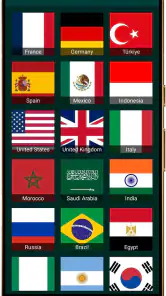
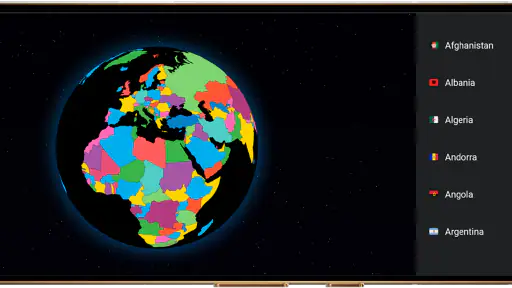
Analysis by Reviewed
I came to TV Garden World Video Player with a simple expectation: use it as a place to bring my own television streams together, rather than treating it like a conventional streaming service with a fixed catalog. That distinction matters. This is an Events app from FANNIA APPS, and its purpose is much closer to opening a personal window onto channels from different parts of the world than browsing a polished library of on-demand shows.
My first impression is that the idea is appealing for people who already have streams they want to watch and need a mobile video player to handle them. It is free, rated for Everyone, and has reached over five hundred thousand installs, so it clearly attracts more than a tiny group of experimenters. The average rating sits at 3.9 from around four and a half thousand ratings, which suggests a useful but not universally smooth experience. I would describe it as a practical tool with an interesting international angle, not as a replacement for every television app on a phone.
From finding a stream to watching it on a phone
The starting point: you bring the viewing source
The most important thing to understand before installing it is the starting condition. The app is designed around your own TV streams from around the world. That means the quality of your experience depends heavily on what you are trying to play. If you already have legitimate stream addresses, a personal list, or a collection of channels you regularly use, the app has a clear reason to exist. If you are expecting it to provide a complete ready-made television lineup immediately, you may find the first step less satisfying.
This makes the app different from services such as YouTube, broadcaster apps, or subscription platforms. Those alternatives generally begin with a catalog: open the app, search for a program, and press play. Here, the useful starting point is your own source material. That gives you more control, but it also means the app cannot remove every part of the setup process for you.
I see that trade-off as the central character of the product. It is not trying to decide what you should watch. Instead, it gives your streams a place to play. For someone who follows regional television, keeps a personal channel list, or wants to test streams on a phone instead of a computer, that can be more valuable than a large but closed catalog.
Step one: preparing the stream list
Before opening the player, I would organize the sources I actually intend to use. This is one of the less obvious ways to make the experience better. A long, untidy collection of channels creates friction later, especially when several streams have similar names or when a source has stopped working. Keeping a smaller working set makes the app feel more like a personal television shelf and less like a technical experiment.
I would also separate sources by purpose rather than simply collecting everything in one place. News, local programming, cultural channels, and event coverage can each have their own place in my routine. That approach is useful because the app’s international focus can otherwise become overwhelming: the attraction is the variety, but variety without organization slows down the handoff from choosing a channel to actually watching it.
Another practical tip is to test important streams before relying on them for a planned viewing session. A source can fail for reasons that have nothing to do with the player, including a temporary outage or a change at the provider’s end. If I were preparing for a live event, I would keep an alternative stream ready rather than assuming one source will remain available throughout.
Step two: moving from source to playback
Once the source is ready, the app’s job becomes more straightforward: accept the stream and play it on the device. This is where a dedicated player can be more convenient than switching between browser tabs or using a desktop setup. The phone becomes the viewing endpoint, while the stream itself remains something I control or obtain separately.
The handoff is important because it separates discovery from playback. I may find a channel through a personal list, a community I trust, or a source I already use, but I do not need to treat the player as the place where all discovery must happen. That makes the app flexible for people with different viewing habits. It can sit at the end of an existing workflow instead of forcing everyone into one content ecosystem.
At the same time, this arrangement means I would not judge the app only by whether a particular stream plays. A failed channel is not automatically evidence that the player is broken. The sensible troubleshooting order is to check the source on another compatible player, verify that the address is still current, and then try again in TV Garden World. That simple habit saves time and prevents blaming the wrong part of the chain.
Step three: deciding whether the phone is the right screen
For short sessions, a phone is a convenient destination. I can check an international channel while commuting, follow a local broadcast away from home, or keep a stream nearby while doing another task. The app fits those moments because it focuses on playback rather than turning the device into a full entertainment hub.
Longer viewing raises a different question. A phone screen is not always the best place for a television stream, particularly when the source contains small text, news tickers, sports details, or a busy studio layout. In those situations, I would prefer a larger display or a platform built around television hardware if one is available to me. The app’s value is strongest when portability and personal control matter more than a living-room interface.
This is also where expectations should stay realistic. A video player can make a source accessible, but it cannot transform an unstable stream into a reliable broadcast or make a small screen behave like a television. I appreciate the app more when I treat it as the final viewing tool in a chain, not as a complete answer to every streaming problem.
The handoffs that determine the experience
There are several handoffs in this workflow, and each one can introduce friction. The first is between the person supplying the stream and the app receiving it. The second is between the app and the network connection. The third is between playback and the person watching. When everything lines up, the process feels simple. When one link fails, the problem may appear vague because the player is only one part of the system.
That is why I would approach setup methodically. I would begin with one known working source instead of importing a large collection at once. Then I would confirm that playback starts, check whether the picture remains stable, and only afterward add more channels. This workflow makes errors easier to isolate and prevents a single bad entry from making the whole collection seem unusable.
For a household or small group, the handoff can also be social. One person may collect the streams while another wants a simple way to watch them. In that case, the organizer should prepare a clear, current list rather than expecting every viewer to understand the technical side. The app can be the viewing layer, but the quality of the shared experience still depends on how well the sources are prepared.
A realistic everyday scenario
Imagine that I follow a regional news channel from another country and want to check it during a lunch break. I already have a legitimate stream source, so I open the player, choose that channel, and let it run on my phone. If the stream starts quickly, the app does exactly what I need: it removes the browser clutter and gives me a focused viewing screen. I can then close it when the break ends without committing to a subscription or a broader content service.
Now imagine a different evening. I have collected several international channels and want to move between them while preparing dinner. The convenience comes from having those sources in one player, but the weakness appears if one channel has changed, another is unavailable, and a third takes time to load. The app still helps, yet the experience becomes dependent on the condition of each source. This is a good example of why a compact, curated list is usually better than an enormous one.
A third scenario is travel. I may want access to familiar regional programming while away from home, but the result depends on the network available at that moment and on whether the stream itself can be reached. The player can be useful in this situation because it is mobile, but I would not make it my only plan for important live coverage. A second viewing option is sensible when timing matters.
What the result feels like when it works
When the source is valid and the connection cooperates, the outcome is pleasantly direct. I get a way to watch my chosen television stream without having to open a separate web page for every channel. That is the app’s strongest result: it turns a personal collection of international streams into something I can approach from a single mobile player.
I also like the independence built into that model. The app is not asking me to replace every existing service. It can complement them. I can still use a broadcaster’s official application for its exclusive programs, a subscription service for its on-demand library, and this player for sources that fit my own international viewing habits. Comparing it with those alternatives, TV Garden World offers more personal control but less built-in convenience.
Compared with a browser, a dedicated player should feel more focused and less cluttered during playback. Compared with a mainstream television platform, it is likely to feel less guided and less polished for casual discovery. Compared with a specialist live-TV service, it may appeal more to technically confident viewers who already know what they want to play. Those distinctions help clarify who will enjoy it instead of treating all streaming tools as interchangeable.
Where the flow breaks
The first break occurs when someone installs the app without having a clear stream source in mind. The product’s concept is easy to understand, but the practical path is not identical to opening a catalog and choosing a title. People who want instant access to familiar channels with no preparation may be happier with an official broadcaster app or a conventional live-TV service.
The second break is source reliability. A player can only play what it receives. If a channel disappears, buffers repeatedly, or refuses to load, the app may not be able to solve the underlying issue. I would treat the player and the stream provider as separate components and test them separately. That is a more useful approach than repeatedly tapping the same channel and hoping the result changes.
The third break is organization. International streams are exciting at first, but a collection can quickly become difficult to navigate if names are inconsistent or outdated. My recommendation is to remove entries that no longer work, keep labels recognizable, and maintain only the channels I genuinely watch. This is not a glamorous feature, but it has a bigger effect on daily usability than simply adding more sources.
There is also a comfort trade-off. Someone who wants a polished living-room experience, extensive program information, recording tools, or a large on-demand catalog should look at a different type of service. This player makes more sense for direct playback and personal stream management than for replacing a complete television subscription.
Who should install it, and who should skip it
I would recommend it to viewers who already use legitimate TV streams and want a mobile place to play them. It is especially suitable for people interested in channels from different regions, travelers who want a familiar viewing routine, and users who prefer assembling their own selection instead of accepting a fixed catalog.
I would be more cautious about recommending it to someone who dislikes setup work. If the ideal experience is “install, search for any program, and start watching,” a catalog-based service is probably a better match. The same applies to viewers who mainly watch on a large television and expect a remote-friendly interface. The app’s portability is useful, but portability is not the same as a complete big-screen solution.
Its Everyone content rating also makes it broadly approachable from an age perspective, though that does not remove the need for sensible source choices. I would still use reputable, lawful streams and avoid treating the player as a way to bypass the normal rights or access arrangements connected to television content.
Version, cost, and the practical decision
TV Garden World is free, which lowers the barrier to trying it with a small set of sources. The current version is 1.0.1, and the app runs on Android 7.0 or later. Those details make it accessible to people using older compatible Android phones, although the age of a device, its network hardware, and its screen can still influence how pleasant video playback feels.
The free price is most meaningful for users who already have a clear workflow. It lets me test whether my own streams fit the player before spending money on a broader service. I would not install it simply because it is free and then expect the app alone to provide a complete television lineup. The value comes from how well it fits the sources and habits I already have.
After using it as a personal playback endpoint, my opinion is positive but specific. Its real strength is putting user-supplied international TV streams into a focused mobile viewing workflow. That is a useful role, especially when a browser feels awkward and a subscription platform feels unnecessarily closed.
My final recommendation is to start small: choose one or two reliable streams, test them, and build the collection only after the basic handoff works. If that process sounds reasonable, this app is worth trying. If it sounds like needless technical effort, an official channel app or a ready-made live-TV platform will probably deliver a smoother result. For the right viewer, TV Garden World is not a universal television replacement, but it is a practical bridge between a personal stream source and everyday mobile viewing.
Pros
- Browse live TV channels from many countries in one place.
- Simple interface makes channel discovery quick and convenient.
- Useful for exploring international news
- culture
- and entertainment.
- Channels are organized by location for easier browsing.
- No cable subscription is required to access the listed streams.
Cons
- Channel availability can change without notice or prior explanation.
- Some streams may load slowly depending on your internet connection.
- Video quality varies considerably between different broadcasters.
- Certain channels may be unavailable in your region.
- The app may depend on external streams that occasionally stop working.
- Category
- Events
- Version
- 1.0.1