TV Garden - Live World TV
- 4.00
- 4.1
- Installs
- 100.00K
- Price
- Free
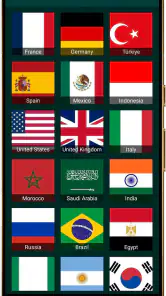
Screenshots
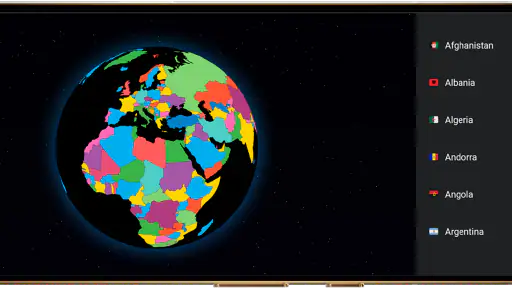
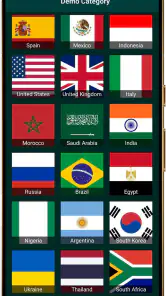

Analysis by Reviewed
Watching television from another part of the world sounds like a simple way to break out of a familiar routine, but the experience depends on more than finding a stream: your connection has to carry it reliably, and the player has to fit the way you watch. TV Garden is aimed at people who already have TV streams they want to play, rather than viewers expecting a complete service with its own ready-made programming. That distinction shapes both its appeal and its limits.
When the connection becomes part of the viewing
BrightCast Media presents this as an events-category app, though its practical use is closer to a player for TV streams. In everyday terms, it gives you a way to watch your own sources from around the world. It is not the same proposition as opening a conventional television app and browsing a supplied catalogue. You need to bring a stream you can use, so the first question is whether you already have one—not whether the app promises a particular channel.
That makes connectivity central from the start. A stream can be slow or unstable even when the player itself opens normally, and a strong mobile connection cannot make an unavailable source work. I would treat the app as one part of a chain: the source, your network, and the device all influence whether a viewing session feels smooth. If a picture stalls, it is worth checking those pieces separately before deciding the player is at fault.
For a realistic use case, imagine wanting to follow a live broadcast from a country you have lived in or are curious about while away from home. TV Garden may be useful if you already have a compatible stream and a dependable connection. It is less suited to someone who wants to install an app, tap a channel from a built-in guide, and leave the rest to the service.
Bring a stream, not a channel wish list
The most useful preparation is to keep track of the exact stream address or source information you intend to use, if your source provides it, and make sure you can access it before settling in for a long session. I would test a new source briefly while on a stable network rather than discovering a problem halfway through a live event. This is a practical workflow, not a hidden feature: separating source setup from the moment you want to watch saves frustration.
That distinction also answers a common expectation question: this is not a general-purpose subscription TV replacement with an assured schedule of channels. Its value depends on what streams you bring and whether those streams remain reachable. If you have no source in mind, a mainstream streaming or broadcaster app is likely a better starting point because it usually makes its available programming clear inside the app.
At home, on the move, and between networks
At home, a stable Wi-Fi connection makes the app’s basic role easiest to judge. You can focus on whether your chosen stream works rather than juggling signal changes. In a hotel, café, or other shared network, the same stream may behave differently: the connection can be congested, and some networks restrict certain traffic. I would not plan around uninterrupted viewing in those settings without testing first.
On mobile data, think about the length of the session before pressing play. Live video can use a meaningful amount of data, and the actual amount depends on the stream and its quality. Since that can vary, I would avoid assuming a short test predicts the cost of a full match or programme. If you have a limited data allowance, Wi-Fi is the more sensible default; if you must use cellular service, keep an eye on your device’s data-usage controls.
A useful mobile habit is to confirm the source while you still have time and a good signal, then avoid repeatedly reopening or restarting the stream just to see whether it has improved. Each restart may simply repeat the same network problem. If you are moving between Wi-Fi and cellular, wait for the connection to settle before judging playback. That small pause can help distinguish a temporary handoff from a source that is genuinely unavailable.
The app is free, which lowers the barrier to trying it, but free access to the player does not guarantee that every stream is free, legal to use, or available everywhere. Check the terms and origin of any stream you bring. That is especially relevant when watching broadcasts from other regions: availability and rights can depend on the source, not merely on the playback app.
What to do when a stream fails
When playback stops, I would troubleshoot in a fixed order rather than immediately reinstalling anything. First, check whether the device still has internet access by loading another ordinary page or service. Next, try the stream again once. If it still fails, consider whether the source itself may be offline or whether the network blocks it. This simple sequence helps avoid treating every interruption as an app defect.
If other internet services work but one particular stream does not, the source is a reasonable suspect. If several streams fail only on one Wi-Fi network, trying a different connection can reveal whether that network is the obstacle. Conversely, if the same source works elsewhere but not on your device, closing and reopening the player is a low-effort first recovery step. These checks are more useful than repeatedly tapping play without changing anything.
I would also avoid relying on an unfamiliar stream for an important live moment until I had tested it. This is where a player built around user-provided sources differs from a broadcaster’s own app: the broadcaster controls its feed and support path, while a third-party source can introduce extra uncertainty. For a major event where missing a few minutes matters, a reliable official service is the safer choice.
Keeping mobile data and expectations in check
TV Garden is currently at version 1.0.1, so I would approach it as a straightforward playback tool rather than assume it has every refinement found in long-established television platforms. The sensible test is modest: try one known source on a good connection, see whether it behaves as you need, and only then make it part of a regular routine. That approach limits wasted time and helps identify whether your issue is the stream, the network, or the app.
The app’s audience profile is broad: it is rated for Everyone, and its minimum operating-system requirement is Android 7.0. It has a 4.1 average from around 875 ratings, which gives prospective users a general signal of reception, not a guarantee that a particular stream or phone will work well. It has passed 100,000 installs, while the small number of written reviews means I would place more weight on testing my own source than on expecting a detailed catalogue of user experiences.
Because the player’s purpose is narrow, a good result should mean more than “it opened.” Ask whether your source is easy enough to use, whether playback stays acceptable on the network where you normally watch, and whether the mobile-data trade-off suits you. If you only plan to watch occasionally, a source that takes effort to prepare may not be worth maintaining. If you already follow international streams, that setup work may feel worthwhile.
Who will get the most from it
I can see TV Garden working best for viewers who know what stream they want, are comfortable troubleshooting basic connection issues, and value access to their own sources over a polished, preselected channel guide. It may also suit someone who wants to test a particular international feed on a phone without committing to a paid player. BrightCast Media has made the app free, but the practical value still rests on the quality and availability of the streams a user chooses.
I would skip it if you expect a complete TV lineup, built-in programme discovery, guaranteed regional access, or dependable support for every source. In those cases, official broadcaster apps and established streaming platforms are usually more convenient because they package content, availability, and playback together. A dedicated player is only an advantage when you have a source that benefits from being played in this way.
My overall take is that TV Garden is best judged as a connection-dependent tool, not a destination for finding television by itself. It can be a practical option for personal streams when your network is steady and you have checked the source ahead of time. The trade-off is clear: more freedom over what you try to play, but more responsibility for making sure it is reachable and suitable. If that balance sounds right, start with a short test on Wi-Fi; if you want effortless channel browsing, choose a service built around its own catalogue instead.
TV Garden - Live World TV Frequently Asked Questions
What is TV Garden - Live World TV?
TV Garden - Live World TV is presented as an app for discovering and watching television channels from different parts of the world. Its channel selection and viewing experience can vary by country, device, and app version. Before installing, check the current store listing for screenshots, supported features, and recent user reviews so you can confirm that the available content matches what you expect.
Is TV Garden - Live World TV free to use?
Whether the app is free, includes optional purchases, or requires a subscription depends on its current version and distribution. Review the app-store listing and any in-app purchase details before downloading, and look for information about advertisements or paid features. Avoid assuming that every channel is available without charge, since access and costs may differ across regions and may change over time.
Can I watch every channel in my country?
Channel availability may depend on your location, the broadcaster, and the rights or streaming sources used by the app. A channel shown in one region may not work in another, and some streams may be temporarily unavailable or removed. Check the channel list and descriptions where available, and remember that a listed channel does not guarantee uninterrupted access or availability on every device.
Do I need a fast internet connection to watch TV Garden - Live World TV?
Live video uses a steady internet connection, and a stronger connection generally helps reduce buffering and improve picture quality. Performance can also depend on network congestion, the stream itself, and your device. If you plan to watch using mobile data, check your data allowance first; video streaming can use substantial data, particularly during longer viewing sessions or at higher quality.
Is TV Garden - Live World TV safe and compatible with my device?
For a safer download, use the official Google Play or Apple App Store listing rather than an unfamiliar third-party site. Check the developer name, requested permissions, privacy information, compatibility requirements, and recent reviews before installing. App availability and supported features may differ between Android and iOS, so confirm that your device and operating-system version meet the store's current requirements.
Articles Related to TV Garden - Live World TV
Clash of Clans Is Won Between the Battles
Its raids are quick; its community is a long-term project of coordination, teaching, rivalry, and shared responsibility—with all the friction that entails.
Android Auto Makes the Case for Quieter Car Software
The car interface is no longer judged by how much it can do, but by how quietly it helps. Android Auto shows what drivers now expect—and what still gets in the way.
MobiOffice: Transforming Mobile Productivity with Seamless Integration
MobiOffice: Word, Sheets, PDF is redefining mobile productivity with a surprising blend of functionality and innovation.
EA SPORTS FC™ Mobile Soccer: Redefining Mobile Sports Gaming
Dive into EA SPORTS FC™ Mobile Soccer, where immersive gameplay and strategic depth transform mobile sports gaming.
Pros
- Offers access to live TV streams from channels around the world.
- Simple interface makes it easy to browse and select channels.
- Useful for exploring international programming in one place.
- Can be a convenient alternative to installing separate regional TV apps.
- Channel listings help users discover streams by country or category.
Cons
- Channel availability and stream quality may vary over time.
- Some channels may be unavailable or fail to load.
- Requires a reliable internet connection for smooth playback.
- Content availability may depend on regional restrictions.
- The app may include ads or links to third-party streams.
- Category
- Events
- Version
- 1.0.1