

Turkish Airlines Flight Ticket
- 1.40K
- 4.4
- Installs
- 10.00M
- Price
- Free

Screenshots
Analysis by Reviewed
I judge a flight app less by how many travel tools it can put on one screen and more by how clearly it helps me make decisions when plans are still flexible. Turkish Airlines Flight Ticket is Turkish Airlines’ free travel app, and its natural audience is people considering or already flying with the airline. That focus can be reassuring: I’m dealing with the carrier rather than starting with a broad travel marketplace. It also sets a boundary. If I’m comparing many airlines or want one place to manage trips booked with several carriers, a general flight-search app may be a better starting point.
When a direct airline app makes sense
I’d start with this app if I already know Turkish Airlines is a serious option, or if I have a trip with the carrier to manage. It is less useful as my only planning tool when I’m still deciding where to go, comparing competing airlines, or building an itinerary with several carriers. A broad search service can cast a wider net; the airline’s own app is more naturally suited to the next step, when I want to focus on that carrier’s flights and trip tasks.
That distinction matters because a convenient list of airline options is not the same thing as a complete view of the market. I’d compare routes and schedules elsewhere if flexibility is my priority, then use the airline app to work through the Turkish Airlines choices that remain. If I have already booked, I would keep the app for airline-related tasks rather than expecting it to replace every travel tool I use.
Trust begins with knowing whose app you are using
The developer is Turkish Airlines, so the app’s airline-specific role is clear. It sits in the travel and local category, has an Everyone age rating, and version 1.43.14 is listed for Android 7.0 and up. It has a 4.6 average from around 141,000 ratings, with over 10 million installs. Those figures suggest broad use, but I wouldn’t treat popularity as a substitute for checking choices carefully when entering travel or account details. I’d download it through the official app store and make sure the developer name matches before signing in.
Use visible choices, not assumptions
When an app asks for personal information or a device permission, I recommend pausing to check what the screen says and whether the request makes sense for the task at hand. I can’t judge a permission or data practice from the app’s travel purpose alone, so I wouldn’t assume that every request is necessary—or that a particular privacy control exists. My practical approach is to provide only the details needed for the task I’m doing, review the available account settings, and avoid saving information on a device I share with other people.
I’d take the same measured approach with account access. Before entering details, I’d check that I’m in the app I intended to open, and I’d avoid leaving an account signed in on a borrowed or shared device. If I’m using someone else’s phone to look up a trip, I’d sign out afterward and check whether any personal information remains visible. These are simple habits, but they are more dependable than guessing how an app handles information behind the scenes.
Booking and Managing a Turkish Airlines Trip
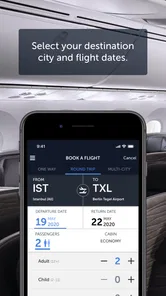
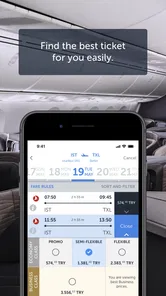
First things first, let's talk about the booking process. The Turkish Airlines Flight Ticket app offers a user-friendly interface that makes finding flights a breeze. You simply enter your departure and destination cities, select your preferred dates, and voilà, a list of available flights appears. One feature I found particularly handy is the filter option, allowing you to narrow down your choices based on price, duration, or even layovers. It's like having a personal travel agent in your pocket!
More From Our News Desk

 Prime Video
Switching to Prime Video: What Changes in Your Viewing Routine
Prime Video can make a compelling second home for streaming, but switching means learning a different catalog, rental layer, and route from browsing to playback.

 Universal TV Remote Control
Universal TV Remote Control Works Best as a Reliable Backup
A phone remote earns its place through quick setup and reliable habits. Here is how to get more from Universal TV Remote Control—and where its limits show.

 Weather - By Xiaomi
Weather by Xiaomi Review: Clear at a Glance, Less Clear Up Close
Xiaomi’s weather app makes everyday forecasts quick to scan, but its calm surface can leave useful details and recovery paths harder to find than they should be.

 X
XX Under Pressure: Can It Recover When Posting Goes Wrong?
A resilience-focused review of X, examining setup, mistaken posts, interruptions, weak connections, and the gaps that matter when recovery needs to be dependable.

 Clash of Clans
Clash of Clans Is Won Between the Battles
Its raids are quick; its community is a long-term project of coordination, teaching, rivalry, and shared responsibility—with all the friction that entails.

 Android Auto
Android Auto Makes the Case for Quieter Car Software
The car interface is no longer judged by how much it can do, but by how quietly it helps. Android Auto shows what drivers now expect—and what still gets in the way.
Latest News



Even when the search feels straightforward, I’d treat the results as options to compare rather than a recommendation to book immediately. A lower price may come with a longer journey, while a shorter itinerary may involve a different cost or connection pattern. Before proceeding, I’d check the dates, airports, departure times and connection details carefully. This is especially useful when a city has more than one airport or when I’m planning around a separate train, hotel check-in or appointment.
Check-in Made Easy
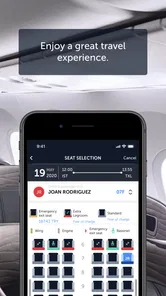
Gone are the days of long queues at the airport check-in counter. With this app, you can check in with just a few taps on your phone. The app sends you a notification when check-in opens for your flight, and you can choose your seat directly from your device. Plus, your boarding pass is stored digitally, so there's no need to worry about losing a paper ticket. Talk about convenience!
For a less stressful routine, I’d handle check-in when I have time and a reliable connection, rather than waiting until I’m rushing out the door. I’d also open the boarding pass once before travel to make sure I can find it quickly, then keep a backup of essential itinerary details somewhere accessible. The digital pass is handy, but a drained phone or an unexpected technical problem can turn a quick airport step into an avoidable hassle.
Seat choice is another moment to slow down. I’d look at the available choices on screen and decide based on what matters for that particular flight—sitting with a travel companion, getting off sooner, or simply choosing a spot I’m comfortable with. I wouldn’t assume that every seat choice is available on every booking, and I’d review any conditions shown before confirming it.
Real-time Flight Updates
One of the standout features of this app is the real-time flight updates. I can’t stress enough how comforting it is to receive notifications about gate changes or delays before you even reach the airport. It saves you from unnecessary stress and ensures you're always in the loop. Knowing exactly what's happening with your flight makes the whole travel experience much smoother.
I’d use alerts as an early heads-up, not as my only source of truth. On a travel day, I might check the app while leaving home, then look at airport screens after arriving, especially if I’m navigating a connection or a crowded terminal. A notification can help me react sooner, but checking the information in front of me is still sensible. If plans change in a way that affects onward transport or a hotel, I’d reassess those arrangements rather than assuming an alert resolves the whole problem.
Loyalty Rewards and Extras
If you're a frequent flyer, you'll appreciate the loyalty rewards program integrated into the app. You can easily track your miles and see how close you are to your next reward. Additionally, the app offers exclusive deals and discounts, giving you more bang for your buck. Whether it's an upgrade to business class or a discount at the duty-free shop, the perks are definitely a nice touch.
I’d treat offers as something to inspect, not as a reason to change a trip that already works. Before acting on a promotion, I’d read its conditions on screen and compare the overall choice with my needs. A frequent traveler may get more practical value from keeping an eye on miles and offers over time, while someone taking one occasional flight may find that section less important than booking and check-in.
Make the app fit the trip, not the other way around
A useful way to approach it is to split planning into stages. Before buying, compare the airline’s available options with a broader search if you’re open to different carriers; then use this app when you’ve decided Turkish Airlines is the right fit. That avoids mistaking an airline-specific search for a complete picture of every route or fare choice. If your dates are fixed, filters can help make the trade-off between journey length and price easier to see. If they’re flexible, check nearby dates before settling on a flight rather than choosing the first result that looks convenient.
For a realistic travel day, I’d check the itinerary at home, use the app’s check-in flow when it becomes available, and keep the digital boarding pass accessible before leaving for the airport. Notifications may be useful for changes, but I’d still check the airport displays and listen for announcements: a phone alert is a helpful extra, not a reason to stop paying attention. Keeping a paper or separately accessible copy of essential trip details can also be sensible if your phone battery runs low or connectivity becomes unreliable.
There is a small but useful planning trade-off here: the app can bring airline tasks together, but it does not remove the need to keep an eye on the rest of the journey. If I have a tight connection to a bus, rail service or hotel transfer, I’d leave enough margin for delays and keep those arrangements separate from my flight checks. That makes the app one part of a travel routine, rather than a single place I expect to solve every moving piece.
Where the airline-specific focus helps—and where it doesn’t
This is most useful when Turkish Airlines is already part of your plan, especially if you want booking, check-in, flight information and loyalty activity together. A general travel app is better for comparing multiple airlines side by side or organizing a mixed-carrier itinerary. I’d also avoid relying on any single airline app as my only source of travel information during a disruption; use the app for its airline-specific updates while checking official airport information and contacting the airline through available channels if you need help resolving a change.
Frequent flyers have the clearest reason to keep it installed, because checking miles and related offers is more relevant when they regularly travel with the same airline. Occasional travelers can still find it useful for a Turkish Airlines booking, but may not need it between trips. If you’re arranging travel for someone else, make sure the booking and account details are handled with their consent, and review what remains saved or signed in afterward, particularly on a shared phone.
For a family or group trip, I’d decide in advance who is responsible for checking the booking and keeping the travel details handy. That avoids several people making changes without coordination or assuming someone else has checked the latest information. If another traveler needs access, share only what they need for the task and be thoughtful about account access, particularly if the device is not theirs.
It is also worth considering whether you need the app between journeys. If you fly with Turkish Airlines often, having it ready can make routine airline tasks easier to find. If you take one trip and rarely use the carrier again, installing it just before travel may be enough; after the trip, you can decide whether its continuing value justifies keeping it on your phone. That choice depends on your habits, not on a need to keep every travel app installed permanently.
What I would check before relying on it
Before a trip, I’d confirm the booking details in the app and compare them with the itinerary I received when I booked. I’d pay particular attention to passenger names, dates, airports and the route, since those are the details that can create the biggest headache if overlooked. I’d also check that I can access my account and the relevant trip information before the day of travel, rather than discovering a sign-in issue at the airport.
If a screen asks me to provide a personal detail or grant a permission, I’d consider whether it is relevant to what I’m doing at that moment. If the purpose is unclear, I’d pause and inspect the prompt instead of accepting automatically. The same principle applies to account settings: I’d use the controls I can see, avoid leaving a session open on a shared device, and not infer privacy guarantees from the app’s airline branding.
A measured verdict for choosing when to use it
The app is free, released on October 10, 2017, and its continued use is reflected in its large install base. That gives me a reasonable basis to consider it a mainstream option, not a guarantee that every booking or airport situation will be effortless. My main trade-off is focus: it is designed around one airline, which can make the journey more direct once I’ve chosen that carrier, but less useful for broad comparison. I’d use it when booking or managing a Turkish Airlines trip, keep an eye on the options and details presented on each screen, and turn to broader search tools when my priority is comparing the whole market.
My recommendation is strongest for travelers who already expect to fly with Turkish Airlines and want a direct way to handle airline-specific parts of the trip. I’d be more cautious about recommending it as the only travel app for someone comparing carriers, coordinating a complex multi-airline itinerary, or seeking one dashboard for every reservation. In those cases, a general travel service may be a better organizer, with this app kept for the Turkish Airlines portion.
In conclusion, the Turkish Airlines Flight Ticket app is a must-have for anyone looking to streamline their travel experience. From booking flights to receiving real-time updates, it covers all the bases. While no app is perfect, the convenience and features offered by this one make it a worthy travel companion. So next time you're planning a trip, give this app a try – it might just change the way you travel!
Turkish Airlines Flight Ticket Frequently Asked Questions
Is Turkish Airlines Flight Ticket available in my language and country?
Before downloading, it is worth checking whether the app is available through the app store you normally use and whether its interface suits your language preferences. Turkish Airlines Flight Ticket is the airline’s app for travel-related tasks, so its usefulness may depend on the routes and services you plan to use. Availability and the experience can vary by region, so check the store page on your device.
Can I use the app without an internet connection?
The app is designed for airline-related tasks such as booking and handling travel arrangements, which generally require access to current information. Plan to connect to the internet when you need to use those functions, especially when checking or changing trip details. If you are traveling, keeping a reliable connection available can make it easier to access the app when you need it.
How much storage space does Turkish Airlines Flight Ticket require?
The amount of storage needed can vary with the device and the app version, so check the download details shown in your app store before installing. If your phone or tablet is low on free space, clearing room first can help avoid interruptions during installation or updates. The app is free to download, but it still uses device storage like other travel apps.
Does the app require an account to book or manage a flight?
An account or booking information may be needed to access features tied to a specific trip. The app is intended for Turkish Airlines travel tasks, including handling reservations, so have your booking details available when you want to manage an itinerary. If you are only exploring the app, you can check its available screens and prompts to understand what information is requested for each task.
Can I use the app to check in and receive flight updates?
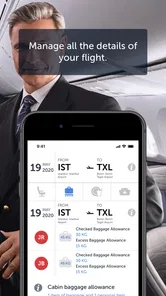
Yes. The Turkish Airlines Flight Ticket app includes online check-in and real-time flight updates, which can be useful for keeping track of a journey from your phone. It also provides information related to travel arrangements, such as baggage allowances and seat selection. For the most relevant details, open the app and review the information associated with your specific booking.
Pros
- User-friendly interface for easy booking
- Wide range of flight options available
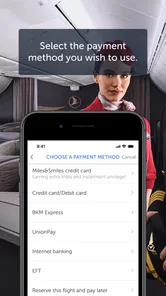
- Secure payment methods provided
- Real-time flight status updates
- Efficient customer support service
Cons
- Limited language options available
- Occasional app crashes reported
- Slow loading times on older devices
- Lack of loyalty program integration
- No offline booking feature











