TUDN: TU Deportes Network
- 23.75K
- 4.2
- Installs
- 5.00M
- Price
- Free

Screenshots




Analysis by Reviewed
I usually turn to a sports app when I want more than a final score: I want to know whether I can watch the match, follow the competition and catch up without hunting through several sources. TUDN: TU Deportes Network is built around that live-soccer need, with coverage that includes Liga MX and the UEFA Champions League. Its appeal is clearest if those competitions are already part of your routine, rather than if you simply want a neutral scoreboard for every sport.
A useful check before kickoff
The app is most valuable when I treat it as a way to check my viewing options, not as a promise that every fixture will be available wherever I am. If I’m choosing between watching on my phone and following a match through a score service, the deciding factor is often whether my provider access is ready. I’d check that while I still have time to troubleshoot, rather than discovering a sign-in snag as the teams come out.
That habit also helps me decide what to bring into the evening. If I know I’ll be away from home, I can confirm access and make sure I have a sensible connection before leaving. If I can’t verify either, I’d plan to follow the score elsewhere instead of assuming the stream will work. It’s a small distinction, but it separates a dependable match-day routine from a last-minute gamble.
Live soccer is the main reason to open TUDN
The key question before relying on TUDN is whether you have access through a TV provider. Live viewing is offered with a provider, so installing the app by itself does not guarantee that every match will play. I’d check that access before planning to watch an important game on a phone. That distinction matters: this is a viewing companion for eligible subscribers, not necessarily a standalone replacement for a paid sports service or television package.
What that means on match day
In practice, I’d use the app as a direct route from “the game is on” to checking whether I can follow it on my device. The benefit is having soccer coverage and related information in one sports-focused place. The trade-off is that the viewing experience depends on provider access. If you’re away from home, traveling, or sharing a screen with other people, confirm that your account and connection are ready before kickoff instead of treating the app as guaranteed access.
A realistic use is checking the schedule during a busy evening, then opening TUDN when a Liga MX or Champions League match begins. If I only have a short break, I can use the app to stay connected to the event rather than trying to remember which channel or service carries it. If I want uninterrupted viewing on a large screen, though, my TV setup may be more comfortable; the phone is most useful when I need portability.
Where it fits among sports apps
Compared with a general scores app, TUDN’s distinctive value is its connection to live soccer viewing, not just quick results. Compared with a broad streaming service, its focus is more useful to someone who follows the competitions it covers, but less compelling to a viewer looking for a wide mix of entertainment. I would keep a scores app alongside it if I follow leagues outside TUDN’s coverage or want a fast glance at many events. The two serve different habits rather than making one automatically better.
More From Our News Desk

Weather by Xiaomi Review: Clear at a Glance, Less Clear Up Close

X Under Pressure: Can It Recover When Posting Goes Wrong?

Clash of Clans Is Won Between the Battles

Android Auto Makes the Case for Quieter Car Software

MobiOffice: Transforming Mobile Productivity with Seamless Integration

EA SPORTS FC™ Mobile Soccer: Redefining Mobile Sports Gaming
There’s also a practical trade-off in choosing a dedicated sports app: it can make a match easier to find, but it asks you to work within its access arrangements. Before game day, I’d open the app once, sign in through the relevant provider if needed, and check that the match I care about is available. That small preparation is especially worthwhile if I’m relying on mobile data or watching somewhere with an unreliable connection.
Making the app part of a realistic routine
For a fan who follows a particular club, the most useful workflow is to separate planning from watching. I’d check what is available before the day gets busy, then return to the app close to kickoff to confirm I can actually view the event. If the match is a priority, I’d avoid leaving the first sign-in or provider check until the opening minutes. This is not an elaborate feature trick; it is simply the best way to account for the app’s central access condition.
It also gives the app a clear role when plans change. If I’m commuting or waiting between errands, I can see whether a phone is a practical viewing option rather than assuming I need to be at home. If viewing is not available for my situation, a separate scores app is a sensible fallback for keeping track of the result. I like that distinction because it prevents me from expecting one app to solve both live access and every kind of sports tracking.
Who is most likely to get value
I’d recommend it most to soccer fans who regularly follow Liga MX or the UEFA Champions League and already have a qualifying TV-provider relationship. It is less suitable if you want every match available without a provider, mainly follow sports outside its soccer focus, or prefer a single app that acts as a universal live-TV destination. The free price makes trying it easier, but it doesn’t remove the access requirement for live viewing.
For background, this is a sports app from Univision Communications Inc. It has a 4.2 average from around 105,000 ratings, and more than five million installs. It is free to download, is rated Everyone 10+, and its current version is 20.0.4. Those figures suggest an established audience, but they don’t tell me whether a particular match will be available to my account; checking access remains the useful step.
The app’s history also makes it a familiar name in sports coverage: it was released on May 14, 2010, and supports devices running version 8.1 or later of its operating system. I would still judge it by the current job I need done—following the soccer competitions it covers—not by longevity alone. If my priority is a particular match, I’d verify it in the app before relying on it as my only viewing option.
Questions worth settling before relying on it
Can I use it without a TV provider? I wouldn’t count on live viewing without the required provider access. Is it a replacement for a television package? I’d treat it as a companion for eligible viewing, not as an automatic substitute. Will it cover every competition I follow? The app’s strongest fit is the soccer coverage it offers, so fans of other leagues should keep a broader results source or another viewing option in mind.
Is it useful if I only want scores? It may still be worth opening when I’m already following one of its matches, but a dedicated scores app is usually the quicker choice for scanning many sports or competitions. And is a phone always the best screen? Not for me: portability is the advantage, while a television is more comfortable for a full match at home. Thinking through those questions beforehand helps set realistic expectations.
When it comes to keeping up with your favorite sports, having a reliable app is essential. That's where TUDN: TU Deportes Network comes in. This app is like having a sports buddy in your pocket, ready to provide you with all the latest updates, insights, and live coverage of your favorite sports events. Let me take you through my experience with this app.
Getting Started with TUDN
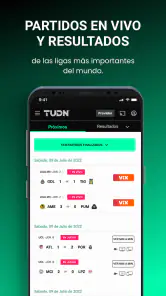
Downloading and setting up TUDN was a breeze. The app is available for both Android and iOS, and you can find it easily on the Google Play Store or Apple App Store. Once you have it installed, you’re greeted with a clean and intuitive interface that makes navigation a piece of cake. I was impressed by how everything was organized, making it easy for me to find the scores, news, and live streams I was interested in.
Dive into the Features
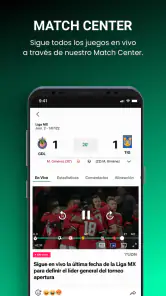
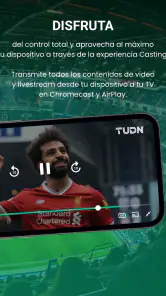
One of the first things I noticed about TUDN is its comprehensive coverage of sports. Whether you’re into soccer, baseball, or even boxing, TUDN has got you covered. The app provides live streaming of matches, which is a game-changer for someone like me who hates missing out on live action. I could catch up on games in real-time, and the video quality was top-notch.
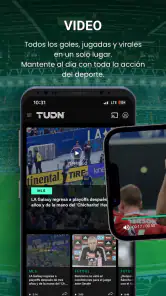
Aside from live streaming, the app offers up-to-date news articles about various sports. The news is fresh and relevant, keeping me informed about the latest happenings in the sports world. I found the analysis and commentary sections particularly insightful, offering perspectives that enriched my understanding of the games and players.
User Experience and Functionality
One of the aspects that stood out to me was the user experience. Navigating through TUDN was smooth, with minimal lag time. The app’s interface is well-designed, and I appreciated the personalized notifications feature. It allowed me to select my favorite teams and leagues, ensuring I received updates tailored to my interests. This made my experience more engaging and personal.
The app also supports multiple languages, which is a huge plus for non-English speakers. It demonstrates TUDN’s commitment to making sports accessible to a global audience. The multilingual support is seamless, and switching languages is straightforward.
Final Thoughts
In conclusion, TUDN is a must-have for any sports enthusiast. Its blend of live streaming, timely news updates, and user-friendly interface make it a standout in the crowded world of sports apps. Whether you’re a casual fan or a die-hard sports buff, you’ll find something to love about TUDN. With its easy setup and comprehensive coverage, it has quickly become my go-to app for everything sports-related. Give it a try, and you might just find it as indispensable as I do!
TUDN: TU Deportes Network Frequently Asked Questions
Do I need a TV provider to watch live soccer on TUDN?
TUDN’s store summary describes live soccer, including Liga MX and UEFA Champions League, as free with your TV provider. That means access to live coverage may depend on having an eligible provider. Check your provider’s access options before downloading if live matches are the main reason you want the app.
What is TUDN: TU Deportes Network?
TUDN: TU Deportes Network is a sports streaming app that provides live coverage, highlights, and updates on various sports events. It features content from popular leagues and tournaments, offering fans a convenient way to watch matches and stay informed about their favorite sports and teams. The app is available on both Android and iOS platforms.
Is TUDN: TU Deportes Network free to use?
TUDN: TU Deportes Network offers both free and premium content. While users can access certain features and limited sports coverage for free, a subscription is required to unlock full access, including live streaming of major sports events and exclusive content. Subscription details and pricing can be found within the app.
What sports can I watch on TUDN: TU Deportes Network?
TUDN: TU Deportes Network covers a wide range of sports, including soccer, basketball, baseball, and more. The app features live matches, highlights, and news from top leagues and tournaments, such as Liga MX, UEFA Champions League, and MLB. Users can personalize their experience by selecting their favorite sports and teams.
Can I watch TUDN: TU Deportes Network content offline?
Currently, TUDN: TU Deportes Network does not support offline viewing. Users need an active internet connection to stream live events and access content. However, recorded highlights and match summaries can be viewed on-demand, allowing users to catch up on games they might have missed.
Pros
- Comprehensive sports coverage
- User-friendly interface
- Live match streaming
- Personalized notifications
- Exclusive interviews and highlights
Cons
- High data usage for streaming
- Subscription may be costly
- Limited offline content
- Occasional app crashes
- Ads may disrupt viewing
- Category
- Sports
- Version
- 20.0.4





