

Truple - Online Accountability
- 406.00
- 4.4
- Installs
- 50.00K
- Price
- Free

Screenshots
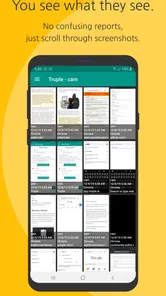
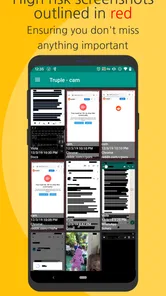

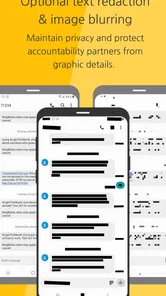
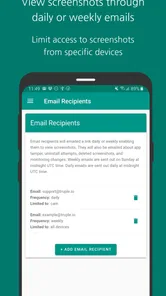
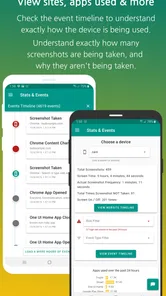
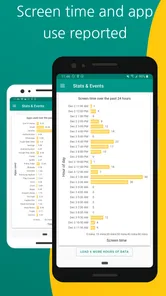
Analysis by Reviewed
Truple - Online Accountability is a parenting app built around a simple but sensitive problem: helping families create safer, more responsible habits online. I approached it less like a tool for spying and more like a system that can support an agreement between parents and children. That distinction matters, because accountability software only works well when everyone understands why it is being used.
In my experience, the app makes the most sense for parents who want an additional layer of awareness around a child’s digital life, especially when ordinary conversations and device rules are not quite enough. It is free to install, carries an Everyone age rating, and comes from Truple, a developer focused on this particular family-safety space. Its store summary is brief, but the practical question is much bigger: does it offer enough useful oversight to justify introducing monitoring into a household?
How Truple fits into a family’s online-safety routine
This is not the kind of parenting app I would recommend installing casually and explaining later. Before using it, I would decide what problem I am trying to solve. Is the concern excessive screen use, exposure to unsuitable material, risky communication, or simply the need for more openness around a young person’s online activity? A clear answer makes the tool easier to use fairly.
A realistic example would be a teenager who has started using several online services independently. A parent may not want to sit beside the child during every session, but may also feel that a verbal promise is no longer enough. Truple can become part of a family agreement: the child knows that online activity is being monitored, the parent checks information at agreed times, and conversations focus on decisions rather than punishment.
That last part is important. Monitoring can easily become a source of conflict if it is treated as a secret investigation. I would explain the purpose, discuss which devices or situations are covered, and set boundaries for how the information will be reviewed. Even a technically capable app cannot replace trust, judgment, or a calm conversation after something worrying appears.
The app is listed in the Parenting category, which feels appropriate because its usefulness depends heavily on the parent-child relationship. It is not simply a browser utility or a general productivity tracker. Its value comes from helping adults take a more informed role in a child’s digital habits while still leaving room for age-appropriate independence.
What the free entry point means
Truple is free to download, so a family can begin by exploring whether its approach fits their expectations without paying an upfront purchase price. That is a meaningful advantage in this category, where parents often want to understand the practical experience before committing money or changing household routines.
More From Our News Desk

 Gmail
GmailGmail in a Busy Inbox: Who Benefits Most?
From first account to crowded workday, Gmail earns its place through dependable search and flexible sorting—but its best fit depends on how much inbox maintenance you can tolerate.

 Prime Video
Switching to Prime Video: What Changes in Your Viewing Routine
Prime Video can make a compelling second home for streaming, but switching means learning a different catalog, rental layer, and route from browsing to playback.

 Universal TV Remote Control
Universal TV Remote Control Works Best as a Reliable Backup
A phone remote earns its place through quick setup and reliable habits. Here is how to get more from Universal TV Remote Control—and where its limits show.

 Weather - By Xiaomi
Weather by Xiaomi Review: Clear at a Glance, Less Clear Up Close
Xiaomi’s weather app makes everyday forecasts quick to scan, but its calm surface can leave useful details and recovery paths harder to find than they should be.

 X
XX Under Pressure: Can It Recover When Posting Goes Wrong?
A resilience-focused review of X, examining setup, mistaken posts, interruptions, weak connections, and the gaps that matter when recovery needs to be dependable.

 Clash of Clans
Clash of Clans Is Won Between the Battles
Its raids are quick; its community is a long-term project of coordination, teaching, rivalry, and shared responsibility—with all the friction that entails.
Latest News



There are in-app purchases ranging from $4.99 to $159.99 per item. I would not treat the free installation as proof that every useful part of the service is free. Instead, I would start with the no-cost access, identify which parts are genuinely useful for the family, and only then consider whether a paid option is justified. The wide range between the smallest and largest purchase also means that the checkout screen deserves careful attention before confirming anything.
For me, the sensible value test is not “is this cheaper than another parenting app?” It is “does the information I receive help me make better parenting decisions than I could make with ordinary device settings and regular conversations?” If the answer is no, paying for more access would not solve the underlying problem.
The app has an average rating of 4.4 from around 966 ratings, with more than 400 written reviews. That suggests a generally positive reception, but ratings cannot tell me whether a particular family will be comfortable with the monitoring model. A parent who wants strict blocking and fixed schedules may judge it very differently from someone who mainly wants accountability and visibility.
Where the app can deliver practical value
The strongest potential benefit is that it gives parents a structured way to stay involved. Many families already have rules such as “tell me if something feels wrong” or “do not talk to strangers,” but those rules are difficult to apply when adults cannot see the wider context. An accountability-focused tool can make follow-up conversations more concrete.
One useful workflow is to review patterns rather than react to isolated moments. If a child encounters one questionable page accidentally, that may call for reassurance and a short explanation. If the same type of concern appears repeatedly, the parent has a stronger reason to revisit settings, discuss the behavior, or seek more support. Looking for patterns helps avoid turning every notification or discovery into a confrontation.
A second, less obvious benefit is consistency between caregivers. In a household where two adults share parenting, online-safety rules can become confusing if one person checks devices while the other never does. A common accountability process can reduce mixed messages. I would agree in advance on who reviews activity, how often, and what should trigger a conversation. That prevents the app from becoming a private source of suspicion between adults as well as between parent and child.
It can also be useful during gradual independence. Children do not move from complete supervision to complete freedom in one step. A parent may want closer involvement for a period, followed by less frequent reviews as the child demonstrates better judgment. Used that way, the app supports a transition rather than locking the family into permanent surveillance.
Another practical insight is to use the tool as a prompt for digital-literacy lessons. If something concerning appears, I would ask the child how they reached it, what they thought it meant, and what they might do next time. That turns an uncomfortable discovery into a chance to discuss scams, pressure from strangers, privacy, and the difference between curiosity and unsafe behavior.
Important trade-offs before installing it
The biggest limitation is not necessarily technical; it is relational. A child who feels watched without having a voice in the arrangement may hide behavior, use another device, or stop speaking openly. No accountability app can prevent that reaction. Transparency and proportionality are essential, especially with older children who reasonably expect more privacy.
I would also avoid presenting monitoring as a substitute for parental involvement. It can show that something deserves attention, but it does not automatically explain intent. A search, message, or page may be misunderstood when viewed without context. Parents need to resist instant conclusions and speak with the child before applying consequences.
There is a trade-off between broad oversight and a calm home environment. More information can feel reassuring at first, yet checking constantly may increase anxiety for the parent and pressure for the child. I think a scheduled review is healthier than repeatedly opening the app throughout the day. The goal should be informed parenting, not an endless cycle of checking.
Families should also consider device coverage and household habits before relying on it. If a child regularly moves between phones, tablets, computers, or shared devices, the family needs a clear plan for where accountability applies. An app installed on only one part of a child’s digital routine may create a false sense of security. I would treat it as one layer, alongside device-level safety controls, age-appropriate education, and supervision in higher-risk situations.
Another point worth considering is whether the family wants monitoring or restriction. These are not identical goals. A parent seeking firm time limits, app blocking, or tightly controlled access may be better served by a dedicated parental-control product whose main purpose is enforcement. Truple’s accountability angle is more suitable when the family wants awareness and follow-up conversations to play a central role.
Who is most likely to benefit
I see the clearest fit for parents of children who are gaining online independence but still need guidance. It may also help families rebuilding routines after a difficult online incident, provided the child understands the arrangement and the parent is prepared to use the information responsibly.
It is particularly suitable when parents want to combine technology with discussion. For example, a family might establish a weekly check-in, use the app to identify topics worth discussing, and gradually reduce the intensity of oversight when the child shows reliable judgment. That is a more constructive use than installing it secretly and waiting for a reason to punish someone.
The free starting point also makes it reasonable for families with limited budgets to investigate the approach before considering an in-app purchase. Since paid items can reach $159.99, I would be careful about choosing any longer-term option until the household has tested its routine and decided that the benefits are real rather than merely reassuring.
I would skip it if the child is too young to understand the arrangement, if the adults cannot agree on how monitoring should be handled, or if the family is looking for a complete replacement for conversation. I would also look elsewhere if the main need is a highly specialized blocking system, detailed scheduling, or a single dashboard designed primarily for device restrictions. A different category of parental-control app may be a better match in those cases.
Setup habits that make the experience more useful
Before beginning, write down the family rules in plain language. Decide what is being monitored, who can view it, when reviews happen, and how long the arrangement will remain in place before being reconsidered. This may sound formal, but it prevents vague expectations from turning into arguments later.
Explain the reason for using the app without exaggerating its power. I would say that it is one tool for helping the family talk about online choices, not a guarantee that every risk will be detected. That honest framing makes it easier for a child to understand the purpose and easier for a parent to acknowledge the app’s limits.
When reviewing activity, start with questions rather than accusations. “Can you help me understand this?” is more productive than assuming the worst. Also, avoid discussing sensitive discoveries in front of siblings. Accountability should not become public embarrassment, because shame tends to damage the openness the parent is trying to build.
Finally, schedule a review of the arrangement itself. Children mature, devices change, and family concerns evolve. A monitoring plan that was reasonable for a younger child may feel excessive later. The app is most valuable when it supports a changing relationship instead of becoming a permanent rule that nobody is allowed to question.
Compatibility, maturity, and everyday expectations
The listed minimum operating-system requirement is Android 7.0, which makes the app accessible to many older Android devices. Its current version is 2.9.8, and it has passed the 50K+ install mark. Those details make it look like an established option rather than a brand-new experiment, although installation numbers alone do not determine whether its approach suits a particular family.
The Everyone content rating is reassuring for a parenting utility, but it should not be confused with a recommendation that every child use the app independently. The adult is the person responsible for deciding how the tool fits the child’s age, maturity, and privacy needs. A general content rating cannot make that judgment for a family.
Because this is a monitoring-oriented product, I would pay close attention during setup to what the app asks me to configure and how the family account is organized. I would not rush through those screens. A few extra minutes spent understanding the arrangement can prevent accidental overreach and make the later review process clearer.
My verdict on the value
Truple - Online Accountability is worth considering when the goal is to create a transparent family process around online behavior. Its free access lowers the barrier to trying the concept, while the in-app purchase range means that paid value should be judged carefully rather than assumed. I would only spend money after confirming that the app adds useful context to the conversations I am already having with my child.
My recommendation is strongest for families that want accountability, gradual independence, and a reason to talk about real digital choices. I would not recommend it as a secret surveillance shortcut, a guaranteed safety net, or a replacement for device controls when strict blocking is the priority.
The best reason to choose Truple is not that it watches more; it is that it can help a family respond more thoughtfully. If parents are willing to be open, set limits on their own checking, and treat discoveries as starting points for guidance, the app can provide meaningful value. If that cooperation is missing, even a free installation may create more tension than protection.
Truple - Online Accountability Frequently Asked Questions
Is Truple free to download, and what might require payment?
Truple is free to download, with in-app purchases available. If you are considering paid features, check the purchase options shown in the app before committing, and make sure you understand what each option includes. The app is for parenting and online accountability, so it is worth deciding with your family and accountability partner which features you actually need.
What devices and software versions can run Truple?
Truple is an Android app, and its minimum operating system requirement is Android 7.0. Compatibility can still depend on your particular device and the permissions available on it, so check that your phone meets the requirement before installing. Truple is also available for iOS users, but features may differ between platforms because their system restrictions are not the same.
What is Truple - Online Accountability and how does it work?
Truple - Online Accountability is designed to help users build healthier digital habits through accountability and activity transparency. Depending on the device and permissions granted, it can capture or report selected online activity, such as browsing behavior, while sharing relevant information with a trusted accountability partner. Before installing it, review exactly what data is monitored, who can access it, and how reports are delivered.
Is Truple suitable for Android and iPhone users?
Truple’s available features can vary considerably between Android and iOS because each platform has different restrictions for monitoring apps, browsing activity, screenshots, and background services. Android may offer broader device-level capabilities, while iOS users could experience limitations depending on the browser and system version. Check the current store listing and compatibility requirements before downloading.
What permissions does Truple require, and are they safe to grant?
The app may request permissions related to accessibility, screen or activity monitoring, notifications, background operation, or device administration, depending on the features you enable. These permissions are important to its accountability functions but can also provide significant access to device activity. Read each permission explanation carefully, enable only what you understand, and review the provider’s privacy policy before continuing.
Pros
- Detailed activity reports help identify browsing patterns and risky behavior.
- Accountability partners can receive alerts without needing constant manual updates.
- Supports multiple devices under one account for broader coverage.
- Tamper alerts make attempts to disable or bypass monitoring easier to notice.
- Useful filtering and blocking tools add protection beyond simple activity tracking.
Cons
- Some advanced monitoring features require a paid subscription.
- Continuous tracking may noticeably affect battery life on mobile devices.
- Setup can be time-consuming when configuring several devices and users.
- Privacy concerns may arise for users uncomfortable with extensive activity monitoring.
- Certain alerts or reports may be delayed when the device has limited connectivity.











