TripIt: Travel Planner
- 14.50K
- 4.7
- Installs
- 5.00M
- Price
- Free

Screenshots




Analysis by Reviewed
Have you ever felt the stress of planning a trip? Trust me, I’ve been there too. Enter TripIt: Travel Planner, a handy app that promises to make travel planning as easy as pie. And let me tell you, after giving it a spin, I can confidently say it’s a game changer.
Getting Started with TripIt
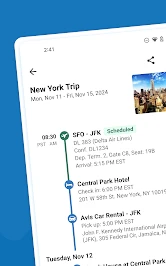
The first thing you’ll notice when you open TripIt is its clean, intuitive interface. Setting up is a breeze – just forward your travel confirmation emails to the app, and voilà, it organizes everything for you. Flights, hotels, car rentals, and even dinner reservations are neatly compiled in one place. It’s like having a personal assistant in your pocket!
Features that Stand Out
One of the standout features of TripIt is its ability to sync with your calendar. This means you can see all your travel plans alongside your daily commitments, a feature I found incredibly useful. No more double-booking mishaps!
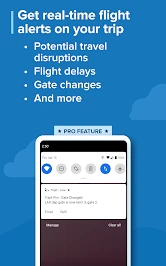
Another cool feature is the real-time flight alerts. Forget about constantly checking flight statuses; TripIt keeps you updated on any changes, delays, or gate information. It’s like having a friend at the airport giving you the inside scoop.
User Experience
From a user’s perspective, navigating through the app is smooth sailing. The developers clearly put a lot of thought into making TripIt user-friendly. The ability to share your itinerary with friends or family is just the cherry on top. Imagine planning a group trip and everyone being on the same page, literally!
Is TripIt Worth It?
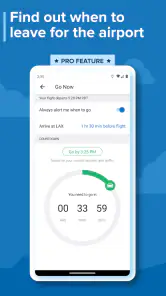
So, is TripIt worth the download? Absolutely. Whether you’re a frequent flyer or just someone who travels occasionally, the convenience it offers is unmatched. The app is available for both Android and iOS, and while there is a free version, opting for the premium version gives you access to even more features, like seat tracking and refund notifications.
In a world where time is of the essence, having an app like TripIt to streamline travel planning is invaluable. So go ahead, give it a try and take the stress out of your travel plans. Trust me, your future self will thank you.
Pros
- User-friendly interface for easy navigation.
- Comprehensive trip organization tools.
- Integration with calendars for seamless planning.
- Real-time travel alerts and notifications.
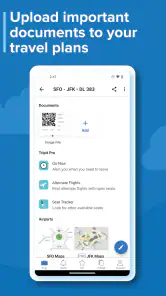
- Offline access to itineraries and travel documents.
Cons
- Premium features require a subscription.
- Occasional syncing issues with email.
- Limited customization of travel plans.
- Some users report slow customer support.
- High battery usage during active tracking.

- Category
- Travel & Local
- Version
- 15.1.0