Trimbox: Easy Email Cleaner
- 683.00
- 4.3
- Installs
- 500.00K
- Price
- Free

Screenshots


Analysis by Reviewed
I have always found email cleanup harder than it looks. The problem is rarely deleting one message; it is recognizing the newsletters, promotions, alerts, and old conversations that quietly take over an inbox. Trimbox: Easy Email Cleaner approaches that problem as a productivity app from Trimbox, built around clearing unwanted email and leaving mailing lists that no longer deserve your attention. After spending time with it, I see the appeal immediately: it turns an unpleasant maintenance job into a focused cleanup session rather than asking me to search through every message one by one.
The important distinction is that this is not an alternative email client in the traditional sense. I would not install it expecting a replacement for Gmail, Outlook, or Apple Mail. Its role is narrower and more useful: it gives inbox cleanup its own workspace. That makes it particularly attractive when your main inbox has become a mixture of useful correspondence and years of accumulated noise.
How Trimbox turns an overloaded inbox into a manageable task
The first thing I noticed is how different the experience feels from ordinary inbox maintenance. In a standard mail app, deleting old messages is usually mixed in with reading, replying, archiving, and searching. That encourages hesitation. Trimbox: Easy Email Cleaner is designed around the cleanup decision itself, so the central question becomes simple: do I still want this type of email, or not?
That focused approach matters because email clutter is often repetitive rather than complicated. A single promotional sender may have filled an inbox with dozens of messages, while a mailing list I once found useful may now be irrelevant. Looking at those messages as a group makes the decision easier. Instead of treating every email as a separate event, I can identify patterns and deal with them together.
I also like the psychological benefit. Cleanup tools work best when they reduce the number of small decisions a person has to make. Trimbox does not make the inbox problem disappear by magic, but it gives the task a clear beginning and end. I can open it with a specific goal, remove obvious clutter, and stop before the process turns into an evening spent reorganizing every folder.
The app sits comfortably in the productivity category because its real benefit is time and attention. It is not trying to make email more entertaining or add a collection of complicated communication features. The purpose is practical: reduce the amount of unwanted mail competing with messages that actually matter.
A realistic cleanup session
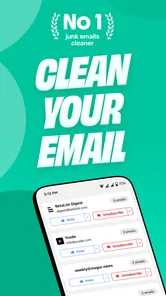
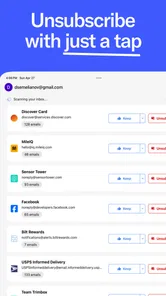
Imagine returning from a busy week to an inbox filled with retail offers, event reminders, automated updates, and newsletters you barely remember joining. In a regular mail app, I might delete the visible messages and leave the underlying subscriptions untouched. That only postpones the problem. With Trimbox, I would use a short session to review the recurring sources, unsubscribe from the ones I no longer read, and remove the accumulated messages that have already served no purpose.
More From Our News Desk

Weather by Xiaomi Review: Clear at a Glance, Less Clear Up Close

X Under Pressure: Can It Recover When Posting Goes Wrong?

Clash of Clans Is Won Between the Battles

Android Auto Makes the Case for Quieter Car Software

MobiOffice: Transforming Mobile Productivity with Seamless Integration

EA SPORTS FC™ Mobile Soccer: Redefining Mobile Sports Gaming
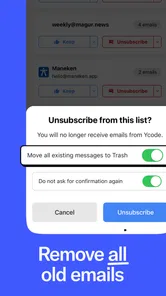
The useful part of that workflow is the separation between stopping future clutter and clearing existing clutter. Unsubscribing addresses the source, while deleting old emails deals with the backlog. Doing only one of those jobs is less satisfying: deleting without unsubscribing means the same sender returns, while unsubscribing without clearing old messages leaves the inbox looking almost as crowded.
A second practical use is preparing an account before an important period. Someone starting a new job, returning to university, or managing a busy project may want a cleaner inbox before the volume increases. Trimbox is better suited to that reset than manually searching for old promotional mail across several years of messages.
What the free access means in practice
Trimbox is free to install, which makes it easy to try without committing money first. That is a meaningful advantage for this type of app because the value depends heavily on the condition of your inbox. If your account is already tidy, there may be little reason to pay for a dedicated cleaner. If your inbox is chaotic, a trial cleanup can quickly show whether the focused workflow saves you enough effort.
The app also contains in-app purchases ranging from $3.99 to $39.99 per item. I would not treat those prices as an automatic recommendation to upgrade. The sensible way to judge the paid value is to compare the purchase with your actual cleanup habits. Someone who needs a one-time reset may find the free access sufficient or may prefer to use the app only when necessary. Someone who repeatedly manages several crowded inboxes may see more value in paid access, provided the available upgrade fits that use.
That distinction is important: the free entry point lowers the risk, but it does not mean every user will receive the same value from paid options. I would first test the app with the most troublesome part of my inbox, then decide whether the time saved justifies spending money. A cleaner inbox is useful, but it is not worth paying simply because the app offers an upgrade.
For a productivity tool, this pricing structure makes the decision relatively straightforward. You can begin with no purchase, observe whether the cleanup method suits you, and only then consider paid value. I prefer that approach to paying upfront for an app whose usefulness depends so much on personal email volume.
Where the app is stronger than ordinary email tools
The biggest strength is focus. Gmail, Outlook, and Apple Mail are excellent for handling messages, but their cleanup functions are usually secondary to reading and composing. They can search, filter, archive, and delete, yet the user still has to construct the cleanup process. Trimbox is more direct because the cleanup goal is built into the experience.
That makes it especially helpful for people who know what they want to do but dislike the mechanics of doing it. I can understand the logic of creating a filter, but I may not want to spend time designing rules for every newsletter or promotional sender. A dedicated cleaner offers a more approachable route for that kind of maintenance.
There is also a useful difference between searching for individual messages and reviewing email sources as a broader problem. Search is excellent when I know the sender, subject, or phrase I need. It is less effective when I simply know that my inbox feels noisy. Trimbox is aimed at that second situation, where the first step is discovering what is creating the noise.
Still, I would not replace the normal mail app with it. Regular email clients remain better for detailed searches, attachments, folders, conversation history, replies, and careful message-by-message decisions. Trimbox earns its place beside them, not instead of them.
Small workflow choices that make cleanup safer
My first recommendation is to begin with obvious low-risk clutter rather than important correspondence. Promotional mail, outdated announcements, and newsletters I never open are easier decisions than receipts, travel information, account notices, or messages connected to ongoing work. Starting conservatively builds confidence and reduces the chance of an impulsive cleanup.
My second recommendation is to treat unsubscribing as a deliberate decision, not a shortcut for deleting. A sender may occasionally provide useful information even if its recent messages are uninteresting. I would unsubscribe only when I am comfortable losing that recurring channel. If I might need the sender later, deleting the old messages may be the better compromise.
A third useful habit is to clean in passes. On the first pass, I would remove clear clutter. On the second, I would look at recurring senders that require more thought. On the final pass, I would check whether the inbox now contains messages that need a reply or a separate archive. This prevents the app from becoming an excuse to postpone important email under the banner of organization.
I would also avoid using a cleanup session when I am rushed. The app can make decisions feel quick, but quick is not always careful. If the inbox includes financial records, work documents, medical correspondence, or travel details, I would slow down and review the sender before removing anything. The convenience of grouped cleanup should support judgment, not replace it.
Limitations and tradeoffs worth considering
The main limitation is that a cleaner cannot decide the personal value of every message perfectly. Email categories overlap. A newsletter may contain an important announcement; an automated notification may be useless most of the time but essential during a specific project. The more mixed your inbox is, the more attention you should give each cleanup decision.
Another tradeoff is that a dedicated app adds one more place to manage email. People who already have a reliable system of filters, labels, rules, and folders may find Trimbox unnecessary. If your inbox is carefully organized and you regularly maintain subscriptions, the app may not save enough effort to justify changing your routine.
It is also not the right choice for someone who wants deep manual control over every aspect of email organization. A traditional client is usually better when the job involves complex folder structures, custom rules, detailed search operators, or careful archival. Trimbox is strongest when the priority is reducing unwanted mail, not building a complete information-management system.
I would be cautious about expecting a single cleanup session to solve everything permanently. Email habits change, and new subscriptions appear. The app can help establish a cleaner starting point, but keeping an inbox manageable still requires occasional attention. Its value is greater for people willing to make cleanup a repeatable habit than for someone looking for a one-time permanent fix.
Who is most likely to get real value
I think Trimbox is a strong match for people whose inbox has grown gradually out of control. That includes anyone who signed up for many services over the years, used an email address for shopping, or kept postponing unsubscribe decisions. The app is also useful for people who find conventional mail settings confusing but still want a practical way to reduce recurring clutter.
It can be particularly helpful before a major change in routine. A new job may bring a higher volume of work messages, while a move, a course, or a busy travel period can make an already crowded inbox harder to navigate. Cleaning the old material first creates a clearer baseline, even if the app is not used every day afterward.
People managing more than one inbox should think carefully about convenience and cost. A dedicated cleaner may be valuable when several accounts suffer from the same problem, but I would test the workflow on the account with the greatest clutter before considering a paid purchase. The free installation makes that evaluation easier.
On the other hand, I would skip it if you rarely receive unwanted email, already use effective filters, or prefer to inspect every message through your existing mail client. I would also avoid making it the center of a highly regulated or document-heavy workflow where manual retention decisions matter more than speed.
Compatibility, maturity, and everyday usability
The app was released on December 17, 2023, and its current version is 2.1.182. It supports Android 7.0 and later, so people using older but still compatible Android phones can consider it without needing a recent operating system. Its content rating is Everyone, which fits the straightforward productivity purpose and makes it suitable for a broad audience.
Trimbox has reached over 500 thousand installs and holds a 4.3 average from around 8.2 thousand ratings, with 683 written reviews. Those figures suggest that the concept has found a substantial audience, while the rating also feels consistent with an app that solves a clear problem but cannot remove every email-management complication. I would read that as encouragement to try it, not as proof that it will suit every inbox.
The developer is Trimbox, and the app is available as a free productivity download with optional in-app purchases. That combination gives the product a sensible evaluation path: install it, test the cleanup workflow on a controlled portion of your inbox, and decide whether the additional value is enough to consider spending money.
My buy-or-skip verdict
My recommendation is to try Trimbox if your inbox is crowded mainly because of newsletters, promotions, and recurring senders. It offers a more focused cleanup experience than the usual email client, and the free starting point makes the experiment low risk. The most convincing benefit is not simply deleting old messages; it is connecting that cleanup with the decision to stop unwanted mail from returning.
I would not buy an upgrade immediately. I would first identify whether the app actually changes my routine, whether it handles the type of clutter I have, and whether I would use it more than once. Paid value makes sense only when the time saved is meaningful for my situation. The listed purchase range is broad enough that I would pay attention to the specific option presented rather than assuming every paid item offers the same benefit.
For someone with a neglected inbox, Trimbox: Easy Email Cleaner is an appealing specialist tool. For someone with a disciplined email system, it may be redundant. My practical verdict is simple: use the free access as a test, clean cautiously, and pay only when the app proves that it saves you recurring effort. That makes it a worthwhile recommendation for inbox recovery, but not an automatic purchase for every email user.
Trimbox: Easy Email Cleaner Frequently Asked Questions
Which email accounts can I connect to Trimbox?
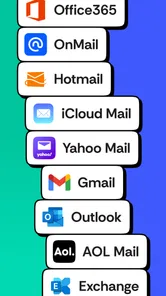
Trimbox works by connecting to an email account so it can help sort and clean messages. Before downloading, consider whether the account you want to manage is supported and whether you are comfortable granting the access requested during sign-in. If you use several inboxes, check the connection options in the app before relying on it to organize them all.
What should I check before installing Trimbox on my phone?
Trimbox is a productivity app for cleaning an inbox, deleting older messages, and unsubscribing from mailing lists. It is free to download and is rated for everyone, with in-app purchases available. Check that your device meets the app’s minimum operating-system requirement, and review the purchase and permission screens before proceeding so you know what access and optional costs to expect.
What is Trimbox: Easy Email Cleaner and how does it work?
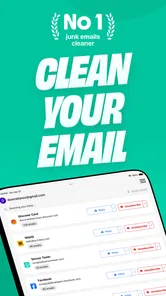
Trimbox: Easy Email Cleaner is designed to help organize and clean up an overcrowded email inbox. After connecting your supported email account, the app helps identify newsletters, promotional messages, old conversations, and other unwanted mail. You can review suggested items, unsubscribe from recurring senders, and delete messages in batches instead of handling every email individually. Its usefulness depends on the email permissions and account services available on your device.
Is Trimbox safe to use with my email account?
Before using Trimbox, you should carefully review the permissions requested during sign-in. Email-cleaning tools generally need access to analyze messages, identify senders, and perform actions such as unsubscribing or deleting emails. Use the official app-store version, check its privacy policy, and connect only the account you intend to manage. If you handle sensitive business or personal correspondence, consider the level of access carefully before approving it.
Can Trimbox unsubscribe me from unwanted newsletters automatically?
Trimbox can help locate recurring newsletters and promotional emails and may provide an unsubscribe option for supported senders. In practice, the result can vary because some mailing lists use unusual unsubscribe systems, confirmation pages, or senders that do not provide a valid link. It is still a good idea to review the list before confirming changes, since an email that looks promotional may contain receipts, account alerts, or information you still want to receive.
Pros
- Quickly identifies newsletters and unwanted emails for review.
- Swipe-based controls make sorting large inboxes feel simple.
- Helps reduce inbox clutter without manually opening every message.
- Useful unsubscribe suggestions can limit future promotional mail.
- Clean interface is approachable for users with little email-management experience.
Cons
- Requires access to your mailbox
- which may concern privacy-focused users.
- Automatic classifications should be checked before deleting important messages.
- Some useful tools may be restricted to a paid subscription.
- Processing a large inbox can take time
- especially with older accounts.
- Results depend on the email provider and permissions granted to the app.











