

TRICARE East
- 550.00
- 3.8
- Installs
- 100.00K
- Price
- Free

Screenshots
Analysis by Reviewed
When healthcare information is spread across a wallet card, an insurer website, email messages, and a phone contact list, even a simple task can become surprisingly awkward. I found TRICARE East most useful as a focused mobile companion for people covered in the TRICARE East Region, especially when they need to check their plan information while away from a computer. It is a free medical app from Humana Government Business, and its purpose is much narrower than that of a general health tracker or hospital app.
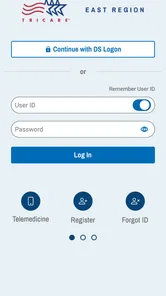
That narrow purpose is also its main strength. I would not install it expecting symptom analysis, medication coaching, fitness tools, or a replacement for urgent medical care. Instead, I see it as a practical access point for beneficiaries who want their TRICARE East information close at hand. The app is available to everyone by age rating, but the useful experience depends on being an eligible beneficiary and having the right account details. That distinction matters in a household where several people share a phone or tablet.
How TRICARE East fits into real household routines
I find a shared household routine works best when everyone knows which tasks belong in the TRICARE East app and which belong elsewhere. Before an appointment, I’d use it to check beneficiary-related information, then keep provider details and scheduling in their usual places. That small division of labor makes the app easier to rely on without turning one phone into the household’s only healthcare record.
A shared-device situation where it can help
Imagine a parent taking a child to an appointment while another adult in the household is at work. The person attending the appointment may need plan information, while the account holder is not physically present. A dedicated app can be more convenient than searching through old messages or asking someone to forward a screenshot. In that situation, I would use the app as a preparation tool: open it before leaving, make sure the relevant account access works, and avoid discovering at the reception desk that the needed information is behind another sign-in step.
The same applies to a household member who helps an older relative manage appointments or insurance tasks. A phone is often easier to carry than a folder of paperwork, and having a familiar place for TRICARE East information can reduce last-minute searching. The important word is “helps,” though. I would not treat the app as a way to create a shared family account or as permission to view another person’s private health information. Each person should use access that belongs to them, with the account holder deciding what can be shared.
For a family that keeps one tablet in a kitchen or living room, the app may be convenient but also demands more care. Signing in on a shared device can leave personal information visible to the next person who opens it. I would avoid saving credentials where other household members can reach them, and I would sign out whenever the device is not genuinely private. That is not a special feature of this app; it is simply sensible handling for a medical account.
What I would do before relying on it outside the home
My first step would be to install the current version, listed as 3.2.4, and complete the account process at home rather than during a rushed visit. I would check that I can reach the information I expect to use and confirm that the correct TRICARE East coverage context appears. If another family member needs something, I would clarify in advance whether they need their own access or whether a printed document is more appropriate.
More From Our News Desk

 Instagram
Instagram’s Power Comes From Its Place in Your Phone
A close look at how Instagram turns Meta’s reach, recommendation systems and everyday camera habits into durable platform power—and what that costs users.

 Gmail
GmailGmail in a Busy Inbox: Who Benefits Most?
From first account to crowded workday, Gmail earns its place through dependable search and flexible sorting—but its best fit depends on how much inbox maintenance you can tolerate.

 Prime Video
Switching to Prime Video: What Changes in Your Viewing Routine
Prime Video can make a compelling second home for streaming, but switching means learning a different catalog, rental layer, and route from browsing to playback.

 Universal TV Remote Control
Universal TV Remote Control Works Best as a Reliable Backup
A phone remote earns its place through quick setup and reliable habits. Here is how to get more from Universal TV Remote Control—and where its limits show.

 Weather - By Xiaomi
Weather by Xiaomi Review: Clear at a Glance, Less Clear Up Close
Xiaomi’s weather app makes everyday forecasts quick to scan, but its calm surface can leave useful details and recovery paths harder to find than they should be.

 X
XX Under Pressure: Can It Recover When Posting Goes Wrong?
A resilience-focused review of X, examining setup, mistaken posts, interruptions, weak connections, and the gaps that matter when recovery needs to be dependable.
Latest News



This preparation is especially useful for people who do not regularly manage digital accounts. A beneficiary may assume that installing the application automatically makes every household member’s information available. It does not make sense to plan around that assumption. Account boundaries are part of the experience: the app is a personal entry point, not a family noticeboard.
I also recommend keeping a non-digital backup for important appointments. A phone can lose battery, a login can require attention, and reception areas do not always offer a comfortable moment for troubleshooting. I like the convenience of having TRICARE East available on a phone, but I would not discard every paper record or contact detail simply because an app exists.
Coordinating care without mixing up responsibilities
One of the more useful household roles for the app is coordination. A parent, spouse, or caregiver can use it as part of a routine for checking information before making a call or attending an appointment. The best workflow is to decide who owns each task. One person might monitor their own coverage details, while another keeps a calendar of appointments and transport. The app can support the first task, but it should not be treated as a complete family scheduling system.
I found that distinction important because insurance information and medical care are connected without being the same thing. An app focused on TRICARE East may help with beneficiary-related tasks, while the provider’s own system may still be better for appointment times, clinical messages, test results, or prescription details. Using the right tool for each job prevents the common mistake of expecting an insurer app to behave like a hospital portal.
For a household with frequent moves, travel, or changing responsibilities, I would make a small pre-appointment checklist: confirm the person whose account is being used, check the relevant coverage information, note the provider’s separate contact details, and keep any required identification available. This takes less time than trying to solve every question from inside one application. The app is most effective when it becomes one dependable step in a wider routine rather than the only source of truth.
Age, trust, and responsible access
The Everyone content rating tells me that the app is suitable from a content perspective for a broad audience. That does not mean every child should be given unsupervised access to an adult’s medical account. A young person might be able to operate the phone, but medical privacy and account security are separate concerns. I would let a teenager assist with navigation only when the account holder is present and comfortable with what is being displayed.
Older adults may appreciate having coverage information on a familiar device, but the setup experience can still be a barrier if passwords, verification steps, or account recovery are unfamiliar. I would help with the initial installation without taking permanent control of the account. Writing down recovery information in a secure place, explaining what the app is for, and practicing the sign-in process can make future use less stressful.
Trust also matters between adults. Sharing a phone does not automatically mean sharing health information. If a spouse or caregiver needs access, I would discuss exactly what is needed and avoid leaving the account open after use. The app can be part of a supportive arrangement, but the arrangement should be based on consent rather than convenience.
What the ratings suggest about expectations
TRICARE East has an average rating of 3.8 from around 1.8 thousand ratings, with roughly 549 written reviews. I read that as a sign to keep expectations practical. The app appears established enough to have a substantial user base, with over 100 thousand installs, but those figures do not guarantee that every household will find the sign-in process or navigation equally smooth.
In my view, a medical account app deserves a little more patience than a casual utility because access can depend on identity and coverage details. At the same time, frustration is understandable when someone is trying to handle an appointment quickly. I would judge it by whether it reliably helps with the specific TRICARE East tasks I need, not by comparing it with entertainment apps that open instantly and require no personal verification.
Where it is better than the usual alternatives
The usual alternative is opening a browser, searching for the TRICARE East website, locating the correct sign-in page, and repeating that process whenever information is needed. A dedicated app can reduce those steps and keep the service closer to the place people already look for daily tools: their phone. That convenience is particularly valuable for beneficiaries who travel between home, work, appointments, and family responsibilities.
Another alternative is relying on screenshots or forwarded messages. Those can become outdated, lose context, or expose more information than the recipient needs. Using the relevant account directly is a cleaner habit when the account holder is available. For a caregiver, however, a printed record or direct phone support may still be preferable if the person being helped cannot comfortably manage digital access.
Compared with a broad medical app, TRICARE East is more specialized. A general health platform may offer wellness tracking or symptom content, but those features do not replace a beneficiary-focused insurance tool. Conversely, a provider portal may contain more clinical information for a particular medical practice. I would use TRICARE East for TRICARE East-related access, the provider portal for clinical communication, and a general health app only for unrelated personal tracking.
Limitations I noticed in the overall approach
The focused design can feel limiting if you want one application to organize every part of family healthcare. It is not the place I would expect to manage an entire household calendar, store every medical document, or coordinate all providers. Keeping several apps and records organized may feel less convenient than a single all-purpose dashboard, even when the specialized tool is better at its own job.
There is also a practical dependency on the correct user and account context. If a family member opens the wrong profile, uses a shared device carelessly, or assumes one login covers everyone, the convenience quickly turns into confusion. The app cannot replace a clear household process for deciding who checks information and who communicates it.
Finally, I would not use it for urgent medical decisions. Insurance access and clinical advice are different needs. If someone has a serious or time-sensitive health problem, the right response is to contact emergency services or an appropriate medical professional, not to wait for an app screen. That boundary is easy to overlook when a medical application is always visible on the phone.
Who should install it, and who may prefer another option
I recommend it to TRICARE East beneficiaries who frequently need mobile access to their coverage-related information, especially those who travel, help coordinate appointments, or dislike repeatedly navigating a browser. It also makes sense for households that want a consistent digital starting point while keeping each adult’s account separate.
I would be more cautious about recommending it to someone who rarely uses smartphones, has no need for mobile access, or expects a complete family health-management system. In those cases, a website, a provider portal, paper records, or direct assistance may be simpler. The best choice depends less on the app’s category than on the task the person is actually trying to complete.
My household verdict
After looking at it as a shared-household tool rather than just an individual download, I see TRICARE East as a useful, focused companion for beneficiaries in the East Region. Its free price removes an obvious barrier, and its Everyone rating makes it approachable for households with different ages, but responsible use still requires adult judgment around privacy and account ownership.
My strongest recommendation is to set it up before it becomes urgent, use personal access rather than casually sharing credentials, and keep a backup for appointments or situations where the phone is unavailable. Those small habits address the main friction points more effectively than expecting the app to handle every family responsibility.
For the right user, the application saves time by putting TRICARE East access on a device that is usually already nearby. For the wrong user, it may feel too specialized or too dependent on digital account management. I would install it if I were a TRICARE East beneficiary and wanted a direct mobile option, but I would keep my provider’s tools and basic offline information available as well. That combination gives the app a sensible role without asking it to do more than it was built to do.
TRICARE East Frequently Asked Questions
Is TRICARE East an official app, and who develops it?
TRICARE East is a medical app developed by Humana Government Business for beneficiaries in the East Region. It is intended to provide mobile access to TRICARE East resources, while eligibility for the underlying health coverage depends on your beneficiary status and enrollment. Before downloading, make sure the app name and developer match so you choose the intended service.
What does TRICARE East help beneficiaries do?
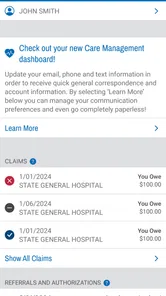
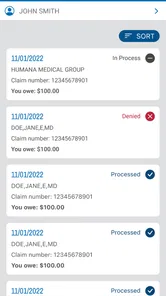
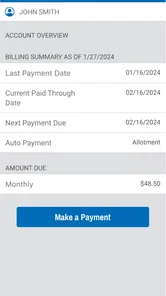
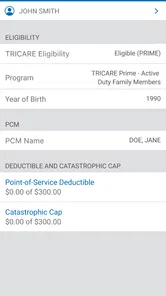
The TRICARE East mobile app is available for beneficiaries in the East Region. Its digital services can help users manage health coverage, review plan information, locate care, check claims, and reach account resources. What you can access depends on your TRICARE status and enrollment, so the app is best viewed as a convenient route to relevant services rather than a replacement for confirming coverage.
What is TRICARE East, and who can use the app?
TRICARE East is the regional health care support service for eligible military members, retirees, family members, and other beneficiaries in the East Region. Its mobile tools are designed to help users manage health coverage, review plan information, locate care, check claims, and access important account resources. Eligibility and available features depend on your TRICARE status and enrollment.
Can I use TRICARE East to find a doctor or check whether a provider is covered?
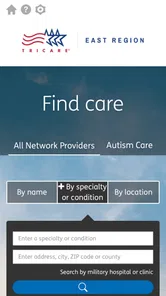
Yes, TRICARE East provides tools for searching participating providers and locating military or civilian health care facilities in the East Region. Before scheduling an appointment, review the provider’s current network status and confirm that the service is covered under your specific plan. Provider directories can change, so verifying details directly is recommended.
Can I view claims, authorizations, and my TRICARE coverage through the app or online account?
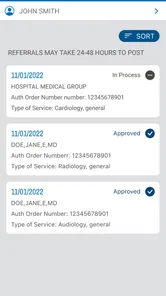
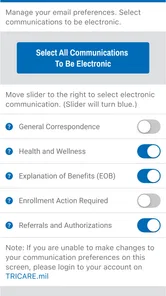
TRICARE East account services generally allow beneficiaries to review claim information, coverage details, referrals, authorizations, correspondence, and other plan-related records. The exact information displayed may vary by beneficiary type and account permissions. You may need to register or sign in through the official secure portal, and some requests may still require contacting customer service.
Pros
- Access benefit details
- claims
- and eligibility information in one place.
- Secure account tools help protect personal health and insurance data.
- Useful provider search helps locate participating doctors and facilities.
- Digital ID card access can be convenient during appointments or pharmacy visits.
- Official updates can help members stay informed about plan changes.
Cons
- Some features may require an existing TRICARE account and member credentials.
- Navigation can feel confusing for users unfamiliar with military health benefits.
- Certain actions may redirect to websites instead of staying inside the app.
- Information may not update instantly after claims or coverage changes.
- Availability and features can vary depending on beneficiary status and region.











