

Travelocity Hotels & Flights
- 9.20K
- 4.7
- Installs
- 5.00M
- Price
- Free

Screenshots


Analysis by Reviewed
When travel planning gets confusing, I like to start by checking the basics in one place rather than bouncing between tabs. Travelocity Hotels & Flights is a free travel app from Travelocity.com, and I find it most useful as a starting point for comparing flight options and booking select hotels. It is aimed at everyday travelers, not just people who plan trips constantly, and its Everyone age rating makes its audience broad. The app has a 4.7 average from around 45,000 ratings, with more than 5 million installs, so it is clearly familiar to many travelers.
Who benefits from this kind of travel search
I see the strongest fit for someone planning a fairly conventional trip: choose dates, compare flights, and find a suitable hotel without making the app responsible for every part of the journey. That can be helpful for a short break, a visit to family, or a work trip where the main decisions are transport and a place to stay. Travelocity.com is the developer, and the app’s focus on travel planning makes it a practical place to begin those searches.
It is less suited to travelers whose plans depend on a very unusual route, an extensive list of lodging styles, or detailed arrangements beyond flights and select hotels. I would not treat one search app as a complete inventory of every travel option. If an important requirement is not represented among the results, I would check a specialist airline or accommodation service as well rather than compromise on the trip just to keep everything in one place.
Finding your way through a trip search
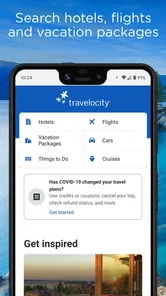
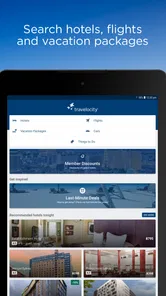
Right off the bat, Travelocity Hotels & Flights greets you with a clean and intuitive interface. The design is straightforward, making it easy even for tech dinosaurs to navigate. I loved how everything is neatly categorized, from flights to hotels to car rentals. It’s like having a personal travel agent in your pocket. The search functionality is incredibly smooth, and filters are available to tailor your search results to fit your exact needs.
Where a search can get stuck
Travel searches can still feel fiddly when you have several constraints: fixed dates, a particular arrival time, and a hotel near a specific part of town. I recommend deciding which requirement matters most before comparing options. If you keep changing dates or filters, pause and check that the results still match the trip you actually want; a low-looking fare is not useful if its timing or location does not work for you.
For a realistic weekend plan, I would first compare flights for the dates I can travel, then look at select hotel options around the area I intend to visit. That order helps me avoid choosing a hotel based on a price before I know whether the flight schedule makes the trip practical. Travelocity works well as a comparison point, but I would still read the details on the final choice carefully instead of treating the first attractive result as the whole story.
Making the most of a search
A useful habit is to separate “must have” details from preferences before opening the results. For example, I would treat the travel dates and a workable arrival time as fixed, then stay flexible about secondary details if the first search is too narrow. I also compare the overall fit of an itinerary rather than ranking options by a single appealing fare. A cheap flight that leaves at an awkward time can cost more in inconvenience than it saves, especially when it does not line up with the hotel stay.
More From Our News Desk

 Prime Video
Switching to Prime Video: What Changes in Your Viewing Routine
Prime Video can make a compelling second home for streaming, but switching means learning a different catalog, rental layer, and route from browsing to playback.

 Universal TV Remote Control
Universal TV Remote Control Works Best as a Reliable Backup
A phone remote earns its place through quick setup and reliable habits. Here is how to get more from Universal TV Remote Control—and where its limits show.

 Weather - By Xiaomi
Weather by Xiaomi Review: Clear at a Glance, Less Clear Up Close
Xiaomi’s weather app makes everyday forecasts quick to scan, but its calm surface can leave useful details and recovery paths harder to find than they should be.

 X
XX Under Pressure: Can It Recover When Posting Goes Wrong?
A resilience-focused review of X, examining setup, mistaken posts, interruptions, weak connections, and the gaps that matter when recovery needs to be dependable.

 Clash of Clans
Clash of Clans Is Won Between the Battles
Its raids are quick; its community is a long-term project of coordination, teaching, rivalry, and shared responsibility—with all the friction that entails.

 Android Auto
Android Auto Makes the Case for Quieter Car Software
The car interface is no longer judged by how much it can do, but by how quietly it helps. Android Auto shows what drivers now expect—and what still gets in the way.
Latest News



Location deserves the same attention. Before choosing a hotel, I would think about where I expect to spend most of the trip and whether the area makes the plan practical. A hotel result is not automatically the right choice just because it appears beside a suitable flight. For a weekend with limited time, a location that reduces unnecessary travel around town may matter more than a small difference in the displayed price.
Booking Made Simple
Booking a flight or a hotel room through this app is a breeze. I tried booking a weekend getaway, and the process was seamless. What’s really cool is that you can compare prices across different airlines and hotels, ensuring you snag the best deal possible. Plus, the app has this nifty feature that lets you bundle your flight and hotel bookings for additional savings. Who doesn’t love saving a few extra bucks?
Small checks before you book
When I am close to booking, I slow down and check the trip dates, traveler details, and the terms shown for the specific option. Bundling can be convenient, but I would compare the combined choice with booking the flight and hotel separately before deciding; a bundle is only a win if both parts fit my needs. If a search looks wrong, I first re-enter the dates and destination, then remove filters one at a time. That makes it easier to tell whether a narrow filter is hiding suitable results.
For a trip with uncertain plans, I would be especially careful about the conditions attached to the individual flight and hotel choices. The convenience of handling both parts in one flow does not remove the need to understand what I am selecting. Before confirming, I check that the dates line up across the itinerary and that I have not accidentally carried an old search setting into a new one. Those quick checks are more useful than repeatedly restarting a search without knowing what changed.
How it compares with other travel options
Compared with searching airline sites one by one, Travelocity can be a more convenient starting point when I want to compare flight choices alongside hotel options. Its advantage is that it brings those trip basics together; its trade-off is that I may still want to check an airline directly before settling on a route, particularly if timing or a specific flight detail is decisive. For lodging, the focus on select hotels means I would use another service when I need a broader search across different kinds of stays.
I would also distinguish between comparison and final confirmation. A travel app can help narrow the choices, but I still read the terms attached to the actual selection and keep the resulting booking information easy to find. For a simple trip, that extra step is quick. For a complicated itinerary, checking each part directly can be worth the time, even if it means using more than one service.
Features that Stand Out
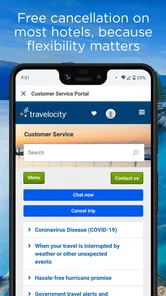
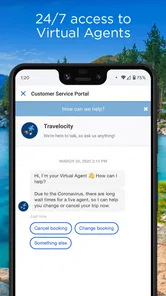
One of the standout features of this app is its 24/7 customer support. Whether you have a last-minute change or a question about your booking, help is just a tap away. I had a query about changing my flight and got a prompt response from their support team. The app also offers exclusive mobile deals that aren’t available on their website, which is a fantastic incentive to keep the app handy on your phone.
Mobile deals are worth checking, but I would compare the whole offer rather than assuming a label makes it the best choice. A deal only helps if the dates, schedule, hotel, and terms suit the trip I am actually taking. If I am still deciding between several possible dates, I would settle the basic plan first and then review the available options; otherwise, it is easy to get distracted by an offer that does not fit.
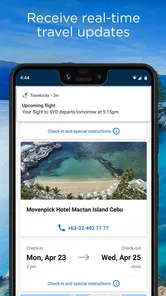
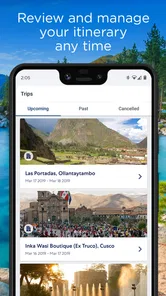
Another feature worth mentioning is the Trip Planner. It helps you organize your itinerary, keeping all your travel details in one place. No more juggling between different apps or emails to find your flight details or hotel reservation.
Using the planner without losing track
I find an itinerary organizer most useful after the main choices are made, when I want a clearer view of what I have arranged. For an ordinary weekend, that might mean checking the travel and hotel details together before leaving, rather than searching through messages at the last minute. I would still keep confirmation messages accessible as a backup. Having trip information gathered in an app is convenient, but it is sensible not to rely on a single view as the only record of a reservation.
One practical approach is to review the itinerary once after booking and again shortly before departure. That gives me a chance to spot a mismatch between the dates I planned and the details I actually selected. If I am traveling with someone else, I would make sure we are both working from the same confirmed information instead of assuming that a shared plan automatically means every traveler has the details they need.
When the app may not be the cause
If a search will not refresh or a booking screen behaves unexpectedly, I would check the connection and make sure the app is current before repeating the search. Travelocity’s current version is 2025.48.0, and it supports Android 10 or later. I also avoid submitting the same booking repeatedly when a screen seems slow; first check whether the trip appears in the app or in any confirmation message, so a momentary delay does not turn into duplicate effort.
The Trip Planner is most useful once the booking information is available to organize. I still keep confirmation messages accessible, especially while traveling, rather than relying on one screen as my only record. If a detail seems inconsistent, I compare it with the confirmation for that specific booking and contact support when the issue concerns a reservation. For broader route comparisons, I may also check an airline directly; for a wider hotel search, another travel service can be a useful second opinion.
Simple recovery steps for a disrupted search
If results seem stale or out of step with what I entered, I would take one change at a time: verify the destination and dates, clear a restrictive filter, then try the search again. Changing several things together makes it harder to identify what caused the odd result. If the app remains unresponsive, checking the connection and making sure it is current are sensible first steps; I would avoid repeatedly tapping a booking action while waiting for a screen to respond.
When the concern is not just a search but a reservation, I would look for the confirmation associated with that booking before trying to book again. That helps separate a slow display from a transaction that has already gone through. If the confirmed details and the app’s itinerary do not agree, I would use the confirmation as a reference and contact support about the specific reservation. For general route or lodging questions, comparing with the relevant provider can help establish whether the issue is with the app’s display or with the option itself.
When another tool is the better choice
I would skip relying on Travelocity alone if I needed an unusually precise flight plan, wanted to explore a wide range of accommodation types, or had a trip with many separate moving parts. In those cases, specialist services may make it easier to focus on one part of the journey in depth. That does not make this app pointless; it can still be a useful first comparison, but I would not force a simple workflow onto a complicated trip.
It also may not be the right starting point for someone who has already chosen a specific airline or hotel and wants to manage everything directly with that provider. Going straight to the provider can be clearer when the decision is already made. I see Travelocity as more useful during the comparison stage, when I have not settled on the basic combination of flight and hotel and want to explore convenient options together.
Who will get the most from it
I would recommend Travelocity to someone arranging a straightforward getaway who wants flight comparisons and select hotel bookings in one app, especially if the mobile deals appeal to them. It is less compelling for a traveler who needs an unusually specific itinerary or wants to search every possible accommodation type in one place. In those cases, I would use it alongside a specialist airline or lodging service rather than assume one app covers every option.
The app is free, which makes it easy to try as a planning tool without treating it as a commitment to book every part of a trip there. Its Everyone rating also suits a broad audience, though the value for any particular traveler depends on whether its flight and hotel searches match the trip they are planning. I would start with one real destination and a realistic date range, then decide whether the results and booking flow fit my habits before making it my default travel tool.
Final Thoughts
In a world where travel apps are dime a dozen, Travelocity Hotels & Flights certainly stands out with its user-friendly design and robust features. It takes the hassle out of travel planning, allowing you to focus on the fun part – the adventure itself. Whether you’re a frequent flyer or planning your first trip, this app is worth checking out. Just remember, with travel, it’s all about the journey and not just the destination. Happy travels!
Travelocity Hotels & Flights Frequently Asked Questions
Can I use Travelocity Hotels & Flights to compare flight and hotel options before booking?
Yes. Travelocity Hotels & Flights is intended to help travelers find deals on flights and book select hotels. You can use its search tools to explore available choices and compare options before deciding what fits your plans. Availability and the details shown can vary by trip, so review the selected itinerary carefully before completing a reservation.
Do I need an account to search for travel in Travelocity Hotels & Flights?
You can use the app to explore its travel-booking features and search for available options. When you proceed with a reservation, you may be asked to provide traveler and contact details so the booking can be handled. Keep your information accurate and check the itinerary before confirming, particularly when entering names and trip dates.
Can I book rental cars through Travelocity Hotels & Flights?
Travelocity Hotels & Flights is described as a travel app for finding flight deals and booking select hotels. Its main focus is therefore useful for travelers comparing those options in one place. If you are looking for a rental car, check the app’s current offerings for your destination rather than assuming that every trip or service is supported.
Is Travelocity Hotels & Flights free to download, and which devices can run it?
Travelocity Hotels & Flights is free to download and is rated for Everyone. It is a travel app for Android devices running version 10 or later, so checking your device’s operating system before installing can help avoid compatibility issues. Once installed, you can explore its travel-booking features and decide whether they suit the way you plan trips.
What is Travelocity Hotels & Flights and what services does it offer?
Travelocity Hotels & Flights is a comprehensive travel application that allows users to book flights, hotels, and rental cars all in one place. It offers a wide range of options from budget-friendly accommodations to luxury hotels, as well as competitive flight deals. The app also provides users with access to exclusive travel deals and discounts, making it a convenient tool for planning and managing travel itineraries anytime, anywhere.
Pros
- User-friendly interface for easy navigation.
- Comprehensive search filters for tailored results.
- 24/7 customer support for booking assistance.
- Competitive pricing with exclusive discounts.
- Integration with loyalty programs for rewards.
Cons
- Occasional app crashes reported by users.
- Limited offline functionality.
- Some features require stable internet connection.
- Advertisements can be intrusive at times.
- Booking cancellations may incur fees.











