Toptracer Range
- 402.00
- 4.8
- Installs
- 1.00M
- Price
- Free

Screenshots
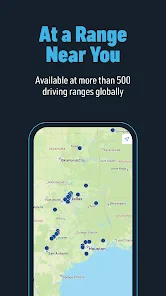
Analysis by Reviewed
I’d judge Toptracer Range less as a golf app to browse at home and more as a companion for a particular kind of outing: you’re at a participating driving range, ready to hit balls, and want more feedback than you can get by watching each shot land. That setting is the key to whether it will be useful. The free sports app is made by Toptracer Range, is rated for Everyone, and has a 4.8 average from around 9,900 ratings. It has passed a million installs, which suggests plenty of golfers are curious about adding shot tracking and competition to range practice.
Start with the range, not the download
Before planning a session around the app, check that the range you intend to visit has the Toptracer system. The experience depends on cameras at the facility following your shots; this isn’t a phone-only swing tracker that can turn any patch of ground into a measured practice bay. That distinction is easy to miss if you think of it as a general golf utility. I’d treat the app as the digital part of an equipped range visit, rather than a replacement for lessons, course navigation, or a personal launch monitor.
On arrival, the useful habit is to get the app ready before you start hitting. Look for the range’s instructions for connecting your session, then make sure you understand where its screen or bay display will show the results. The exact setup can depend on the venue, so I wouldn’t assume every location handles the handoff identically. Getting oriented first means you spend less of your paid practice time trying to work out how to begin.
From a bucket of balls to useful feedback
Have you ever wondered what it’s like to be a professional golfer, analyzing every swing and improving with each stroke? Well, with Toptracer Range, you can bring this experience right to your local driving range. This app has brought a game-changing twist to the golfing world, combining technology and sport in a way that’s both engaging and educational. Let’s dive into what makes this app a must-have for both casual players and serious golf enthusiasts.
Enhancing Your Golfing Experience
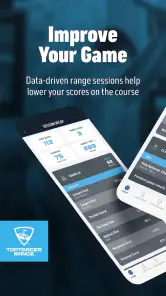
When you first launch the Toptracer Range app, you’re instantly immersed in a user-friendly interface that’s designed to make your golfing experience as seamless as possible. The app pairs with cameras installed at driving ranges to provide real-time shot data. This means every swing you take is analyzed, offering insights into distance, speed, and even the trajectory of your shots. It’s like having a virtual caddy guiding you through your practice sessions.
Features That Stand Out
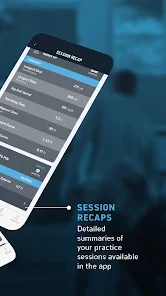
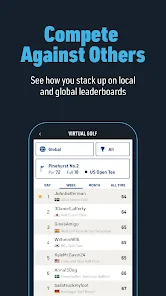
Some of the standout features include detailed shot analytics and the ability to compete against friends or other golfers around the world. You can participate in virtual games and challenges, bringing a social aspect to your practice sessions. This makes it not just about improvement but also about having fun. The app also offers a mode to track your progress over time, giving you a comprehensive view of how you’re improving as a player.
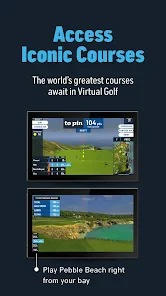
An interesting feature is the variety of game modes available. Whether you’re practicing for an upcoming tournament or just having a casual day out with friends, there’s something for everyone. From precision challenges to distance competitions, the app transforms your usual practice routine into an exciting and competitive event.
More From Our News Desk

Clash of Clans Is Won Between the Battles

Android Auto Makes the Case for Quieter Car Software

MobiOffice: Transforming Mobile Productivity with Seamless Integration

EA SPORTS FC™ Mobile Soccer: Redefining Mobile Sports Gaming

How Microsoft OneDrive Became a Mobile Productivity Giant

How Google Translate Breaks Language Barriers Effortlessly
Practice with a purpose
For a realistic weekday session, I’d pick one club and one question before opening a game: are my shots starting consistently, or am I losing distance when I try to swing harder? Hit a small group of balls with the same club, watch the pattern rather than celebrating one unusually good result, then switch clubs only after you’ve noticed a trend. That approach makes the figures more useful than simply collecting a long stream of shots. It also helps keep the app from turning practice into a race for the longest drive.
A practical trade-off is that range feedback tells you about shots in that setting, not everything that happens on a course. A clean number can’t explain your lie, choice of target, nerves, or how a shot behaves on uneven ground. I’d use the session to form a focused practice question and take that question to a coach or course round, rather than treating a range session as a complete diagnosis of my game.
What the social layer changes
Leaderboards and challenges are most valuable when they give a group a shared reason to practice. If friends are hitting beside you, choose a challenge before the first shot and agree to take turns; otherwise, it’s easy for everyone to watch their own screen and miss the social part. For a solo visit, a personal target can provide structure, but I wouldn’t rely on competition as the main reason to keep practicing. Golfers who prefer quiet repetition may find a notebook and a simple routine less distracting.
Compared with a basic range visit, this setup adds measured feedback and a more playful structure. Compared with a dedicated personal launch monitor, it’s tied to a facility that has the tracking equipment, so it won’t travel with you to a backyard or an unequipped range. That makes it a convenient option when you already visit a supported venue, but a poor fit if you want consistent practice data wherever you go.
Why You’ll Love It
What really sets Toptracer Range apart is its ability to make a traditionally solitary sport a social experience. Connecting with other users, sharing your scores, and participating in leaderboards bring a new dimension to the game. Plus, the detailed analytics are incredibly educational, helping golfers of all levels understand their strengths and areas for improvement.
Another bonus is the app’s accessibility. It’s designed for golfers of all ages and skill levels. Whether you’re a newbie just learning the ropes or a seasoned player looking to refine your game, the app provides valuable insights and challenges tailored to your level.
Who should bring it to the bay?
I’d recommend it to a beginner who wants practice to feel less like hitting balls into the distance, to a regular golfer who enjoys comparing sessions, and to friends looking for a light competition without turning the range into a serious tournament. It can also suit a player preparing for a round, provided they use the feedback to focus on a few clubs or shot patterns instead of trying to fix every part of their swing at once.
I’d skip it if your nearest range doesn’t use Toptracer, if you mainly want course maps or scorekeeping, or if you’d rather practice without screens and leaderboards. It is also not a substitute for instruction when you’re unsure why a swing is producing a particular result. In those cases, a lesson, a plain practice routine, or a portable tracker may serve you better.
Small choices that make a session better
One useful tip is to separate experimentation from scoring. When you’re changing a grip or trying a different swing thought, don’t judge the adjustment by a single shot; give it a short, consistent run and compare the pattern. Then use a game or challenge as a separate finish, when you can enjoy the competition without confusing a playful result with reliable practice progress. If you’re sharing a bay, take turns setting up and reviewing shots so that the phone doesn’t become a barrier between people.
The app is free, and version 3.45.78 supports Android 7.0 and later. Its strongest reason to stay installed is straightforward: it can make an equipped range session more informative and give friends a common way to make practice engaging. My honest reservation is the venue dependency. If you have a compatible range nearby and enjoy seeing how shots compare, I’d give it a try; if you need golf tools that work anywhere, it isn’t the right all-purpose choice.
A better way to plan a first visit
I’d make the first session deliberately simple rather than trying to explore every option while a group is waiting. Check how the range handles starting a tracked session, choose one familiar club, and hit enough shots to see a pattern before switching to a challenge. This gives you a useful baseline and leaves room to learn the venue’s routine without treating every screen or result as something you must master immediately.
If you’re introducing a new golfer, the app can also give them an easy first task: aim at a chosen target and notice how shots differ, rather than worrying about technical swing terms. I’d still keep expectations gentle. A beginner may find the visible feedback motivating, but numbers alone don’t explain what to change; one small question and a patient pace are more helpful than chasing a perfect result.
What to expect from the handoff
The app is only one part of the experience. The range’s tracking setup observes the shot, while the phone and any bay display help you follow what happened. That division matters if something seems confusing: first check that you’re using the facility’s intended session process, then look for the result where the venue presents it. If you arrive with friends, agree on who is handling the phone so the group doesn’t interrupt its rhythm to pass it around after every ball.
For a casual after-work visit, I’d use the app to turn a short practice window into a focused activity: warm up, compare a few shots with one club, then finish with a light challenge. That is more satisfying than opening the app only after you have already hit most of the balls. It also makes the outing easier to share with someone who enjoys games more than repetitive practice, while still leaving space for your own goals.
Choosing the right kind of feedback
Toptracer Range sits between untracked practice and owning a personal device. A normal bucket is simpler and keeps attention on feel, while a personal launch monitor is the better direction for golfers who want equipment they can use in different practice settings. This app’s advantage is that the tracking is part of a range visit, so there is no need to bring a separate measuring device. Its limitation follows from the same arrangement: the experience is useful when the facility supports it and much less relevant when it doesn’t.
I’d also avoid comparing results from different visits as if every session were perfectly alike. Your warm-up, club choice, swing intention, and the way you use the bay can all affect what a session tells you. If you want to track progress, keep the question and routine reasonably consistent, and treat a change in the numbers as a prompt to investigate rather than proof that one adjustment has solved your game.
My recommendation after weighing the trade-offs
Toptracer Range makes the most sense for golfers who already have access to a supported venue and want a little more purpose from practice. It can make a solo session easier to structure and a group visit more entertaining, while its shot information gives you something concrete to reflect on afterward. The app’s 4.8 average and roughly 402 written reviews reflect a strong response from users, though your own experience will still depend heavily on the range you visit and how much you value on-screen feedback.
I wouldn’t install it expecting a complete golf coach, a portable tracker, or an all-purpose course companion. I would try it if I were heading to an equipped range, especially with a friend or with a clear practice goal in mind. The release date is January 19, 2018, and the current version is 3.45.78; what matters more to me is the straightforward bargain: it costs nothing to try, but its usefulness is tied to the right place and a willingness to use the feedback thoughtfully.
In conclusion, if you’re looking to elevate your golfing experience, Toptracer Range is definitely worth a try. With its innovative approach to analyzing and enhancing your practice sessions, it’s an essential tool for anyone serious about improving their game while having a blast doing it.
Toptracer Range Frequently Asked Questions
Is Toptracer Range free to download, and what devices can run it?
Toptracer Range is a free sports app for Android and iOS, so you can install it without paying for the download. Its stated minimum operating-system requirement is version 7.0, which helps you check compatibility before installing. The app is intended to complement a visit to a Toptracer-enabled golf range, where you can track shots and view ball statistics and game leaderboards.
What is Toptracer Range and how does it enhance my golfing experience?
Toptracer Range is an advanced technology app that transforms your golfing experience by providing real-time data on your swing, shot distance, speed, and accuracy. It uses advanced tracking technology to give you detailed insights and analytics about your performance, allowing you to improve your skills. With virtual games and challenges, it brings an element of fun and competition to the range, making practice more engaging.
Is Toptracer Range suitable for beginners or only for professional golfers?
Toptracer Range is designed to cater to golfers of all skill levels, from beginners to professionals. The app provides valuable insights into your game, helping beginners learn and improve while offering advanced analytics that professionals can use to refine their skills. Its user-friendly interface ensures that even those new to golf can easily navigate and benefit from the technology.
Do I need any special equipment to use Toptracer Range at a golf facility?
No special equipment is required to use Toptracer Range at a facility. The technology is integrated into the driving range's infrastructure. All you need is to have the app installed on your smartphone to track and save your performance data. This ease of use makes it accessible and convenient for all golfers visiting the facility.
How does Toptracer Range integrate social features into the golfing experience?
Toptracer Range enhances the social aspect of golfing by allowing users to compete with friends or other golfers globally. With features like leaderboards, virtual games, and challenges, you can share your scores and achievements via social media. This integration not only makes the experience more interactive but also adds a competitive edge to your practice sessions.
Pros
- Enhances golf practice with detailed analytics.
- User-friendly interface for easy navigation.
- Real-time tracking of golf shots and performance.
- Wide range of courses and game modes available.
- Connects with friends for social golfing experience.
Cons
- Requires stable internet connection for best use.
- Limited free features
- in-app purchases needed.
- Occasional app crashes reported by users.
- May not work optimally on older devices.
- Some features may seem complex for beginners.

- Category
- Sports
- Version
- 3.45.78