Topgolf
- 1.54K
- 4.7
- Installs
- 1.00M
- Price
- Free

Screenshots
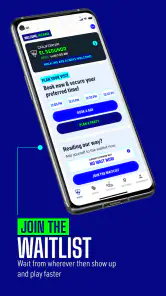
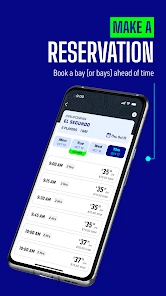
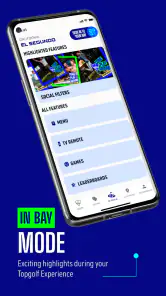
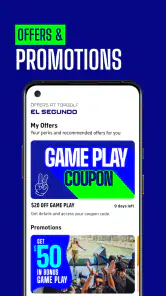

Analysis by Reviewed
I’d treat Topgolf as a companion for planning and taking part in a Topgolf visit, rather than as a standalone golf game. That distinction matters: the useful moments are often tied to being with friends, choosing what to do, and keeping the outing moving. The app is free, published by Topgolf, and sits in the sports category; its broad appeal makes sense for casual groups as well as people who already enjoy golf.
Planning before the group arrives
For a first visit, I’d use the app as a shared point of reference rather than expect it to make every decision for the group. One person can look through the available options, then ask the others what sounds enjoyable. This is especially useful when the group includes people with very different ideas of what makes a good evening: a committed golfer may want a challenge, while a newcomer may be more interested in joining in without feeling tested.
A small practical tip is to agree on the purpose of the outing before you open the app. Are you trying a new activity together, adding a playful stop to a night out, or looking for a little friendly competition? That conversation helps keep choices focused. Otherwise, people can end up browsing without knowing what they are deciding, which is a poor use of everyone’s time when you are coordinating in a group chat or on the move.
Where a connection changes the experience
Network access is most relevant when the app needs to bring current information or shared activity into the experience. In practical terms, I’d open it before leaving home or while connected to reliable Wi-Fi, then check anything I need while arranging the visit. If I’m already at a busy venue, I’d avoid making a group wait while I search through screens or troubleshoot a slow connection.
That makes it different from a simple scorecard or a basic golf reference app, which can be useful for a quick lookup without much social coordination. Topgolf’s appeal is more closely connected to a shared outing. If your goal is only to track practice or learn golf technique, a dedicated training or scoring tool may suit you better; if you’re organizing a relaxed group visit, this app is the more natural starting point.
Useful in real mobile situations
A realistic use is checking the app during the journey, then handing the phone around briefly so friends can get on the same page before you arrive. I’d settle decisions such as who is joining and what the group wants to do before reaching the venue, rather than trying to coordinate every detail while people are waiting. That small bit of preparation is especially helpful when some friends are enthusiastic golfers and others are simply there for a social evening.
It is also a better fit for short, deliberate phone checks than constant attention during a group outing. The phone should help the plan, not become the main event. If you tend to keep mobile data restricted, check the app while you have Wi-Fi and avoid repeatedly reopening it just to browse. That’s a practical way to keep connectivity from distracting from the people you came with.
More From Our News Desk

Clash of Clans Is Won Between the Battles

Android Auto Makes the Case for Quieter Car Software

MobiOffice: Transforming Mobile Productivity with Seamless Integration

EA SPORTS FC™ Mobile Soccer: Redefining Mobile Sports Gaming

How Microsoft OneDrive Became a Mobile Productivity Giant

How Google Translate Breaks Language Barriers Effortlessly
When something takes longer than expected
If a screen is slow to load, I wouldn’t assume the app has lost your place or keep tapping rapidly. I’d pause, check that the phone has a usable connection, then try the task again once. For anything important to the group, it is sensible to agree on a simple fallback—such as deciding the plan together rather than making everyone wait for one screen to respond.
This is a modest but useful habit because a network-dependent moment can feel more frustrating in a noisy, busy setting than it would at home. Keep the app updated when convenient, and open it before you need it rather than for the first time at the counter. The current version is 3.99.2, and the app has been available since August 31, 2013; its long presence does not remove the ordinary realities of mobile reception and loading time.
What Makes Topgolf Stand Out?
First off, the app offers an impressive blend of entertainment and strategy. You’re not just swinging clubs here; you’re engaging in skill-based challenges that test your precision and timing. Topgolf does a fantastic job of emulating the real-world golfing experience, complete with realistic physics and dynamic environments.
What’s cool is how the app caters to both newbies and seasoned players. If you’re new to golf, there’s a handy tutorial to get you started. Meanwhile, seasoned golfers will appreciate the advanced gameplay mechanics that allow for complex shots and strategies. Plus, you can play solo or connect with friends for a more competitive edge, which is where the social aspect of Topgolf really shines.
Features That Hook You In
The app is packed with features that keep you coming back for more. There’s a variety of game modes, each offering unique challenges and rewards. Whether you’re playing a quick round or diving into a lengthy tournament, there’s something for everyone.
One feature worth highlighting is the customization options. You can tweak your gear, clubs, and even your character’s outfit. This level of personalization ensures that your experience is unique and tailored to your style. Plus, who doesn’t love decking out their avatar in the latest golf fashion?
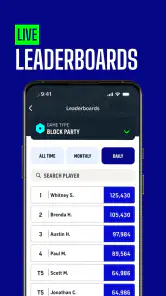
Another standout feature is the app's leaderboard. Compete against players worldwide and see how you stack up. It’s a great motivation to improve your skills and earn bragging rights among your friends.
The User Experience
Let’s talk about the app’s design and usability. The interface is sleek and intuitive, making it easy to navigate through menus and game modes. The graphics are top-notch, with vibrant colors and smooth animations that enhance the overall gaming experience. And guess what? It doesn’t hog your phone’s resources, ensuring smooth gameplay without those annoying lags.
Moreover, the developers are always on the ball, rolling out updates and new content regularly. This commitment to improvement keeps the game fresh and exciting, ensuring that players always have something new to look forward to.
My recommendation depends on what you want from a golf app. Topgolf is the stronger choice for a social, playful outing and a bit of friendly competition; a conventional golf tracker is more useful for recording real rounds, while a lesson-focused app is better if improving your swing is the priority. I’d skip this if you want a serious course-management tool, dislike group-oriented experiences, or prefer to avoid relying on a phone connection when making plans.
Choosing it over other golf apps
The useful comparison is not simply which app has the longest feature list; it is what you expect your phone to help you do. A standard golf tracker is built around recording a round and reviewing performance. A coaching app is a better match for drills, technique, and structured practice. This app is aimed at a more social kind of golf experience, so I would choose it when the outing itself is the point, not when I need a detailed record of my game.
That distinction also helps answer whether it is worth installing if you are not a golfer. I think it can be, provided you are curious about the group activity and happy to learn as you go. Someone who wants only a general party game may find that a golf-centered app is too specific; someone joining friends at a Topgolf outing has a clearer reason to try it. The best fit is a mixed group that wants an activity everyone can talk about, rather than a tool for one person’s training routine.
Who will get the most from it?
For a mixed group, the best approach is to let the more experienced golfer explain the basics while everyone else focuses on having a good time. The app’s beginner-friendly guidance can lower the barrier, but it won’t replace patient coaching for someone who wants to learn the sport in depth. Likewise, seasoned players may enjoy the challenge and social comparison without finding it a substitute for practicing outdoors or tracking formal golf performance.
Families and friends can also use it as a conversation starter when deciding whether a golf-themed outing suits everyone. I’d check the age guidance before handing a device to a child: the app is rated Everyone, which makes it broadly accessible, though an adult should still help younger users with planning and phone use. It is free to download, and its average rating is 4.7 from around 8,300 ratings, with more than a million installs. Those figures suggest a widely used app, but they matter less than whether its social style matches your group.
Keeping the outing data-conscious
If you are watching mobile data use, the most sensible approach is to do the exploratory browsing when connected to Wi-Fi and limit unnecessary repeat checks once the group has settled on a plan. I would not make assumptions about exactly how much data an app uses from one session to another; what matters is that you can avoid turning a social visit into constant phone browsing. A few purposeful checks are less distracting and easier to manage than leaving the app open as the group makes every decision.
Battery is another everyday consideration, especially if your phone is also how you coordinate with friends or get home. I’d arrive with enough charge for the whole evening and keep the phone available for the essential parts of the plan, rather than spending the visit customizing or checking rankings. That is not a special requirement for this app so much as a useful trade-off: more screen time can add engagement, but it can also take you out of the conversation the app is meant to support.
Small choices that make it smoother
One non-obvious trade-off is that personalization and leaderboards can make casual play more engaging, but they can also pull attention toward screens and comparison. If your group has different skill levels, agree in advance that the point is to enjoy the outing rather than chase a ranking. That keeps the competitive side fun instead of making a first-time player feel behind.
I’d also treat the app as one part of the plan, not the sole source of coordination. Before setting off, make sure everyone knows the basic arrangement and who is meeting whom. Then the app can support the experience without becoming a bottleneck if reception is patchy or someone’s battery is low. This is a simple precaution, but it is more useful than assuming every mobile task will work instantly in a crowded place.
My connectivity verdict
Ultimately, I like the app best when a connection supports the social occasion rather than dictating it. It makes sense for people who want a playful golf experience, shared challenges, and an easy way to bring a group into the same plan. It is less compelling for golfers looking for detailed practice analytics or for anyone who wants an entirely self-contained tool with no network-dependent moments.
In conclusion, Topgolf is more than just a golfing app; it’s a full-fledged entertainment package that delivers fun, challenge, and social interaction in equal measure. Whether you’re a golf aficionado or just looking for a fun game to pass the time, this app is sure to hit the mark. So, why not give it a swing and see for yourself? Trust me; you won’t be disappointed!
Topgolf Frequently Asked Questions
Is Topgolf available for both Android and iOS?
Topgolf is a mobile app from Topgolf, available for Android and iOS. It is listed as a sports app, and its short description is simply “Topgolf,” with the invitation “Let’s Play!” The app is free to download and is rated for Everyone. Check that your device meets the minimum operating-system requirement before installing.
What is Topgolf and how does it work?
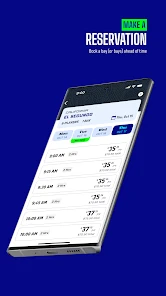
Topgolf is a sports entertainment complex that combines the fun of golf with a high-tech driving range experience. Players hit microchipped golf balls at targets on an outfield, and the app enhances the experience by tracking scores, reserving bays, and providing interactive game modes. It's perfect for golfers of all skill levels, including beginners.
Is the Topgolf app free to download and use?
Yes, the Topgolf app is free to download on both Android and iOS devices. While downloading and using the app is free, users may need to pay for certain in-app features or services, such as booking a bay or participating in special events at physical Topgolf locations.
What features does the Topgolf app offer?
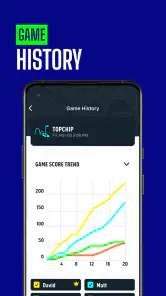
The Topgolf app offers a variety of features to enhance your visit, including bay reservations, score tracking, game history, and exclusive offers. It also provides a seamless check-in experience and updates on upcoming events, ensuring you make the most out of your Topgolf experience.
Can I use the Topgolf app without visiting a Topgolf location?
While the main functionality of the Topgolf app is designed to enhance the experience at a Topgolf location, users can still benefit from some features remotely. These include checking game history, managing your account, and exploring upcoming events. However, to fully enjoy the app's capabilities, visiting a physical location is recommended.
Pros
- Engaging gameplay with real-life golf simulations
- User-friendly interface and easy navigation
- Variety of game modes for different skill levels
- Frequent updates with new features
- Social sharing options to challenge friends
Cons
- Requires stable internet connection
- In-app purchases can be pricey
- Ads can disrupt gameplay
- Limited free content after initial stages
- May drain battery quickly
- Category
- Sports
- Version
- 3.99.2





