

TinyNest - Family Album
- 19.00
- 4.7
- Installs
- 10.00K
- Price
- Free

Screenshots

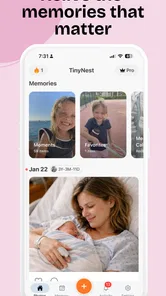
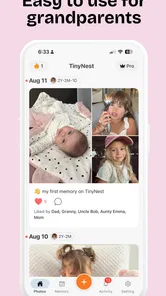

Analysis by Reviewed
Sharing baby photos sounds simple until the same picture starts traveling through several family chats, camera rolls, and social feeds. I tried TinyNest - Family Album with that problem in mind: not as another place to dump every image, but as a focused parenting app for keeping a child’s photos within a family circle. My overall impression is positive, especially if your priority is a calmer way to share early memories rather than a broad social network or a general cloud-storage service.
The app is free to start, and it comes from Tiny Nest AI LLC. It has built a strong early reception, with a 4.7 average from around 477 ratings and more than 10K installs. Those figures suggest that the idea is connecting with parents, although I would still treat it as a relatively young service compared with long-established photo platforms. Its store age rating is Teen, and it runs on Android 7.0 or newer. The current version is 1.266.0.
How I would decide whether TinyNest belongs in your family’s routine
The first question is not whether the app can hold cute pictures. Most modern phones and cloud services can do that. The better question is whether your family needs a dedicated destination for baby photos, with less clutter than a messaging app and less exposure than a public social platform. That distinction is where this app makes the most sense.
I would consider four practical points before moving anything. First, who actually needs access? If the audience is grandparents, a partner, and a few close relatives, a private family album is a more natural fit than a large group chat. Second, how often will people contribute? A service is useful only when uploading and viewing become easy habits. Third, do you want a memory archive or just quick sharing? Those are related, but they are not identical jobs. Finally, are you comfortable with in-app purchases if the free experience eventually feels too limited? The listed purchase range is $12.99 to $79.99 per item, so it is worth understanding your own usage before treating the app as the permanent home for years of photos.
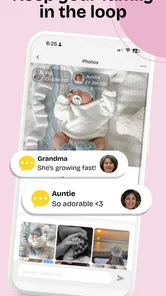
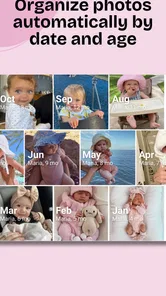
In my experience, the strongest reason to choose TinyNest is emotional organization. Baby pictures arrive in bursts: a sleepy morning, a first meal, a visit from relatives, or an ordinary moment that becomes meaningful later. In a normal chat, those images are mixed with unrelated messages and can be difficult to find again. A dedicated album gives the family a shared place to return to, which changes the experience from “send this now” to “keep this together.”
That does not automatically make it the best choice for every household. If you already have a carefully organized family library in a general photo service and everyone uses it comfortably, switching may create more work than value. TinyNest is most convincing when the current system is scattered, repetitive, or too public.
A realistic family workflow
Imagine a parent taking several photos during a baby’s first visit to a park. In a messaging app, the parent may send the best few to one relative, forward them to another, and later discover that the full set is split across conversations. With TinyNest, the more sensible routine is to place the pictures in the family album once, then direct relatives to that shared space. The immediate benefit is not a flashy editing tool; it is avoiding duplicated sending and giving everyone the same reference point.
More From Our News Desk

 Gmail
GmailGmail in a Busy Inbox: Who Benefits Most?
From first account to crowded workday, Gmail earns its place through dependable search and flexible sorting—but its best fit depends on how much inbox maintenance you can tolerate.

 Prime Video
Switching to Prime Video: What Changes in Your Viewing Routine
Prime Video can make a compelling second home for streaming, but switching means learning a different catalog, rental layer, and route from browsing to playback.

 Universal TV Remote Control
Universal TV Remote Control Works Best as a Reliable Backup
A phone remote earns its place through quick setup and reliable habits. Here is how to get more from Universal TV Remote Control—and where its limits show.

 Weather - By Xiaomi
Weather by Xiaomi Review: Clear at a Glance, Less Clear Up Close
Xiaomi’s weather app makes everyday forecasts quick to scan, but its calm surface can leave useful details and recovery paths harder to find than they should be.

 X
XX Under Pressure: Can It Recover When Posting Goes Wrong?
A resilience-focused review of X, examining setup, mistaken posts, interruptions, weak connections, and the gaps that matter when recovery needs to be dependable.

 Clash of Clans
Clash of Clans Is Won Between the Battles
Its raids are quick; its community is a long-term project of coordination, teaching, rivalry, and shared responsibility—with all the friction that entails.
Latest News



I also found that this kind of app works best when the family agrees on a simple habit. Upload meaningful groups rather than every nearly identical frame. Use a recognizable sequence for visits, holidays, or milestones. Ask relatives to look in the album before requesting that photos be resent. These small rules matter because a shared album can become just as messy as a chat if nobody decides how it should be used.
A less obvious advantage is that the app can separate the act of sharing from the act of posting. Parents who want relatives to see a moment may not want that moment placed on a public timeline or attached to a wider social identity. A family-focused album supports a more deliberate audience. I would still review the app’s privacy choices and access settings personally before uploading sensitive images, but the basic category is better aligned with close-family sharing than a public social network.
Where the focused design feels strongest
The clearest win is reduced social noise. General platforms are built around feeds, contacts, recommendations, and a mixture of personal content. TinyNest is positioned around baby photos, so its purpose is easier to explain to relatives who are not interested in learning another broad social service. That narrow purpose can be a genuine usability advantage for grandparents or family members who mainly want to see new pictures.
It also encourages a different kind of archive. A phone’s camera roll is personal and often chaotic. A family album is shared and selective. Those two collections should not necessarily be identical. I like the idea of using the phone for everything captured and TinyNest for the moments the family would actually want to revisit together. That approach saves relatives from scrolling through dozens of near-duplicates while preserving the larger private collection elsewhere.
Another useful trade-off is audience control. A messaging group is quick, but membership can change, conversations can become crowded, and older images may be hard to retrieve. A public social account is convenient for broad announcements, but it may expose more of a child’s life than some parents intend. TinyNest sits between those options: more intentional than chat, less outward-facing than public posting. That middle ground is its most persuasive role.
The developer, Tiny Nest AI LLC, has also kept the product identity clear. The short store description is simply “TinyNest,” while the broader store summary presents it as a family photo-sharing app for baby photos. That simplicity helps set expectations: I would not install it looking for a full photo editor, a general backup replacement, or a social network with endless discovery. I would install it to create a family-centered place for baby memories.
Small habits that make the album more useful
My first practical tip is to decide what belongs in the shared space before inviting everyone. If the album begins with every test shot, relatives may stop checking it. A smaller stream of meaningful updates makes each visit feel worthwhile and keeps the archive easier to browse.
My second tip is to treat the album as a long-term conversation starter rather than only a notification channel. Uploading one group after a family event gives relatives a reason to return, while sending individual pictures through several chats creates fragmented reactions. This is especially useful when family members live apart and cannot attend ordinary moments in person.
Third, keep an independent copy of important memories. A dedicated sharing app can be excellent for access and family participation, but I would not make any single service the only home for irreplaceable photos. Maintain your normal device or cloud backup, then use TinyNest as the family-facing layer. That two-part workflow protects the archive while preserving the convenience of shared viewing.
Finally, review the album’s membership from time to time. Families change, phones change, and old invitations can be forgotten. A quick check of who should still see the pictures is a sensible routine for any private family-sharing tool. This is not a reason to avoid TinyNest; it is part of using a child-focused service thoughtfully.
What alternatives do better
The usual alternatives fall into three groups, and each wins in a different situation. A messaging app is best for immediate conversation. If the main goal is to send one photo with a question or a funny comment, chat remains faster and more familiar. It also avoids asking relatives to adopt another destination. The cost is poor long-term organization, especially once the conversation becomes busy.
A general cloud photo service is usually better for broad storage, search, device synchronization, and keeping a large personal library. If you want one place for travel photos, documents, family videos, and baby pictures together, a general service may be more practical. It can also be the better choice for someone who already has years of albums arranged there. TinyNest’s focused purpose is useful, but that focus may feel restrictive if your needs extend far beyond baby photos.
A public social network is the easiest option for reaching a wide circle, but it brings a different audience and a different mindset. It is suitable when sharing publicly is genuinely part of your family’s routine. I would choose it over TinyNest only when broad visibility matters more than a dedicated family archive. For parents who are cautious about putting a child’s photos in public spaces, the comparison points the other way.
There is also the simple shared folder: practical, familiar, and often adequate for a technically confident family. Its weakness is that folders do not always feel welcoming to relatives who want a warm, photo-first experience. TinyNest’s appeal is less about replacing every storage tool and more about making one specific type of sharing feel intentional.
This is why I would not judge the app by asking whether it has every feature of a full cloud platform. That would miss its purpose. I would ask whether my current method makes relatives search, whether I resend the same images, and whether baby photos are mixed into places where they are hard to revisit. If the answer is yes, the focused approach has a clear advantage.
The real cost of changing your routine
The financial starting point is straightforward: TinyNest is free, with optional in-app purchases ranging from $12.99 to $79.99 per item. The more important cost is behavioral. Every family member has to know where the album is, accept the invitation or access process, and remember to check it. A parent may be ready immediately while a grandparent continues asking for photos in the old chat. During that transition, you may end up maintaining both systems.
That overlap is the main switching friction I would expect. Moving selected photos is easy enough, but moving a family habit is harder. I would not migrate the entire camera roll on the first day. I would start with one meaningful event, invite the people who genuinely want access, and see whether they return without repeated reminders. If the experiment works, add older highlights gradually rather than turning setup into a large archival project.
There is also a decision about permanence. If the app becomes the place where relatives expect every update, leaving later may require explaining a new system and reorganizing the shared archive. That does not make the service a bad choice, but it means I would keep original photos in my regular backup and avoid treating the album as the only copy. The best setup is a shared viewing layer plus a separate personal archive.
Paid options deserve the same practical caution. I would first learn whether the free experience fits the family’s normal volume and participation. If the household uploads occasionally and mainly needs a small stream of highlights, paying may not be necessary. If the app becomes a central part of family life, an optional purchase could feel more reasonable, but I would decide based on sustained use rather than the excitement of a newborn’s first weeks.
Device compatibility is another quiet consideration. Because the app supports Android 7.0 and newer, it can work with many older Android phones, which may help when relatives do not upgrade often. Even so, I would check the actual phones used by grandparents and other family members before building the whole routine around it. The practical test is simple: can the least technical person in the group open the album, understand what to do, and return to it later without assistance?
Who should choose it, and who should skip it
I would recommend TinyNest to new parents who currently share photos through several family chats, relatives who want a dedicated place to follow a child’s everyday moments, and households that prefer selective family sharing over public posting. It is also a good fit for parents who want to keep the phone’s complete camera roll separate from the smaller collection relatives actually need to see.
I would be more hesitant for someone who already has a well-maintained shared library and whose family is happy with it. I would also skip it if your main requirement is advanced photo management across every type of media, because a focused baby-photo service is not the same as a complete digital archive. Families that need public reach, professional collaboration, or a single system for many unrelated storage tasks may find another category more suitable.
Privacy-minded parents should make their own careful decision before inviting anyone. I would consider the intended audience, the family members who truly need access, and the difference between sharing a selected album and broadcasting a child’s entire life. The app’s category makes it a better conceptual match for close-family sharing than a public feed, but responsible setup still depends on the choices made by the account owner.
My recommendation after weighing the trade-offs
TinyNest - Family Album is worth trying if your current baby-photo routine is scattered across chats and social apps. Its value is not that it replaces every photo tool; its value is that it gives one specific family activity a clear home. I especially like the distinction between a private camera archive and a shared selection for relatives. That simple separation can reduce repetition and make ordinary moments easier to revisit.
I would begin with a small test: create one album for a recent family event, add a limited set of photos, and invite only the people who will actually use it. Keep your original images backed up elsewhere, observe whether relatives return naturally, and postpone any paid commitment until the routine proves useful. That approach keeps the cost of switching low while giving the app a fair chance.
With a 4.7 average and over 10K installs, it has enough early traction to deserve attention, but I would still evaluate it as a developing service rather than assuming it will suit every family forever. For me, the final verdict is favorable: choose it for focused, family-centered baby-photo sharing; choose a general cloud library for broader storage; and stay with messaging if conversation matters more than organization. TinyNest earns its place when the family needs a quieter, more deliberate way to keep growing memories together.
TinyNest - Family Album Frequently Asked Questions
Who develops TinyNest - Family Album, and is it intended for families with young children?
TinyNest - Family Album is a parenting app developed by Tiny Nest AI LLC. Its focus is family photo sharing, especially for baby photos, so it may suit parents who want to keep relatives connected to a child’s everyday moments and milestones. The app has a Teen age rating, which is worth checking against your family’s preferences before installing.
What is TinyNest - Family Album used for?
TinyNest - Family Album is designed to help families collect, organize, and share personal photos and memories in one private space. Instead of posting moments publicly on a social network, you can use it as a family album for children’s milestones, everyday updates, special occasions, and memorable events. Its main appeal is keeping shared memories more personal and easier for relatives to follow.
Is TinyNest - Family Album private and who can see my photos?
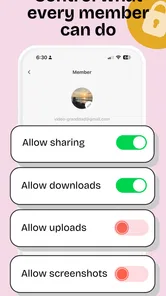
Privacy is one of the most important points to check before using any family album application. TinyNest is intended for sharing memories with selected family members rather than a public audience, but you should still review its invitation, account, and sharing controls carefully. Before uploading sensitive images, confirm who has access, whether members can download or reshare content, and how the app handles stored data.
Can grandparents and other relatives use TinyNest without being very technical?
TinyNest can be useful for relatives who want to see family updates without navigating a busy public social network. The experience is generally most convenient when family members receive an invitation and follow the album from their own device. However, ease of use may depend on the person’s smartphone experience, notification settings, and account setup, so some initial help may be needed for less confident users.
Does TinyNest - Family Album require an internet connection?
Because TinyNest is built around uploading, synchronizing, and sharing photos with other family members, an internet connection is normally required for the main features. You may be able to view content that has already been cached on your device, but uploads and new updates will generally wait until Wi-Fi or mobile data is available. If you plan to share many photos, check your data usage and storage settings.
Pros
- Private space for sharing family photos and memories
- Simple interface that is easy for relatives of all ages
- Keeps family moments organized in one dedicated album
- Useful for sharing updates with selected family members
- Helps preserve memories without relying on public social networks
Cons
- Some features may require a subscription or in-app purchases
- Requires relatives to install the app and create accounts
- Limited appeal if your family already uses another photo service
- Cloud storage and privacy depend on the provider’s policies
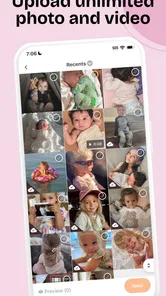
- Uploading large photo collections may take time on slower connections











