TimeTree - Shared Calendar
- 7.18K
- 4.7
- Installs
- 10.00M
- Price
- Free

Screenshots



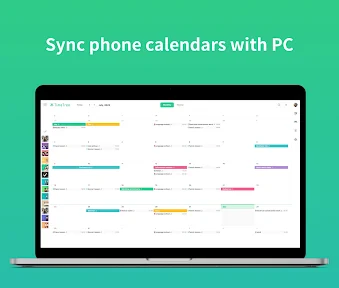
Analysis by Reviewed
When people share a household, a project, or even a busy social life, the problem is rarely a lack of calendars. It is that plans end up scattered across chats, personal schedules, and someone’s memory. I find TimeTree - Shared Calendar most useful when the group needs one place to check what is happening and talk through the details without turning every change into another round of messages.
A shared space that works best with a clear purpose
Before inviting everyone, I’d decide what the calendar is for: family plans, a volunteer group, or coordinating shifts, for example. That small choice makes it easier to keep the calendar useful instead of letting every event from every part of life pile into one stream. For a household, a shared calendar can cover appointments and school activities; a separate one for friends can stay focused on outings.
TimeTree is a free productivity app from TimeTree, Inc., available for Android and iOS. It has a 4.7 average from around 217,000 ratings, with more than 10 million installs. It is rated for Everyone, and optional in-app purchases range from $0.49 to $44.99 per item. Those figures give a sense of its reach, but the practical question is whether your group will actually check the same calendar.
Make event details do more of the work
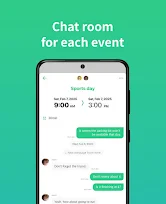
For a shared event, I’d put the useful context in its notes or comments: what to bring, where to meet, or who is handling a task. That way, the event itself becomes the reference point rather than a chat thread people have to search later. It is a modest habit, but it can prevent the familiar “what time was that?” message when plans get busy.
Color-coding also becomes more helpful when it follows a simple rule. I’d use colors to distinguish people or types of commitments, not change them randomly from event to event. If a family member scans the calendar quickly, consistent colors make the schedule easier to read; if the group cannot agree on a system, the labels may become decoration rather than useful information.
Where it fits—and where it may not
Compared with relying on a personal calendar and copying details into group chats, TimeTree gives the group a shared view and a place to discuss an event. That is a useful middle ground for people who want more coordination than a basic calendar provides but do not need a full project-management setup. Syncing with Google Calendar or Apple Calendar can also help people keep an existing calendar routine, though it is worth deciding which calendar is the source of truth so changes do not become confusing.
It will not suit every situation. If your friends or relatives will not open another app, a shared calendar cannot solve the coordination problem on its own. And if you need detailed task ownership, complex project tracking, or strict workplace scheduling, a dedicated tool may be a better fit. I’d also avoid putting sensitive personal details in a calendar shared with a broad group; keep the audience as small as the plans require.
You May Like

Clash of Clans Is Won Between the Battles

Android Auto Makes the Case for Quieter Car Software

MobiOffice: Transforming Mobile Productivity with Seamless Integration

EA SPORTS FC™ Mobile Soccer: Redefining Mobile Sports Gaming

How Microsoft OneDrive Became a Mobile Productivity Giant

How Google Translate Breaks Language Barriers Effortlessly
A realistic week, not another inbox
The clearest payoff is in recurring coordination, especially when the same people need to answer the same practical questions week after week. Think of a household where one adult has an appointment, another is responsible for pickup, and a relative may need to bring something along. Putting the time, place, and relevant note on the event gives everyone a shared reference. If the plan changes, updating that event is usually more useful than sending a message that can be missed or read out of context.
That does not mean every conversation belongs in a calendar. I’d keep quick, informal discussion in the messaging app the group already uses, then move the settled details into the event. This division is a small but valuable workflow: chat is for working out the plan, while the calendar is for the version people should rely on. It avoids turning the calendar into a long conversation and makes it easier to find the final time later.
Choosing what belongs in each calendar
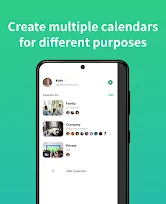
Multiple calendars can help when groups have genuinely separate audiences, such as a household and a sports club. They are less helpful if every member has to guess which calendar contains a particular event. Before creating another one, I’d ask whether the people invited and the purpose are different. If not, a clear event name and consistent use of the existing calendar may be simpler.
This is also where privacy and convenience meet. A shared calendar is easiest to use when people can see enough context to act, but not every personal appointment needs to be visible to everyone. I’d share only the event details the group needs, and keep private commitments elsewhere. That boundary is particularly important in a work or volunteer setting, where a broad group may not need access to the same personal information as close family.
Ever felt like your calendar is a mess and you can't keep up with your own schedule, let alone coordinate with your family or friends? Well, let me tell you about this nifty app I stumbled upon called TimeTree - Shared Calendar. It's like having a personal assistant that keeps everyone in sync, and trust me, it’s a game-changer!
Your Calendar, but Better
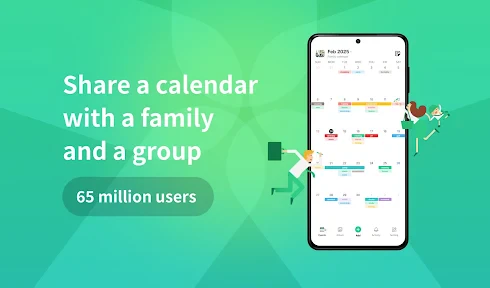
So, what’s the buzz with TimeTree? Imagine a shared calendar that's not just about marking dates but also about fostering better communication with your group. Whether it’s planning a family outing, managing a project at work, or simply keeping track of your own schedule, TimeTree has got your back. The app is available on both Android and iOS, making it super accessible for everyone.
Easy Peasy Setup
Getting started with TimeTree is as easy as pie. Once you've downloaded the app, creating a new calendar is just a few taps away. You can invite friends, family, or colleagues to join, and boom, you have a shared calendar. It's like having a social media group but for your schedule. Each event can be color-coded, which is a lifesaver when you need to differentiate between your personal and work commitments.
Features That Stand Out
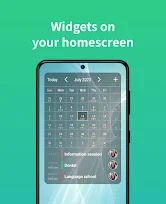
One feature that I absolutely love is the ability to add notes and comments to events. This means you can discuss details all within the app, without the need to switch to another messaging platform. Plus, the notification system is on point, ensuring that no one misses an important event. The app allows you to sync with other calendars like Google Calendar and Apple Calendar, which is super handy if you're already using those.
Keeping Everyone in the Loop
With TimeTree, you can create multiple calendars for different aspects of your life. Whether it's family, work, or social groups, each calendar is neatly organized and accessible. The shared to-do lists and memos are perfect for group projects or family chores, keeping everyone on the same page. It's like having a digital command center for your life's plans.
Making small-group coordination easier
For a group of friends arranging a day out, the useful detail is not only the date but also the meeting point, the person booking, and any last-minute change. An event can hold that context so people do not have to reconstruct the plan from a chain of replies. For a volunteer team, it can help members see upcoming commitments together, although I would still use a dedicated task tool if the work needs assigned responsibilities and progress tracking.
It is a better fit for shared commitments than for a personal to-do list. Someone who mainly wants to plan solo may find a standard phone calendar quicker and less demanding, because there is no group to invite or shared convention to maintain. TimeTree earns its place when other people need the same information. If nobody else participates, its central advantage fades, even if the calendar itself remains usable.
What it saves in a normal week
Imagine a parent checking appointment times while another family member is arranging pickup. They can look at the same event, add the practical details there, and avoid relying on a screenshot buried in a conversation. For a club or a group of friends, the same approach helps distinguish the date itself from the questions around it. The benefit is not that nobody ever sends a message; it is that the answer has a sensible home.
I would use reminders selectively rather than enabling an alert for every shared event. Too many notifications teach people to ignore them, while a reminder for a time-sensitive appointment or a meeting point can be genuinely useful. For recurring routines, a tidy calendar also makes it easier to notice clashes early, before someone has made plans based on an outdated chat message.
Small habits that keep it reliable
The strongest setup depends on participation. Agree on who adds events, what belongs in the shared calendar, and whether changes should be discussed in event comments. If one person enters everything and nobody else checks it, the app becomes a personal admin tool rather than a shared one. I’d start with one calendar and a few real upcoming plans, then add separate calendars only when a group has a distinct purpose.
For people wondering whether it replaces their existing calendar, I see it more as a coordination layer than a reason to abandon familiar tools. Syncing can make it fit alongside Google Calendar or Apple Calendar, but a group should still establish where edits are made to avoid duplicate or confusing entries. If a member wants a private schedule, they can keep that separate and share only the plans the group needs.
When a simpler calendar is enough
The main trade-off is that shared planning requires shared habits. People have to accept invitations, look at the calendar, and keep event details current. A familiar group chat may feel easier at first, but its plans can become hard to retrieve; a personal calendar is tidy for its owner, but it does not automatically give everyone the same view. TimeTree sits between those approaches, and it works best when the group is willing to treat it as the agreed place for dates.
For a workplace with formal shifts, approvals, or carefully controlled access, I would compare it with a tool designed specifically for that job rather than assuming a shared calendar covers every operational need. The same goes for complicated projects: dates and notes are helpful, but they are not a substitute for tracking dependencies or assigning detailed work. For casual coordination, though, that lighter approach can be an advantage because it asks less of the group.
Who I’d recommend it to
I’d recommend TimeTree to families, couples, and small groups who regularly coordinate appointments, outings, or shared routines and are tired of repeating details in chat. It is especially useful when different people need to add information, not merely view a schedule created by one organizer. The notes and comments help keep event-specific discussion attached to the event, while separate calendars can prevent unrelated groups from crowding the same view.
I would skip it if the people involved will not use another app, if all you need is a private calendar, or if your work depends on advanced project controls. It is also worth agreeing on how to handle changes before relying on it for something important. A shared tool can reduce avoidable confusion, but it cannot make an outdated entry accurate unless someone updates it and the others check it.
In a world where time management is crucial, TimeTree is a lifesaver. Its user-friendly interface and robust features make it a must-have app for anyone looking to streamline their schedule and improve group communication. So, if you're looking to take control of your calendar chaos, give TimeTree a try. You might just wonder how you ever managed without it!
TimeTree - Shared Calendar Frequently Asked Questions
What does TimeTree help me organize?
TimeTree is a productivity app built around shared calendars. It can help you keep events and schedules in one place and coordinate plans with other people. Its store summary describes creating a shared calendar in 60 seconds, making it a practical option if you want to get a group calendar started without a complicated setup.
Is TimeTree suitable for someone who has never used a shared calendar app?
TimeTree is approachable for new users because the main task is clear: create a calendar, add events, and share it with the people who need access. You can start with one schedule and add more as your planning needs grow. The app’s focus on shared calendars makes it useful even if you are simply looking for an easy way to coordinate plans.
Can I use TimeTree for both personal and shared schedules?
Yes. TimeTree is designed for personal planning as well as coordinating with other people. You can keep separate calendars for different parts of your life, such as personal plans and group schedules, then share the calendars that others need to see. This can make it easier to keep activities organized without putting every event in one place.
What is TimeTree and how does it work?
TimeTree is a shared calendar app designed to help individuals, families, and groups coordinate schedules in a seamless manner. The app allows users to create multiple calendars and share them with others. Each calendar can be color-coded for easy identification. Users can add events, set reminders, and attach notes or photos to events, making it an ideal tool for collaborative planning and scheduling.
Is TimeTree free to use or are there any hidden costs?
TimeTree is free to download and use. It offers a variety of features at no cost, which are sufficient for most users. However, there might be optional in-app purchases available for advanced features or functionalities. These are not necessary for basic usage, and users can enjoy the core features without any charges. Optional in-app purchases range from $0.49 to $44.99 per item, so check the purchase details before confirming anything.
Pros
- User-friendly interface for all ages.
- Easy event sharing with family and friends.
- Real-time notifications for updates.
- Color-coded calendar for better organization.
- Cross-platform sync on Android and iOS.
Cons
- Limited customization for event types.
- Premium features require subscription.
- Occasional sync delays reported.
- Ads present in free version.
- No offline mode available.

- Category
- Productivity
- Version
- Varies with device











