Timestamp Camera
- 3.18K
- 4.6
- Installs
- 50.00M
- Price
- Free

Screenshots
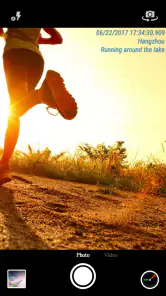
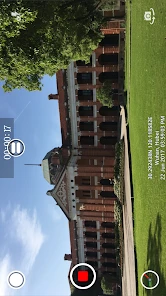
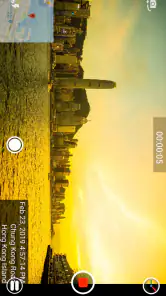
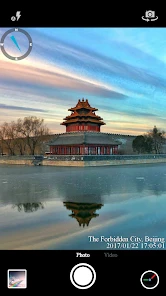

Analysis by Reviewed
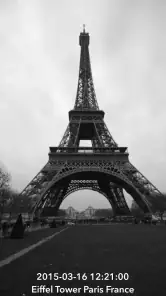
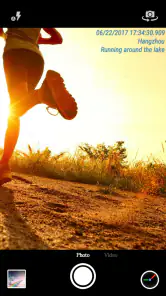
I choose a camera app based on one practical question: do I need the date and time visible on the image itself, or do I just want them saved in the photo’s details? Timestamp Camera is aimed at the first kind of job. It puts a time mark on photos and videos as you capture them, which can be useful when the image needs to make its timing clear without asking someone to check file information later.
That makes it a different choice from the camera already on your phone, where a date may be recorded in the image metadata but not printed over the picture. The trade-off is worth thinking through: a visible mark is convenient evidence and context, but it becomes part of the image people see. I’d use it for records, progress photos, or personal archives, rather than automatically stamping every family snapshot.
Choose it for a visible record, not just a camera shortcut
A realistic example is documenting a repair at home. I could take a photo before work begins, another midway through, and a final one afterward. The timestamp makes the sequence easier to understand when I send the images to someone who was not there. For a small business owner recording deliveries or a traveler keeping a dated visual diary, that same clarity can save a step later.
There is a useful workflow consideration: decide on a consistent date format and stamp appearance before taking a large batch. If one set uses a different layout from another, the records can look less orderly, and changing a format later does not remove a mark already embedded in a saved picture. I would take a test image first, check that the text is readable against both light and dark scenes, and then start the session.
Small workflow choices that make the stamp more useful
For a sequence of images, I’d also try to keep the framing consistent. The date can help establish when each image was taken, but it does not explain what changed between shots. Photographing the same corner of a room or the same item from a similar angle makes comparisons clearer, while the timestamp supplies the context. This is especially handy for maintenance notes, garden growth, or tracking the condition of an item before it is moved.
When a picture might be shared beyond its original audience, I’d check the stamp’s contrast and position before beginning. A mark placed over a face, a label, or a small detail can undermine the image’s purpose. If the composition is busy, I’d choose a simpler frame or skip stamping that shot rather than assuming the date will remain legible without obscuring anything important.
Another practical question is whether the date should be readable at a glance or merely present for later reference. Large lettering is easier to see in a quick message, but it claims more visual space. A smaller mark is less intrusive, though it may be harder to read after an image is resized. I’d make that choice based on where the photos will be viewed, not just how they look in the camera preview.
You May Like

Clash of Clans Is Won Between the Battles

Android Auto Makes the Case for Quieter Car Software

MobiOffice: Transforming Mobile Productivity with Seamless Integration

EA SPORTS FC™ Mobile Soccer: Redefining Mobile Sports Gaming

How Microsoft OneDrive Became a Mobile Productivity Giant

How Google Translate Breaks Language Barriers Effortlessly
Features That Make It Stand Out
First things first, the Timestamp Camera is incredibly user-friendly. As soon as you open the app, you’re greeted with a clean interface that makes navigation a breeze. Whether you're a pro photographer or just someone who loves taking selfies, you'll find the design intuitive and easy to use.
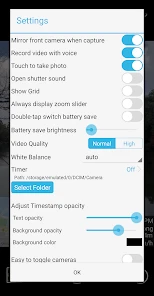
One of the coolest features is the variety of timestamp formats. You can customize how your date and time appear on the photos. Want it in DD/MM/YYYY or MM/DD/YYYY? No problem. You can even adjust the font size and color to suit your personal style.
But wait, there’s more! The app doesn’t just stop at timestamps. It offers a range of camera filters to enhance your photos right before you take them. From vintage looks to modern aesthetics, there’s something for everyone. Plus, you can add text and location stamps to make your photos even more informative. Imagine taking a picture on vacation, and having not just the date, but also the location stamped right there on the photo. How convenient is that?
Using filters, text, and location with a clear purpose
I see the extra overlays as tools for specific kinds of pictures, rather than decorations I’d automatically turn on. A location mark can help a travel diary make sense months later, while a short text label could distinguish one inspection or project from another. The more information you add, though, the busier the image becomes. For a useful record, I’d keep the wording brief and make sure it does not compete with the subject.
Filters can be useful when the image is intended to be shared as well as documented, but I would be cautious about using them for comparisons. If I photograph a wall before and after painting, for example, a filter may change how the color appears and make the pair less reliable as a visual reference. For that job, consistency matters more than style; for a holiday diary, a more expressive look may be welcome.
Performance and Usability
Performance-wise, this app is a solid performer. It launches quickly and doesn’t lag, which is crucial when you’re trying to capture a fleeting moment. The photo quality is top-notch, maintaining high resolution even with all the additional data being stamped on the image.
Usability is another area where the app excels. The settings are easy to tinker with, so you can get your camera just how you like it. And if you're someone who likes to share their snaps instantly, the app offers seamless integration with social media platforms. A few taps and your timestamped photos are ready to wow your followers!
What to check before depending on it
Even a quick camera workflow benefits from a short check before an important session. I’d confirm that the phone’s clock is accurate, take one sample, and inspect the saved result rather than relying only on the preview. That catches avoidable problems such as a hard-to-read overlay or an unexpected crop before I have a whole batch to sort through.
I would also avoid treating a visible date as proof of when something happened. It is useful context for everyday documentation, but a printed mark alone cannot establish the integrity of an image. If the record has legal, insurance, or workplace significance, I’d follow the relevant documentation process and retain the original files alongside any stamped copies.
For a casual user, the important question is whether the extra step becomes part of a natural routine. If I only need a timestamp once in a while, opening a separate camera may feel like friction. If I take recurring progress pictures, keeping the same settings ready can make the process much more orderly. The value is less about adding decoration and more about avoiding confusion later.
Where another camera may suit you better
If you care most about flexible editing, a dedicated photo editor may be the better fit: you can keep an original clean and decide later whether a date belongs on a particular image. That approach takes extra steps, but it avoids permanently covering part of a picture you might want to crop or reuse. Likewise, for polished portraits or carefully composed creative work, I’d start with a camera focused on those priorities and add a timestamp only when it serves the image.
For video, the key question is whether a visible date and time help the viewer. They can make a clip easier to place in a timeline, but they may distract in a personal montage. If you are unsure, capture a short test clip and review it on the screen where you expect people to watch it. A stamp that looks unobtrusive while recording can be more noticeable on a larger display.
Choosing between a camera app, an editor, and photo details
The usual alternatives solve related but different problems. A phone’s built-in camera is the simplest choice when I want an uncluttered image and can use its file details later. An editor is better when I want to choose images one by one, position a date with care, or preserve a clean master. Timestamp Camera is most compelling when the label belongs on the image from the start and I want to capture a run of photos or video without adding the same information afterward.
That distinction helps avoid a common disappointment: the app is not a substitute for every photography tool just because it takes pictures. Someone who mainly wants advanced composition controls or a polished portrait workflow may prefer a camera designed around those needs. Someone who wants a quick visual log, on the other hand, may find the direct, stamped result more useful than a feature-rich camera followed by editing.
There is also a trade-off in how permanent the result feels. A stamp printed into a saved picture is immediately understandable when forwarded or viewed outside a photo library, but it is less adaptable than information kept separately from the image. For important shots, I’d take care to retain an unstamped original when possible and use the labeled version for the people or task that need it.
Who should install it—and what to expect
Made by Bian Di, this free photography app is rated for Everyone. It has a 4.6 average from around 365,000 ratings and more than 50 million installs, so it has reached a broad audience. Those figures suggest plenty of people find the basic idea useful, but the right choice still depends on whether you want the date printed on the image rather than simply stored with it.
I’d recommend it to people who repeatedly need a clear visual timeline: anyone tracking a home project, keeping a dated travel record, or sharing images where the capture time saves explanation. It can also suit small teams that use photos for everyday coordination, provided they agree on a consistent stamp style and do not mistake the overlay for a formal verification system.
I’d skip it as my everyday camera if I rarely need visible dates, dislike text over photographs, or often rework images for creative projects. In those cases, the standard camera plus photo details—or an editor used selectively—keeps more options open. The app’s value depends on a narrow but practical preference: wanting timing to travel with the picture itself.
Before relying on a stamped image as a formal record, I’d check that the device’s date and time are set correctly. A visible timestamp is only as useful as the clock behind it. I’d also keep an unstamped original when an image may later need editing or a different presentation; that small habit gives you a clean copy without giving up the quick, labeled version.
Final Thoughts
In a world where our smartphones are our constant companions, having an app like Timestamp Camera is a game-changer. It’s not just about taking pictures; it’s about preserving memories in the most detailed way possible. The app is straightforward, yet packed with features that cater to both casual users and photography enthusiasts.
If you’re in the market for a camera app that offers more than just your standard point-and-shoot capabilities, this app is definitely worth downloading. It’s a small addition to your phone, but a giant leap in capturing memories. So go ahead, give it a try, and let your photos tell the story of your life, one timestamp at a time.
Timestamp Camera Frequently Asked Questions
Can I use Timestamp Camera to record important moments as they happen?
Timestamp Camera is designed to add date and time watermarks to photos and videos, making it useful when you want the capture time to remain visible on your media. It may suit personal records, work documentation, or memories you want to organize by when they were captured. Consider whether you want that information displayed directly on each image or video before installing.
Who develops Timestamp Camera, and what is its age rating?
Timestamp Camera is a photography app developed by Bian Di, with an Everyone age rating. Its straightforward purpose—adding date and time marks to photos and videos—may appeal to people who want a clear record of when media was captured. Before downloading, consider whether a visible timestamp suits the way you plan to share or keep your images.
What is Timestamp Camera and what are its primary features?
Timestamp Camera is a versatile app designed to add timestamps to your photos and videos, allowing you to document and remember when specific moments happened. Its primary features include customizable timestamp formats, GPS location stamping, and the ability to overlay text such as weather information and altitude. You can also choose from various fonts and colors, making it a great tool for professionals and personal use alike.
Is Timestamp Camera available for both Android and iOS devices?
Yes, Timestamp Camera is available for both Android and iOS platforms. Users can download the app from the Google Play Store for Android devices and from the Apple App Store for iOS devices. The app maintains a consistent user experience across both platforms, ensuring that all features are accessible regardless of the device you are using.
Can I customize the appearance of the timestamps on my photos and videos?
Absolutely! Timestamp Camera offers extensive customization options for the appearance of your timestamps. You can select from a variety of timestamp formats, colors, and fonts to suit your preferences. Moreover, the app allows you to adjust the size and position of the timestamps, ensuring they complement your photos and videos rather than detract from them.
Pros
- High precision time stamps.
- Supports video and photo modes.
- Customizable date formats.
- Geotagging capabilities.
- User-friendly interface.
Cons
- Limited editing features.
- Watermark on free version.
- Ad interruptions.
- Consumes considerable battery.
- Requires permissions for location.

- Category
- Photography
- Version
- Varies with device












