Timestamp Camera Pro
- 329.00
- 4.5
- Installs
- 100.00K
- Price
- $4.99

Screenshots
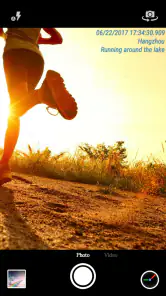
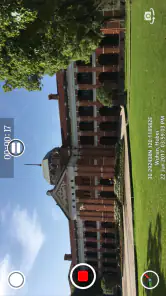
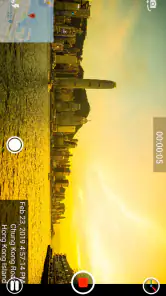
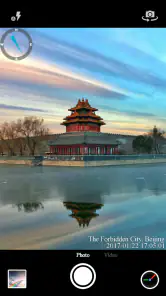
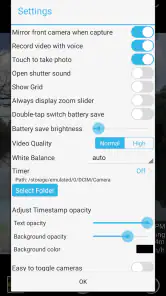
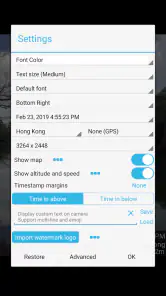

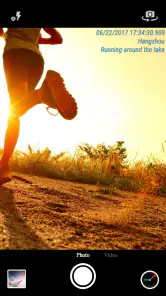
Analysis by Reviewed
Have you ever found yourself in need of a reliable way to timestamp your photos and videos? Well, let me introduce you to Timestamp Camera Pro. This app is a game-changer for anyone who needs to keep track of exactly when and where their media was captured. Whether you’re a professional photographer or just someone who loves to document your adventures, this app has got you covered.
Features That Stand Out
One of the first things you’ll notice about Timestamp Camera Pro is its simplicity. The user interface is straightforward, allowing you to dive right in without a steep learning curve. You can easily add timestamps and geotags to your photos and videos, which is perfect for those of us who are a bit forgetful about when and where we snapped that perfect shot.
What really sets this app apart is the customization options. You can choose from a variety of formats for your timestamps, and even adjust the position and font size to suit your style. It’s these little touches that make the app feel personal and tailored to your needs. Plus, if you’re someone who loves to share your moments on social media, the app lets you do so directly, keeping your workflow smooth and efficient.
Performance and Reliability
When it comes to performance, this app doesn’t disappoint. It works seamlessly, even when you’re capturing high-resolution videos. I’ve tested it out on both Android and iOS devices, and the experience has been consistently smooth. There’s nothing worse than an app that crashes mid-use, but with Timestamp Camera Pro, you can rest assured that your media is safe and sound.
The app also excels in terms of reliability. During my testing, I didn’t encounter any bugs or glitches, which is a rarity these days. It’s clear that the developers have put a lot of effort into ensuring that the app runs flawlessly, and it really shows. This level of reliability is especially important if you’re using the app for professional purposes, as you need to trust that it will perform when you need it most.
Why You Should Give It a Try
If you’re still on the fence about whether to download Timestamp Camera Pro, let me give you a little nudge. The app is perfect for anyone who wants to add a professional touch to their photos and videos. It’s also great for keeping track of your personal memories, ensuring that you’ll always know exactly when and where a moment was captured.
In conclusion, Timestamp Camera Pro is more than just a simple timestamping app. It’s a tool that enhances the way you capture and remember your moments. With its user-friendly interface, customizable options, and rock-solid performance, it’s an app that deserves a spot on your device. So go ahead, give it a try, and start documenting your life with precision and style!
More From Our News Desk

Clash of Clans Is Won Between the Battles

Android Auto Makes the Case for Quieter Car Software

MobiOffice: Transforming Mobile Productivity with Seamless Integration

EA SPORTS FC™ Mobile Soccer: Redefining Mobile Sports Gaming

How Microsoft OneDrive Became a Mobile Productivity Giant

How Google Translate Breaks Language Barriers Effortlessly
Timestamp Camera Pro Frequently Asked Questions
What does Timestamp Camera Pro do, and is it worth considering before downloading?
Timestamp Camera Pro is a camera app in the Video Players & Editors category that adds date and time watermarks to photos and videos. It is developed by Bian Di and costs $4.99. Its main appeal is having a visible timestamp on captured media, with options to tailor how that stamp looks. The app is rated Everyone, making it suitable for a general audience.
What features does Timestamp Camera Pro offer?
Timestamp Camera Pro allows users to add current time and location on their photos and videos. It offers various timestamp formats, supports custom text input, and the ability to change font, font color, and size. Users can also choose the location manually. Additionally, it provides a range of filters to enhance the imagery.
Is Timestamp Camera Pro user-friendly for beginners?
Yes, Timestamp Camera Pro is designed with a user-friendly interface that makes it easy for beginners to navigate. The app offers clear instructions and intuitive controls, allowing users to quickly understand how to apply timestamps and use its various features without prior experience in photo editing.
Can I customize the timestamp format in Timestamp Camera Pro?
Absolutely, Timestamp Camera Pro provides extensive customization options for timestamps. Users can choose from multiple timestamp formats, adjust the position, and modify the font style, color, and size. This flexibility ensures that the timestamp can be tailored to suit the specific needs and preferences of the user.
Does Timestamp Camera Pro support video recording?
Yes, Timestamp Camera Pro supports video recording, allowing users to apply real-time timestamps while capturing videos. This feature is particularly useful for creating documentation or vlogs where date and time tracking is crucial. Users can enjoy seamless integration of timestamps in both their photos and videos.
Pros
- High-quality video recording support.
- Custom watermark options available.
- Adjustable timestamp formats.
- User-friendly interface design.
- Supports various resolutions and fps.
Cons
- Limited editing features available.
- Occasional bugs in timestamp syncing.
- Consumes high battery resources.
- No cloud storage integration.
- Paid app with no free trial.
- Category
- Video Players & Editors
- Version
- Varies with device












