TimeCue – Reminders & Alerts
- 0.00
- 0.0
- Installs
- 10.00K
- Price
- Free

Screenshots
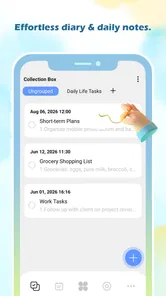
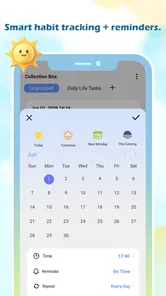
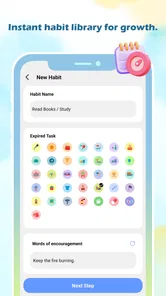
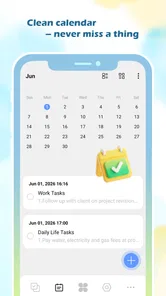

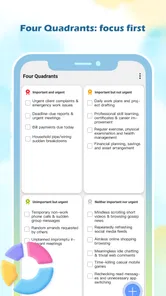
Analysis by Reviewed
I often lose time not because I forget an important event, but because I remember it at the wrong moment. A task can stay in my head all morning and still disappear when I finally have the chance to do it. That is the small, recurring problem TimeCue – Reminders & Alerts is built around. Its purpose is simple: help me notice the right moment instead of relying on memory to keep bringing the task back.
After using it as a productivity app, I see the appeal immediately. It is not trying to replace a full calendar, a project-management system, or a complicated habit tracker. It sits closer to the everyday reminder tools people reach for when they need a prompt that cuts through a busy day. The store summary, “Seize the Day and find the Moment,” captures the idea better than a long feature list: the value is in timing, not in filling my screen with more planning.
The strongest reason to try TimeCue is the friction it can remove between remembering something and actually acting on it. That makes it useful for ordinary responsibilities, short-term intentions, and those small jobs that are easy to postpone because they do not belong to a larger project. It is free, rated for Everyone, and developed by Classified Prime LLc, so the entry barrier is low for anyone using a compatible Android device.
Why a small reminder can save more time than a bigger productivity system
Most people already have several ways to record tasks. I can write a note, add an item to a to-do list, mark something in a calendar, or send myself a message. The problem is that recording an intention is not the same as receiving a useful prompt. A note may be accurate but invisible. A calendar entry may be too formal for a quick errand. A task list may become crowded enough that important items look exactly like minor ones.
TimeCue makes sense in the gap between those options. I would use it when the main question is not “How do I organize an entire project?” but “When should I be reminded to do this?” That distinction keeps the app focused. A time-based prompt can be more practical than a list when the task depends on a particular part of the day, such as calling someone after work, checking an oven, taking something out of a freezer, or leaving home with an item that is easy to forget.
There is also a psychological benefit to moving these thoughts out of my head. When I trust a reminder to appear at the right time, I do not need to rehearse the same instruction repeatedly. That saves attention even when the task itself takes only a minute. In my experience, this is where a lightweight utility earns its place: not by managing everything, but by preventing small obligations from competing for mental space.
Still, I would not treat it as a universal productivity solution. People who need shared task ownership, detailed project stages, document attachments, advanced recurring plans, or a broad calendar view may be better served by a more established planning platform. TimeCue is most convincing when the desired result is a timely nudge rather than a complete command center.
More From Our News Desk

Weather by Xiaomi Review: Clear at a Glance, Less Clear Up Close

X Under Pressure: Can It Recover When Posting Goes Wrong?

Clash of Clans Is Won Between the Battles

Android Auto Makes the Case for Quieter Car Software

MobiOffice: Transforming Mobile Productivity with Seamless Integration

EA SPORTS FC™ Mobile Soccer: Redefining Mobile Sports Gaming
The first setup should be deliberately small
My advice is to begin with one reminder that has a clear action and a clear moment. Instead of writing “important,” I would use wording such as “take the parcel before leaving” or “call the clinic after lunch.” The more concrete the instruction, the less thinking is required when the alert appears. This is a useful habit with any reminder app, but it matters especially in a focused tool where the reminder itself is the main product.
I would also avoid transferring every task from an existing list on the first day. That creates noise and makes it difficult to judge whether the app is helping. A better test is to choose a few recurring pain points: the thing I forget before commuting, the household job I postpone, and the follow-up I remember only after the opportunity has passed. If TimeCue catches those moments reliably, it has already proved more useful than a crowded list.
The app is available at no cost, which makes this trial practical rather than theoretical. Its current version is 1.00.5, and it supports Android from version 8.0 onward. That compatibility is broad enough for many older devices, although anyone using a phone below that system requirement should check compatibility before planning around it. I would also treat the first setup as a reliability check: create a low-stakes reminder, wait for it, and make sure the alert fits the way I normally use the phone.
That test is more valuable than simply opening the app and deciding whether the interface looks pleasant. A reminder tool is judged at the moment I am busy, distracted, or away from the screen where I created it. If the prompt is easy to understand and arrives when expected, the app is doing its job. If I have to reconstruct what I meant or remember to check another place, the time-saving promise becomes weaker.
Writing reminders that work in real situations
One practical technique I found helpful is to include the trigger in the wording. “Send form” is vague because there may be several forms and several possible recipients. “Send the rental form to Sam after dinner” gives the future me enough context to act without opening another app. This turns the alert into a small instruction rather than a mysterious interruption.
Another useful distinction is between a reminder that starts an action and one that marks a deadline. “Begin the laundry” and “submit the application” are not the same kind of prompt. The first tells me when to start; the second warns me about an endpoint. Keeping that difference clear prevents a common mistake: setting one alert so late that it only announces the problem instead of leaving time to solve it.
I would also avoid using a reminder as a substitute for a note when the information is long. A short prompt should point me toward an action. If the task requires extensive instructions, a separate notes or documents app is a better companion. This is one of the trade-offs of a focused reminder utility: its strength is speed and clarity, while detailed reference material belongs elsewhere.
Where TimeCue fits into an ordinary day
I find the best way to judge a reminder tool is to look at the handoffs in my day: leaving home, finishing a meeting, or switching from work to dinner. In this section, I focus on how a timely prompt can support those transitions without turning every intention into another task to manage. That practical lens also helps clarify where a simple alert belongs beside a calendar or task list.
A realistic workday example
Imagine that I need to leave work early to collect a package, but the collection window is not part of my normal routine. I could add it to a calendar, write it on paper, or hope that seeing the package notification is enough. With TimeCue, I would create a direct prompt for the point when I need to stop working and leave. The useful part is not merely remembering the package; it is connecting the reminder to the action that prevents me from missing the window.
On a different day, I might need to call a service provider after arriving home. A morning reminder would be too early because it would be easy to dismiss and forget. A prompt close to the practical opportunity is better. This is the kind of timing problem that makes a dedicated alert tool worthwhile: the task is known, but its usefulness depends on appearing near the moment when I can actually complete it.
For household routines, the app can help with transitions rather than entire schedules. I would use one alert to start preparing dinner, another to check something that must not be left unattended, or a prompt to put an item beside the door before going to bed. These are not complex plans. They are brief interventions that protect a busy routine from one predictable oversight.
Study, errands, and personal follow-ups
Students can use a reminder for the point when studying should begin, not only for the final examination date. That difference matters because a deadline alert often arrives when the remaining time is already uncomfortable. A well-timed start prompt creates a chance to act while the task is still manageable. I would keep the wording specific, such as “review the next chapter for twenty minutes,” rather than using a broad label like “study.”
For errands, TimeCue is useful when the item or action is tied to a location in my routine but not necessarily to a fixed appointment. I might need to return a borrowed object on my way out, pick up a prescription after work, or buy something before reaching home. The reminder should describe the moment I pass the opportunity. If I am likely to be driving, I would set it before leaving and avoid interacting with the phone while moving; the app should support my routine, not create a distraction.
Personal follow-ups are another strong use case. After meeting someone, I may promise to send a document or check in later. Writing a prompt immediately is faster than trusting a vague intention. The important insight is to create the reminder at the moment the commitment is made, while the details are still fresh. That workflow prevents the common failure where I remember that I promised something but cannot recall exactly what it was.
When a calendar or task manager is better
TimeCue should not replace a calendar entry when other people need to see the appointment or when the event involves a fixed place, duration, and schedule. A calendar is better at showing how commitments fit together. It also gives me a wider view of the day, while a reminder app is intentionally narrower.
A task manager is the better choice when work must be broken into steps, delegated, tagged, reviewed, or tracked over time. If I am managing a move, a business launch, or a long study plan, a single alert cannot provide enough structure. I would use TimeCue alongside those tools for the moments that are easiest to overlook, rather than forcing it to carry the entire project.
The usual phone alarm can also be the better option when I need a loud, unmistakable wake-up signal or a simple countdown. TimeCue is more useful for meaningful prompts that need readable context. The trade-off is that a minimal reminder app may feel unnecessary for someone who only wants a basic alarm, while an alarm alone may be too blunt for a task that needs a clear instruction.
How it reduces everyday mental clutter
The time saved here is not necessarily the time spent tapping through the app. It is the repeated mental checking that can disappear afterward. Before using a reminder, I may think, “I must remember to do that later,” several times across the day. Each check is brief, but it interrupts whatever I am doing. A well-placed alert lets me return to the current task with less background worry.
There is a subtle trade-off, though. Every reminder transfers responsibility from memory to the device, and that only works if I respond to the prompt rather than dismissing it automatically. If I create too many alerts, they become part of the noise. I would regularly remove reminders that no longer matter and phrase each remaining one so that it tells me what action is expected. The app can reduce clutter only if I do not use it to create a second kind of clutter.
A useful advanced habit is to set reminders around decision points. Instead of prompting myself to “think about the weekend,” I would create a prompt to decide whether to shop, prepare, or contact someone. Decision-point reminders are easier to act on because they define the next move. This is more effective than filling the app with broad intentions that still require planning when the alert appears.
Reliability matters more than visual novelty
For this kind of app, I care less about decorative extras than about whether the reminder is understandable at a glance. The alert has one job: interrupt me with enough information to make the next action obvious. That is why my evaluation would focus on repeatable daily use rather than a single impressive setup.
I would build confidence gradually. First, I would use it for a harmless prompt, then for a task with a real consequence, and only later for something time-sensitive. This is not a criticism of TimeCue specifically; it is sensible behavior with any reminder utility. A productivity tool becomes part of my routine only after it has earned trust through repeated use.
The app has reached over ten thousand installs, which suggests that it has found an audience beyond a private experiment. I would still judge it personally by whether it fits my phone habits and whether its focused approach is enough for my needs. Install volume can show interest, but it does not decide whether a simple alert workflow is right for a particular person.
Limits, audience, and my final recommendation
The main limitation is also the app’s identity: TimeCue is focused. That is excellent when I need a direct prompt and do not want to maintain a large productivity system. It is less suitable when I need a complete record of projects, collaboration, rich notes, or a visual schedule. Anyone looking for one app to manage appointments, tasks, documents, and shared responsibilities may feel restricted quickly.
I would also skip it if my current system already handles reminders perfectly and I rarely miss time-sensitive tasks. Adding another place to record information can create more work than it saves. The app earns its keep when it solves a recurring problem that existing tools have not solved well, especially reminders that need to arrive near the moment of action.
For someone who often says, “I knew I had to do that, but I forgot when,” this is a sensible app to test. The best results come from short, actionable wording, reminders created as soon as commitments are made, and a small number of carefully chosen alerts. Those habits matter as much as the software itself, but TimeCue gives them a focused home.
My recommendation is positive for Android users who want a free productivity utility centered on timing rather than elaborate organization. It is appropriate for everyday errands, household transitions, personal follow-ups, and tasks that fall between a calendar appointment and a full to-do list. I would pair it with a calendar or task manager when the work becomes complex, but I would not dismiss the value of a smaller tool. In daily use, TimeCue – Reminders & Alerts can save attention by making one important moment easier to catch.
Classified Prime LLc has kept the concept straightforward, and that straightforwardness is the reason I can recommend it with a clear condition: use it for prompts, not for everything. If that boundary matches the way you organize your day, the app is worth trying on a compatible Android device running version 8.0 or later. The current version is 1.00.5, and its Everyone age rating makes it approachable for a broad audience.
Ultimately, I judge it by a simple question: did it help me act at the right time with less mental effort? When the answer is yes, the app has done something more valuable than adding another list. It has removed a small but repeated source of friction, and that is exactly where a focused reminder tool can make an ordinary day feel more manageable.
TimeCue – Reminders & Alerts Frequently Asked Questions
Is TimeCue available for my phone, and what does it cost?
TimeCue – Reminders & Alerts is a productivity app from Classified Prime LLc. It is free to download and is listed for devices running Android 8.0 or later. Its content rating is Everyone, so it is presented as suitable for a broad audience. If you use an iPhone or iPad, check the relevant store page for compatibility before downloading.
What is TimeCue – Reminders & Alerts used for?
TimeCue – Reminders & Alerts is designed to help you remember important tasks, appointments, habits, and time-sensitive activities. Instead of relying only on a calendar, the app focuses on delivering reminders and alerts when you need them. It can be useful for medication schedules, meetings, daily routines, deadlines, personal goals, and other events that are easy to overlook during a busy day.
How do reminders and alerts work in TimeCue?
After creating a reminder, you typically choose its title, date, time, and, where available, a repeat schedule. The app then uses notifications to alert you at the selected moment. Depending on your device settings, alerts may appear as banners, sounds, vibrations, or lock-screen notifications. For reliable results, notification permissions must be enabled and battery-saving restrictions should not prevent the app from running.
Does TimeCue support recurring reminders?
TimeCue is intended for both one-time and repeating reminders, making it suitable for recurring responsibilities such as daily medication, weekly chores, monthly payments, or regular appointments. Before depending on it for an important routine, check the available repeat options in the reminder editor. Some advanced schedules may vary by platform, so Android and iOS users should review the features offered on their specific device.
Does TimeCue require an internet connection to send reminders?
Basic time-based reminders generally work through the device’s local notification system, so an active internet connection may not be necessary once a reminder has been created. However, features such as synchronization, account access, cloud backup, or updates could require connectivity if they are included in your version. Make sure the app has permission to send notifications and can operate in the background.
Pros
- Flexible recurring reminders for routines
- tasks
- and appointments.
- Clean interface makes creating alerts quick and straightforward.
- Useful for managing multiple reminders throughout the day.
- Helps reduce missed deadlines and everyday tasks.
- Suitable for personal planning
- habits
- and work-related alerts.
Cons
- Some advanced reminder options may require extra setup.
- Notification delivery can depend on device battery settings.
- Limited collaboration features for shared reminders.
- Frequent alerts may feel overwhelming for busy schedules.
- The app may offer fewer integrations than full calendar apps.











