

Thunder Pro
- 31.00
- 2.7
- Installs
- 10.00K
- Price
- Free

Screenshots




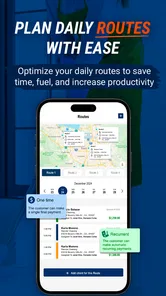

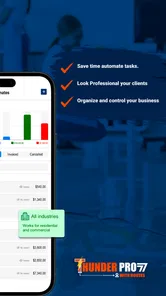

Analysis by Reviewed
Running a cleaning company is less about one big task than about keeping many small promises at the same time: remembering which client needs a visit, making sure a cleaner knows the plan, and keeping the business owner aware of what is happening. Thunder Pro is a business app from Thunder Pro LLC that aims to bring that work into one place. I approached it as a tool for a small cleaning operation rather than as a general notes app, and its main appeal is clear: it is designed around the daily rhythm of managing cleaning work.
The app is free to download, with optional purchases ranging from $29.99 to $749.99 per item. That combination makes it easy to try, but it also means I would not treat the free entry point as the full cost of using it for a growing company. Its audience is business users, although the Everyone age rating makes the app broadly accessible. It runs on Android 7.0 or later, which is useful for teams still using older phones.
Thunder Pro as a practical control center for cleaning work
I look at Thunder Pro as a possible home for the details that keep a cleaning business moving, rather than as just another place to write down appointments. In this section, I focus on how a dedicated system can help turn scattered updates into a shared routine. That practical foundation leads naturally to the question of what happens when the workday depends on a phone and a reliable connection.
The capability that matters most
The most important idea behind Thunder Pro is not simply recording customers or writing down appointments. Its value comes from giving a cleaning business a dedicated operating space instead of forcing the owner to combine a calendar, text messages, paper notes, and separate spreadsheets. That focus matters because cleaning work is repetitive but not identical. A weekly home, a one-off deep clean, and a commercial location all create different reminders and different expectations.
In my view, the app makes the most sense when the owner is already feeling the cost of scattered information. If the schedule lives in a notebook, customer details sit in a phone, and staff instructions are sent through several conversations, small mistakes become difficult to trace. A specialized business app can reduce that mental load by giving the work a consistent home.
That does not automatically make it the right choice for every cleaner. Someone working alone with only a few regular clients may find a normal calendar faster. The advantage appears when there are enough jobs, changes, and people involved that memory is no longer a reliable system. Thunder Pro is therefore best judged as an organizing tool for an active cleaning operation, not as a replacement for every business service a company might need.
How I would use it during a normal workday
I would begin by treating each customer record as the starting point for a job rather than entering isolated appointments. The practical goal is to keep the client, the expected work, and the timing connected. When a customer calls to move a visit, I would update the business record immediately instead of leaving the change buried in a message thread. That habit is more important than it sounds: the owner needs one current version of the plan before sending cleaners out.
More From Our News Desk

 Gmail
GmailGmail in a Busy Inbox: Who Benefits Most?
From first account to crowded workday, Gmail earns its place through dependable search and flexible sorting—but its best fit depends on how much inbox maintenance you can tolerate.

 Prime Video
Switching to Prime Video: What Changes in Your Viewing Routine
Prime Video can make a compelling second home for streaming, but switching means learning a different catalog, rental layer, and route from browsing to playback.

 Universal TV Remote Control
Universal TV Remote Control Works Best as a Reliable Backup
A phone remote earns its place through quick setup and reliable habits. Here is how to get more from Universal TV Remote Control—and where its limits show.

 Weather - By Xiaomi
Weather by Xiaomi Review: Clear at a Glance, Less Clear Up Close
Xiaomi’s weather app makes everyday forecasts quick to scan, but its calm surface can leave useful details and recovery paths harder to find than they should be.

 X
XX Under Pressure: Can It Recover When Posting Goes Wrong?
A resilience-focused review of X, examining setup, mistaken posts, interruptions, weak connections, and the gaps that matter when recovery needs to be dependable.

 Clash of Clans
Clash of Clans Is Won Between the Battles
Its raids are quick; its community is a long-term project of coordination, teaching, rivalry, and shared responsibility—with all the friction that entails.
Latest News



A realistic example is a small two-person operation handling homes across a local area. One client asks to move a Friday visit to Saturday, while another requests extra attention in a kitchen. With a paper calendar, the owner may change the date but forget to pass along the extra instruction. In a dedicated workflow, the schedule change and job note can be handled as part of the same customer-focused process. The benefit is not flashy automation; it is reducing the number of places where an important detail can disappear.
I would also use the app as a morning checkpoint. Before the first job, the owner can review what needs attention that day, identify changes, and make sure the person doing the work has the relevant context. At the end of the day, the same record can become the place to prepare for the next visit. This creates a simple loop: plan, communicate, complete, and prepare again.
One useful but easily overlooked trade-off is that organization only improves when the owner enters information consistently. An app cannot correct a schedule that is incomplete or updated late. I would establish a rule that every change is recorded as soon as it is agreed with the customer. That single discipline is likely to produce more value than adding lots of detail inconsistently.
A better workflow for recurring customers
Recurring cleaning clients are where a focused tool can earn its place. These customers may appear simple because their visits repeat, but they often bring exceptions: a holiday change, a different access arrangement, a request for a particular room, or a temporary pause. I would use the customer history to preserve the stable information while updating only what changes from visit to visit.
This approach avoids two common errors. The first is rewriting the same instructions from memory every time. The second is assuming that a previous instruction still applies when the customer has changed it. Keeping the recurring relationship organized allows the owner to distinguish routine expectations from one-time requests.
For a small team, I would prepare a short internal checklist before using the app seriously. Decide what every customer record must contain, how special requests should be written, and when a completed visit is considered closed. Thunder Pro can support a common process, but the business still needs to define its own language. Without that agreement, one cleaner may write “full clean” while another records a much narrower task.
This is also where I would be cautious about overloading records with unnecessary notes. Too much text can hide the one instruction that matters. Short, specific wording is more useful than a long description copied from one visit to the next. The app’s dedicated setting encourages structure, but the owner has to protect that structure from clutter.
The strongest everyday scenario
The best fit, in my opinion, is an owner-operated cleaning company with a small number of cleaners and a growing base of repeat customers. At that stage, the owner is still close enough to the work to know the clients personally, but busy enough to lose track of changes. Thunder Pro can act as the bridge between personal knowledge and a repeatable business routine.
Imagine the owner receives three calls before lunch. One customer wants a different arrival day, another asks for a move-out clean, and a third reports that a cleaner should use a side entrance. The owner may be traveling between jobs and cannot rely on remembering everything later. Recording each item in the business system at the moment it arrives creates a much safer handoff to the rest of the day.
The same scenario shows why I would not use it as a passive archive. If the owner only enters information after the workday, the app becomes a delayed record rather than an active control center. Its real effect comes from using it at the point where decisions are made. That is the concrete habit I would recommend to anyone testing it: update the job while the phone call or customer conversation is still fresh.
Where it may feel less comfortable
The average rating is 2.7 from around fifty-six ratings, with around thirty-one written reviews. I would take that as a reason to test the app carefully rather than dismiss it immediately. A low average can reflect different expectations, device experiences, or workflow frustrations, and it tells me that the app may not feel equally polished for everyone.
The current version is 1.0.17.45, and the product was released on October 31, 2023. Those details place it in a relatively young stage compared with long-established business platforms. I would expect a focused tool like this to appeal to owners who are willing to shape their process around it, but I would be more cautious if my company required a mature ecosystem with extensive integrations and a long record of refinement.
The purchase structure is another important consideration. Although the app itself is free, individual in-app purchases can reach $749.99. That is a substantial difference from downloading an ordinary free utility. Before committing business records to it, I would identify exactly which part of the workflow requires payment and whether the selected option matches the size of the operation. A solo cleaner should not assume that a high-priced tier is necessary simply because it exists, while a larger company should not assume that the free download covers its needs.
I would also avoid moving the entire business over on the first day. Start with a limited group of customers, use the app through a complete scheduling cycle, and check whether the team actually updates it. This trial approach answers the questions that matter most in practice: Is it quick enough during a busy day? Do cleaners understand the information they receive? Can the owner find a changed appointment without searching through conversations? Those answers are more valuable than a long feature checklist.
How it compares with familiar alternatives
The usual alternatives are a phone calendar, a spreadsheet, messaging apps, or a general field-service platform. A calendar is often quicker for one person who only needs dates and times. A spreadsheet gives an owner flexibility and makes it easy to create custom columns, but it can become awkward on a phone and does not naturally reflect the flow of a cleaning visit. Messaging is immediate, yet important details can become buried as conversations continue.
Thunder Pro’s advantage is its specific business context. Instead of adapting a general tool to cleaning work, the owner starts with an app intended for that kind of operation. That can reduce the amount of design and improvisation required at the beginning. Its weakness is the other side of the same choice: a specialized app may be less flexible than a spreadsheet and less broadly connected than a larger field-service system.
If I needed accounting, advanced dispatching, extensive reporting, or connections to many other services, I would compare Thunder Pro with a more established full-service platform before switching. That type of system may cost more or take longer to learn, but it can be a better fit for a company with complex administration. If I only needed a private reminder list for my own jobs, a calendar would probably be simpler.
Thunder Pro sits between those extremes. It is more purposeful than a basic calendar, but I would not select it solely because it carries a business label. The decision should depend on whether the cleaning-specific workflow saves enough time and confusion to justify learning the app and evaluating its purchase options.
Who gains the most from trying it
I would recommend a cautious trial to owners who are moving beyond solo work, especially those coordinating recurring residential visits and occasional special jobs. The app is also worth considering for a manager who wants cleaners to follow one shared process instead of relying on informal instructions. Its Android compatibility down to version 7.0 may help businesses with mixed or older devices, although each team should still test the app on the actual phones it uses.
The strongest user is someone who values consistency more than customization. They want a dedicated place for client and job information and are prepared to make updating it part of the daily routine. They should also be comfortable checking the available purchase options before depending on it for a larger operation.
I would tell a solo cleaner with a very small schedule to compare the effort honestly. If a calendar already handles every appointment and there are no staff handoffs, Thunder Pro may add another step rather than remove one. Likewise, a company that needs deep financial controls or a broad collection of integrations should look beyond a focused cleaning-business app.
My recommendation after weighing the trade-offs
Thunder Pro has a sensible central purpose: helping a cleaning business turn scattered customer and scheduling information into a repeatable working routine. I like the way its value is tied to a real operational problem rather than to a generic productivity promise. The most convincing use is the small team that has outgrown memory, paper, and message threads but does not yet want the complexity of a large field-service suite.
At the same time, I would approach it as a measured business trial. The modest 2.7 average, the relatively recent release, and the broad range of optional purchase prices all make it important to test the workflow before making a major commitment. I would begin with a few recurring customers, define a simple note standard, and use the app during real schedule changes rather than only entering old records.
My final view is that Thunder Pro can be useful when its dedicated focus matches the company’s stage of growth. The real payoff is not downloading it; it is making it the single place where a change becomes visible to everyone who needs to act on it. For a growing cleaning operation, that can prevent avoidable confusion. For a solo worker with a simple calendar, the extra structure may not be worth the switch.
Thunder Pro Frequently Asked Questions
Who develops Thunder Pro, and who is it intended for?
Thunder Pro is a business app developed by Thunder Pro LLC, with the stated aim of helping users run a cleaning business. It may be relevant to cleaning-business owners or others involved in managing that kind of business. Before downloading, consider whether its business focus matches what you need and review the app’s description and screens to understand how it may fit into your day-to-day work.
What is Thunder Pro, and what can I use it for?
Thunder Pro is generally presented as a utility or entertainment application, but its exact purpose can vary depending on the developer and the store listing. Before downloading, check the official description, screenshots, supported devices, and recent update notes. During testing, the most important things to evaluate are whether its main tools work as advertised, whether navigation is clear, and whether the app provides enough useful features in its free version.
Is Thunder Pro free to download and use?
Thunder Pro is free to download, although it offers in-app purchases ranging from $29.99 to $749.99 per item. Users should carefully review the pricing information shown on Google Play or the App Store before installing it. Also check whether subscriptions renew automatically, whether a trial converts into a paid plan, and whether advertisements or usage limitations apply to the free experience.
Is Thunder Pro safe and trustworthy?
Safety depends largely on downloading Thunder Pro from an official app store and verifying the publisher’s name, reviews, update history, and requested permissions. Avoid modified APK files or unofficial download pages, since they may contain malware or altered features. Before granting access, consider whether permissions such as storage, microphone, location, contacts, or notifications are genuinely necessary for the app’s advertised functions.
Which devices are compatible with Thunder Pro?
Thunder Pro requires Android 7.0 or later. Compatibility can differ between Android and iOS versions, so users should check the minimum operating-system requirement listed on the relevant store page. Older phones may install the app but deliver slower performance, crashes, or limited functionality. It is also worth confirming the required storage space, internet connection requirements, tablet support, and whether the same account or features are available across multiple devices.
Pros
- Fast access to weather alerts and forecasts
- Clean interface makes key information easy to find
- Useful radar and map views for tracking storms
- Supports planning with hourly and extended forecasts
- Weather updates are available wherever you travel
Cons
- Forecast accuracy may vary by location
- Some advanced features may require a subscription
- Ads can interrupt the experience for free users
- Weather data may refresh slowly on weaker connections
- Battery usage can increase when location services stay active











