theScore: Sports News & Scores
- 36.72K
- 4.3
- Installs
- 10.00M
- Price
- Free

Screenshots
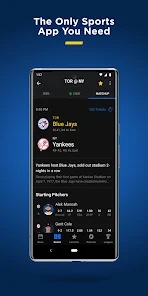



Analysis by Reviewed
When it comes to staying updated with the latest in sports, the theScore: Sports News & Scores app is like having a personal sports assistant right in your pocket. Whether you're a fan of football, basketball, hockey, or cricket, this app has got you covered with real-time updates, news, and scores.
When the network is part of the experience
Following a live game on a phone is only useful when updates arrive while the action is happening. That makes a dependable connection an important part of the experience here: scores, news, stats, and video are most valuable when I can get them at the moment I want to check. In a weak-signal spot, I treat the app as a way to catch up when service returns rather than assume every screen will refresh immediately.
I find it helpful to decide what I need before opening it. If I only want to know whether a game has changed, a quick score check is enough; if I want context, I can spend longer with the related news or stats. That distinction matters on a commute or in a busy workplace, where a brief connection may be easier to count on than a long stretch of uninterrupted browsing.
Useful on the move, with sensible expectations
The app is especially suited to the small gaps in a day: checking a score during a break, scanning a headline before heading out, or looking up a result after a conversation turns to a match. Its broad sports coverage is useful if my interests shift between leagues instead of staying with one team or competition. The trade-off is that a wide mix of updates can feel busy if I open it without a particular game, team, or sport in mind.
A practical routine is to choose the teams and competitions I care about, then use alerts for the moments I would otherwise keep checking manually. I would still be selective. Too many notifications can turn a helpful nudge into background noise, and a phone set to silent or a blocked notification setting can make an alert easy to miss. For important moments, I check the app directly rather than relying on a single notification.
What happens when a refresh is delayed
Live sports are time-sensitive, so a delay can be frustrating even when it lasts only a short while. If a score appears stale, I first check whether my connection is working and give the screen a moment before repeatedly reopening the same page. That simple habit avoids wasting time and battery on impatient taps, and it helps distinguish a network hiccup from a genuine lack of new action in the game.
When I have been away from service, I use a fresh check as a catch-up point: confirm the score, then read the latest relevant update before deciding whether I need more detail. I would not use a scores app as the sole source for a decision that demands exact timing or official confirmation. For following a match casually, though, it is a convenient companion; for a critical result, checking an official league or team source as well is a sensible fallback.
More From Our News Desk

Weather by Xiaomi Review: Clear at a Glance, Less Clear Up Close

X Under Pressure: Can It Recover When Posting Goes Wrong?

Clash of Clans Is Won Between the Battles

Android Auto Makes the Case for Quieter Car Software

MobiOffice: Transforming Mobile Productivity with Seamless Integration

EA SPORTS FC™ Mobile Soccer: Redefining Mobile Sports Gaming
Keeping browsing focused and data-conscious
Scores and short text updates are easier to check briefly than video, which can take more time and data to watch. When I am on a limited mobile plan or using a connection I want to conserve, I focus on the score and written coverage first and save video highlights for a more suitable moment. This is a useful way to enjoy the app without turning every quick check into a longer media session.
It also helps to open with a clear purpose. If I am tracking a particular game, I go straight to that rather than browsing every headline across every sport. Personalizing the leagues and teams I follow can make the experience feel less cluttered, while occasional pruning keeps old interests from competing with the events I care about now. The app offers a lot to follow, but I get more from it when I choose what deserves my attention.
Your Ultimate Sports Companion
Imagine a world where you never miss a single highlight or game score because theScore ensures you're always in the loop. The interface is sleek and user-friendly, making navigation a breeze even for those who aren't tech-savvy. Once you open the app, you're greeted with a clean homepage that showcases the most important updates in the sports world. It's like flipping through the sports section of a newspaper, only better.
Real-Time Alerts and Customization
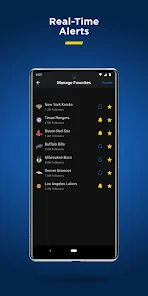
One of the standout features is the real-time alert system. You can customize notifications to receive updates on your favorite teams or specific games. Imagine sitting in a meeting and receiving a silent alert when your team scores a goal! It’s perfect for keeping up with games when you can’t be glued to the screen.
Moreover, the customization options are impressive. You can tailor the app to focus on the leagues and teams you care about most. This personalized experience ensures that all the news and updates are relevant to you, which is a huge plus for any sports enthusiast.
Making alerts work for your routine
I would start by following only a few teams and competitions, then add more after I know which updates I actually use. That keeps the main feed from becoming a stream of unrelated results and makes a notification more meaningful. If I follow several sports, I also decide which ones deserve an alert and which can wait until I open the app. This is a small setup choice, but it can make the difference between a useful score companion and a phone that constantly interrupts.
Notifications are best treated as prompts, not as the whole experience. A quick alert can tell me to check a game, while the app itself is where I go for the surrounding score and coverage. In a meeting, a short glance at a silent notification may be enough; when I have more time, opening the relevant game gives me a clearer picture. If I am not receiving alerts, checking the phone’s notification settings and the app’s selections is a more useful first step than assuming the game has no updates.
In-Depth Analysis and Highlights
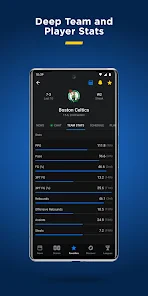
If you love digging deep into statistics and game analysis, theScore doesn’t disappoint. It provides detailed breakdowns of games, player performances, and even expert opinions. The app also offers video highlights, which are perfect for catching up on the action you might have missed. The combination of stats and visuals helps you understand the game better, almost like you're discussing it with a group of friends over coffee.
For a useful catch-up, I start with the score and then choose the kind of detail I need. Stats can help put a result in context, while a highlight gives a faster visual sense of a key moment. Neither replaces watching a full match: a short clip cannot provide the complete flow, and a number on its own may not explain why a game turned. I like having both routes available because they suit different amounts of time, but I would not mistake a quick recap for the same experience as following the whole event.
Choosing it over a single-sport source
Compared with a league-specific app, the appeal here is breadth. I can keep an eye on several sports without switching between separate sources whenever a game or headline catches my attention. That is especially handy for a household or friend group with different favorite teams, or for someone whose interests change with the season. A dedicated team or league app can still be the better choice when I want its particular official coverage or a narrow focus; this app makes more sense when I value a single place to scan a wider sports picture.
It also differs from watching sports television or a live stream. A scores-and-news app is easier to dip into during a short break and can keep me informed without committing to a broadcast, but it cannot recreate the atmosphere or continuous play of watching the event. I use it as a companion to sports coverage, not a substitute for every way of following a game. That distinction helps set expectations: it is strongest when I want fast context and several kinds of updates in one mobile routine.
A realistic day might start with a quick check of a game before work, continue with a discreet alert during a break, and end with a look at the final score and a highlight if I missed the action. The same routine works for someone checking multiple leagues, provided they keep their selections focused. If I only care about one competition and want a dedicated official experience, a league-specific option may suit me better. If I enjoy keeping up with several sports and want scores, coverage, and stats close at hand, theScore is a more natural fit.
Moreover, the customization options are impressive. You can tailor the app to focus on the leagues and teams you care about most. This personalized experience ensures that all the news and updates are relevant to you, which is a huge plus for any sports enthusiast.
Sharing and conversation
And let's not forget about the social aspect. You can share articles, scores, and updates directly from the app to your social media. It’s a great way to engage with fellow fans and spark conversations about thrilling matches and unexpected outcomes.
I find sharing most useful when I send one specific result or story to someone who is already following that game. It gives a conversation a concrete starting point without requiring me to summarize everything myself. Still, sharing is optional; the app’s value does not depend on posting publicly. Someone who prefers to follow sports privately can simply use the information for their own updates and leave the social side alone.
Who will get the most from it
The strongest fit is a sports fan who wants to move between major leagues and sports, check scores in spare moments, and read more when a result raises a question. The mix of alerts, stats, news, and video gives different ways to stay informed without requiring a long session each time. It can also help a casual fan keep track of a team without learning a separate app for every competition.
I would skip it, or pair it with another source, if I only want one team’s official information, if I need a full live broadcast, or if I dislike notification-led updates and broad feeds. It may also be less comfortable for someone who expects a sports app to be useful without a reliable connection, since current scores and media are naturally tied to getting fresh information. For me, its best role is as a flexible mobile dashboard, not as a replacement for every dedicated source.
At a glance, without treating numbers as the whole story
TheScore is a free sports app from Score Media and Gaming Inc., and it has been available since May 19, 2010. Its current version is 25.19.0, and it requires iOS 11 or later. It is rated for Everyone, so it is presented for a broad audience. Those details make it easy to understand the kind of app it is, but I would judge whether it suits me by its coverage and day-to-day usefulness rather than by figures alone.
Its average rating is 4.3 from around 202 thousand ratings, with roughly 37 thousand written reviews, and it has over 10 million installs. That level of adoption suggests it is a familiar choice for many sports followers, while individual preferences still matter: one person may value wide coverage, and another may prefer a narrower official source. I see those numbers as context, not a guarantee that every feed, sport, or notification setup will suit every user.
Conclusion: A Must-Have for Sports Fans
In conclusion, theScore: Sports News & Scores is more than just an app; it's a must-have tool for any sports fan. Whether you're a die-hard supporter of a particular team or just love to keep track of multiple sports, this app has something for everyone. Its real-time updates, personalized notifications, and in-depth analysis make it stand out in a crowded market. So, if you haven't already, give it a try and elevate your sports-following experience to a whole new level. Trust me, once you start using it, you'll wonder how you ever lived without it!
The connectivity verdict
My practical verdict is that the app works best when I have a steady connection and know what I want to follow. A brief check for a score is easy to fit into the day; video and deeper browsing are better saved for a moment when I have time and a suitable connection. If a refresh seems behind, I check service and try again rather than trusting a stale screen. Those habits make its live coverage more useful without promising instant updates in every setting.
Overall, I would recommend it to someone who wants a broad, customizable sports companion and is comfortable using a connected app for timely information. I would choose a dedicated source instead when one team’s official coverage, a full broadcast, or a narrowly focused feed matters more than breadth. For my own everyday use, the balance of quick score checks and optional deeper reading is the reason to keep it handy—and the key is to tune the alerts and follow list so the sports I care about stay easy to find.
theScore: Sports News & Scores Frequently Asked Questions
Can I follow several sports and teams in one place with theScore?
Yes. theScore brings together coverage across a wide range of sports, so it can suit fans whose interests go beyond a single league. You can use it to keep up with professional competitions, college sports, and international events in one app, rather than switching between separate sources for every sport you follow.
Is theScore mainly for sports fans in the United States?
TheScore covers both major North American leagues and competitions beyond them, including the EPL and international sports. That range makes it relevant to fans with different sporting interests, whether they follow professional leagues, college sports, or events around the world. Its focus is sports news, scores, statistics, and videos across those competitions.
What sports and leagues are covered by theScore app?
theScore app provides comprehensive coverage of a wide range of sports and leagues. Users can access up-to-date scores, news, and stats from popular leagues such as the NBA, NFL, NHL, MLB, EPL, and many more. The app also covers college sports and a variety of international competitions, ensuring that sports fans have access to all the information they need for their favorite teams and events.
What can I use theScore app for besides checking scores?
Beyond scores, theScore brings together sports news, statistics, and videos, making it useful when you want more context around a game or league. Its coverage spans major professional competitions as well as college sports, so you can use it to follow a range of sports interests in one app. The experience is centered on sports updates and information rather than watching full games.
Is theScore app free to use, or are there any in-app purchases?
theScore app is completely free to download and use, offering a wealth of sports news and scores without any cost. However, it does contain ads to support its free model. There are no mandatory in-app purchases, although users may have the option to remove ads or access premium features if they wish to enhance their experience further.
Pros
- Comprehensive coverage of various sports leagues.
- Timely and accurate sports news updates.
- User-friendly interface with easy navigation.
- Customizable alerts for favorite teams.
- Detailed statistics and analysis available.
Cons
- Frequent ads can disrupt user experience.
- Limited video content compared to competitors.
- Some features require a paid subscription.
- Occasional app crashes reported by users.
- Notifications can be overwhelming at times.
- Category
- Sports
- Version
- 25.19.0





